
Sonero X-IMS060
Sonero IMS060 Infrared Motion Detector Plug-in Instruction Manual
1. Inleiding
This manual provides essential information for the proper installation, operation, and maintenance of your Sonero IMS060 Infrared Motion Detector. This device is designed to automatically control lighting circuits based on detected movement, contributing to energy cost reduction. It is suitable for indoor use.
- Model: Sonero IMS060
- Bespeuringshoek: 120°
- Bespeuringsreeks: Tot 9 meter
- Beskermingsklas: IP20 (slegs vir binnenshuise gebruik)
- Verstelbare instellings: Light sensitivity (3-2000 lux) and time delay (10 seconds - 7 minutes)
2. Veiligheidsinstruksies
Please read and understand all safety instructions before installing or operating the device. Failure to follow these instructions may result in electric shock, fire, or serious injury.
- Hierdie toestel is ontwerp vir slegs binnenshuise gebruik. Do not expose it to moisture, rain, or extreme temperatures.
- Maak seker dat die kragtoevoer ontkoppel is voor installasie of instandhouding.
- Moenie die toestel uitmekaar haal of wysig nie. Verwys alle diens na gekwalifiseerde personeel.
- Hou buite bereik van kinders.
- Ensure the electrical outlet used is compatible with the device's plug type.
3. Produk verbyview
The Sonero IMS060 is a compact plug-in motion detector. It features an infrared sensor on the front to detect movement and a standard electrical socket for connecting a load. The back of the device has the electrical plug for insertion into a wall outlet.
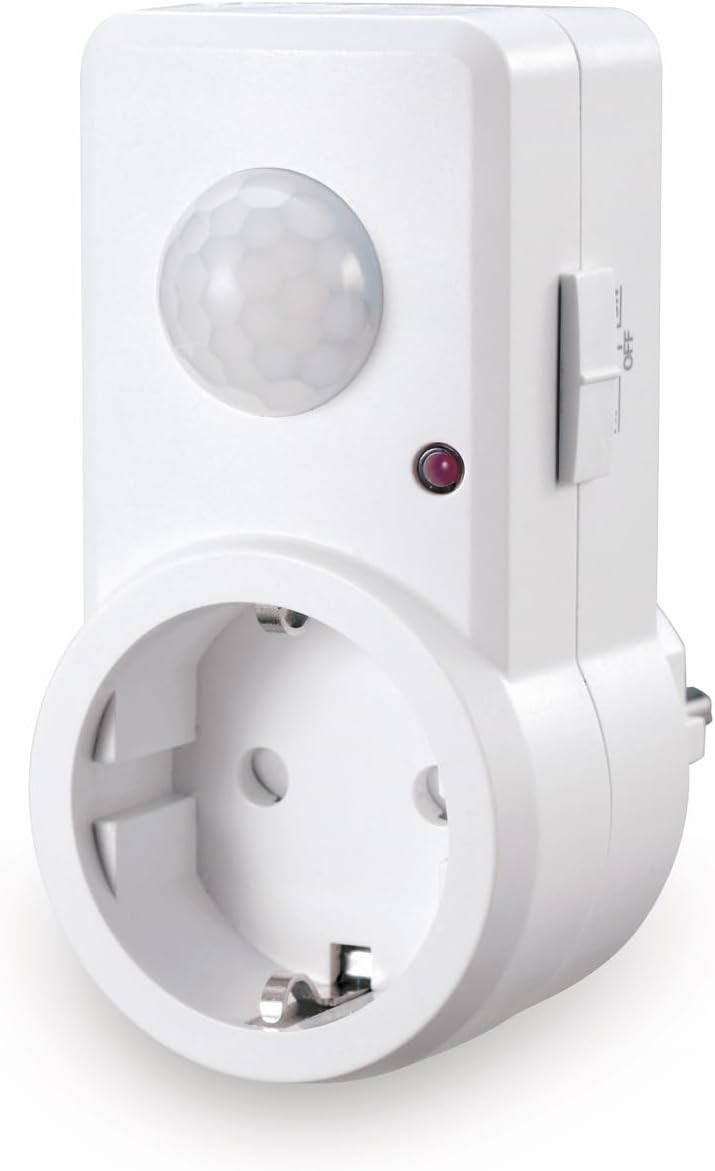

4. Opstelling
- Pak uit: Carefully remove the Sonero IMS060 from its packaging.
- Kies ligging: Choose an indoor electrical outlet that is within the desired detection range (up to 9 meters) and angle (120°) of the area where motion detection is required. Avoid placing the detector near heat sources, direct sunlight, or areas with strong air currents, as these can cause false triggers.
- Inprop: Insert the Sonero IMS060 directly into a compatible wall electrical outlet. Ensure a secure connection. Note: This device features a European-style plug. Verify compatibility with your local electrical outlets before use.
- Verbind laai: Plug the electrical appliance or light fixture you wish to control into the socket on the front of the Sonero IMS060.
5. Bedryfsinstruksies
The Sonero IMS060 features adjustable settings for optimal performance:
- Liggevoeligheid (LUX): This setting determines the ambient light level at which the motion detector will activate. You can adjust it continuously from 3 lux (darkness) to 2000 lux (daylight). For example, set it to a lower lux value if you only want the light to turn on when it's dark, or to a higher value if you want it to activate even in brighter conditions.
- Tydsvertraging (TYD): This setting controls how long the connected appliance or light remains on after motion is last detected. It is continuously adjustable from 10 seconds to 7 minutes. Set a shorter time for quick passages or a longer time for areas where prolonged illumination is needed.
Refer to the adjustment dials or switches on the device for specific control points. Test the settings after adjustment to ensure they meet your requirements.
6. Onderhoud
To ensure the longevity and proper functioning of your Sonero IMS060, follow these simple maintenance guidelines:
- Skoonmaak: Disconnect the device from the power outlet before cleaning. Use a soft, dry cloth to wipe the exterior. Do not use abrasive cleaners, solvents, or excessive moisture.
- Inspeksie: Kontroleer die toestel en sy verbindings gereeld vir enige tekens van skade of slytasie.
- Omgewing: Maintain the device in a clean, dry indoor environment within its specified temperature range.
7. Probleemoplossing
- Toestel skakel nie aan nie:
- Ensure the device is securely plugged into a functioning electrical outlet.
- Verify that the electrical outlet itself has power.
- Light does not turn on with motion:
- Check the light sensitivity (LUX) setting. If set too high, the detector may not activate in bright conditions.
- Ensure the connected light bulb or appliance is working correctly.
- Verifieer dat die bewegingsensor nie geblokkeer is nie.
- Confirm that the motion is within the detection range and angle.
- Light stays on continuously or triggers falsely:
- Adjust the time delay (TIME) setting to a shorter duration.
- Check for environmental factors like heat sources (heaters, direct sunlight), strong air currents, or pets that might be causing false triggers.
- Ensure the sensor lens is clean.
- Plug Incompatibility: This device uses a European-style plug. If your local outlets are different (e.g., UK, US, Belgian), an appropriate adapter is required. Ensure any adapter used is rated for the device's power requirements and is certified for safety.
8. Spesifikasies
| Kenmerk | Spesifikasie |
|---|---|
| Handelsmerk | Sonero |
| Modelnommer | X-IMS060 |
| Produkafmetings (L x B x H) | 9.83 x 4.5 x 8.15 cm |
| Gewig | 149.69 gram |
| Kleur | Wit |
| Styl | Plug-in (for electrical outlet) |
| Kragbron | Elektriese kabel |
| Bespeuringshoek | 120° |
| Opsporingsreeks | Tot 9 meter |
| Beskermingsklas | IP20 |
| Adjustable Light Sensitivity | 3 – 2000 lux |
| Verstelbare tydsvertraging | 10 sekondes - 7 minute |
| Bedryfstemperatuurreeks | 25 Degrees Celsius (typical) |
| Batterye benodig | Nee |
| Ingesluit komponente | 1 Sonero IMS060 unit |
9. Waarborg en Ondersteuning
Sonero products are designed for reliability and performance. For warranty information, technical support, or service inquiries, please refer to the contact details provided with your purchase or visit the official Sonero webwebwerf. Bewaar u bewys van aankoop vir waarborgeise.
Ask a question about this manual
Ask about setup, troubleshooting, compatibility, parts, safety, or missing instructions. Manuals+ will review the question and use this page’s manual context to help answer it.