
Inleiding
This manual provides essential information for the proper use and maintenance of your Brother BT5000M Magenta Ink Bottle. This ink bottle is designed to deliver high-quality colored printing output for compatible Brother inkjet printers.
The Brother BT5000M Magenta Ink Bottle is an original product, ensuring optimal performance and longevity for your printer. It is specifically formulated for Brother printers, providing reliable results.

Image: Brother BT5000M Magenta Ink Bottle packaging and bottle.

Beeld: Voorkant view of the Brother BT5000M Magenta Ink Bottle and its packaging.
Opstelling en installasie
Before installing the ink bottle, ensure your printer is turned on and ready for ink refilling. Refer to your printer's specific manual for detailed instructions on accessing the ink tanks.
- Berei die inkbottel voor: Gently shake the ink bottle a few times before opening.
- Maak die inktenkdop oop: Locate the magenta ink tank on your Brother printer and open its cap.
- Plaas die inkbottel in: Invert the ink bottle and insert its nozzle firmly into the ink tank's opening. The ink will flow automatically into the tank. Do not squeeze the bottle.
- Monitor Ink Level: Observe the ink level in the tank. Once the tank is full, the ink flow will stop automatically.
- Verwyder en bedek: Carefully remove the ink bottle and securely close the ink tank cap. Close the cap of the ink bottle if there is any remaining ink.
- Maak drukkerdeksel toe: Close any printer covers that were opened during the refilling process.
Genuine Product Verification
To ensure you are using a genuine Brother product, follow these verification steps:
- Mobile Authentication: Scan the QR code on the label using the Brother support center app or a data matrix reader app.
- Web Stawing: Meld aan by brother.com/id and authenticate by entering the 7-digit ID number printed on the label.
- Examine the Label: Authenticate by tilting and rotating the label against light to verify the genuine Brother hologram.

Image: Visual guide on how to identify genuine Brother ink bottles using mobile authentication, web authentication, and label examination.
Bedryfsinstruksies
The Brother BT5000M Magenta Ink Bottle is used for refilling the magenta ink tank in compatible Brother inkjet printers. Once installed, the printer will automatically detect the ink level and prepare for printing.
Versoenbare drukkermodelle
This ink bottle is compatible with the following Brother printer models:
- DCP-T220, DCP-T226, DCP-T420W, DCP-T426W, DCP-T520W, DCP-T525W, DCP-T820DW
- MFC-T920DW, DCP-T310, DCP-T510W, DCP-T710W, MFC-T910DW
- HL-T4000DW, MFC-T4500DW
- Also compatible with Brother Ink BT5000, BT6000 for Brother DCP-T300, T500W, T700W and MFC-T800W.
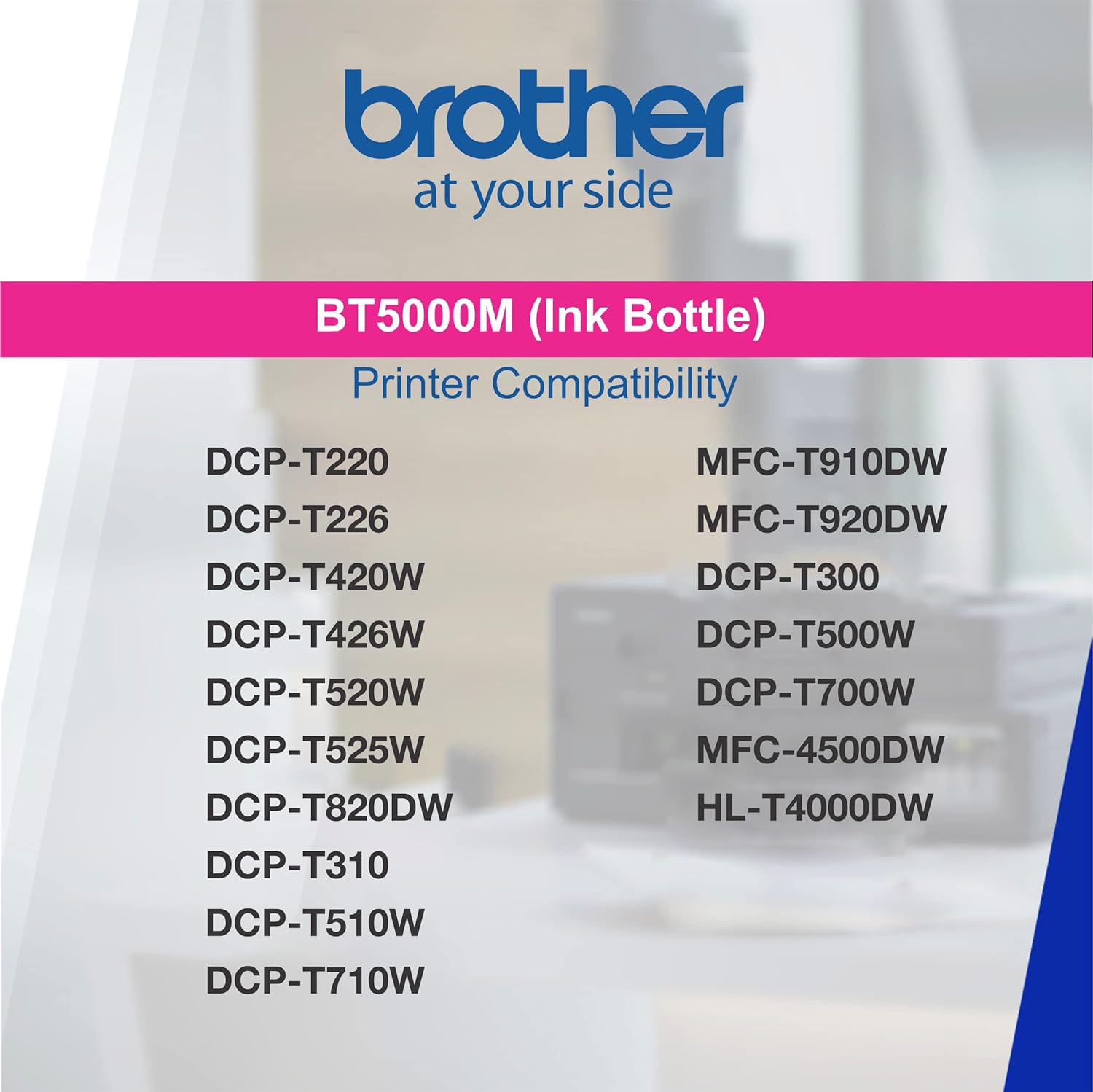
Image: List of compatible Brother printer models for the BT5000M ink bottle.
Druk Uitset
The BT5000M ink bottle provides colored printing output, specifically magenta, for vibrant and accurate color reproduction in your documents and photos.
Video: 'n Oorview of the Brother BT5000M Magenta Ink Bottle, highlighting its product type, color, printing output, and compatible printer models. This video demonstrates the key features and uses of the ink bottle.
Onderhoud
To ensure the best performance and longevity of your Brother printer and ink, follow these maintenance guidelines:
- Berging: Store ink bottles upright in a cool, dark place, away from direct sunlight and extreme temperatures.
- Hantering: Handle ink bottles carefully to avoid spills. Keep out of reach of children.
- Genuine Supplies: Always use genuine Brother ink supplies. Genuine supplies are engineered for Brother printers to provide professional quality prints, reliable page yield, and contribute to a longer-lasting printer.

Image: Highlights the benefits of using genuine Brother supplies, including professional quality prints and reliable performance.
Probleemoplossing
If you encounter issues with printing or ink performance, consider the following:
- Swak drukgehalte: If prints are faded or colors are inaccurate, ensure the ink tank is adequately filled and perform a print head cleaning cycle through your printer's utility software.
- Lae bladsyopbrengs: If you experience significantly fewer prints than expected, verify that you are using genuine Brother ink. Non-genuine supplies may not deliver the advertised page yield.
- Ink Leakage: Ensure the ink bottle was properly inserted and removed, and that the ink tank cap is securely closed. Leakage can often be attributed to improper handling or non-genuine products.
- Printer Failures/Jams: While ink bottles themselves rarely cause mechanical failures, using non-genuine ink can lead to clogs, damage, and other printer malfunctions. If issues persist, consult your printer's manual or Brother support.

Image: Illustrates potential problems that may arise from using non-genuine ink supplies, such as poor print quality and printer damage.
Spesifikasies
| Model Naam | BT5000M |
| Handelsmerk | Broer |
| Ink Kleur | Magenta |
| Bladsy opbrengs | 5000 bladsye (ongeveer) |
| Versoenbare toestelle | Inkjet Printers (Brother DCP-T220, DCP-T226, DCP-T420W, DCP-T426W, DCP-T520W, DCP-T525W, DCP-T820DW, MFC-T920DW, DCP-T310, DCP-T510W, DCP-T710W, MFC-T910DW, HL-T4000DW, MFC-T4500DW, DCP-T300, T500W, T700W, MFC-T800W) |
| Spesiale kenmerk | High quality, Compatible |
| Inkbasis | Water |
| Item gewig | 900 gram |
| Itemafmetings (D x B x H) | 7D x 18B x 9H Sentimeter |
| Land van oorsprong | Filippyne |
| Boksinhoud | 1 Ink Bottle |
Waarborg inligting
The Brother BT5000M Magenta Ink Bottle comes with Geen waarborg nie as per the manufacturer's specifications. For any issues related to the product, please refer to the support section or contact Brother customer service.
Ondersteuning en Kontak
For further assistance, inquiries, or technical support regarding your Brother BT5000M Magenta Ink Bottle or compatible Brother printers, please contact the manufacturer directly:
- Vervaardiger: BROTHER INTERNATIONAL (INDIA) PVT. LTD.
- Adres: UNIT NO. 801 AND 802, 8TH FLOOR, ALPHA BUILDING, HIRANANDANI GARDENS, POWAI, MUMBAI - 400 076, INDIA
- Website for Genuine Product Verification: brother.com/id
Always refer to the official Brother website or your printer's specific manual for the most up-to-date support information and contact details.