
1. Inleiding
The CLEAN REMOTE CR3BCB is a durable, spillproof television remote control designed for ease of use. Its ergonomic design and simplified button layout make it ideal for controlling basic TV functions. This manual provides instructions for setting up, operating, maintaining, and troubleshooting your CR3BCB remote control.
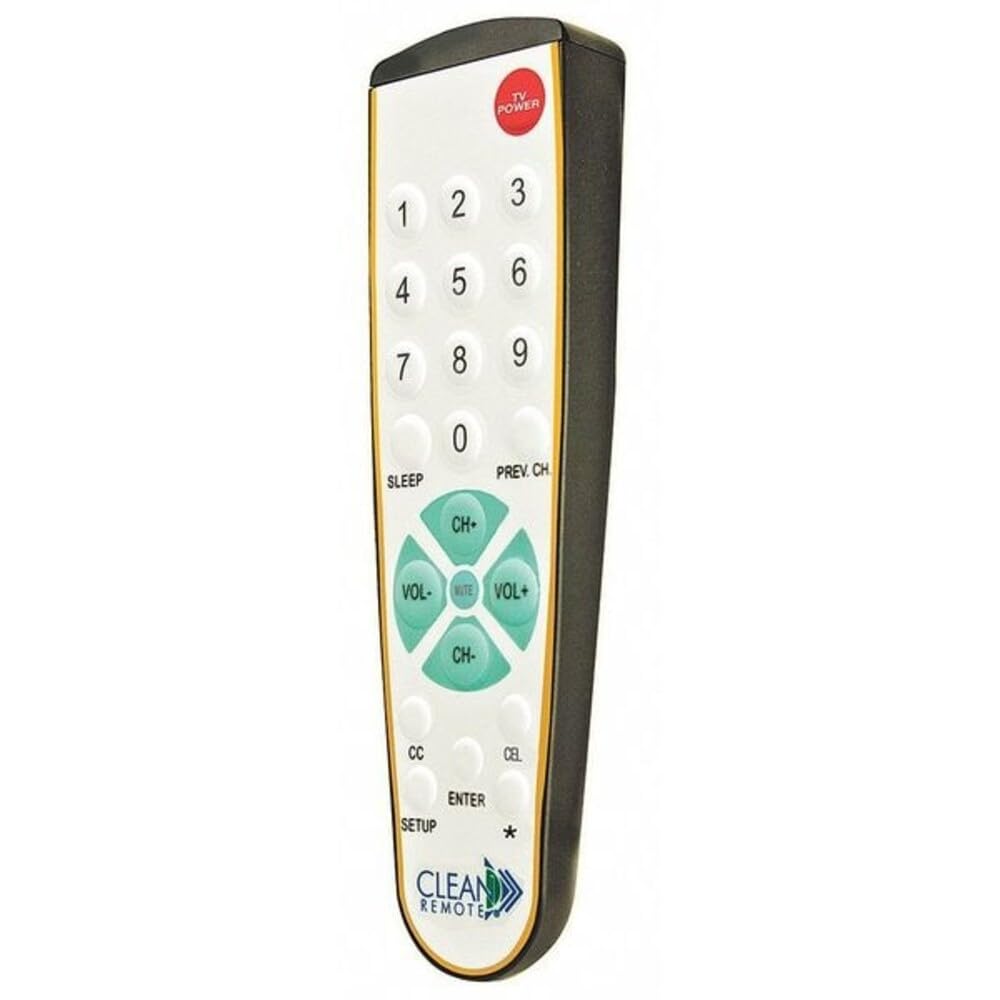
Voorkant view of the CLEAN REMOTE CR3BCB, showing the numerical keypad, channel and volume controls, and power button.
2. Opstelling
2.1. Battery Installasie
- Vind die batterykompartement aan die agterkant van die afstandbeheer.
- Skuif die batteryklep afwaarts en verwyder dit.
- Insert two (2) AAA alkaline batteries, ensuring the positive (+) and negative (-) terminals align correctly with the markings inside the compartment.
- Plaas die batteryklep terug deur dit terug te skuif totdat dit stewig klik.
2.2. Programmering van die afstandbeheer
The CLEAN REMOTE CR3BCB is a universal remote that can be programmed to control most televisions. Follow these general steps for programming:
- Turn on the television you wish to control.
- Druk en hou die OPSTEL button on the remote until the indicator light (usually near the POWER button) illuminates.
- Terwyl jy die OPSTEL button, enter the 3-digit code for your TV brand. (Refer to the included code list, if available, or try common codes for your TV brand).
- If the indicator light turns off, the code has been accepted. Release the OPSTEL knoppie.
- Toets die afstandbeheerder deur op die KRAG button. If the TV turns off, the remote is programmed.
- If the TV does not respond, repeat steps 2-5 with a different code for your TV brand.
Auto Code Search (if direct code fails):
- Skakel die televisie aan.
- Druk en hou die OPSTEL knoppie totdat die aanwyserliggie aanskakel.
- Druk die CH+ (Channel Up) button repeatedly, slowly, until the TV turns off.
- Once the TV turns off, immediately press the OPSTEL button again to lock in the code.
- Test the remote's functions.
3. Bedryfsinstruksies
The CLEAN REMOTE CR3BCB features a simplified layout for common television functions:
- KRAG: Skakel die televisie aan of af.
- Nommerblokkie (0-9): Voer kanaalnommers direk in.
- CH+ / CH-: Verander die televisiekanaal op of af.
- VOL+ / VOL-: Increases or decreases the television volume.
- DEMPEL: Silences or restores the television audio.
- SLAAP: Activates the TV's sleep timer function (if supported by the TV). Pressing repeatedly may cycle through sleep timer options.
- PREV CH: Keer terug na die vorige viewed kanaal.
- CC (Closed Caption): Toggles closed captions on or off (if supported by the TV broadcast/content).
- TV: Switches the remote's control mode to TV (if it was previously set to control a cable box, though this model is primarily for TV).
- INSKRYWING: Confirms selections or completes channel entry.
4. Onderhoud
4.1. Skoonmaak
The CLEAN REMOTE CR3BCB features a spillproof design, making it easy to clean. To clean the remote:
- Vee die oppervlak af met 'n sagte, damp lap.
- For stubborn stains, a mild soap solution can be used.
- Ensure no excessive liquid enters the battery compartment.
- Do not use abrasive cleaners or solvents, as these may damage the remote's finish or buttons.
4.2. Battery vervanging
Replace batteries when the remote's performance degrades or the indicator light does not illuminate when a button is pressed. Follow the battery installation steps in Section 2.1.
5. Probleemoplossing
| Probleem | Moontlike oorsaak | Oplossing |
|---|---|---|
| Remote not working / TV not responding | Dead or incorrectly installed batteries. Remote not programmed correctly. Obstruction between remote and TV. | Check battery orientation and replace if necessary. Re-program the remote (see Section 2.2). Ensure a clear line of sight to the TV's IR sensor. |
| Limited functionality after programming | Incorrect TV code used. | Try other codes for your TV brand or use the auto code search feature (see Section 2.2). Some advanced TV functions may not be supported by this simplified remote. |
| Knoppies is klewerig of reageer nie | Dirt or residue under buttons. | Clean the remote thoroughly (see Section 4.1). |
6. Spesifikasies
- Handelsmerk: SKOON AFSTANDBAARHEID
- Modelnaam/nommer: CR3BCB
- Tipe: Television Remote Control, Spillproof
- Materiaal: Plastiek
- Kleur: Black Case/White Keypad with Gold Trim
- Voltooi: Micro-Texture Case
- Afmetings (L x B x H): 7.93" x 2.5" x 1.31" (7-15/16" x 2-1/2" x 1-5/16")
- Spesiale kenmerk: Ergonomies
- Maksimum aantal ondersteunde toestelle: 1
- Versoenbare toestelle: Televisie
- Verbindingstegnologie: Infrarooi
- Button Quantity: 25
- Kontroleurstipe: Knoppie beheer
- Maksimum reeks: 10 meter
- Battery tipe: Alkaline (2x AAA, not included)
- UPC: 709317695991
- Land van oorsprong: China
7. Waarborginligting
Specific warranty details for the CLEAN REMOTE CR3BCB are not provided in this manual. For information regarding warranty coverage, terms, and conditions, please refer to the product packaging or contact CLEAN REMOTE customer support directly.
8. Kliëntediens
If you encounter issues not covered in this manual or require further assistance, please contact CLEAN REMOTE customer support. Contact information can typically be found on the product packaging or the official CLEAN REMOTE webwebwerf.