
1. Inleiding
This manual provides detailed instructions for the installation, operation, and maintenance of your Ewent EW7030 2.5-inch USB 2.0 Tool-Free Hard Drive Enclosure. This enclosure is designed to house 2.5-inch SATA SSDs and HDDs, offering a convenient and portable solution for data storage and transfer.
The Ewent EW7030 features a high-speed USB 2.0 interface, supporting data transfer rates up to 480 Mbps. Its tool-free design ensures quick and easy installation of your hard drive. The durable ABS material provides protection for your data.

Image: The Ewent EW7030 enclosure, highlighting its 480 Mbps data transfer rate and support for up to 15TB storage capacity via High-Speed USB 2.0.
2. Pakketinhoud
Verifieer asseblief dat alle items in die pakket teenwoordig is:
- Ewent EW7030 2.5-inch USB 2.0 Tool-Free Hard Drive Enclosure
- USB 2.0 tipe A-kabel
- Protective Case (may be included depending on specific product variant)

Image: The Ewent EW7030 enclosure shown with a protective case, indicating its inclusion for portability and safety.
3. Opstelling en installering
The Ewent EW7030 enclosure features a tool-free design for easy hard drive installation. Follow these steps:
- Maak die omhulsel oop: Gently slide open the enclosure cover. No screws or tools are required.
- Plaas die hardeskyf in: Align your 2.5-inch SATA SSD or HDD with the SATA connector inside the enclosure. Carefully push the drive into the connector until it is firmly seated. Ensure the drive is properly aligned for a secure connection.
- Maak die omhulsel toe: Slide the cover back onto the enclosure until it clicks securely into place.

Image: A visual guide demonstrating the simple, tool-free installation process: 1. Open the box, 2. Insert the hard disk, 3. Close the box. No screwdriver is needed.
4. Bedryfsinstruksies
After installing your hard drive, connect the enclosure to your computer or compatible device:
- Koppel die USB-kabel: Plug one end of the provided USB 2.0 cable into the enclosure's USB port and the other end into an available USB Type-A port on your computer or device.
- Krag aan: The enclosure is bus-powered, meaning it draws power directly from the USB connection. No external power adapter is required. A status LED on the enclosure will illuminate to indicate power and activity.
- Toegang tot die Drive: Your operating system should automatically detect the new drive (Plug and Play). For new hard drives, you may need to initialize and format the drive through your operating system's disk management utility before it can be used. For drives with existing data, it will appear as a removable storage device.

Image: Various usage scenarios for the Ewent EW7030, showing compatibility with computers, laptops, gaming consoles, and televisions for data access and backup.
5. Verenigbaarheid
The Ewent EW7030 is designed for broad compatibility with various operating systems and devices:
- Hard Drive Compatibility: Supports 2.5-inch SATA I/II/III SSDs and HDDs with heights of 7mm and 9.5mm.
- Bedryfstelselversoenbaarheid: Fully compatible with Windows XP/Vista/7/8/10, Apple macOS, Linux, and Chrome OS.
- Toestelversoenbaarheid: Suitable for use with laptops, desktop PCs, gaming consoles (Playstation, Xbox), smart TVs, and other devices with a USB port.

Image: The Ewent EW7030 enclosure, illustrating its compatibility with both Windows and Apple Mac operating systems.
6. Onderhoud
To ensure the longevity and optimal performance of your Ewent EW7030 hard drive enclosure:
- Fisiese beskerming: The enclosure is constructed from durable ABS material. An internal sponge provides additional shock resistance and aids in heat dissipation, protecting your installed 2.5-inch hard drive or SSD.
- Skoonmaak: Gebruik 'n sagte, droë lap om die buitekant van die omhulsel skoon te maak. Vermy die gebruik van vloeibare skoonmaakmiddels of oplosmiddels.
- Berging: When not in use, store the enclosure in a cool, dry place, away from direct sunlight and extreme temperatures. If a protective case is included, use it for added safety during transport.

Image: The Ewent EW7030 enclosure, emphasizing its construction from solid ABS material for enhanced reliability and protection of the internal drive.
7. Probleemoplossing
If you encounter issues with your Ewent EW7030 enclosure, consider the following:
- Aandrywer nie opgespoor nie:
- Ensure the hard drive is correctly seated within the enclosure's SATA connector.
- Probeer om die omhulsel aan 'n ander USB-poort op jou rekenaar te koppel.
- Test the enclosure with a different USB cable if available.
- Verify that the hard drive itself is functional by testing it in another enclosure or directly connecting it to a computer if possible.
- For new drives, ensure they are initialized and formatted in your operating system's disk management utility.
- Stadige oordragspoed:
- Ensure you are using a USB 2.0 port for optimal 480 Mbps performance. While backward compatible, using a USB 1.1 port will result in slower speeds.
- Check for other USB devices that might be consuming bandwidth.
- Enclosure LED Not On:
- Confirm the USB cable is securely connected to both the enclosure and the computer.
- Try a different USB port or computer to rule out port issues.
8. Spesifikasies
| Kenmerk | Detail |
|---|---|
| Modelnommer | EW7030 |
| Hardeskyfvormfaktor | 2.5 duim |
| Ondersteunde Drive Tipes | SATA I/II/III SSD/HDD (7mm and 9.5mm height) |
| Maksimum bergingskapasiteit | Tot 15TB |
| Hardeware-koppelvlak | USB 2.0 Tipe-A |
| Data-oordragtempo | Up to 480 Megabits Per Second (Mbps) |
| Verbindingstegnologie | USB, SATA |
| Omhulselmateriaal | Akrielnitril Butadieen Styreen (ABS) |
| Kleur | Swart |
| Item gewig | 48 gram |
| Versoenbare platforms | Laptop, PC, computers, gaming consoles, smart TVs |
| Ondersteunde bedryfstelsel | Windows XP/Vista/7/8/10, Apple macOS, Linux, Chrome OS |
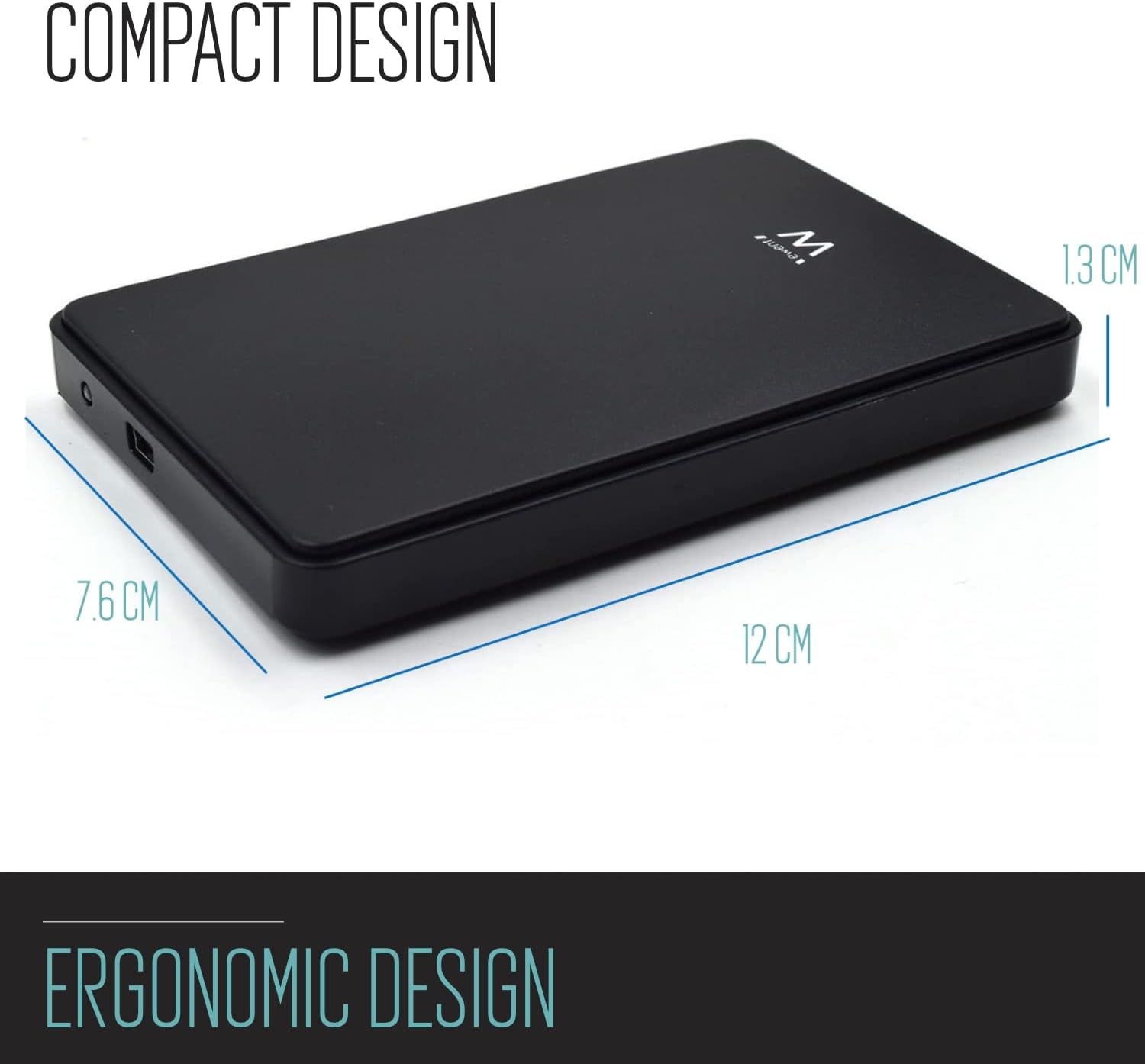
Image: The Ewent EW7030 enclosure showcasing its compact and ergonomic design with approximate dimensions of 12 cm (length), 7.6 cm (width), and 1.3 cm (height).
9. Waarborg en Ondersteuning
The Ewent EW7030 Hard Drive Enclosure comes with a 5 jaar waarborg. This warranty covers defects in materials and workmanship under normal use. For warranty claims or technical support, please contact Ewent customer service through their official webwebwerf of u kleinhandelaar.