
Inleiding
This manual provides detailed instructions for the setup, operation, and maintenance of your Homtime C12PRO Docking Station Speaker. The C12PRO integrates a Bluetooth speaker, FM radio, alarm clock, and dual USB charging capabilities, designed for convenient everyday use.
Pakketinhoud
Verifieer asseblief dat al die items wat hieronder gelys word, in u pakket ingesluit is:
- 1 x Homtime C12PRO Speaker Unit
- 1 x kragadapter
- 1 x Gebruikershandleiding
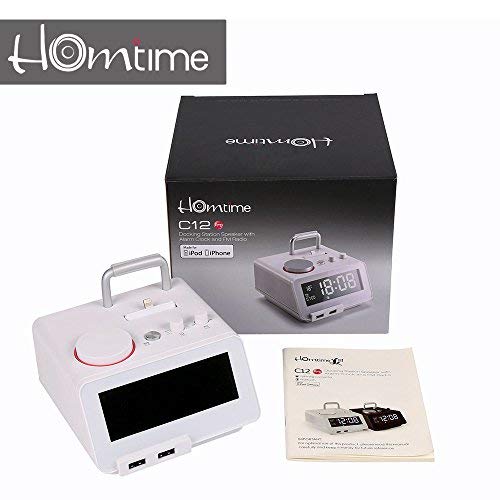
Prent: Contents of the Homtime C12PRO package, showing the main speaker unit, power adapter, and the user manual.
Produk verbyview
Familiarize yourself with the various components and controls of your C12PRO unit.

Prent: Voorkant view of the Homtime C12PRO with an iPhone docked. The large digital display shows time and temperature, and the front features dual USB charging ports.

Prent: Voorkant view of the Homtime C12PRO without a phone docked. This image clearly shows the digital display, the docking connector, and the control buttons on the top surface.
Voorpaneel en skerm
- Large 4.2-inch LCD Display: Shows time, alarm status, and room temperature (Celsius or Fahrenheit). Brightness is adjustable.
- Dubbele USB-laaipoorte: Located at the front base for convenient charging of external devices.
Kontroles op die boonste paneel
- Dokverbinding: Apple Certified Lightning connector for iPod/iPhone.
- Beheerknoppies/-knoppe: For setting time, alarm, volume, mode selection, and FM radio tuning.
Agterpaneelverbindings
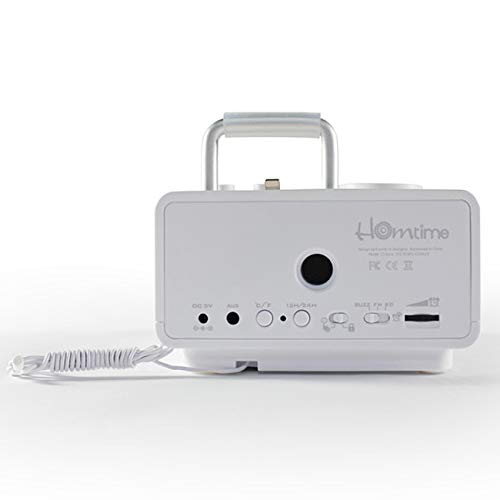
Prent: Agter view of the Homtime C12PRO. This image displays the DC 9V power input, AUX-in port, 12H/24H time format button, and other rear controls.
- DC 9V ingang: Koppel die meegeleverde kragadapter hier aan.
- AUX-in-poort: 3.5 mm-aansluiting vir die koppeling van eksterne klankbronne.
- 12H/24H Button: Toggles between 12-hour and 24-hour time display formats.
- Ander kontroles: May include snooze/dimmer, alarm on/off, and FM antenna connection.
Opstelling
- Pak die eenheid uit: Carefully remove the C12PRO speaker and all accessories from the packaging.
- Koppel krag: Insert the DC plug of the power adapter into the DC 9V input port on the rear of the unit. Plug the power adapter into a standard wall outlet. The display will illuminate.
- Aanvanklike tydinstelling:
- Druk en hou die TYD BEREIK button (location may vary, typically on top or rear).
- Gebruik die +/- buttons or rotary knob to adjust the hour. Press TYD BEREIK weer om te bevestig.
- Adjust the minute using the +/- buttons or rotary knob. Press TYD BEREIK to confirm and exit time setting mode.
- Om tussen 12-uur en 24-uur formaat te wissel, druk die 12H/24H knoppie op die agterpaneel.
- Pas die helderheid van die skerm aan: Druk die SNOOZE / DIMMER button (often combined) repeatedly to cycle through brightness levels.
- Stel temperatuur-eenheid: Indien van toepassing, druk die ° C / ° F. button to switch between Celsius and Fahrenheit display for room temperature.
Bedryfsinstruksies
Krag aan/af
Druk die KRAG button to turn the unit on or off. When off, the clock display remains active.
Stel die alarm
- Druk en hou die ALARMSTEL button. The alarm hour will flash.
- Gebruik die +/- buttons or rotary knob to adjust the alarm hour. Press ALARMSTEL te bevestig.
- Adjust the alarm minute. Press ALARMSTEL te bevestig.
- Select the alarm source (Buzzer, FM Radio, or Docked Device). Use +/- or rotary knob and press ALARMSTEL te bevestig.
- Om die alarm te aktiveer/deaktiveer, druk die ALARM AAN / AF knoppie. 'n Alarmikoon sal op die skerm verskyn wanneer dit aktief is.
- As die alarm klink, druk die SLUIMER button to temporarily silence it for a few minutes. Press KRAG om die alarm vir die dag af te skakel.
FM-radio werking
- Druk die MODUS knoppie totdat "FM" op die skerm verskyn.
- For automatic station scanning, press and hold the SPEEL/POUSEER button (or a dedicated SKANDEER button). The radio will scan and save available stations.
- Om handmatig in te stem, gebruik die VORIGE/VOLGENDE buttons or rotary knob to adjust the frequency.
- To select a saved station, press the VOORINSTEL knoppie en gebruik dan VORIGE/VOLGENDE om te navigeer.
- Verstel die volume met die VOLUME knob or buttons.
Bluetooth-koppeling
- Druk die MODUS button until "BT" or "Bluetooth" appears on the display. The Bluetooth indicator will flash, indicating pairing mode.
- Aktiveer Bluetooth op jou mobiele toestel en soek vir nuwe toestelle.
- Select "Homtime C12PRO" from the list of available devices.
- Once paired, the Bluetooth indicator on the C12PRO will stop flashing and remain solid. You can now play audio wirelessly from your device.
- Adjust volume on both the C12PRO and your connected device.
Gebruik die dokstasie
The C12PRO features an Apple Certified Lightning connector for compatible iPod/iPhone devices.
- Carefully align your iPhone/iPod with the Lightning connector on the top of the unit.
- Gently push down until the device is securely seated.
- The C12PRO will automatically charge your device and can play audio from it.
- Druk die MODUS button to select the docking station as the audio source.
USB Laai
The unit includes dual USB ports for charging other devices.
- Connect your USB charging cable to one of the USB ports on the front of the C12PRO.
- Connect the other end of the cable to your device (e.g., Android phone, tablet).
- The C12PRO will provide power to charge your device.
AUX-in-aansluiting
Connect external audio players via the 3.5mm AUX-in port.
- Connect a 3.5mm audio cable (not included) from your external audio device's headphone jack to the AUX-in port on the rear of the C12PRO.
- Druk die MODUS knoppie totdat "AUX" op die skerm verskyn.
- Play audio from your external device. Adjust volume on both the C12PRO and the external device.
Onderhoud
- Skoonmaak: Disconnect the power adapter before cleaning. Use a soft, dry cloth to wipe the exterior surfaces. Do not use abrasive cleaners, waxes, or solvents.
- Berging: Indien die eenheid vir 'n lang tydperk gestoor word, ontkoppel dit van die kragtoevoer en bêre dit op 'n koel, droë plek weg van direkte sonlig en uiterste temperature.
- Battery: The unit contains a CR2 battery (included) for clock memory backup. This battery is not user-replaceable for general operation and should only be replaced by qualified service personnel if necessary.
Probleemoplossing
| Probleem | Moontlike oorsaak | Oplossing |
|---|---|---|
| Geen krag/Skerm af | Kragadapter nie gekoppel nie of foutiewe stopcontact. | Maak seker dat die kragadapter stewig in die eenheid en 'n werkende muurprop ingeprop is. |
| Geen klank van luidspreker nie | Volume too low; incorrect source selected; device not connected properly. | Verhoog die volume. Druk. MODUS to select the correct audio source (BT, FM, Dock, AUX). Reconnect Bluetooth device or docked phone. |
| Bluetooth-samestelling misluk | C12PRO not in pairing mode; device too far; interference. | Ensure C12PRO is in BT mode and flashing. Move device closer. Turn off other Bluetooth devices. |
| FM radio static/poor reception | Swak sein; antenna nie uitgestrek nie. | Extend the FM antenna fully. Reposition the unit for better reception. Perform auto-scan again. |
| Alarm klink nie | Alarm not activated; alarm volume too low. | Ensure the alarm icon is visible on the display. Check alarm volume settings. |
| Device not charging via USB/Dock | Cable issue; device not compatible; unit not powered. | Try a different USB cable. Ensure the C12PRO is powered on. Verify device compatibility with the Lightning dock. |
Spesifikasies

Prent: A table detailing the specifications of the Homtime C12PRO, including driver units, S/N ratio, Bluetooth version, range, radio frequency, power, and dimensions.
| Model | C12 Pro |
| Bestuurder eenhede | 2x40 mm |
| S/N-verhouding | > 70dB |
| Bluetooth weergawe | 2.1 + EDR |
| Bluetooth-reeks | 10 miljoen |
| Radiofrekwensie-reeks | 87.5MHz - 108MHz |
| Versoenbare toestelle | iPad, iPhone, Android, Windows Phone, Computer |
| Kragadapter | AC100-240V, 50/60Hz, DC 5V 3A |
| Uitset krag | 3W + 3W (6 Watts total) |
| Afmetings (LxBxH) | 12.8 x 12.9 x 10.7 cm |
| Item gewig | 800 g |
| Oudiobronne | Apple Lightning, USB, Bluetooth, Aux-in |
| Tipe vertoon | Digital LCD (4.2 inches) |
| Batterye | 1 CR2 battery required (included for clock memory) |
Waarborg en Ondersteuning
Waarborg inligting
The Homtime C12PRO comes with a 1-jaar beperkte waarborg from the date of purchase. This warranty covers manufacturing defects in materials and workmanship under normal use. It does not cover damage caused by misuse, accidents, unauthorized modifications, or external causes.
Behou asseblief jou aankoopbewys vir waarborgeise.
Kliënte ondersteuning
For technical assistance, troubleshooting not covered in this manual, or warranty inquiries, please contact Homtime customer support. Refer to the contact information provided with your product packaging or visit the official Homtime webwebwerf vir die mees onlangse ondersteuningsbesonderhede.