
PRORECK PARTY 15
PRORECK Party 15 Portable PA Speaker System
Gebruikershandleiding
Model: PARTY 15
Inleiding
Dankie vir die aankoopasing the PRORECK Party 15 Portable PA Speaker System. This system is designed to deliver powerful and clear audio for various applications, including parties, DJ events, home studios, and social gatherings. Featuring Bluetooth connectivity, USB/SD card playback, FM radio, and integrated LED lights, the Party 15 offers versatile audio solutions. Please read this manual thoroughly before operating the system to ensure proper use and to maximize its performance and longevity.
Belangrike veiligheidsinligting
Volg altyd basiese veiligheidsmaatreëls wanneer u hierdie produk gebruik om die risiko van brand, elektriese skok en besering te verminder.
- Do not expose this equipment to rain or moisture.
- Do not open the speaker enclosure. There are no user-serviceable parts inside. Refer all servicing to qualified service personnel.
- Verseker die kragtoevoer voltage pas by die voltage gespesifiseer op die eenheid.
- Beskerm die kragkoord teen geloop of vasgeknyp, veral by proppe, geriefshouers en die punt waar dit uit die apparaat kom.
- Ontkoppel hierdie apparaat tydens weerligstorms of wanneer dit vir lang tye ongebruik word.
- Moenie enige ventilasie-openinge blokkeer nie. Installeer volgens die vervaardiger se instruksies.
- Gebruik slegs met die wa, staander, driepoot, bracket of tafel wat deur die vervaardiger gespesifiseer is, of saam met die apparaat verkoop word.
Wat is in die boks
Carefully unpack your PRORECK Party 15 system and ensure all items listed below are present and in good condition. If any items are missing or damaged, please contact your retailer immediately.

Image: Complete PRORECK Party 15 system with all included accessories.
- 1 x Aktiewe Luidspreker
- 1 x Passive Speaker
- 2 x Luidsprekerstaanders
- 1 x bedrade mikrofoon
- 1 x Speakon Cable (for connecting active to passive speaker)
- 1 x Kragkabel
- 1 x afstandbeheer

Beeld: Gedetailleerd view of the wired microphone, remote control, and various cables.
Opstelling
Follow these steps to set up your PRORECK Party 15 speaker system.
1. Luidsprekerstaander-samestelling
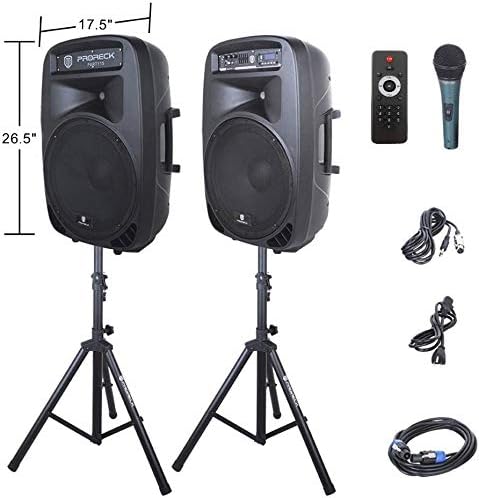
Image: The two included speaker stands.
- Unfold the tripod legs of each speaker stand until they are fully extended and stable.
- Loosen the height adjustment knob on the stand and extend the pole to your desired height. Ensure the safety pin is inserted through the appropriate hole to secure the height.
- Draai die hoogteverstellingsknop stewig vas.
2. Luidsprekerplasing
- Carefully lift each speaker and place it onto the top pole of a speaker stand. Ensure the speaker is securely seated.
- Position the active speaker (the one with the control panel) near a power outlet.
- Place the passive speaker within reach of the included Speakon cable from the active speaker.
Image: PRORECK Party 15 speakers set up on their stands.
3. Luidsprekers koppel
- Locate the Speakon output on the rear panel of the active speaker and the Speakon input on the rear panel of the passive speaker.
- Connect one end of the Speakon cable to the active speaker's Speakon output and the other end to the passive speaker's Speakon input. Ensure a secure connection.

Image: Rear panels of the active and passive speakers, highlighting the Speakon connection.
4. Kragverbinding
- Ensure the master volume knob on the active speaker is turned down to its minimum setting.
- Connect the power cable to the active speaker's power input and then plug it into a suitable electrical outlet.
Bedryfsinstruksies
This section details how to operate your PRORECK Party 15 speaker system and utilize its various features.
Beheerpaneel oorview

Beeld: Gedetailleerd view of the active speaker's control panel.
The active speaker features a comprehensive control panel with an LCD display, various input options, volume controls, and an equalizer.
1. Skakel aan/af
- After connecting the power cable, locate the power switch on the rear panel of the active speaker.
- Flip the switch to the "ON" position to power on the system. The LCD display will illuminate.
- To power off, flip the switch to the "OFF" position.
2. Moduskeuse
Druk die MODUS button on the control panel or remote control to cycle through available input modes: Bluetooth, USB, SD Card, FM Radio, and Line Input.
3. Bluetooth-verbinding
- Select "Bluetooth" mode using the MODUS button. The LCD display will show "BLUE".
- Soek op jou Bluetooth-geaktiveerde toestel (slimfoon, tablet, ens.) vir beskikbare Bluetooth-toestelle.
- Select "PRORECK PARTY 15" from the list. Once paired, the speaker will emit a confirmation sound.
- You can now play audio from your device through the speakers.
4. USB/SD-kaartterugspeel
- Plaas 'n USB-skyf of SD-kaart wat MP3-klank bevat files in die toepaslike gleuf op die beheerpaneel.
- The system will automatically switch to USB or SD mode and begin playing the first compatible audio fileIndien nie, druk die MODUS knoppie om die korrekte invoer te kies.
- Gebruik die SPEEL/POUSEER, VORIGE, en VOLGENDE buttons on the control panel or remote to manage playback.
5. FM Radio
- Select "FM Radio" mode using the MODUS knoppie.
- Druk die SPEEL/POUSEER button to initiate an automatic scan for available FM stations. The system will save detected stations.
- Gebruik die VORIGE en VOLGENDE knoppies om deur die gestoorde stasies te navigeer.
6. Mikrofoongebruik
- Connect the wired microphone to the 1/4'' MIC input on the control panel.
- Adjust the "MIC VOL" knob to control the microphone's volume level.
- Ensure the main volume is set appropriately to avoid feedback.
7. Afstandbeheer funksies
Image: The included remote control.
The remote control allows for convenient operation from a distance (up to 20 feet). Functions include:
- WYSE: Switch between input modes.
- SPEEL/POUSIE: Speel of onderbreek oudio-terugspeel.
- VORIGE VOLGENDE: Skip tracks or navigate FM stations.
- VOL+/VOL-: Pas hoofvolume aan.
- EQ: Blaai deur die voorinstellings van die gelykmaker.
- Numeric buttons for direct track selection (in USB/SD mode).
8. Equalizer Adjustment
The control panel features a 5-band graphic equalizer. Adjust the sliders to fine-tune the audio output to your preference. Experiment with different settings to achieve the desired sound for various music genres or vocal performances.
9. LED-ligte

Image: PRORECK Party 15 speakers demonstrating various LED light colors.
The PRORECK Party 15 speakers are equipped with built-in LED lights that activate with sound. These lights enhance the party atmosphere. There is a dedicated switch on the rear of the active speaker to turn the LED lights on or off.
Onderhoud
Behoorlike onderhoud verseker die lang lewensduur en optimale werkverrigting van jou luidsprekerstelsel.
- Skoonmaak: Use a soft, dry cloth to clean the exterior of the speakers. Do not use abrasive cleaners, waxes, or solvents.
- Berging: When not in use for extended periods, store the speakers in a cool, dry place, away from direct sunlight and extreme temperatures.
- Ventilasie: Maak seker dat die ventilasie-openinge vry van stof en puin is om oorverhitting te voorkom.
- kabels: Regularly check all cables for signs of wear or damage. Replace any damaged cables immediately.
Probleemoplossing
If you encounter issues with your PRORECK Party 15 system, refer to the following common problems and solutions.
| Probleem | Moontlike oorsaak | Oplossing |
|---|---|---|
| Geen krag nie | Kragkabel nie gekoppel nie; Skakel af; Socket wanfunksioneer. | Ensure power cable is securely connected and plugged into a working outlet. Check power switch on rear panel. |
| Geen geluid van luidsprekers nie | Volume too low; Incorrect input mode; Speakon cable loose/damaged; Audio source issue. | Increase master volume. Select correct input mode. Check Speakon cable connection between active and passive speakers. Verify audio source is playing. |
| Bluetooth saambind nie | Speaker not in Bluetooth mode; Device too far; Device already paired to another speaker. | Ensure speaker is in Bluetooth mode ("BLUE" on display). Move device closer to speaker. Disconnect device from other Bluetooth connections. |
| Mikrofoon werk nie | Mic volume too low; Microphone not connected properly; Microphone faulty. | Increase "MIC VOL" knob. Ensure microphone is fully inserted into the 1/4'' input. Test with another microphone if available. |
| Verwronge klank | Volume too high; Input signal too strong; Equalizer settings. | Reduce master volume or input source volume. Adjust equalizer settings. |
| LED ligte werk nie | LED switch off; Volume too low for activation. | Ensure the LED switch on the rear panel is in the "ON" position. Increase volume to activate sound-reactive lights. |
Spesifikasies
| Model Naam | PARTYTJIE 15 |
| Tipe luidspreker | Woofer |
| Luidsprekergrootte | 15 duim |
| Luidspreker Maksimum uitsetkrag | 2000 Watts P.M.P.O (Peak Music Power Output) |
| Verbindingstegnologie | Bedraad, Draadloos (Bluetooth) |
| Draadlose kommunikasietegnologie | Bluetooth |
| Bluetooth-reeks | 10 meter (ongeveer 33 voet) |
| Spesiale kenmerke | LED Light, FM Radio, USB Port, SD Card Reader, Digital LCD Display |
| Insette | 1/4'' Mic, RCA Line Inputs, USB, SD Card |
| Uitsette | Speakon Output (for passive speaker), RCA Line Output |
| Materiaal | Akrielnitril Butadieen Styreen (ABS) |
| Produk Afmetings (elke luidspreker) | 19"D x 30"W x 29"H (approximate, likely including handles/feet) |
| Itemgewig (totaal) | 81.6 pond |
| Kragbron | Elektries met koord |
Waarborg en Ondersteuning
PRORECK products come with a limited warranty. For specific warranty terms and conditions, please refer to the warranty card included with your product or visit the official PRORECK website. For technical support, troubleshooting assistance, or parts inquiries, please contact PRORECK customer service through their official channels.
Manufacturer: PRORECK AUDIO
Ask a question about this manual
Ask about setup, troubleshooting, compatibility, parts, safety, or missing instructions. Manuals+ will review the question and use this page’s manual context to help answer it.