
1. Inleiding
The Sony SBH54 is a versatile Stereo Bluetooth Headset designed for wireless communication and audio playback. It offers both handset and headset functionalities, allowing you to take and make calls, view messages, listen to music, and tune into FM radio directly from its display. Crafted from premium metal with a splash-proof design, it combines elegance with durability.
Key features include Bluetooth Wireless 3.0, NFC technology for easy pairing, an OLED display, and built-in noise cancellation for clear audio during calls. The headset supports A2DP profile and can connect to two devices simultaneously.
2. Produk verbyview
The SBH54 features a compact design that fits comfortably in your hand. It includes an OLED display for information at a glance and physical controls for media and call management.
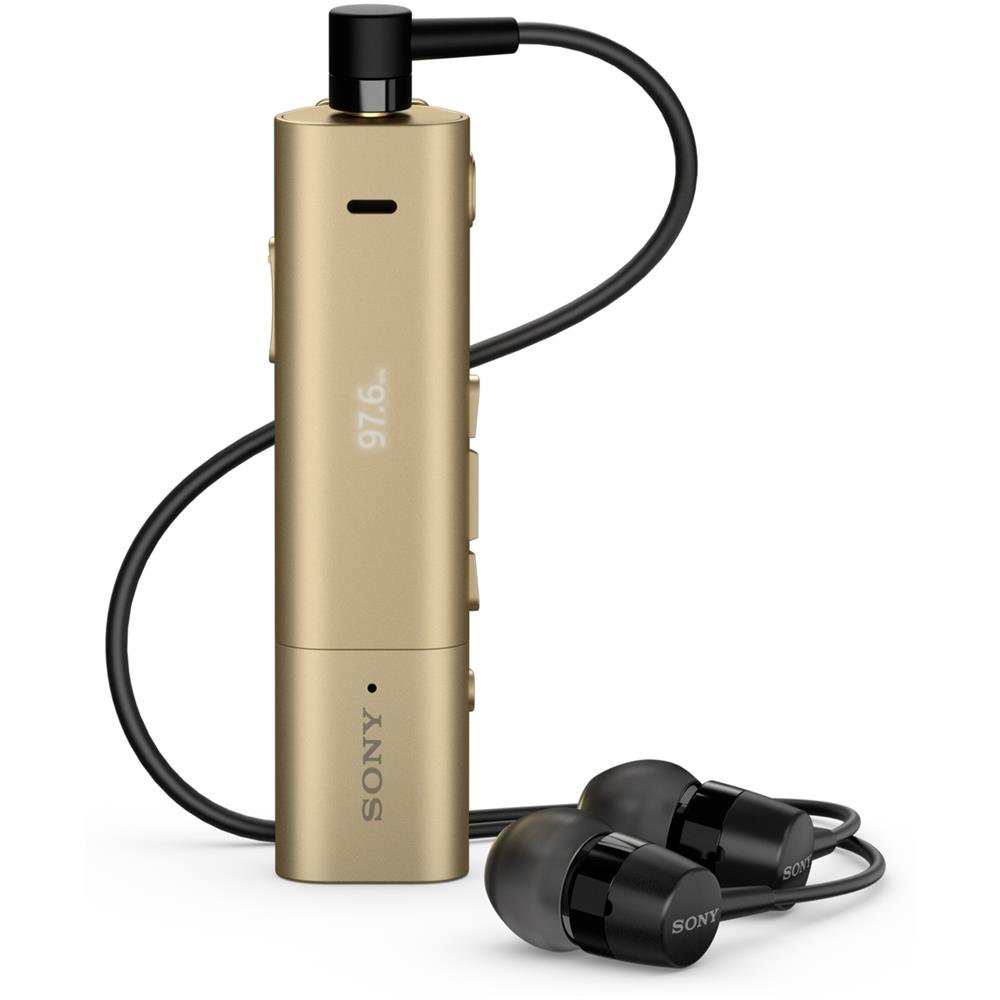
Image: Sony SBH54 Gold Stereo Bluetooth Headset. This image displays the compact, gold-colored headset with its integrated clip and display screen.
Kontroles en aanwysers:
- OLED -skerm: Shows caller ID, messages, music track information, and FM radio frequency.
- Multifunksie-knoppie: For call answering/ending, play/pause music.
- Volume knoppies: Pas die klankvolume aan.
- Navigasie-knoppies: For menu navigation and track skipping.
- Mikrofoon: Integrated for voice calls.
- Koptelefoonaansluiting: 3.5mm port for connecting the included premium headphones.
- Laaipoort: Mikro-USB-poort vir die laai van die toestel.
3. Opstelling
3.1 Laai die oorfone
- Connect the supplied USB cable to the headset's charging port and to a USB power adapter or a computer's USB port.
- Die battery-aanwyser op die skerm sal die laaistatus wys.
- Laai die headset ten volle voor die eerste gebruik.
3.2 Pairing with a Device (Bluetooth)
- Maak seker dat die oorfone gelaai en afgeskakel is.
- Press and hold the power button until the headset enters pairing mode (indicated by a specific light pattern or message on the display).
- Aktiveer Bluetooth op jou slimfoon of ander Bluetooth-geaktiveerde toestel en soek vir beskikbare toestelle.
- Kies "SBH54" uit die lys van gevonde toestelle.
- If prompted, enter the passcode "0000" (four zeros).
- Sodra dit gekoppel is, sal die oorfone 'n suksesvolle verbinding aandui.
3.3 Pairing with a Device (NFC)
For devices with NFC (Near Field Communication):
- Maak seker dat NFC op jou slimfoon geaktiveer is en dat die skerm ontsluit is.
- Touch the NFC detection area of your smartphone to the NFC detection area on the SBH54 headset.
- Volg enige instruksies op die skerm om die saambindproses te voltooi.
4. Bediening van die oorfone
4.1 Krag aan/af
- Om aan te skakel: Druk en hou die kragknoppie in totdat die skerm verlig.
- Om af te skakel: Druk en hou die aan/af-knoppie in totdat die skerm afskakel.
4.2 Maak en ontvang oproepe
- Beantwoord 'n oproep: When a call comes in, press the multi-function button.
- Beëindig 'n oproep: During a call, press the multi-function button.
- Verwerping van 'n oproep: Press and hold the multi-function button when a call comes in.
- Maak 'n oproep: Dial the number on your phone. The call will automatically route to the headset. You can also use voice commands if supported by your phone.
- Handset Function: The compact SBH54 can be used as an unobtrusive handset for calls.
- Ruisonderdrukking: The headset features echo, wind, and noise cancellation for clear voice transmission.
- HD Stem: Enhances voice clarity for both parties during a call.
4.3 Musiekweergawe
- Speel/pouse: Druk die multifunksieknoppie.
- Volgende snit: Press the forward navigation button.
- Vorige snit: Press the backward navigation button.
- Volumebeheer: Gebruik die volume op/af knoppies.
4.4 FM -radio
- Aktiveer FM-radio: Navigate through the headset menu to select the FM Radio function.
- Stemstasies in: Use the navigation buttons to scan or manually tune to FM frequencies.
- Stoor voorafinstellings: The headset may allow saving favorite stations (refer to on-screen prompts).
5. Onderhoud
- Skoonmaak: Wipe the headset with a soft, dry cloth. Avoid using harsh chemicals or abrasive materials.
- Waterweerstand: The SBH54 has a splash-proof design. This means it can withstand light splashes of water but should not be submerged or exposed to heavy rain. Ensure the charging port cover is securely closed.
- Berging: Bêre die oorfone op 'n koel, droë plek weg van direkte sonlig en uiterste temperature.
- Batterysorg: Om die batterylewe te verleng, vermy om die battery gereeld heeltemal te ontlaai. Laai dit gereeld.
6. Probleemoplossing
Algemene kwessies en oplossings:
- Oorfone skakel nie aan nie: Maak seker dat die battery gelaai is. Koppel aan 'n kragbron en probeer weer.
- Kan nie met 'n toestel koppel nie:
- Maak seker dat die oorfone in paringsmodus is.
- Maak seker dat Bluetooth op jou toestel geaktiveer is.
- Beweeg die koptelefoon nader aan jou toestel.
- Herbegin beide die oorfone en jou toestel.
- Vee vorige Bluetooth-verbindings op jou toestel uit en probeer weer koppel.
- Geen klank of swak klankgehalte:
- Kontroleer die volumevlakke op beide die oorfone en jou gekoppelde toestel.
- Ensure the headset is within range of your device.
- Ontkoppel en koppel die Bluetooth-verbinding weer.
- Ensure the headphones are properly plugged into the 3.5mm jack.
- FM Radio not working: Maak seker dat jy in 'n gebied met goeie FM-seinontvangs is.
7. Spesifikasies
| Kenmerk | Detail |
|---|---|
| Handelsmerk | Sony |
| Modelnommer | SBH54GD |
| Kleur | Goud |
| Oorplasing | In Oor |
| Vormfaktor | In Oor |
| Geraasbeheer | Aktiewe geraaskansellasie |
| Item gewig | 0.1 kilogram |
| Tipe oudiobestuurder | Dinamiese bestuurder |
| Frekwensiereeks | 20 Hz - 20 000 Hz |
| Omhulselmateriaal | Metaal |
| Versoenbare toestelle | Smartphones, Laptops, Tablets, Bluetooth-enabled Devices |
| Waterweerstandvlak | Waterbestand (Spatbestand) |
| Verbindingstegnologie | Bluetooth, NFC |
| Draadlose Tegnologie | Bluetooth, NFC |
| Bluetooth weergawe | 3.0 |
| Tipe beheer | Mediabeheer |
| Beheer metode | Afgeleë |
8. Waarborg en Ondersteuning
For warranty information and customer support, please refer to the documentation included with your purchase or visit the official Sony support webwebwerf. Spesifieke waarborgvoorwaardes kan per streek en kleinhandelaar verskil.
Aanlyn ondersteuning: www.sony.com/electronics/support