
MIDAS M32C
Midas M32C Digitale Rekmenger Gebruikershandleiding
Model: M32C
1. Inleiding
The Midas M32C is a 40-input channel, 25-bus, 1U rackmountable digital mixing core designed for professional live and installed sound applications. It integrates advanced digital signal processing with Midas's renowned audio quality, offering extensive connectivity and control options for complex audio environments.
This manual provides essential information for the proper setup, operation, and maintenance of your M32C Digital Rack Mixer. Please read it thoroughly before using the device.
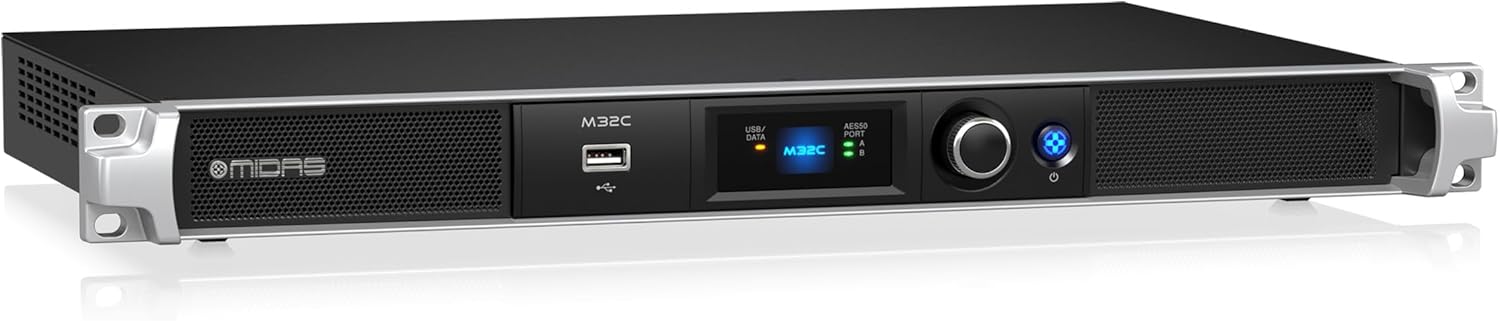
Figuur 1.1: Midas M32C Digital Rack Mixer. This image shows the front perspective of the M32C unit, highlighting its compact 1U rackmount design, front panel display, USB port, and control knob.
2. Belangrike veiligheidsinstruksies
To reduce the risk of electric shock, fire, or damage to the unit, observe the following safety precautions:
- Kragbron: Connect the unit only to an AC power supply of the specified voltage. Ensure the power cord is securely plugged into both the unit and the wall outlet.
- Aarding: The unit must be properly grounded. Do not defeat the safety purpose of the polarized or grounding-type plug.
- Ventilasie: Ensure adequate ventilation. Do not block any ventilation openings. Install in accordance with the manufacturer's instructions.
- Water en vog: Do not expose this apparatus to rain or moisture. Do not use this apparatus near water.
- Hitte: Moenie naby enige hittebronne soos verkoelers, hitteregisters, stowe of ander toerusting (insluitend ampversterkers) wat hitte produseer.
- Diens: Verwys alle diens na gekwalifiseerde dienspersoneel. Versorging word vereis wanneer die apparaat op enige manier beskadig is, soos kragtoevoerkoord of prop beskadig is, vloeistof gemors is of voorwerpe in die apparaat geval het, die apparaat aan reën of vog blootgestel is, nie normaal werk nie. , of laat vaar is.
3. Opstelling
3.1 Uitpak en inspeksie
Carefully unpack the M32C and inspect it for any signs of damage that may have occurred during transit. Retain the original packaging for future shipping or storage.
3.2 Fisiese installasie
The M32C is designed for standard 19-inch rack mounting and occupies 1U of rack space. Secure the unit using appropriate rack screws. Ensure sufficient airflow around the unit for proper cooling.
3.3 Verbindings
Refer to the rear panel diagram below for connection points.

Figuur 3.1: Midas M32C Rear Panel. This image displays the rear panel of the M32C, showing all input and output ports including AC input, expansion slot, USB, Ethernet, MIDI, ULTRANET, AES50, and monitor/talkback connections.
- WS-INSET: Connect the supplied AC power cable here.
- UITBREIDINGSLOT: For optional expansion cards (e.g., DN32-USB for USB audio interface).
- USB 2.0: For firmware updates and data transfer.
- REMOTE ETHERNET: Connect to a network router or computer for remote control via M32-EDIT software or M32-MIX app.
- MIDI IN/UIT: Vir die koppeling van eksterne MIDI-toestelle.
- ULTRANET PERSONAL MONITORING: Connect to Behringer P16-M personal mixers for distributed monitoring.
- AES50 PORT A/B: Connect to Midas digital stage boxes (e.g., DL16, DL32) for expanded input/output capabilities. These ports support up to 96 inputs and 96 outputs.
- MONITOR OUTPUT (BAL/UNBAL): Analog outputs for local monitoring.
- TALKBACK INPUT (MIC/TRIM): Analog input for a talkback microphone.
3.4 Aanvanklike opstart
After all connections are made, press the power button on the front panel. The unit will initiate its startup sequence. Observe the front panel display for status indicators.
4. Operating the M32C
4.1 Voorpaneelkontroles

Figuur 4.1: Midas M32C Front Panel. This image shows a direct front view of the M32C, detailing the USB/DATA port, the central display, AES50 port indicators, the main rotary encoder, and the power button.
- USB/DATA Port: Used for connecting USB storage devices for firmware updates or scene/preset management.
- Vertoon: Provides essential status information, including AES50 connection status and basic system parameters.
- AES50 PORT A/B Indicators: LEDs indicate active AES50 connections.
- Roterende enkodeerder: Used for navigating menus and adjusting parameters displayed on the front panel.
- Kragknoppie: Skakel die eenheid aan of af.
4.2 afstandbeheer
The M32C is primarily controlled via external software. Connect the unit to a network using the REMOTE ETHERNET port. You can then use:
- M32-EDIT Software: A comprehensive application for Windows, macOS, and Linux, offering full control over all mixer functions.
- M32-MIX App: Mobile applications for iOS and Android devices, providing remote control capabilities for mixing on the go.
4.3 AES50 Networking
The AES50 ports are crucial for expanding the M32C's capabilities. They allow connection to digital stage boxes, providing remote microphone preamplifiers and analog outputs, effectively extending the mixer's I/O count to up to 96 inputs and 96 outputs.
4.4 Mix Buses and DSP
The M32C features 25 time-aligned and phase-coherent mix buses, providing flexible routing and processing options for monitors, effects sends, and matrix mixes. The 40-bit floating point digital signal processing ensures high-fidelity audio and extensive dynamic range.
5. Onderhoud
5.1 Skoonmaak
To maintain the appearance and functionality of your M32C, regularly clean the exterior with a soft, dry cloth. Avoid using abrasive cleaners or solvents. Ensure ventilation openings are free from dust and debris.
5.2 Firmware-opdaterings
Periodically check the Midas website for firmware updates. Keeping your M32C's firmware current ensures optimal performance, access to new features, and bug fixes. Firmware updates are typically performed via the front panel USB port using a USB flash drive.
6. Probleemoplossing
If you encounter issues with your M32C, consult the following common troubleshooting steps:
- Geen krag:
- Verify the AC power cable is securely connected to both the unit and a working power outlet.
- Kontroleer die posisie van die kragskakelaar.
- Geen klankinvoer/-uitvoer:
- Ensure AES50 connections to stage boxes are secure and active (check AES50 indicators).
- Verify input and output routing within the M32-EDIT software or M32-MIX app.
- Check gain staging for all channels and buses.
- Remote Control Connection Issues:
- Confirm the Ethernet cable is properly connected to the REMOTE ETHERNET port and your network.
- Check network settings (IP address, subnet mask) on both the M32C and your control device.
- Ensure firewall settings on your computer or mobile device are not blocking the M32-EDIT/M32-MIX application.
- Eenheid vries of tree onreëlmatig op:
- Perform a power cycle (turn off, wait 10 seconds, then turn on).
- Consider performing a factory reset (refer to the Midas website or full software manual for instructions).
- Maak seker dat die firmware op datum is.
7. Spesifikasies
| Kenmerk | Detail |
|---|---|
| Insette kanale | 40 |
| Meng busse | 25 (time-aligned, phase-coherent) |
| Digitale seinverwerking | 40-bis drywingspunt |
| Netwerk | AES50 (up to 96 inputs / 96 outputs) |
| Konstruksie materiaal | High-performance aluminium and high-impact steel structure |
| Rekgrootte | 1U |
| Afmetings (H x B x D) | 7.49 x 4.65 x 0.78 inches (approximate, unit specific) |
| Item gewig | 7.7 pond (3.5 kg) |
| Kragbron | Wired AC |
| Verbindingstegnologie | Wired (Ethernet, USB, MIDI, AES50) |
8. Waarborginligting
Midas products are covered by a limited warranty. For detailed information regarding the terms and conditions of your warranty, including registration and claims procedures, please refer to the official Midas website or the warranty card included with your product. Keep your proof of purchase for warranty validation.
9. Ondersteuning en Kontak
For technical support, service, or further information regarding your Midas M32C Digital Rack Mixer, please visit the official Midas webwebwerf:
You may also find additional resources, FAQs, and software downloads on the support section of the webwebwerf.
Ask a question about this manual
Ask about setup, troubleshooting, compatibility, parts, safety, or missing instructions. Manuals+ will review the question and use this page’s manual context to help answer it.