
1. Inleiding
This manual provides comprehensive instructions for the setup, operation, and maintenance of the EDUP EP-3701 USB WiFi Disk. The EP-3701 is a portable wireless storage device designed to expand storage and facilitate data sharing for iOS and Android smartphones and tablets without the need for cables or a computer.
Lees asseblief hierdie handleiding deeglik deur voordat u die toestel gebruik om behoorlike funksionaliteit te verseker en skade te voorkom.
2. Produk verbyview
The EDUP EP-3701 acts as a bridge between your USB storage devices (like USB flash drives or external hard drives) and your mobile devices via a Wi-Fi connection. It creates its own Wi-Fi hotspot, allowing multiple devices to connect and access stored files gelyktydig.
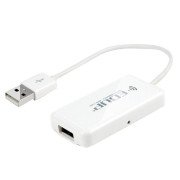
Beeld 2.1: Voorkant view of the EDUP EP-3701 USB WiFi Disk, showing the USB host port and the integrated USB cable.
3. Sleutel kenmerke
- Wireless Data Access: Toegang files on connected USB storage devices wirelessly from smartphones, tablets, and computers.
- Multi-gebruiker ondersteuning: Allows multiple users to connect and stream/access data simultaneously.
- Draagbare ontwerp: Compact and lightweight, ideal for travel and on-the-go use.
- Kragbron: Powered via USB, can be connected to a USB wall adapter, power bank, or computer USB port.
- Programbeheer: Dedicated mobile application for easy file management and device configuration.
4. Pakketinhoud
Verifieer dat alle items in die pakket teenwoordig is:
- EDUP EP-3701 USB WiFi Disk
- Vinnige Begingids (hierdie handleiding)
5. Opstelling
5.1. Skakel die toestel aan
- Connect the integrated USB cable of the EP-3701 to a USB power source (e.g., a 5V/1A USB wall adapter, a power bank, or a computer's USB port).
- The power indicator light on the device will illuminate, indicating it is powered on.
5.2. Connecting USB Storage
- Insert your USB flash drive or external hard drive into the USB host port on the EP-3701.
- Ensure the USB storage device is properly seated.
5.3. Connecting Mobile Device
- On your smartphone or tablet, go to Wi-Fi settings.
- Locate and connect to the Wi-Fi network named "EDUP_XXXXXX" (XXXXXX will be the last six digits of the device's MAC address).
- The default password is "12345678". It is recommended to change this password after initial setup.
- Download and install the "WiFi Disk" application from your device's app store (App Store for iOS, Google Play Store for Android).
- Open the "WiFi Disk" app. The app will automatically detect and connect to the EP-3701.
6. Bedryfsinstruksies
6.1. File Bestuur
- Blaai deur Files: Within the "WiFi Disk" app, navigate through the folders and files on the connected USB storage.
- Laai op Files: Oordrag files from your mobile device to the USB storage connected to the EP-3701.
- Laai af Files: Oordrag files from the USB storage to your mobile device.
- Stroom media: Speel video's, musiek en view photos directly from the USB storage without downloading.
6.2. Netwerkinstellings
The "WiFi Disk" app allows you to configure network settings:
- Change Wi-Fi Name (SSID): Modify the name of the EP-3701's Wi-Fi network.
- Change Wi-Fi Password: Update the password for the Wi-Fi network.
- Internet Passthrough (Bridge Mode): Connect the EP-3701 to an existing Wi-Fi network to provide internet access to connected devices while still allowing access to the USB storage.
7. Onderhoud
- Skoonmaak: Gebruik 'n sagte, droë lap om die buitekant van die toestel skoon te maak. Moenie vloeibare skoonmaakmiddels of aërosols gebruik nie.
- Berging: Bêre die toestel op 'n koel, droë plek weg van direkte sonlig en uiterste temperature.
- Firmware -opdaterings: Periodically check the "WiFi Disk" app or the EDUP official webwebwerf vir firmware-opdaterings om optimale werkverrigting en sekuriteit te verseker.
- Veilige verwydering: Always ensure data transfer is complete before disconnecting the USB storage device or powering off the EP-3701.
8. Probleemoplossing
8.1. Toestel skakel nie aan nie
- Ensure the USB cable is securely connected to a working USB power source.
- Probeer 'n ander USB-poort of kragadapter.
8.2. Cannot Connect to Wi-Fi Network
- Verify you are selecting the correct "EDUP_XXXXXX" network.
- Double-check the Wi-Fi password (default is "12345678").
- Restart the EP-3701 device and your mobile device.
8.3. USB Storage Not Detected
- Ensure the USB storage device is properly inserted into the EP-3701's USB host port.
- Check if the USB storage device is formatted in a supported file system (FAT32, NTFS, exFAT).
- Some high-power consumption external hard drives may require an external power source.
- Try a different USB storage device to rule out a faulty drive.
8.4. App Not Functioning Correctly
- Ensure your mobile device is connected to the EP-3701's Wi-Fi network.
- Close and reopen the "WiFi Disk" app.
- Reinstall the "WiFi Disk" app.
- Kyk vir programopdaterings in jou toestel se programwinkel.
9. Spesifikasies
| Kenmerk | Beskrywing |
|---|---|
| Model | EP-3701 |
| Koppelvlak | USB 2.0 (Host), USB 2.0 (Power Input) |
| Draadloos standaard | IEEE 802.11b/g/n |
| Frekwensieband | 2.4 GHz |
| Sekuriteit | WPA / WPA2, WPA-PSK / WPA2-PSK |
| Ondersteun File Stelsels | FAT32, NTFS, exFAT |
| Krag Invoer | DC 5V/1A (via USB) |
| Afmetings | (Approximate, based on typical USB dongle size) 60mm x 25mm x 10mm |
| Bedryfstemperatuur | 0°C tot 40°C (32°F tot 104°F) |
10. Waarborg en Ondersteuning
EDUP products typically come with a limited warranty. Please refer to the warranty card included with your purchase or visit the official EDUP webwebwerf vir gedetailleerde waarborgbepalings en -voorwaardes spesifiek vir u streek.
For technical support, product inquiries, or warranty claims, please contact EDUP customer service through their official webwebwerf of die kontakinligting wat in u produkverpakking verskaf word.
Webwebwerf: www.szedup.com