
1. Inleiding
This manual provides essential instructions for the safe and efficient use of your Epson LQ-310 24-Pin Narrow Carriage Impact Printer. Please read this manual thoroughly before operating the printer and keep it for future reference.
The Epson LQ-310 is a compact and reliable dot matrix printer designed for fast and efficient printing of various documents, including multi-part forms, invoices, and reports. It features versatile connectivity options including USB, Serial, and Parallel ports.
2. Veiligheidsinligting
Observe the following safety precautions to ensure safe operation and to prevent damage to the printer or injury to yourself.
- Plaas die drukker altyd op 'n stabiele, plat oppervlak.
- Moenie die ventilasiegleuwe op die drukker blokkeer of bedek nie.
- Gebruik slegs die kragkabel wat saam met die drukker voorsien word.
- Do not expose the printer to water, moisture, or excessive heat.
- Ontkoppel die drukker van die kragtoevoer voordat u skoonmaak of onderhoud uitvoer.
- Hou buite bereik van kinders.
3. Pakketinhoud
Verifieer dat alle items in die pakket teenwoordig is:
- Epson LQ-310 Printer Unit
- Kragkabel
- Lintpatroon
- Gebruikershandleiding (hierdie dokument)
- Bestuurder-CD (kan per streek verskil)
4. Opstelling
4.1 Uitpak en plasing
- Haal die drukker uit sy verpakking.
- Remove all protective tapes and packing materials.
- Place the printer on a flat, stable surface with adequate ventilation.
4.2 Verbind die kragkabel
Koppel die kragkabel aan die drukker en dan aan 'n geaarde elektriese aansluiting.
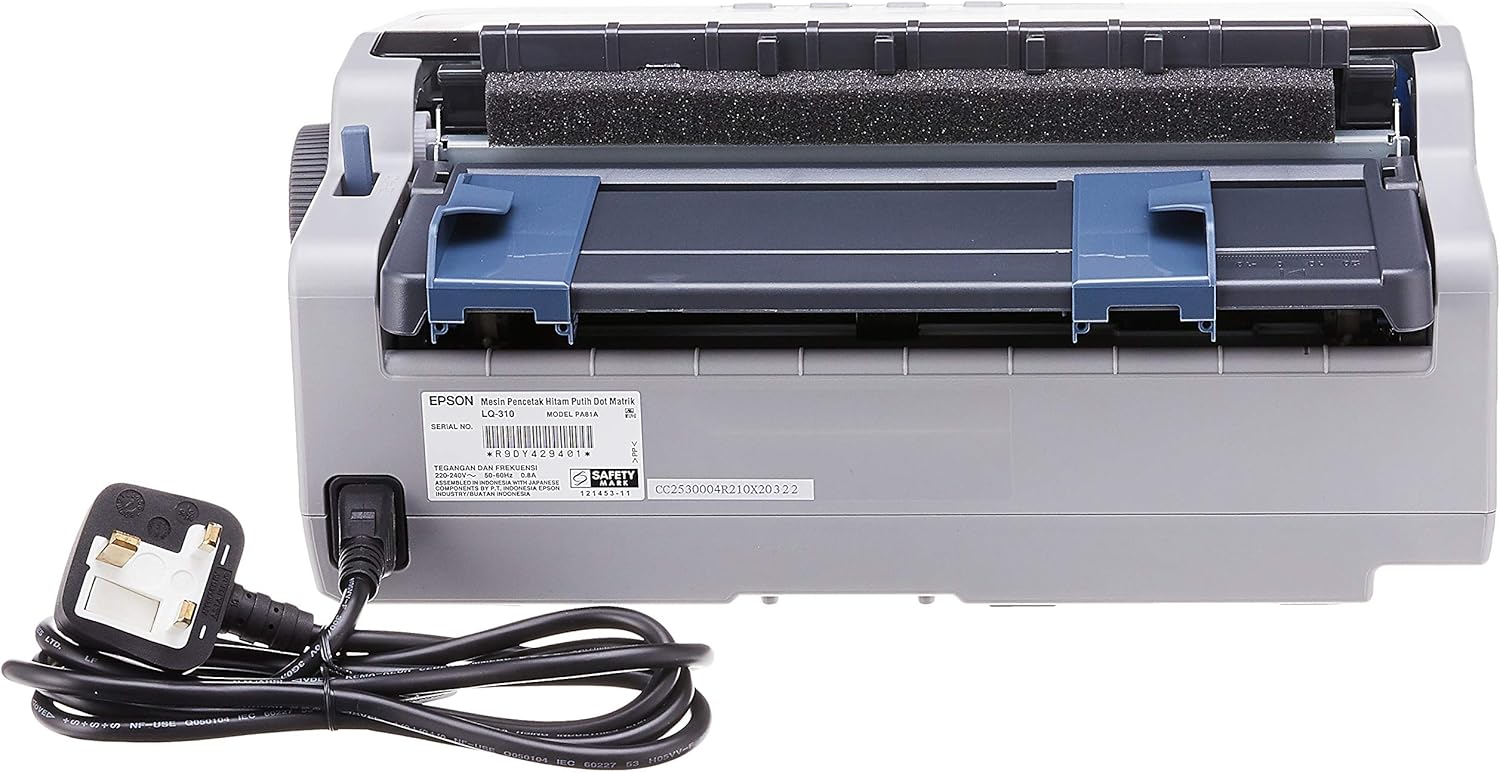
Figuur 4.2.1: Agter view of the Epson LQ-310 printer, highlighting the power input and various data ports (USB, Serial, Parallel) for connection to a computer.
4.3 Koppel aan 'n rekenaar
The LQ-310 supports USB, Serial, and Parallel connections. Choose the appropriate cable for your computer and connect it to the corresponding port on the printer.
- USB-verbinding: Use a standard USB A-B cable.
- Serieverbinding: Use a serial cable (RS-232C).
- Parallelle verbinding: Use a parallel cable (Centronics).
4.4 Installing the Ribbon Cartridge
- Maak seker dat die drukker afgeskakel is.
- Maak die drukkerdeksel oop.
- Unpack the new ribbon cartridge.
- Align the ribbon cartridge with the guides inside the printer and press down firmly until it clicks into place.
- Turn the ribbon feed knob on the cartridge to ensure the ribbon is taut and not twisted.
- Maak die drukkerdeksel toe.

Figuur 4.4.1: The ribbon cartridge for the Epson LQ-310 printer, which needs to be installed correctly for printing.
4.5 Laai papier
The LQ-310 can handle various paper types, including continuous forms and single sheets.
- For Continuous Forms: Place the forms on the tractor feed mechanism at the rear of the printer. Adjust the tractor guides to match the paper width and engage the pins.
- For Single Sheets: Insert a single sheet into the front paper slot, ensuring it is straight.
4.6 Bestuurderinstallasie
After connecting the printer, install the necessary drivers on your computer. You can typically find these on the included CD or download them from the official Epson support webwebwerf.
5. Bedryfsinstruksies
5.1 Beheerpaneel verbyview
The control panel on the front of the printer allows you to manage basic functions.

Figuur 5.1.1: Voorkant view of the Epson LQ-310 printer, showing the control panel with buttons for Tear Off, LF/FF, Load/Eject, Paper Out, Pause, Lock, Font, Item, Micro Adjust, and Set.
- Kragknoppie: Skakel die drukker aan of af.
- Papier uit-aanwyser: Lights up when the printer is out of paper.
- Pouse-knoppie: Stop tydelik die drukwerk. Druk weer om te hervat.
- LF/FF (Line Feed/Form Feed) Button: Advances paper by one line or one page.
- Load/Eject Button: Loads a single sheet of paper or ejects the current sheet.
- Tear Off Button: Beweeg deurlopende papier na die afskeurposisie.
- Font Button: Selects different fonts.
- Item/Set Buttons: Used for menu navigation and setting options.
5.2 Basiese drukwerk
- Maak seker dat die drukker aangeskakel en aan jou rekenaar gekoppel is.
- Load paper according to the instructions in Section 4.5.
- Maak die dokument wat jy op jou rekenaar wil druk, oop.
- Select the Epson LQ-310 as your printer in the print dialog.
- Adjust print settings (e.g., paper size, print quality) as needed.
- Klik 'Druk'.
6. Onderhoud
6.1 Vervanging van lintpatroon
Replace the ribbon cartridge when print quality deteriorates or the ribbon is visibly worn.
- Skakel die drukker af en trek die kragkabel uit.
- Maak die drukkerdeksel oop.
- Carefully remove the old ribbon cartridge by lifting it out.
- Install a new ribbon cartridge as described in Section 4.4.
- Close the printer cover and reconnect the power.
6.2 Maak die drukker skoon
Regular cleaning helps maintain printer performance.
- Skakel die drukker af en trek die kragkabel uit.
- Vee die buitekant van die drukker af met 'n sagte, damp lap. Moenie skuur skoonmaakmiddels of oplosmiddels gebruik nie.
- Gently clean the print head area with a soft, lint-free cloth if necessary, being careful not to touch the pins.
- Remove any paper dust or debris from the paper path.
7. Probleemoplossing
This section addresses common issues you might encounter with your LQ-310 printer.
7.1 Printer Does Not Turn On
- Maak seker dat die kragkabel stewig aan beide die drukker en 'n werkende elektriese aansluiting gekoppel is.
- Kontroleer of die kragaansluiting funksioneel is deur 'n ander toestel in te prop.
7.2 "Paper Out" Indicator is On
- Load paper correctly as described in Section 4.5.
- Ensure the paper sensor is not obstructed.
7.3 No Print Output
- Verify the printer is powered on and connected to the computer.
- Check if the correct printer driver is installed and selected in your application.
- Ensure the ribbon cartridge is installed correctly and has ink.
- Check the printer's status on your computer; clear any pending print jobs.
7.4 Swak drukkwaliteit
- The ribbon cartridge may be old or running out of ink. Replace it if necessary.
- Ensure the paper type is suitable for impact printing.
- Clean the print head area if there is visible debris.
8. Spesifikasies
| Kenmerk | Spesifikasie |
|---|---|
| Druk tegnologie | 24-Pin Narrow Carriage Impact Dot Matrix |
| Druk spoed | Up to 347 / 416 cps (10 / 12 cpi) |
| Konnektiwiteit | 1 Full-Speed USB 2.0, Serial Port, Parallel Port |
| Drukker Uitset | Colour (Ink Color: Black) |
| Resolusie | 240 x 170 dpi (Max Print Resolution Black and White: 240 dpi) |
| Item gewig | 4.1 kilogram |
| Produk Afmetings (D x B x H) | 27.5D x 36.2W x 15.4H sentimeter |
| Maksimum mediagrootte | Letter/A4 |
| Druk Media | Papier (gewoon) |
| Model Naam | LQ 310 |
| Modelnommer | LQ-310 |
9. Waarborg en Ondersteuning
The Epson LQ-310 printer comes with a limited warranty. For detailed warranty information, please refer to the warranty card included with your product or visit the official Epson webwebwerf.
For technical support, driver downloads, or further assistance, please visit the Epson support website or contact your local Epson customer service center. Have your printer model number (LQ-310) and serial number ready when contacting support.