
Inleiding
This manual provides detailed instructions for the Inateck Bluetooth 4.1 Sport Headset, Model P20 (BH1001). Please read this guide thoroughly before using the product to ensure proper operation and to maximize your listening experience. This headset is designed for active lifestyles, offering wireless audio with a secure fit and integrated microphone.
1. Opstelling
1.1 Pakketinhoud
Verifieer dat alle items in die pakket teenwoordig is:
- Inateck Bluetooth Sport Headset (P20 / BH1001)
- USB-laaikabel
- Multiple pairs of silicone ear tips (various sizes)
- Drasak
- Gebruikershandleiding (hierdie dokument)
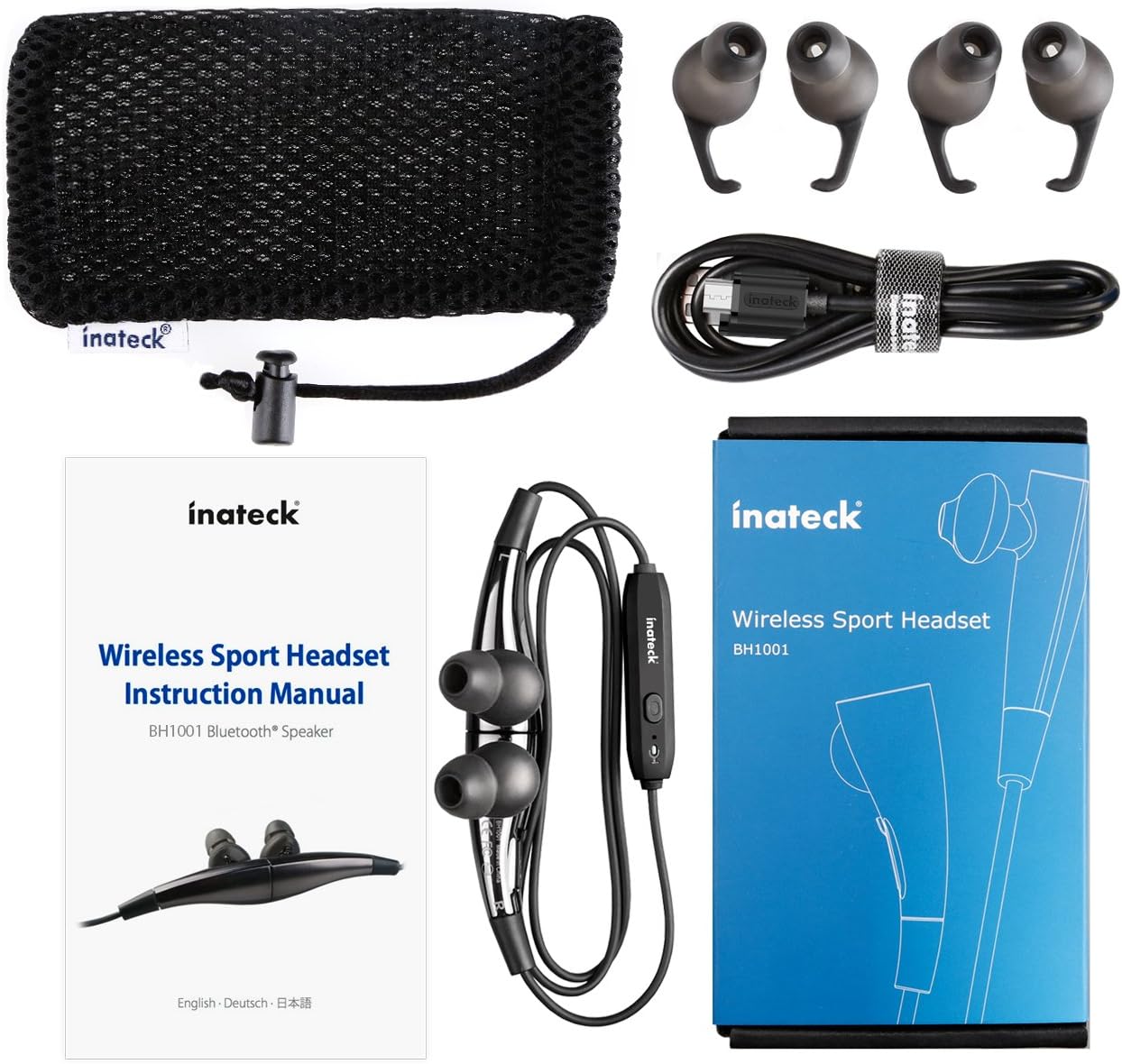
Figuur 1.1: Contents of the Inateck Bluetooth Sport Headset package.
1.2 Laai die oorfone
Before first use, fully charge the headset. A full charge takes approximately 3 hours and provides at least 8 hours of music playback.
- Locate the Micro USB charging port on the headset.
- Connect the small end of the provided USB charging cable to the headset's Micro USB port.
- Koppel die groter punt van die USB-kabel aan 'n USB-kragbron (bv. 'n rekenaar se USB-poort, USB-muuradapter).
- The status indicator light will illuminate during charging. It will change color or turn off once charging is complete.

Figuur 1.2: Charging the Inateck Bluetooth Sport Headset via Micro USB.
1.3 Koppeling met 'n Bluetooth-toestel
Om jou oorfone aan 'n slimfoon of ander Bluetooth-geaktiveerde toestel te koppel:
- Verseker dat die koptelefoon afgeskakel is.
- Press and hold the Multifunction Key (MFB) on the inline control unit for approximately 5-7 seconds until the status indicator light flashes red and blue alternately. This indicates pairing mode.
- On your Bluetooth device, enable Bluetooth and search for new devices.
- Select "Inateck BH1001" or "Inateck P20" from the list of available devices.
- Once paired, the status indicator light on the headset will flash blue slowly, and you may hear an audible confirmation.
- The headset will automatically attempt to reconnect to the last paired device when turned on.

Figuur 1.3: Inateck Headset paired with a mobile device for music playback.
2. Bedryfsinstruksies
2.1 Koptelefoonkontroles
The inline control unit provides easy access to various functions:

Figuur 2.1: verbyview of the Inateck Headset control unit.
- Multifunction Key (MFB):
- Press and hold (5-7s): Power On/Off, Enter Pairing Mode
- Short press: Play/Pause music, Answer/End call
- Long press (during incoming call): Reject call
- Volume op (+) / Volgende snit:
- Kort druk: Verhoog volume
- Lang druk: Slaan oor na volgende snit
- Volume af (-) / Vorige snit:
- Kort druk: verlaag volume
- Long press: Go to previous track
- Mikro -USB -poort: Vir die laai van die headset.
- Status aanwyser: Wys krag-, parings- en laaistatus.
- Mikrofoon: Vir handvrye oproepe.
2.2 Dra van die oorfone
Select the ear tips that provide the most comfortable and secure fit for your ears. The headset is designed to be worn with the cable behind your neck, ensuring stability during physical activity.

Figuur 2.2: Proper wearing of the Inateck Sport Headset for active use.
2.3 Magnetic Earbuds Feature
The earbuds feature integrated magnets. When not in use, you can connect the two earbuds together, forming a necklace around your neck. This action automatically pauses music playback and prevents the headset from falling off.

Figuur 2.3: Magnetic earbuds feature for secure wearing around the neck.

Figuur 2.4: Headset worn as a necklace using the magnetic feature.
3. Onderhoud
- Skoonmaak: Vee die oorfone met 'n sagte, droë lap af. Moenie skuurmiddels of oplosmiddels gebruik nie.
- Oorwenke: Verwyder en maak die silikoon-oorpuntjies gereeld skoon met sagte seep en water. Maak seker dat hulle heeltemal droog is voordat jy hulle weer vasmaak.
- Berging: When not in use, store the headset in the provided carrying pouch to protect it from dust and damage. Avoid extreme temperatures.
- Waterweerstand: The headset is designed to be water-resistant for sports and exercise (e.g., sweat, light rain). Do not submerge it in water or expose it to heavy rain.
4. Probleemoplossing
4.1 Kan nie aanskakel nie
Ensure the headset is fully charged. Connect it to a power source using the USB cable and allow it to charge for at least 30 minutes before attempting to power on again.
4.2 Kan nie met toestel koppel nie
- Ensure the headset is in pairing mode (status indicator flashing red and blue alternately).
- Make sure Bluetooth is enabled on your device and it is within range (typically 10 meters or 33 feet).
- Turn off and on the Bluetooth function on your device.
- If previously paired, try "forgetting" or "unpairing" the headset from your device's Bluetooth settings and then re-pair.
- Maak seker dat geen ander Bluetooth-toestelle met die verbinding inmeng nie.
4.3 Geen klank of swak klankgehalte
- Kontroleer die volumevlak op beide die oorfone en jou gekoppelde toestel.
- Maak seker dat die oorfone behoorlik gekoppel en aan jou toestel gekoppel is.
- Move closer to your device to reduce potential interference or range issues.
- Ensure the ear tips are correctly seated in your ears for optimal sound delivery.
- Reboot both the headset and your connected device.
4.4 Intermittent Connection
- Ensure there are no physical obstructions between the headset and your device.
- Avoid placing your device in areas where the signal might be blocked (e.g., deep pockets, behind thick walls).
- Minimize interference from other wireless devices (Wi-Fi routers, other Bluetooth devices).
- Keep the headset and your device within the recommended Bluetooth range.
5. Spesifikasies
| Handelsmerk | Inateck |
| Model Naam | P20 |
| Modelnommer | BH1001 |
| Verbindingstegnologie | Bluetooth 4.1 |
| Vormfaktor | In-Oor |
| Oorplasing | Intra-aural |
| Koptelefoonaansluiting | USB (vir laai) |
| Waterweerstandvlak | Waterproof (suitable for sweat/light rain) |
| Spesiale kenmerke | Sports and exercise, integrated microphone, magnetic earbuds |
| Item gewig | 78 gram |
| Tipe beheer | Volume Control, Multifunction Button |
| Materiaal | Plastiek |
6. Waarborginligting
Inateck products typically come with a limited warranty. For specific warranty terms and conditions applicable to your Inateck Bluetooth Sport Headset, please refer to the warranty card included in your product packaging or visit the official Inateck webwebwerf. Bewaar u bewys van aankoop vir waarborgeise.
7. Kliëntediens
If you encounter any issues not covered in this manual or require further assistance, please contact Inateck customer support. You can usually find contact information, FAQs, and additional resources on the official Inateck webwebwerf:
Webwebwerf: www.inateck.com
Please have your product model (P20 / BH1001) and purchase details ready when contacting support.