
1. Produk verbyview
The Oster Digital French Door Oven is a versatile 8-in-1 countertop appliance designed to simplify your cooking experience. Its elegant stainless steel finish and unique French door mechanism, which allows both doors to open with a single pull, make it a convenient addition to any kitchen. Equipped with digital controls, this oven offers precise temperature and time settings for various cooking functions.
This extra-large convection oven is capable of accommodating two 16-inch pizzas, making it ideal for family meals or entertaining. It utilizes Turbo Convection baking technology to cook food faster and brown more evenly, while consuming up to 50% less energy compared to traditional ovens. The integrated 90-minute timer ensures your food cooks for the desired duration, with an automatic shut-off feature for safety and convenience.
Sleutel kenmerke:
- Single Door Pull: Opens both French doors with one hand for ease of use.
- Digitale kontroles: Provides precise cooking time and temperature settings.
- Turbo Convection Baking Technology: Cooks faster and browns more evenly.
- Dual Racks: Offers maximum cooking flexibility with two included racks.
- Extra-Large Interior: Accommodates up to two 16-inch pizzas.
- Preheat Setting: Ensures precise cooking by reaching the desired temperature before cooking begins.
- 90-minute timer: Automatically shuts off the oven when cooking is complete.
- 8-in-1 Funksies: Includes Toast, Bake, Broil, Pizza, Defrost, Warm, Dehydrate, and Convection.

Figuur 1: Voorkant view of the Oster Digital French Door Convection Oven.
2. Komponente en Toebehore
Your Oster Convection Oven comes with essential accessories to enhance your cooking versatility.
Ingesluit komponente:
- Oven Unit
- Twee draadrakke
- Bakpan
- Verwyderbare krummelbak

Figure 2: Included accessories: baking pan and wire racks.
3. Opstelling
Before using your new Oster Convection Oven, please follow these setup instructions carefully.
Uitpak en plasing:
- Remove all packaging materials, including any internal packing and protective films.
- Place the oven on a flat, stable, heat-resistant surface. Ensure there is adequate clearance (at least 6 inches) on all sides and above the oven for proper ventilation. Do not place the oven directly against a wall or under cabinets.
- Maak seker dat die kragkabel nie geknyp of in kontak is met warm oppervlaktes nie.
Aanvanklike skoonmaak:
- Before first use, wipe the interior of the oven, racks, and baking pan with a damp lap en sagte skoonmaakmiddel. Droog deeglik af.
- It is recommended to run the oven empty on the 'Bake' setting at 450°F (232°C) for approximately 15 minutes to burn off any manufacturing residues. A slight odor or smoke may be present during this initial operation; this is normal. Ensure the area is well-ventilated.
4. Bedryfsinstruksies
Your Oster Convection Oven features intuitive digital controls for easy operation. Familiarize yourself with the control panel before use.
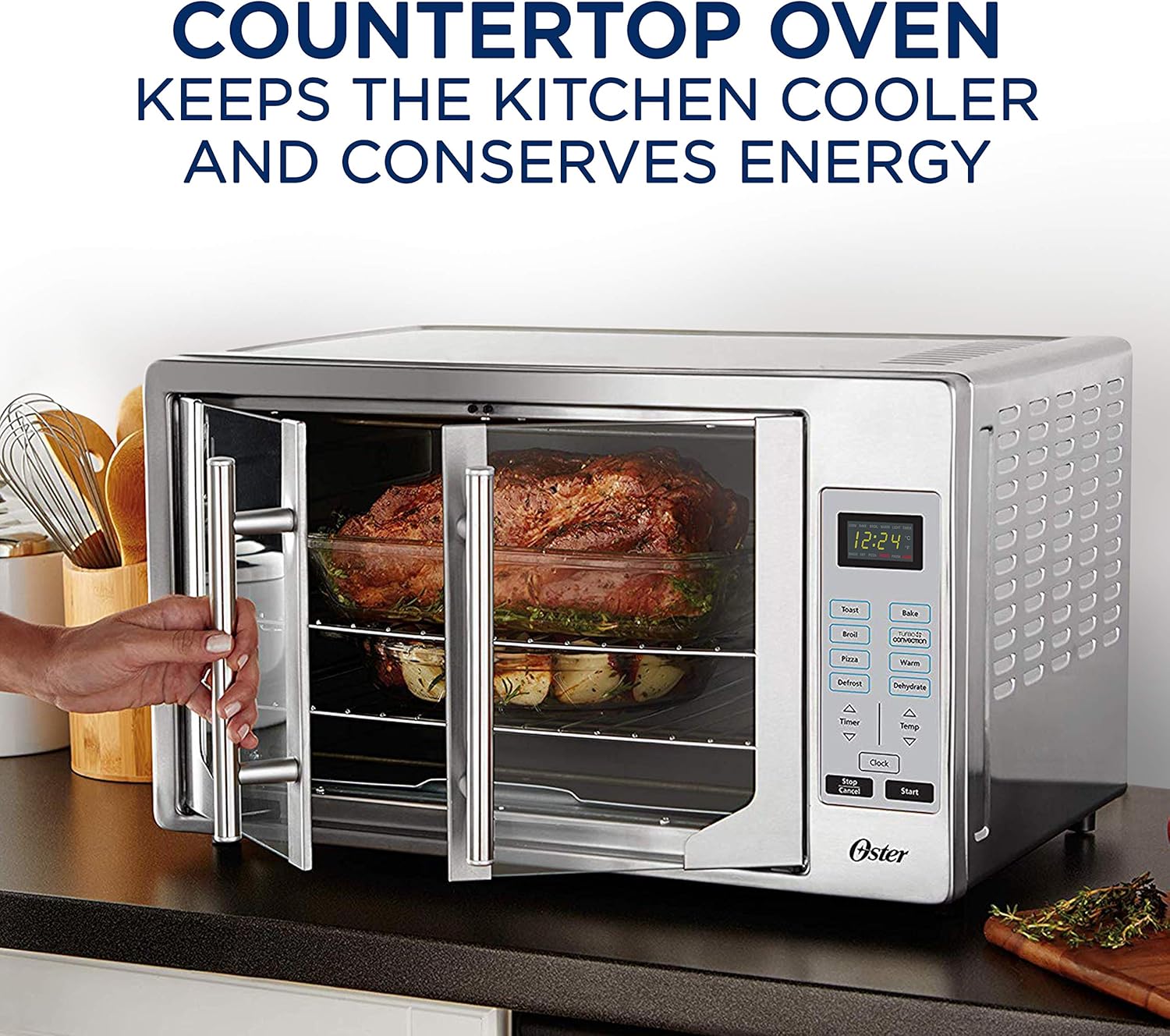
Figuur 3: oorview of oven features and digital control panel.
Beheerpaneel oorview:
- Digitale skerm: Toon tyd, temperatuur en gekose funksie.
- Funksie knoppies: Toast, Broil, Pizza, Defrost, Bake, Turbo Convection, Warm, Dehydrate.
- Timer Arrows (Up/Down): Pas kooktyd aan.
- Temp Arrows (Up/Down): Pas kooktemperatuur aan.
- Horlosie-knoppie: Stel die huidige tyd in.
- Begin-knoppie: Begins the selected cooking cycle.
- Stop/Kanselleer-knoppie: Stops or cancels the current operation.
Algemene Bedieningsstappe:
- Place food on the appropriate rack or baking pan.
- Close the French doors by pulling the single handle.
- Select the desired cooking function (e.g., Bake, Toast, Broil).
- Adjust the temperature using the 'Temp' arrows.
- Adjust the cooking time using the 'Timer' arrows.
- Druk die 'Start'-knoppie om te begin kook.
- The oven will automatically shut off when the timer expires.
Spesifieke Funksies:
- Roosterbrood: Ideal for bread, bagels, and frozen waffles. Adjust shade level as desired.
- Bak: For general baking needs like cakes, cookies, and casseroles.
- Braai: Use for browning, grilling, or toasting open-faced sandwiches.
- Pizza: Optimized setting for cooking pizzas to perfection.
- Ontdooi: Ontdooi bevrore kosse versigtig.
- Warm: Keeps cooked food warm until ready to serve.
- Dehidreer: Low-temperature setting for dehydrating fruits, vegetables, and jerky.
- Turbo Convection: Activates a fan to circulate hot air, cooking food faster and more evenly. This is particularly useful for roasting and baking.

Figure 4: Turbo Convection technology circulates hot air for even cooking.

Figure 5: The French door design allows easy access to the oven interior.
5. Onderhoud en Skoonmaak
Regular cleaning and maintenance will ensure the longevity and optimal performance of your Oster Convection Oven.
Skoonmaakinstruksies:
- Ontkoppel altyd die oond se stekker en laat dit heeltemal afkoel voordat jy dit skoonmaak.
- Binne: Vee die binnemure af met adamp cloth and mild, non-abrasive detergent. For stubborn stains, a paste of baking soda and water can be used. Avoid using steel wool or abrasive cleaners.
- Buitekant: Maak die buite-oppervlaktes skoon met 'n sagte, damp lap. Vir vlekvrye staal, gebruik 'n gespesialiseerde vlekvrye staal skoonmaakmiddel om die glans daarvan te behou.
- Glas deure: Wipe the glass doors with a soft cloth and glass cleaner.
- Racks and Pan: The wire racks and baking pan can be washed in warm, soapy water or placed in a dishwasher.
- Krummelbak: Pull out the removable crumb tray from the bottom front of the oven. Empty crumbs and wash the tray in warm, soapy water. Ensure it is dry before reinserting.
Note: Do not immerse the oven unit in water or any other liquid.
6. Probleemoplossing
If you encounter issues with your Oster Convection Oven, refer to the following common problems and solutions.
Algemene kwessies en oplossings:
| Probleem | Moontlike oorsaak | Oplossing |
|---|---|---|
| Oond skakel nie aan nie. | Nie ingeprop nie; krag aftage; stroombreker het geaktiveer. | Ensure the oven is securely plugged into a working outlet. Check your home's circuit breaker. |
| Control buttons are unresponsive. | Temporary electronic glitch; buttons require firm press. | Unplug the oven for 5 minutes, then plug it back in to reset. Ensure you are pressing the touch-sensitive buttons firmly and directly. |
| Kos kook nie eweredig nie. | Onbehoorlike rakposisie; oorbevolking; probleem met konveksiewaaier. | Adjust rack position for optimal heat distribution. Avoid overcrowding the oven. Ensure the convection fan is operating (if using convection mode). |
| Oormatige rook of reuk tydens werking. | Food residue; initial burn-off. | Clean the interior thoroughly, especially the crumb tray and heating elements. If it's the first use, this is normal and will dissipate. Ensure good ventilation. |
| French doors do not stay open. | Doors not opened fully. | Ensure the doors are pushed open completely until they lock into their open position. |
If the problem persists after attempting these solutions, please contact Oster customer support.
7. Spesifikasies
Detailed technical specifications for the Oster Digital French Door Convection Oven.
| Spesifikasie | Detail |
|---|---|
| Handelsmerk | Oster |
| Model Naam | French Door Convection Countertop and Toaster Oven |
| Item Modelnommer | TSSTVFDDG |
| Kleur | Vlekvrye staal |
| Grootte | Ekstra groot |
| Produk Afmetings (D x B x H) | 20.15" D x 23.8" B x 15.1" H |
| Item gewig | 18.1 pond |
| Spesiale kenmerk | Digitaal |
| Tipe beheer | Raak Beheer |
| Deurstyl | Franse deur |
| Voltooi Tipe | Gepoleer |
| Tipe deur materiaal | Vlekvrye staal |
| Kragbron | Elektries |
| UPC | 034264477735 |
8. Waarborg en Ondersteuning
For detailed warranty information, please refer to the warranty card included with your product or visit the official Oster webwebwerf. Bewaar u aankoopbewys as bewys van aankoop vir enige waarborgeise.
Kliëntediens:
If you require further assistance, have questions about your product, or need to report a defect, please contact Oster customer support. You may also find additional resources and FAQs on the Oster brand webwebwerf.
A digital version of the User Manual is available for download: Oster Convection Oven User Manual (PDF)