
Inleiding
Thank you for choosing the Technoline WT 745 Radio Controlled Alarm Clock. This digital alarm clock features precise timekeeping, dual alarms with snooze, date and weekday display, and indoor temperature monitoring. Please read this manual carefully to ensure proper setup and operation.
Pakketinhoud
- Technoline WT 745 Radio Controlled Alarm Clock
- Gebruikershandleiding
Note: 2x AAA batteries are required and not included.
Produk verbyview
Familiarize yourself with the main components of your WT 745 alarm clock.
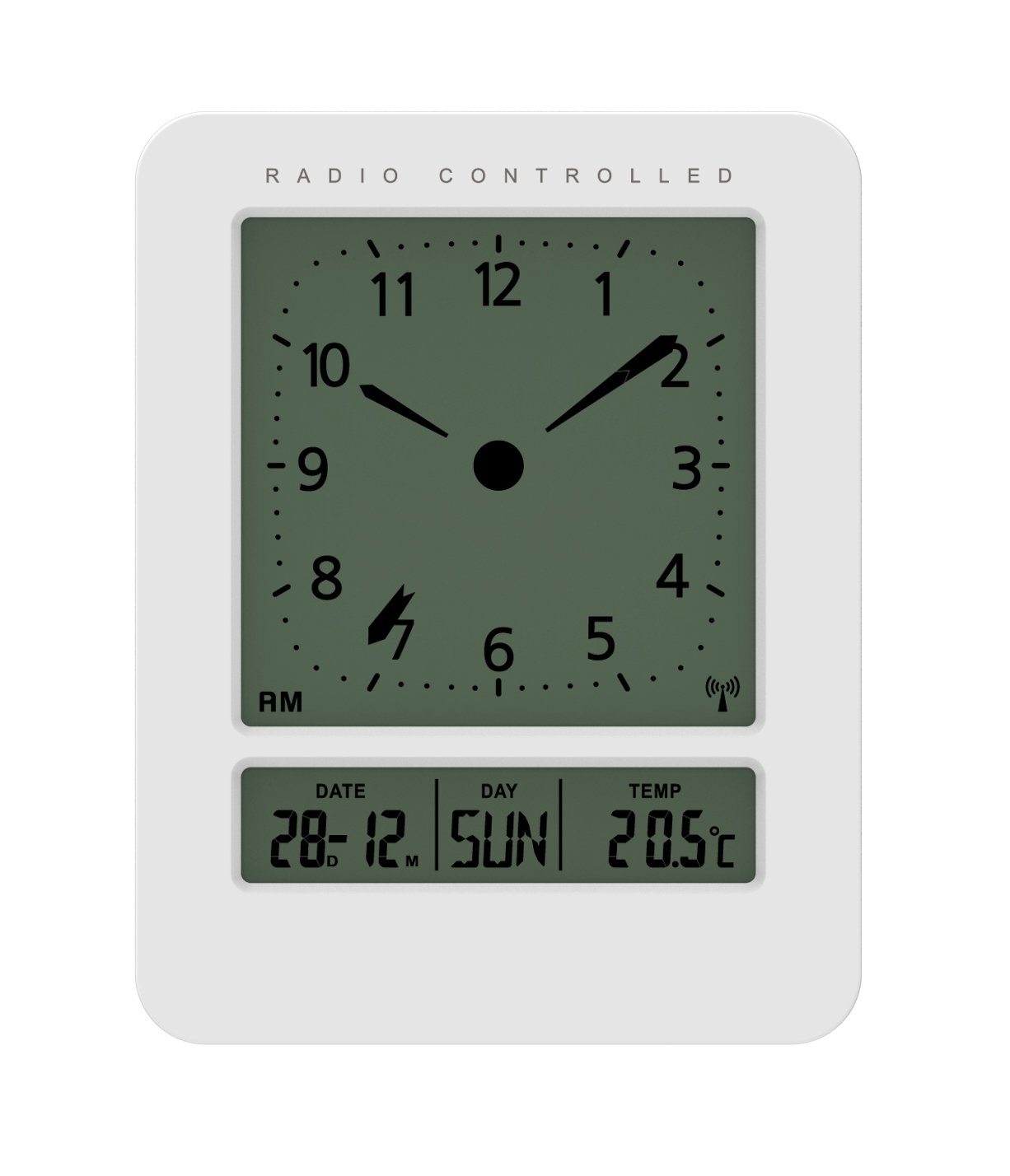
Beeld: Voorkant en sykant view of the Technoline WT 745 Radio Controlled Alarm Clock, showing the digital display with time, date, day, and temperature, and the analog clock face. The clock is white with a light grey display.
- Analog Clock Face: Displays current time with hour, minute, and second hands.
- Digitale skerm: Shows date, day of the week, and indoor temperature.
- Radio Controlled Indicator: Symbol indicating successful radio signal reception.
- Beheerknoppies: Buttons for setting time, alarm, and other functions, typically located on the back or side.
- Battery kompartement: Located on the back for 2x AAA batteries.
Opstelling
1. Insit van batterye
- Maak die batteryklep aan die agterkant van die wekker oop.
- Plaas 2 nuwe AAA-batterye in en let op die korrekte polariteit (+/-).
- Maak die batterykompartement se deksel stewig toe.
Note: The clock will automatically start searching for the radio time signal after battery insertion. This process may take several minutes.
2. Initial Radio Signal Reception
- Plaas die horlosie naby 'n venster vir optimale seinontvangs.
- Vermy die plasing daarvan naby elektroniese toestelle wat steuring kan veroorsaak.
- Once the signal is received, the time, date, and day will be automatically set. The radio controlled indicator will appear on the display.
If the signal is not received within 10 minutes, try repositioning the clock or manually setting the time (see "Manual Time Setting").
Bedryfsinstruksies
Stel die alarm
- Druk die ALARMSTEL button (location not specified, assume standard placement). The alarm time will flash.
- Gebruik die UP or AF knoppies om die uur aan te pas.
- Druk ALARMSTEL weer om die uur te bevestig en na minute oor te skakel.
- Gebruik die UP or AF knoppies om die minute aan te pas.
- Druk ALARMSTEL om die alarmtyd te bespaar.
- Om die alarm te aktiveer/deaktiveer, druk die ALARM AAN / AF knoppie. 'n Alarmikoon sal op die skerm verskyn/verdwyn.
The WT 745 supports two independent alarms. Repeat the steps above to set the second alarm.
Sluimer funksie
- As die alarm klink, druk die SLUIMER button (usually a large button on top). The alarm will pause for approximately 5 minutes and then sound again.
- To stop the alarm completely, press any other button (e.g., ALARM ON/OFF) or let it ring for its full duration.
Backlight Activation
- Druk die LIG or SLUIMER button to temporarily illuminate the display for easy viewin toestande met swak lig.
Viewing Date, Day, and Temperature
- The digital display continuously shows the current date, day of the week, and indoor temperature. No specific action is required to view hierdie.
Manual Time Setting (if radio signal is unavailable)
- Druk en hou die TYD BEREIK button for a few seconds until the hour digits flash.
- Gebruik die UP or AF knoppies om die uur aan te pas.
- Druk TYD BEREIK weer om die uur te bevestig en na minute oor te skakel.
- Gebruik die UP or AF knoppies om die minute aan te pas.
- Hou aan druk TYD BEREIK to cycle through and adjust year, month, and day as needed.
- Druk TYD BEREIK one last time to exit manual setting mode.
Onderhoud
- Skoonmaak: Vee die horlosie af met 'n sagte, droë lap. Moenie skuurmiddels of oplosmiddels gebruik nie.
- Battery vervanging: Replace batteries when the display dims or functions become erratic. Always replace both batteries simultaneously with new ones.
- Berging: Indien die horlosie vir 'n lang tydperk gestoor word, verwyder die batterye om lekkasie te voorkom.
- Omgewing: Hou die horlosie weg van direkte sonlig, uiterste temperature en hoë humiditeit.
Probleemoplossing
| Probleem | Moontlike oorsaak | Oplossing |
|---|---|---|
| Die skerm is leeg of dof. | Batterye is laag of verkeerd geplaas. | Vervang batterye met nuwe AAA-batterye en maak seker dat die polariteit korrek is. |
| Clock does not receive radio signal. | Interference, poor location, or signal too weak. | Move the clock closer to a window, away from electronic devices. Try manual time setting. |
| Die alarm lui nie. | Die alarm is nie geaktiveer nie of verkeerd gestel. | Ensure the alarm icon is visible on the display. Recheck alarm time settings. |
| Verkeerde tyd word vertoon. | Radio signal lost or manual time set incorrectly. | Allow the clock to resynchronize with the radio signal. If persistent, manually set the time. |
Spesifikasies
- Model: WT 745
- Handelsmerk: Tegnolyn
- Afmetings: 7.1 x 4.5 x 9.2 cm (L x B x H)
- Gewig: 150 g
- Materiaal: Plastiek
- Vertoon tipe: Digital with Analog Clock Face
- Kragbron: 2 x AAA-batterye (nie ingesluit nie)
- Spesiale kenmerke: Radio Controlled Time, Dual Alarms, Snooze Function, Date Display, Day of Week Display, Indoor Temperature Display, Backlight.
- Gebruik: Binneshuise
Waarborg en Ondersteuning
For warranty information or technical support, please refer to the warranty card included with your product or visit the official Technoline webwebwerf. Bewaar u aankoopbewys as bewys van aankoop.
Amptelik Webwebwerf: www.technoline.eu