
1. Inleiding
This manual provides detailed instructions for the safe and effective use of your VONYX MEG045 40W Megaphone. Please read this manual thoroughly before operating the device and retain it for future reference. The VONYX MEG045 is a powerful, portable megaphone designed for outdoor activities, events, and public address, featuring 40W output, recording function, siren, and multimedia playback capabilities.
2. Veiligheidsinstruksies
- Do not expose the megaphone to rain or moisture to prevent electric shock or fire.
- Moenie die c oopmaak nieasing. Daar is geen onderdele binne wat deur die gebruiker onderhou kan word nie. Verwys alle onderhoud na gekwalifiseerde personeel.
- Use only the specified battery type (6 x D-cell batteries). Ensure correct polarity when inserting batteries.
- Remove batteries if the megaphone will not be used for an extended period to prevent leakage.
- Keep the megaphone away from direct sunlight and heat sources.
- Avoid pointing the megaphone directly at people's ears at close range, as the high volume can cause hearing damage.
- Gooi batterye weg volgens plaaslike regulasies.
3. Pakketinhoud
Kontroleer asseblief dat alle items teenwoordig en in 'n goeie toestand is wanneer u die pakkie oopmaak:
- VONYX MEG045 40W Megafoon
- Verstelbare skouerband
- Gebruikershandleiding (hierdie dokument)
4. Produk verbyview
Familiarize yourself with the components of your VONYX MEG045 Megaphone.
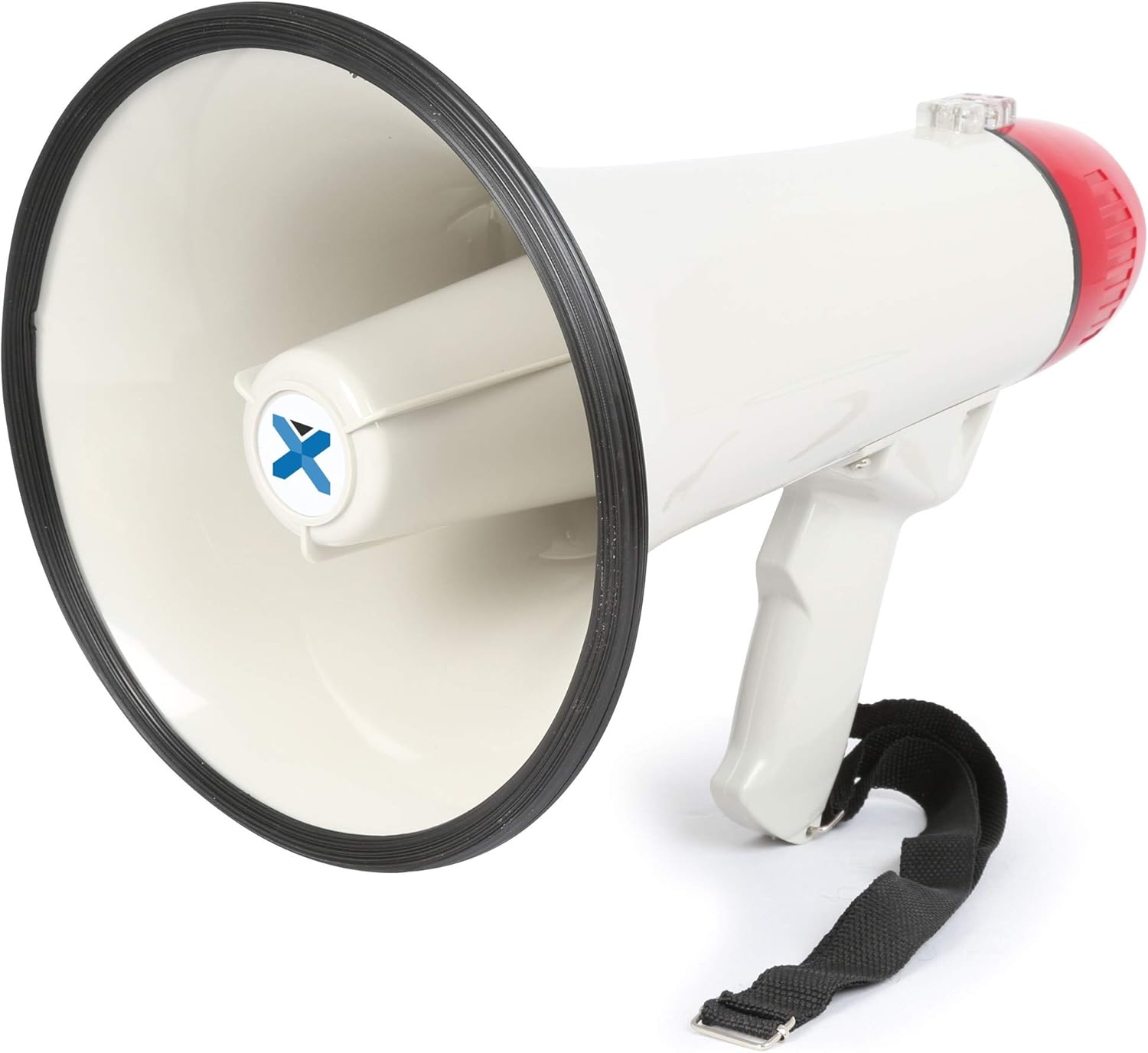
Figuur 4.1: Algehele view of the VONYX MEG045 Megaphone, showing the horn, handle, and attached shoulder strap.
- Horing: The sound output area.
- Mikrofoon: Integrated into the rear of the megaphone for voice amplifikasie.
- Hanteer: Ergonomiese greep vir gemaklike vashou.
- Beheerpaneel: Located near the handle, containing various buttons and ports.
- Battery kompartement: Located at the rear, under the red cap.
- Skouerband: For easy carrying and portability.
5. Opstelling
5.1 Battery installasie
The MEG045 megaphone requires 6 x D-cell batteries (not included).
- Twist the red rear cap counter-clockwise to open the battery compartment.
- Insert 6 D-cell batteries, ensuring correct polarity (+ and -) as indicated inside the compartment.
- Replace the red rear cap by twisting it clockwise until securely closed.

Figuur 5.1: Open battery compartment showing where D-cell batteries are inserted.
5.2 Bevestig die skouerband
Attach the provided shoulder strap to the designated loops on the megaphone for convenient carrying.
6. Bedryfsinstruksies
The control panel features various buttons and input ports for different functions.

Figuur 6.1: Close-up of the control panel showing USB, AUX, and SD/MMC card slots.
6.1 Basic Operation (Voice Amplifikasie)
- Maak seker dat batterye korrek geïnstalleer is.
- Locate the power switch (usually a trigger on the handle or a button on the control panel) and turn the megaphone ON.
- Adjust the volume control knob to a suitable level.
- Praat duidelik in die geïntegreerde mikrofoon.
6.2 Siren Function
Druk die Sirene button on the control panel to activate the built-in siren sound. Press it again to turn off the siren.
6.3 Opname en afspeel
- To record: Press and hold the Rekord button. Speak into the microphone. Release the button to stop recording.
- To play back: Press the Afspeel button to listen to your last recording.
6.4 Multimedia Playback (USB/SD/AUX)
The megaphone supports playback from USB drives, SD/MMC cards, and external devices via the AUX input.
- USB/SD-terugspeel: Insert a USB drive or SD/MMC card into the corresponding slot on the control panel. The megaphone will automatically detect and play compatible audio files (e.g., MP3). Use the track navigation buttons (if available) to skip tracks.
- AUX-invoer: Connect an external audio device (smartphone, laptop, tablet) to the AUX input using a 3.5mm audio cable. The megaphone will play audio from the connected device. Control playback and volume from your external device.
7. Onderhoud
- Skoonmaak: Wipe the megaphone with a soft, dry cloth. Do not use abrasive cleaners or solvents.
- Batterysorg: Always remove batteries if the megaphone is not used for extended periods to prevent corrosion.
- Berging: Store the megaphone in a cool, dry place, away from direct sunlight and extreme temperatures.
8. Probleemoplossing
| Probleem | Moontlike oorsaak | Oplossing |
|---|---|---|
| Geen klank/Lae volume |
|
|
| Siren/Recording not working |
|
|
| USB/SD/AUX playback issues |
|
|
9. Spesifikasies
| Kenmerk | Detail |
|---|---|
| Handelsmerk | VONYX |
| Modelnommer | MEG045 (8715693276435) |
| Kraguitset | 40 W |
| Reeks | Tot 1 km (0.6 myl) |
| Gewig | 1.3 kg (ongeveer) |
| Kragtoevoer | 6 x D-sel batterye (nie ingesluit nie) |
| Insette | USB, SD/MMC card slot, AUX (3.5mm) |
| Funksies | Stem amplification, Siren, Recording, Multimedia Playback |
10. Waarborg en Ondersteuning
Specific warranty information and customer support details are not available in the provided product data. For warranty claims, technical support, or service inquiries, please refer to the documentation included with your purchase or visit the official VONYX webwebwerf vir die mees onlangse inligting.
Jy kan ook jou kleinhandelaar kontak vir hulp.