
1. Inleiding
The Edifier P180 is a stereo earbud headset designed for clear audio and convenient communication. Featuring an inline microphone and control, it offers a comfortable listening experience for various devices.

Figure 1: Edifier P180 Wired Earbud Headset
2. Wat is in die boks
- Edifier P180 Earbud Headset
- Kabel
3. Sleutel kenmerke
- Classic Comfort: Ergonomic design for comfortable wear without irritating the ear canal.
- Uitstekende klankgehalte: Equipped with 16mm neodymium magnetic monomers for high-fidelity audio playback.
- Integrated Microphone and Control: 3.5mm stereo earphones with a built-in microphone and remote button for mobile phone communication.
- Funksionaliteit: Single button control for picking up/hanging up calls and skipping songs (device dependent for iOS/Android).
- Duursame ontwerp: Constructed with quality materials for longevity.

Figure 2: Ergonomic design for comfortable fit.
4. Opstelling
- Pak uit: Carefully remove the Edifier P180 headset from its packaging.
- Inspekteer: Check the earbuds and cable for any visible damage.
- Koppel: Insert the 3.5mm audio jack into the headphone port of your compatible device (smartphone, tablet, computer, etc.). Ensure the jack is fully inserted for proper audio and microphone function.
- Posisie: Place the earbuds comfortably in your ears. The ergonomic design is intended to rest well without causing irritation.
5. Bedryfsinstruksies
The Edifier P180 features an inline control button for easy management of calls and music playback.
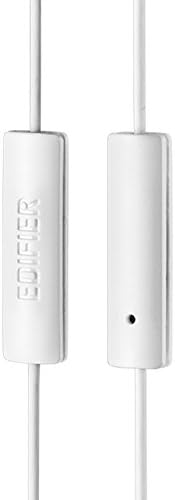
Figure 3: Inline microphone and control button.
- Oproepe beantwoord / beëindig: Press the control button once to answer an incoming call. Press it again to end an active call.
- Playing/Pausing Music: Press the control button once to play or pause audio playback.
- Slaan snitte oor: Double-press the control button to skip to the next track. Triple-press to go to the previous track (functionality may vary by device and operating system).
- Stemassistent: Long-press the control button to activate your device's voice assistant (e.g., Siri, Google Assistant).
Video 1: Amptelike produk verbyview of the Edifier P180 Classic Earbud Headsets, demonstrating features and usage.
6. Onderhoud
- Skoonmaak: Vee die oorfone en kabel liggies af met 'n sagte, droë lap. Vermy die gebruik van harde chemikalieë of skuurmiddels.
- Berging: When not in use, store the headset in a clean, dry place, away from extreme temperatures and direct sunlight. Avoid tangling the cable.
- Vermy vog: Do not expose the headset to water or excessive moisture, as this can damage the internal components.
7. Probleemoplossing
- Geen klank:
- Maak seker dat die 3.5 mm-aansluiting volledig in jou toestel se klankpoort geplaas is.
- Gaan jou toestel se volume-instellings na.
- Test the earbuds with another device to rule out a device-specific issue.
- Mikrofoon werk nie:
- Maak seker dat die 3.5 mm-aansluiting volledig ingesit is.
- Gaan jou toestel se mikrofoon-invoerinstellings na.
- Toets die mikrofoon met 'n ander toestel of toepassing.
- Intermitterende oudio:
- Check the cable for any kinks or damage.
- Maak seker dat die klankaansluiting skoon en vry van puin is.
8. Spesifikasies
| Kenmerk | Spesifikasie |
|---|---|
| Modelnommer | P180 |
| Frekwensierespons | 20 Hz - 20 000 Hz |
| Koptelefoonaansluiting | 3.5 mm-aansluiting |
| Verbindingstegnologie | Bedraad |
| Item gewig | 1.76 onse (50 gram) |
| Produk afmetings | 2.01 x 5.59 x 0.91 duim |
| Materiaal | Neodymium |
| Tipe beheer | Inline Control Button |
| Impedansie | 32 ohm |
| Geraasbeheer | Klankisolasie |
9. Waarborg en ondersteuning
The Edifier P180 headset is backed by a 1 jaar waarborg. For any support inquiries or warranty claims, please refer to the contact information provided with your purchase or visit the official Edifier webwebwerf.