
Inleiding
This manual provides comprehensive instructions for the VIZIO XRT112 Replacement Remote Control. Designed to function seamlessly with a wide range of VIZIO televisions, this remote offers a direct replacement solution without the need for complex programming. Please read this manual carefully to ensure proper setup and operation of your new remote control.
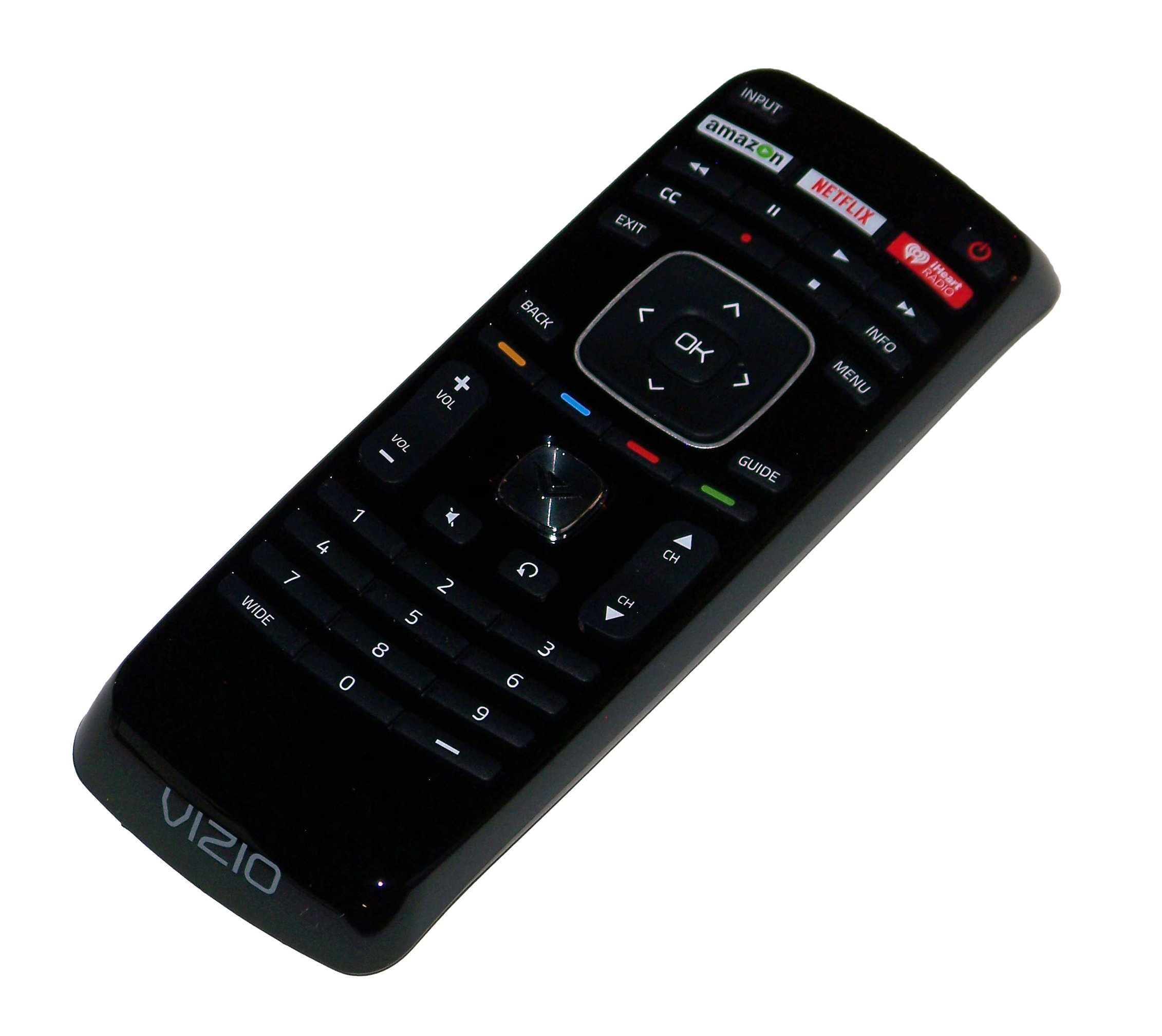
An image showing the VIZIO XRT112 Replacement Remote Control, featuring its ergonomic design and dedicated app buttons for Amazon, Netflix, and iHeart Radio.
Verenigbaarheid
The VIZIO XRT112 Replacement Remote Control is compatible with a broad range of VIZIO brand Television sets manufactured after 2012. It is designed to replace original remotes for many VIZIO LCD and LED TV models.
Key Compatible Models Include:
- E502AR, E550IA0, E550I-A0, E550IB2, E550I-B2, E600IB3, E600I-B3
- E370VP, E320VT, E370VT, E420VT, E422VLE, M370SL
- E322AR, E422AR, E472VLE, E552VLE
- E472VL, E552VL, E460ME
- M420SR, M420SV, M470SV, M550SV, M320SR, M370SR
- E3D320VX, E3D420VX, E3DB420VX, E3D470VX
- M3D421SR, M3D550SR, M3D460SR, M3D420SR
- XVT3D474SV, XVT3D650SV, XVT3D554SV
- E390i-A1, E500i-A1, M501-A2R
- E241IA1, E241I-A1W, E280IA1, E291IA1, E320IA2, E390IA1, E390IB1, E401IA2, E420A1, E420IA0, E500DA0, E500IB1E, E551IA2
This list is not exhaustive. The remote is generally compatible with most VIZIO LCD and LED TVs from 2012 onwards that originally used a similar XRT-series remote.
Kenmerke
- Direkte Vervanging: Functions immediately without programming for compatible VIZIO TVs.
- Toegewyde toepassingknoppies: Quick access to popular streaming services including Amazon, Netflix, and iHeart Radio.
- Ergonomiese ontwerp: Gerieflik om vas te hou en maklik om te gebruik.
- Infrarooi Tegnologie: Reliable communication with your television.
- Omvattende beheer: Full functionality for power, volume, channel, input selection, menu navigation, and more.
Opstelling
1. Battery Installasie
- Vind die batterykompartement aan die agterkant van die afstandbeheer.
- Skuif die batteryklep afwaarts of na buite om dit oop te maak.
- Insert two (2) new AAA Alkaline batteries, ensuring the positive (+) and negative (-) terminals match the diagrams inside the compartment.
- Plaas die batteryklep terug deur dit terug in posisie te skuif totdat dit stewig klik.
The remote control is now ready for use. No additional programming is typically required for compatible VIZIO televisions.
Bedryfsinstruksies
Point the remote control directly towards the infrared sensor on your VIZIO television. Ensure there are no obstructions between the remote and the TV.
- Kragknoppie (KRAG): Druk om die TV in of uit te skakel.
- Volume op/af (VOL +/-): Pas die klankvlak aan.
- Kanaal op/af (CH +/-): Verander die televisiekanaal.
- Invoer (INSET): Blaai deur beskikbare invoerbronne (HDMI, AV, ens.).
- Spyskaart (SPYSKAART): Kry toegang tot die TV se hoofkieslys vir instellings en opsies.
- Navigasie knoppies (PYLE): Use the directional arrows (Up, Down, Left, Right) to navigate through menus and options.
- OK/Select (OK): Bevestig keuses binne spyskaarte.
- Back/Exit (TERUG / UITGANG): Keer terug na die vorige skerm of verlaat die huidige kieslys.
- Dedicated App Buttons (AMAZON, NETFLIX, IHEART RADIO): Press these buttons for direct access to the respective streaming applications.
- Demp (DEM): Maak die TV-klank stil.
Onderhoud
Battery vervanging
Replace batteries when the remote's response becomes inconsistent or stops working. Always replace both batteries at the same time with new AAA Alkaline batteries. Do not mix old and new batteries, or different types of batteries.
Skoonmaak
Om die afstandbeheerder skoon te maak, vee die oppervlak liggies af met 'n sagte, droë lap. Vir hardnekkige vuiligheid, vee dit effens af.ampMaak die lap met water skoon. Vermy die gebruik van harde chemikalieë, skuurmiddels of oormatige vog, aangesien dit die afstandbeheerder kan beskadig.
Probleemoplossing
- Afstandsbediening reageer nie:
- Maak seker dat vars batterye korrek geïnstalleer is.
- Check for any obstructions between the remote and the TV's infrared sensor.
- Maak seker dat die afstandbeheerder direk op die TV gerig is.
- Spesifieke knoppies werk nie:
- This may indicate a faulty button or low battery power. Try replacing batteries.
- Remote does not control TV:
- Verify your VIZIO TV model is listed in the compatibility section or is a VIZIO LCD/LED TV manufactured after 2012.
- Ensure the TV's infrared sensor is not blocked or damaged.
Spesifikasies
| Handelsmerk | VIZIO |
| Model Naam | XRT112 (Replacement for XRT100 and others) |
| Model Number (Mfr Part Number) | 4330251959 |
| Verbindingstegnologie | Infrarooi |
| Battery Tipe | 2 x AAA alkaliese batterye |
| Maksimum reeks | 10 meter (ongeveer 33 voet) |
| Knoppie Hoeveelheid | 45 |
| Spesiale kenmerk | Ergonomic Design, Dedicated App Buttons (Amazon, Netflix, iHeart Radio) |
| Versoenbare toestelle | VIZIO Televisions (LCD and LED models manufactured after 2012) |
| UPC | 741271833972 |
Waarborg en Ondersteuning
This product is typically covered by a limited warranty provided by the seller or manufacturer. For specific warranty details, please refer to the product packaging or contact your point of purchase. For technical support or further assistance, please reach out to the seller or VIZIO customer service.
For more information, you may visit the official VIZIO support webwebwerf: www.vizio.com/en/support