
Inleiding
This manual provides essential instructions for the setup, operation, and maintenance of your Gigaset Handset and Charging Station. This product is compatible with various Gigaset phone systems, including models S2, S44, S200, S440, S445, S645, SX440, and SX445. Please read this manual carefully to ensure proper use and to maximize the lifespan of your device.
1. Opstelling
1.1 Uitpak en Aanvanklike Inspeksie
Carefully unpack all components. Ensure that the handset, charging station, and power adapter are present and undamaged. If any items are missing or damaged, contact your retailer.
1.2 Koppel die laaistasie
- Connect the power adapter cable to the charging station.
- Steek die kragadapter in 'n standaard elektriese aansluiting.
- Place the charging station on a flat, stable surface, away from heat sources and direct sunlight.

Beeld 1.1: Bo view of the Gigaset charging station. This image shows the compact design of the charging station, ready to receive the handset.
1.3 Inserting the Battery and Charging the Handset
- Maak die batterykompartement se deksel aan die agterkant van die selfoon oop.
- Plaas die herlaaibare battery in en maak seker dat die polariteit korrek is.
- Maak die batterykompartement se deksel toe.
- Place the handset into the charging station. Ensure it is seated correctly and the charging indicator (if present) illuminates.
- Laat die handset vir ten minste 6-8 uur laai voor die eerste gebruik om volle batterykapasiteit te verseker.
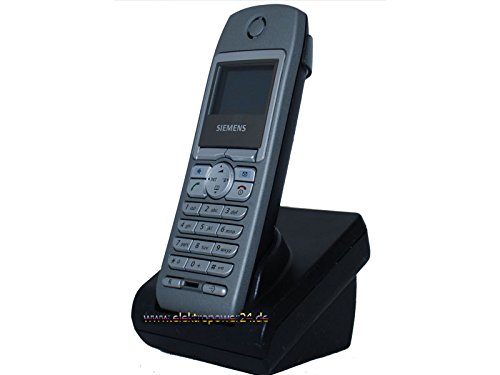
Beeld 1.2: Voorkant view of the Gigaset handset securely placed in its charging station. The display shows "Wahlvorbereitung" (dialing preparation) and a phone number, indicating it's powered on and ready.
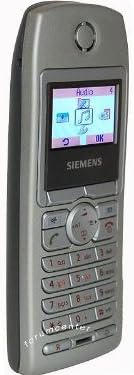
Beeld 1.3: Sykant view of the Gigaset handset, highlighting its ergonomic design and button layout. The display shows menu options like "Audio" and "OK".

Beeld 1.4: Agterkant view of the Gigaset handset, showing the smooth casing and the location of the battery compartment cover.
1.4 Registrasie van die handset by 'n basisstasie
This handset is designed to be compatible with various Gigaset base stations. The registration process may vary slightly depending on your specific base station model. Refer to your base station's manual for detailed instructions. Generally, the steps involve:
- Activate registration mode on your Gigaset base station (usually by pressing and holding a registration button).
- On the handset, navigate to the "Settings" or "Registration" menu.
- Select "Register Handset" and follow the on-screen prompts. You may need to enter a PIN (default is usually 0000).
- Once registered, the handset display will confirm successful connection to the base station.
2. Bedryfsinstruksies
2.1 Basiese Funksies
- Maak 'n oproep: Enter the phone number and press the green call key.
- Beantwoord 'n oproep: Press the green call key when the phone rings.
- Beëindig 'n oproep: Druk die rooi beëindig-oproep-toets.
- Handvrye oproepe: During a call, press the dedicated hands-free key (often backlit) to activate the speakerphone.
2.2 Telefoonboek (Gids)
The handset features a directory capable of storing up to 200 phone numbers and names.
- Voeg 'n inskrywing by: Navigate to the "Directory" or "Phonebook" menu, select "New Entry," and enter the name and number.
- Calling from Directory: Open the directory, scroll to the desired entry, and press the green call key.
2.3 Vertoon en aanwysers
The handset features a 5-line illuminated graphic display. Key indicators include:
- Datum/Tyd-aanwysing: Always visible on the idle screen.
- CLIP Function (Call Display): Shows the caller's number or name (if stored in the directory) for incoming calls.
- Battery aanwyser: Toon die huidige batterylaaivlak.
- Seinsterkte-aanwyser: Displays the connection quality to the base station.
3. Onderhoud
3.1 Skoonmaak
- Wipe the handset and charging station with a soft, damp lap.
- Moenie skuur skoonmaakmiddels of oplosmiddels gebruik nie.
- Maak seker dat geen vloeistof die toestel se openinge binnedring nie.
3.2 Batterysorg
- Always use the original or approved replacement rechargeable batteries.
- Vermy om die battery aan uiterste temperature bloot te stel.
- Indien die handset nie vir 'n lang tydperk gebruik gaan word nie, verwyder die battery.
4. Probleemoplossing
| Probleem | Moontlike oorsaak | Oplossing |
|---|---|---|
| Handset does not turn on. | Battery nie korrek geplaas nie of ontlaai. | Check battery insertion. Place handset in charging station for several hours. |
| Geen kiestoon nie. | Handset not registered to base station or out of range. | Ensure handset is registered. Move closer to the base station. Check base station power. |
| Swak oproepkwaliteit. | Interference or handset too far from base station. | Move away from other electronic devices. Move closer to the base station. |
| Kan nie oproepe maak of ontvang nie. | Line issue or base station problem. | Check your telephone line connection. Restart the base station by unplugging and replugging its power. |
5. Spesifikasies
- Handelsmerk: Gigaset
- Versoenbare modelle: Gigaset S2, S44, S200, S440, S445, S645, SX440, SX445
- Telefoonboek kapasiteit: Up to 200 entries (names and numbers)
- Vertoon: 5-line illuminated graphic display
- Kenmerke: Backlit hands-free key, Date/Time display, CLIP function (Call Display)
- Vervaardiger: Gigaset
- ASIN: B0102FULTW
Note: Information regarding spare parts availability and guaranteed software updates is not provided. This product is currently not listed as discontinued by the manufacturer.
6. Waarborg en Ondersteuning
Specific warranty details for this Gigaset Handset and Charging Station are not provided within the available product information. For warranty claims, technical support, or service inquiries, please refer to the documentation included with your original purchase or visit the official Gigaset webwebwerf vir jou streek.
Jy kan ook jou kleinhandelaar kontak vir hulp.