
Inleiding
This manual provides detailed instructions for the installation, operation, and maintenance of your microSHIFT Thumb Shifter Set (Model SL-T09). This precision-engineered 9-speed shifter set is designed for compatibility with both mountain and road bike systems, supporting double and triple chainring configurations. It offers seamless and reliable gear changes, enhancing your cycling experience.
Produk verbyview
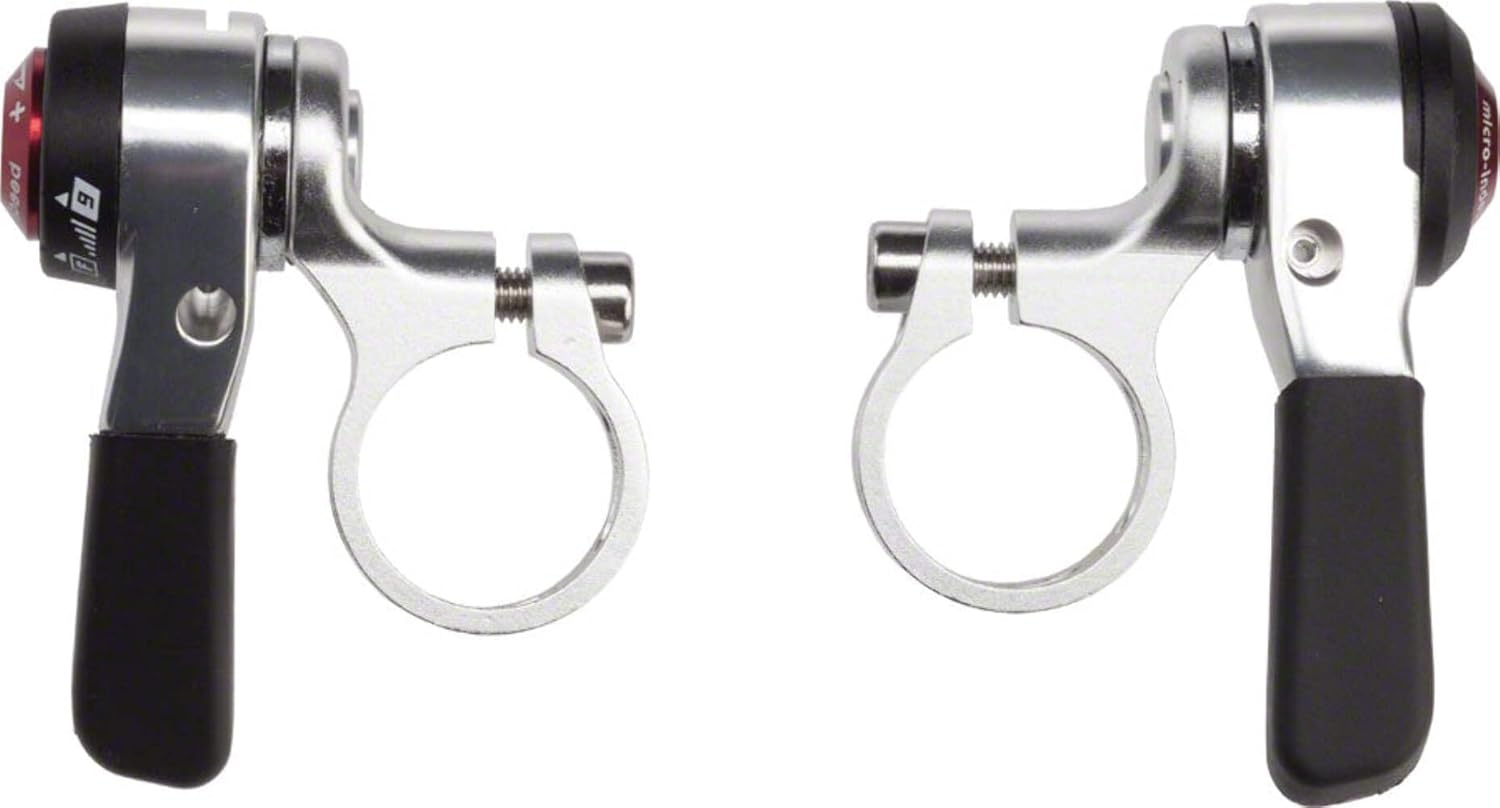
Prent: The microSHIFT Thumb Shifter Set, featuring two silver-colored shifters with black thumb levers and integrated handlebar clamps. The left shifter is for the front derailleur, and the right shifter is for the rear derailleur.
Opstelling en installasie
Proper installation is crucial for optimal performance. The microSHIFT Thumb Shifter Set includes shift cables for straightforward installation.
Vereiste gereedskap:
- Hex wrench set (specifically a 4mm hex wrench for mode adjustment)
- Kabelsnyers
- Grease (for cable housing)
Installasie stappe:
- Stuurstangmontering: Position the shifters on your handlebars in a comfortable and accessible location. Secure the clamps using a hex wrench. Ensure they are tight enough to prevent rotation but do not overtighten.
- Kabelroetering: Route the included shift cables through your bike's cable housing and guides to the respective front and rear derailleurs. Ensure cables run smoothly without sharp bends or kinks.
- Kabelaanhegting: Attach the shift cables to your derailleurs according to the derailleur manufacturer's instructions. Ensure proper tension.
- Aanvanklike aanpassing: Perform initial adjustments to both front and rear derailleurs to ensure smooth shifting across all gears. This may involve adjusting cable tension and limit screws.
Bedryfsinstruksies
The microSHIFT Thumb Shifter Set offers dual-mode functionality: indexed and friction shifting.
Indexed Shifting (Rear Derailleur):
- The right shifter (rear) is typically factory-set to indexed mode for 9-speed cassettes.
- To shift to a higher gear (smaller cog), push the thumb lever forward. Each click corresponds to one gear change.
- To shift to a lower gear (larger cog), pull the thumb lever backward. Each click corresponds to one gear change.
Friction Shifting (Front and Rear Derailleur):
- Friction mode allows for more customized and precise control, as there are no distinct "clicks" for each gear.
- To engage friction mode for the rear shifter, use a 4mm hex wrench to adjust the mechanism. Consult a professional if unsure.
- For both front and rear shifters in friction mode, gently push or pull the lever until the chain moves smoothly onto the desired chainring or cog without rubbing.
Onderhoud
Regular maintenance ensures the longevity and optimal performance of your shifters.
- Skoonmaak: Periodically wipe down the shifters with a clean, damp cloth to remove dirt and grime. Avoid using harsh chemicals that could damage the finish or internal components.
- Kabel inspeksie: Regularly inspect shift cables for fraying, rust, or excessive wear. Replace damaged cables promptly to prevent shifting issues.
- Smering: Apply a small amount of bicycle-specific lubricant to the pivot points of the shifter levers and ensure cables are well-lubricated within their housings for smooth operation.
- Bevestigingskontrole: Periodically check all mounting bolts and screws to ensure they are securely tightened.
Probleemoplossing
If you encounter issues with your microSHIFT Thumb Shifter Set, consider the following:
- Poor Shifting Performance:
- Check cable tension. Too loose or too tight can affect shifting accuracy.
- Inspect cables and housing for damage or excessive friction. Replace if necessary.
- Ensure derailleurs are properly aligned and limit screws are correctly set.
- Difficulty Engaging Indexed Mode (Rear):
- Verify that the shifter is correctly set to indexed mode. A 4mm hex wrench adjustment may be required.
- Ensure compatibility with your 9-speed cassette and rear derailleur.
- Lever Feels Loose or Sticky:
- Kontroleer monteringsboute vir styfheid.
- Clean and lubricate the shifter's pivot points.
For persistent issues, it is recommended to consult a qualified bicycle mechanic.
Spesifikasies
| Handelsmerk | mikroSHIFT |
| Modelnommer | SL-T09 (also referred to as SL-T10) |
| Spoedversoenbaarheid | 9-Speed (Rear) |
| Chainring Compatibility | Double/Triple (Front) |
| Shifting Modes | Indexed (Rear), Friction (Front & Rear) |
| Materiaal | Multiple (Aluminum handle) |
| Kleur | Silwer |
| Item gewig | 6.88 onse (ongeveer 195 g) |
| Afmetings (L x B) | 5 cm L x 5 cm B (ongeveer) |
| Ingesluit komponente | Shifter, Flat Bar- Pair |
Waarborg inligting
The microSHIFT Thumb Shifter Set is covered by a Limited Warranty provided by the manufacturer. For specific details regarding warranty terms, duration, and claims process, please refer to the documentation included with your product or visit the official microSHIFT webwebwerf.
Ondersteuning
For technical assistance, replacement parts, or further inquiries, please contact microSHIFT customer support through their official website. You may also consult your local authorized microSHIFT dealer or a professional bicycle mechanic for installation and service.