
Logitech 920-007182
Logitech K830 Verligte Sitkamersleutelbord Gebruikershandleiding
Model: 920-007182 | Handelsmerk: Logitech
Inleiding
The Logitech Illuminated Living-Room Keyboard K830 is designed to enhance your home entertainment experience. This keyboard combines a full keyboard layout with a built-in touchpad, offering seamless wireless control of your connected TV or computer, even in low-light conditions, thanks to its bright backlit keys.

Figure 1: Logitech K830 Illuminated Living-Room Keyboard, top view.
Pakketinhoud
Maak seker dat alle items in die pakket teenwoordig is:
- Logitech K830 Illuminated Living-Room Keyboard
- Logitech Unifying-ontvanger
- USB herlaai kabel
- USB range extender
- User information (this manual)
Opstelling
1. Laai die sleutelbord
Before first use, fully charge the keyboard. Connect the supplied USB recharge cable to the micro-USB port on the keyboard and the other end to a USB power source (e.g., computer USB port, USB wall adapter).
- The battery indicator light will glow green when charging and turn off when fully charged.
- A full charge typically provides several weeks of use.
2. Koppel die sleutelbord
The K830 keyboard offers two connection methods: Logitech Unifying receiver or Bluetooth Smart technology.
2.1. Using the Logitech Unifying Receiver (Recommended for PCs)
- Locate the Logitech Unifying receiver in the package.
- Plug the Unifying receiver into an available USB port on your computer or smart TV. For optimal range, use the included USB range extender if the receiver is obstructed or far from the keyboard.
- Turn on the keyboard by sliding the power switch located on the top edge of the keyboard to the ON position.
- The keyboard should automatically connect to the receiver. If not, use the Logitech Unifying Software (downloadable from Logitech's webwebwerf) om die toestelle te koppel.

Figure 2: User operating the K830 keyboard from a comfortable distance.
2.2. Using Bluetooth Smart Technology (For compatible devices)
- Ensure your device (e.g., Android TV, tablet) has Bluetooth Smart (Bluetooth Low Energy) enabled.
- Skakel die sleutelbord aan.
- Press and hold the Bluetooth pairing button (usually indicated by a Bluetooth icon) on the keyboard until the indicator light starts blinking rapidly, indicating it's in pairing mode.
- Gaan na Bluetooth-instellings op jou toestel en kies "Logitech K830" uit die lys van beskikbare toestelle om te koppel.
- Volg enige instruksies op die skerm om die saambindproses te voltooi.
Bedryfsinstruksies
Sleutelborduitleg en -funksies
The K830 features a compact layout optimized for living room use, including standard alphanumeric keys, function keys, and dedicated media controls.
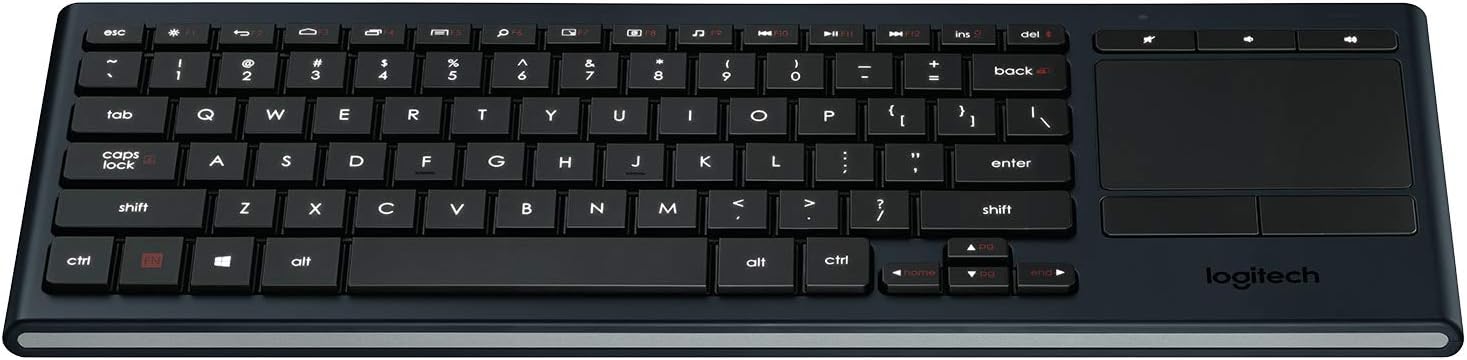
Figuur 3: oorview of the K830 keyboard layout.
Agterlig
The keyboard features automatic backlighting that adjusts to ambient light conditions. A sensor detects the room's light level and automatically brightens or dims the key backlights for optimal visibility. The backlighting also activates when your hands approach the keyboard and turns off when not in use to conserve battery.
Geïntegreerde Touchpad
The large, responsive touchpad provides precise cursor control and supports multi-touch gestures. The two physical buttons below the touchpad function as left-click and right-click.
- Enkelvinger tik: Links-klik.
- Twee vinger tik: Regs klik.
- Twee-vinger-rol: Drag two fingers up or down to scroll vertically.
- Pinch Zoom: Knyp in of uit met twee vingers om te zoem.

Figuur 4: Kant view highlighting the integrated touchpad and power indicator.
Media Keys and Shortcut Keys
The top row of keys includes dedicated media controls and shortcut keys for quick access to common functions. These keys are optimized for Windows and Android operating systems.
- Volumebeheer: Demp, Volume af, Volume op.
- Mediaspeel: Speel/Pouseer, Vorige snit, Volgende snit.
- Windows/Android Kortpaaie: Home, Back, Search, etc. (specific functions may vary by OS).
To use the F1-F12 functions, press the Fn sleutel gelyktydig met die verlangde F-sleutel indruk.
Onderhoud
Maak die sleutelbord skoon
To clean your K830 keyboard:
- Skakel die sleutelbord af voordat u dit skoonmaak.
- Gebruik 'n sagte, pluisvrye lap effens dampeindig met water of 'n ligte skoonmaakoplossing.
- Vermy oormatige vog en moenie skoonmaakmiddels direk op die sleutelbord spuit nie.
- For the touchpad, use a dry, soft cloth to remove fingerprints and smudges.
Battery sorg
The K830 uses a built-in rechargeable Lithium Polymer battery. To maximize battery life:
- Charge the keyboard regularly, but avoid leaving it plugged in constantly after it's fully charged.
- As jy die sleutelbord vir 'n lang tydperk bêre, laai dit tot ongeveer 50% voor jy dit bêre.
- Vermy om die sleutelbord aan uiterste temperature bloot te stel.
Probleemoplossing
| Probleem | Moontlike oorsaak | Oplossing |
|---|---|---|
| Sleutelbord reageer nie | Low battery; Keyboard off; Receiver not plugged in; Out of range; Pairing issue. | Charge the keyboard. Ensure the keyboard is ON. Plug the Unifying receiver into a working USB port. Move closer to the receiver (within 10 meters/33 feet). Re-pair the keyboard using Logitech Unifying Software or Bluetooth pairing process. |
| Agterbeligting werk nie | Low battery; Ambient light too bright; Sensor obstruction. | Charge the keyboard. The backlighting automatically adjusts; it may not activate in bright environments. Ensure the light sensor (located near the top edge) is not covered. |
| Touchpad erratic or unresponsive | Dirty touchpad surface; Software issue; Interference. | Clean the touchpad surface with a dry, soft cloth. Restart your computer/device. Ensure no other wireless devices are causing interference. |
| Sleutels tik nie korrek nie | Software issue; Physical obstruction under key. | Restart your computer/device. Gently check for any debris under the affected key. |
Spesifikasies
| Kenmerk | Detail |
|---|---|
| Modelnommer | 920-007182 |
| Konnektiwiteit | Logitech Unifying (2.4 GHz RF), Bluetooth Smart (Bluetooth Low Energy) |
| Wireless Range | Tot 10 meter (33 voet) |
| Battery Tipe | Herlaaibare litiumpolymeer |
| Agterlig | Automatic, single color |
| Geïntegreerde Touchpad | Yes, with multi-touch gesture support |
| Bedryfstelselversoenbaarheid | Windows 7, Windows 8, Windows 10 or later; Android 5.0 or later; Chrome OS |
| Afmetings (LxBxH) | 15.1 x 5.59 x 1.65 duim (38.35 x 14.2 x 4.19 cm) |
| Gewig | 1.09 pond (0.49 kg) |
Waarborg en Ondersteuning
Vir waarborginligting, tegniese ondersteuning en bykomende hulpbronne, besoek asseblief die amptelike Logitech-ondersteuning. website or refer to the user guide PDF:
- Logitech Ondersteuning Webwebwerf: www.logitech.com/support
- Gebruikersgids (PDF): Laai PDF af
Behou asseblief jou aankoopbewys vir waarborgeise.
Ask a question about this manual
Ask about setup, troubleshooting, compatibility, parts, safety, or missing instructions. Manuals+ will review the question and use this page’s manual context to help answer it.