
Sealey SDH70
Sealey SDH70 Industrial Dehumidifier User Manual
Model: SDH70
Handelsmerk: Sealey
1. Inleiding
This manual provides comprehensive instructions for the safe and efficient operation, setup, and maintenance of your Sealey SDH70 Industrial Dehumidifier. Please read this manual thoroughly before operating the unit and retain it for future reference. The Sealey SDH70 is designed for professional use in various industrial and commercial environments to effectively control humidity levels.
2. Veiligheidsinstruksies
Volg altyd die volgende veiligheidsmaatreëls om die risiko van brand, elektriese skok of besering te verminder.
- Maak seker dat die kragtoevoer ooreenstem met die voltagsoos gespesifiseer op die ontvochtiger se graderingsetiket.
- Do not operate the unit with a damaged power cord or plug. Contact qualified service personnel for repair.
- Place the dehumidifier on a stable, level surface to prevent tipping.
- Maintain adequate clearance around the unit for proper airflow (at least 20 cm from walls or other objects).
- Moenie voorwerpe in die luginlaat- of -uitlaatroosters steek nie.
- Unplug the unit before cleaning, performing maintenance, or moving it.
- Hierdie toestel is nie bedoel vir gebruik deur persone (insluitend kinders) met verminderde fisiese, sensoriese of geestelike vermoëns, of 'n gebrek aan ervaring en kennis nie, tensy hulle toesig of instruksies oor die gebruik van die toestel gegee is deur 'n persoon wat verantwoordelik is vir hul veiligheid.
- Moenie die ontvochtiger gebruik in areas waar vlambare vloeistowwe of gasse gestoor word nie.
- The unit contains R290 refrigerant. Servicing should only be performed by qualified personnel.
3. Produk verbyview
Familiarize yourself with the components of your Sealey SDH70 Industrial Dehumidifier.

Figuur 3.1: Voorkant view of the Sealey SDH70 Industrial Dehumidifier. This image shows the robust red and black casing, the control panel on the side, and the durable wheels for portability.
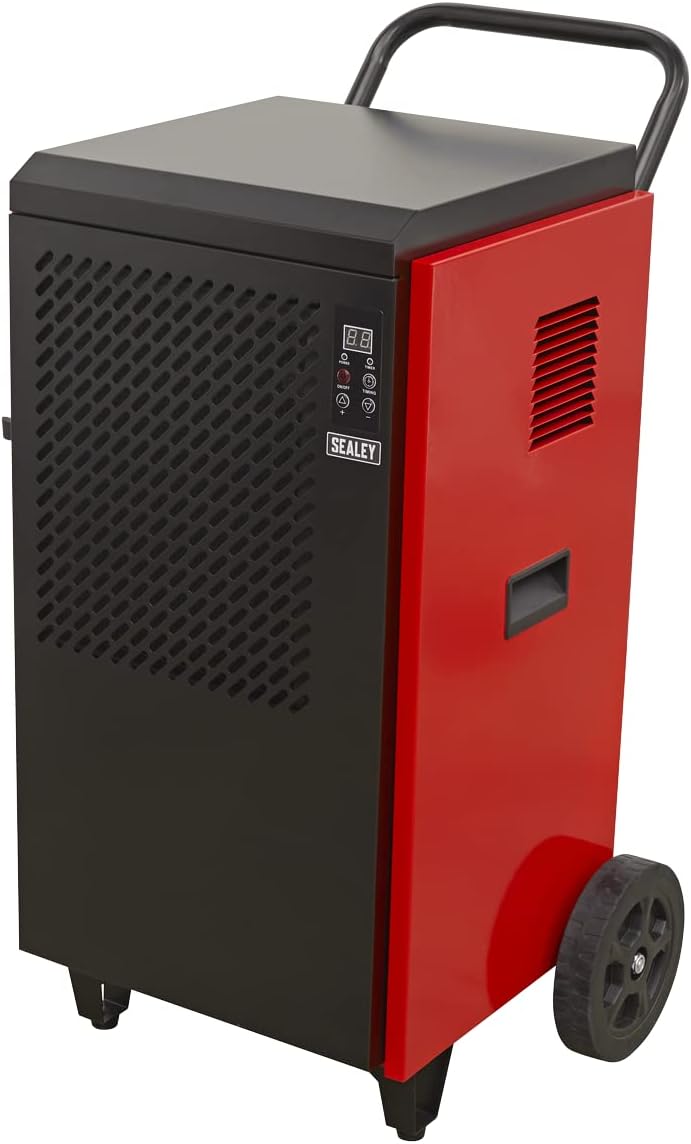
Figuur 3.2: Kant view of the dehumidifier, highlighting the continuous drainage hose connection point at the bottom. The hose allows for direct water removal without manual emptying.

Figuur 3.3: Gedetailleerd view of the digital control panel. It features a digital display for humidity readings, power button, full tank indicator, timer indicator, and up/down buttons for setting desired humidity levels and timer functions.
4. Opstelling
- Uitpak: Carefully remove the dehumidifier from its packaging. Inspect for any shipping damage. Retain packaging for future transport or storage.
- Plasing: Position the unit on a firm, level surface in the area requiring dehumidification. Ensure there is at least 20 cm (8 inches) of clear space around all sides of the unit to allow for proper air circulation. Do not block the air inlet or outlet.
- Dreinering Opstelling: The SDH70 is designed for continuous drainage. Connect the provided drainage hose to the drainage outlet at the bottom of the unit. Route the hose to a suitable drain or collection container, ensuring it is sloped downwards to allow gravity flow. Ensure the hose is not kinked or blocked.
- Kragverbinding: Steek die kragkabel in 'n geaarde elektriese aansluiting wat ooreenstem met die voltage vereistes van die eenheid.
5. Bedryfsinstruksies
- Krag aan/af: Druk die KRAG button on the control panel to turn the unit on or off. The digital display will illuminate.
- Instelling van Gewenste Humiditeit:
- When the unit is running, the display shows the current room humidity.
- Druk die UP (▲) of AF (▼) buttons to adjust the desired humidity level. The setting range is typically between 30% and 90% Relative Humidity (RH).
- The unit will operate until the set humidity level is reached, then cycle off. It will restart automatically if the humidity rises above the set level.
- Timer funksie:
- Druk die TYD button to set the auto-off timer. Each press increases the timer by one hour, up to 24 hours.
- The unit will automatically shut off after the set number of hours.
- Om die tydteller te kanselleer, druk die TYD button until "00" is displayed.
- Deurlopende werking: For continuous dehumidification, set the desired humidity level to the lowest possible setting (e.g., 30% RH). The unit will run continuously, provided the drainage hose is properly set up.
6. Onderhoud
Gereelde onderhoud verseker optimale werkverrigting en verleng die lewensduur van jou ontvochtiger.
- Skoonmaak van die lugfilter:

Figuur 6.1: Demonstrates the removal of the washable air filter from the side of the dehumidifier for cleaning.
- The air filter should be cleaned every two weeks or more frequently depending on the operating environment.
- Unplug the unit before attempting to clean the filter.
- Locate the air filter access panel (typically on the side or rear). Remove the filter.
- Wash the filter with warm, soapy water. Rinse thoroughly and allow it to air dry completely before reinserting. Do not use a dishwasher.
- A clean filter ensures efficient operation and prevents dust buildup inside the unit.
- Skoonmaak van die buitekant: Vee die buitekant van die eenheid af met 'n sagte, damp lap. Moenie harde chemikalieë, skuurmiddels of oplosmiddels gebruik nie.
- Berging: If storing the unit for an extended period, ensure it is clean and dry. Coil the power cord neatly. Store in a cool, dry place, preferably in its original packaging.
7. Probleemoplossing
Voordat u kliëntediens kontak, verwys na die volgende tabel vir algemene probleme en hul oplossings.
| Probleem | Moontlike oorsaak | Oplossing |
|---|---|---|
| Eenheid skakel nie aan nie. | No power supply; Power cord loose; Circuit breaker tripped. | Kontroleer die kragaansluiting; Maak seker dat die kragkabel stewig ingeprop is; Herstel die stroombreker. |
| Ontvochtiger versamel nie water nie. | Humidity setting too high; Room temperature too low; Air filter clogged; Drainage hose kinked/blocked. | Lower humidity setting; Ensure room temperature is above 5°C (41°F); Clean air filter; Check drainage hose for obstructions. |
| Eenheid is raserig. | Unit not level; Air filter clogged; Internal components loose. | Place on a level surface; Clean air filter; If noise persists, contact service. |
| Lugvloei is swak. | Lugfilter verstop; Luginlaat/-uitlaat geblokkeer. | Clean air filter; Ensure no obstructions around air vents. |
8. Spesifikasies
Technical specifications for the Sealey SDH70 Industrial Dehumidifier.
| Kenmerk | Detail |
|---|---|
| Handelsmerk | Sealey |
| Modelnommer | SDH70 |
| Kleur | Rooi |
| Produkafmetings (L x B x H) | 49 x 60 x 105 cm |
| Item gewig | 46.7 kilogram |
| Kapasiteit | 70 Litres (dehumidification capacity per day) |
| Koelmiddel | R290 (Eco-friendly) |

Figuur 8.1: The R290 Eco Friendly logo, indicating the type of refrigerant used in the SDH70 dehumidifier.
9. Waarborg en Ondersteuning
Your Sealey SDH70 Industrial Dehumidifier comes with a manufacturer's warranty.

Figuur 9.1: Sealey 1 Year Guarantee logo, indicating the product warranty.
Sealey products are manufactured to a high standard and are guaranteed for 1 year from the date of purchase against manufacturing defects. This guarantee is subject to the terms and conditions available on the official Sealey website or from your retailer.
For technical support, spare parts, or warranty claims, please contact your authorized Sealey dealer or visit the official Sealey website for contact information. When contacting support, please have your model number (SDH70) and purchase details ready.
Ask a question about this manual
Ask about setup, troubleshooting, compatibility, parts, safety, or missing instructions. Manuals+ will review the question and use this page’s manual context to help answer it.