
1. Inleiding
This manual provides essential instructions for the ZILLA KX-FA86E Compatible Drum Cartridge. This drum cartridge is designed to work seamlessly with specific Panasonic laser printers, ensuring clear and consistent print quality. Please read this manual thoroughly before installation and use.
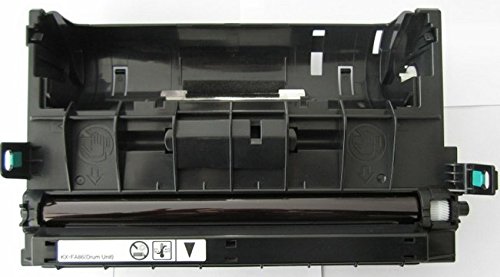
Image: The ZILLA KX-FA86E Compatible Drum Cartridge in its retail packaging.
2. Versoenbare drukkers
The ZILLA KX-FA86E drum cartridge is compatible with the following Panasonic printer models:
- Panasonic KX-FLB801
- Panasonic KX-FLB802
- Panasonic KX-FLB803
- Panasonic KX-FLB811
- Panasonic KX-FLB812
- Panasonic KX-FLB813
- Panasonic KX-FLB851
- Panasonic KX-FLB852
- Panasonic KX-FLB853
- Panasonic KX-FLB881
- Panasonic KX-FLB882
- Panasonic KX-FLB883
3. Veiligheidsinligting
Neem asseblief die volgende veiligheidsmaatreëls in ag:
- Always handle the drum cartridge with care. Avoid touching the green drum surface directly to prevent damage and print quality issues.
- Keep the drum cartridge out of reach of children.
- Do not expose the drum cartridge to direct sunlight or extreme temperatures.
- Do not incinerate used drum cartridges. Dispose of them according to local regulations.
4. Opstelling en installering
Follow these steps to install the ZILLA KX-FA86E drum cartridge into your compatible Panasonic printer:
- Unpack the Drum Cartridge: Carefully remove the new drum cartridge from its packaging. Avoid touching the green drum surface.
- Power Off the Printer: Ensure your Panasonic printer is turned off and unplugged from the power outlet before proceeding.
- Maak die drukkerdeksel oop: Refer to your specific printer's user manual for instructions on how to open the front cover and access the drum unit compartment.
- Remove the Old Drum Unit: Gently pull out the old drum unit from the printer. Place it in a protective bag for proper disposal.
- Insert the New Drum Cartridge: Align the new ZILLA KX-FA86E drum cartridge with the guides in the printer and push it in firmly until it clicks into place.
- Maak die drukkerdeksel toe: Maak die drukkerdeksel stewig toe.
- Skakel die drukker aan: Plug in and turn on your printer. The printer may perform a self-test or calibration after installation.

Beeld: Sykant view of the ZILLA KX-FA86E Compatible Drum Cartridge packaging.
5. Bedryfsinstruksies
Once the ZILLA KX-FA86E drum cartridge is correctly installed, it operates automatically with your printer. No special operating procedures are required for the drum unit itself.
- Ensure your printer drivers are up to date for optimal performance.
- Monitor your printer's display or software for any messages regarding drum life or print quality.
- Replace the drum unit when the printer indicates it is near the end of its service life to maintain print quality.
6. Onderhoud
To maintain optimal print quality and extend the life of your drum cartridge, follow these guidelines:
- Store unused drum cartridges in their original packaging in a cool, dry place away from direct sunlight.
- Avoid exposing the drum unit to light for extended periods during installation or maintenance, as this can damage the photosensitive drum.
- If print quality degrades, check for any visible debris on the drum surface (without touching it directly) and consult your printer's manual for cleaning procedures.
7. Probleemoplossing
Verwys na die volgende algemene probleme en hul moontlike oplossings:
Problem: Faint or streaky prints.
Oplossing: The drum unit may be nearing the end of its life, or there might be an issue with the toner cartridge. Ensure the toner cartridge is properly installed and has sufficient toner. If the issue persists, consider replacing the drum unit.
Problem: Error message related to drum unit.
Oplossing: Reinstall the drum unit to ensure it is seated correctly. Power cycle the printer (turn off, unplug, wait 30 seconds, plug in, turn on). If the error persists, the drum unit may be faulty or at the end of its service life.
Problem: Printer not recognizing the drum unit.
Oplossing: Ensure the drum unit is correctly installed. Power cycle the printer. If the problem continues, verify compatibility with your printer model and contact support if necessary.
8. Spesifikasies
| Model | ZILLA KX-FA86E Compatible Drum Cartridge |
| Deelnommer | ZP-KX-FA86E |
| Druk Tegnologie | Laser |
| Bladsy opbrengs | 10,000 Pages @ 5% Coverage |
| Kleur | Swart |
| Item gewig | 1 kg 280 g |
| Pakket afmetings | 34.6 x 23.8 x 15.6 cm |
9. Waarborginligting
This ZILLA KX-FA86E Compatible Drum Cartridge comes with a 2 jaar waarborg from the date of purchase. Please retain your proof of purchase for warranty claims. The warranty covers manufacturing defects. It does not cover damage caused by improper installation, misuse, or normal wear and tear.
10. Ondersteuning
For technical assistance, troubleshooting, or warranty claims, please contact ZILLA customer support. Refer to the product packaging or the official ZILLA webwebwerf vir die mees onlangse kontakbesonderhede.