
Belangrike veiligheidsinligting
Read all instructions carefully before installation and operation. Failure to follow these instructions may result in electric shock, fire, or serious injury. This device is intended for indoor use only.
- WAARSKUWING: Risk of electric shock. Disconnect power at the circuit breaker or fuse box before installing or servicing.
- Installation should be performed by a qualified electrician or trained personnel.
- Maak seker dat alle bedradingsverbindings veilig is en aan plaaslike elektriese kodes voldoen.
- Do not exceed the maximum electrical ratings of the timer.
- Keep children away from the timer and wiring during installation and operation.
Produk verbyview
The Intermatic 610224 is a digital 7-day programmable timer designed to automate the ON/OFF switching of electrical loads such as lights, fans, and other appliances. It features a clear digital display and intuitive controls for setting daily or weekly schedules. This timer operates at 120V AC and can handle loads up to 15 Amperes.
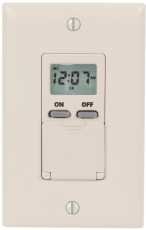
Prent: Voorkant view of the Intermatic 610224 Digital 7-Day Timer. The image displays the timer's ivory-colored faceplate with a digital screen at the top and several control buttons below it. The buttons are arranged for setting time, programming, and manual override functions.
Installasie
Follow these steps to properly install your Intermatic 610224 Digital 7-Day Timer.
- Skakel krag af: Locate the circuit breaker or fuse that controls the power to the switch you are replacing. Turn off the power completely. Verify power is off using a voltage toetser.
- Verwyder bestaande skakelaar: Carefully remove the wall plate and unscrew the existing switch from the wall box. Disconnect the wires from the old switch, noting which wire is connected to which terminal (Line, Load, Neutral, Ground).
- Bedrading verbindings: The Intermatic 610224 timer requires Line (hot), Load, Neutral, and Ground connections. Connect the wires from the wall box to the corresponding terminals on the timer:
- Koppel die Reël (warm) wire (usually black) from the power source to the terminal marked 'LINE'.
- Koppel die Laai wire (usually black, going to the fixture) to the terminal marked 'LOAD'.
- Koppel die Neutraal wire (usually white) to the terminal marked 'NEUTRAL'.
- Koppel die Grond wire (usually bare copper or green) to the terminal marked 'GROUND'.
Note: A wiring diagram is typically included with the product packaging. Ensure all connections are tight and secure.
- Montering: Gently push the wired timer into the wall box. Secure it with the provided screws. Attach the new wall plate.
- Herstel krag: Turn the power back on at the circuit breaker or fuse box. The timer display should illuminate.
Bedryfsinstruksies
This section details how to set the current time and program ON/OFF events for your timer.
Stel huidige tyd en dag in
- Press the 'CLOCK' button. The time display will flash.
- Use the 'HOUR' and 'MIN' buttons to adjust the current hour and minute.
- Press the 'DAY' button to select the current day of the week.
- Press 'CLOCK' again to save the settings and exit.
Programmering van AAN/AF-gebeurtenisse
The timer allows for multiple ON/OFF programs per day. Refer to your specific model's manual for the exact number of programs (typically up to 14 ON and 14 OFF events).
- Press the 'PROG' button. The display will show '1 ON' and the time will flash.
- Use the 'HOUR' and 'MIN' buttons to set the desired ON time for program 1.
- Press the 'DAY' button repeatedly to select the day(s) of the week for this program (e.g., Mon-Sun, Mon-Fri, Sat-Sun, individual days).
- Press 'PROG' again. The display will show '1 OFF' and the time will flash.
- Use the 'HOUR' and 'MIN' buttons to set the desired OFF time for program 1.
- Press the 'DAY' button to select the day(s) for this OFF program, matching the ON program.
- Repeat steps 1-6 for additional ON/OFF programs (e.g., '2 ON', '2 OFF', etc.).
- After setting all desired programs, press the 'CLOCK' button to exit programming mode.
Handmatige oorheersing
To temporarily override the current program without deleting it:
- Press the 'MANUAL' button. This will cycle the output between ON, OFF, and AUTO modes.
- In 'AUTO' mode, the timer follows the programmed schedule.
- In 'ON' or 'OFF' mode, the timer will remain in that state until the next programmed event or until 'MANUAL' is pressed again to return to 'AUTO'.
Dagligbesparingstydaanpassing
Some models may have an automatic Daylight Saving Time adjustment feature. If not, manually adjust the time by one hour forward or backward as required using the 'HOUR' button in clock setting mode.
Onderhoud
The Intermatic 610224 Digital 7-Day Timer requires minimal maintenance.
- Skoonmaak: Om die timer skoon te maak, vee die oppervlak af met 'n sagte, damp lap. Moenie skuurmiddels of oplosmiddels gebruik nie, aangesien dit die afwerking of interne komponente kan beskadig.
- Battery-rugsteun: This timer typically includes an internal battery backup to retain programmed settings during power outages. The battery is usually non-replaceable by the user and designed to last the life of the product. If the display is blank or programs are lost after a power outage, the battery may be depleted, indicating the unit may need replacement.
Probleemoplossing
If you encounter issues with your timer, refer to the following common problems and solutions.
| Probleem | Moontlike oorsaak | Oplossing |
|---|---|---|
| Die timer-skerm is leeg. | Geen krag na die timer nie. | Check circuit breaker or fuse. Ensure wiring connections are secure. |
| Die timer skakel nie AAN/AF op geprogrammeerde tye nie. | Incorrect programming; Timer is in Manual ON/OFF mode. | Review programming steps. Ensure timer is in 'AUTO' mode (press 'MANUAL' button until 'AUTO' is displayed). |
| Tyd is verkeerd na 'n kragonderbrekingtage. | Internal battery backup depleted. | Reset the current time and day. If this occurs frequently, the timer may need replacement. |
| Load (light/appliance) does not turn on. | Load is faulty; Wiring issue; Timer is OFF. | Test the load directly. Check wiring connections. Ensure timer is programmed to ON or manually set to ON. |
Spesifikasies
- Model: 610224
- Voltage: 120V AC 60Hz
- Huidige gradering: 15A Resistive, 10A Tungsten, 1/2 HP
- Program Cycles: 7 dae
- Programme: Up to 28 ON/OFF events (14 ON, 14 OFF)
- Bedryfstemperatuur: 0°C tot 50°C (32°F tot 122°F)
- Omhulsel: Ivory, Wall Mount
Waarborg en Ondersteuning
Intermatic-produkte word vervaardig volgens hoë gehalte standaarde en word gerugsteun deur 'n vervaardiger se waarborg. Vir spesifieke waarborgbesonderhede, verwys asseblief na die waarborgkaart wat by u produk ingesluit is of besoek die amptelike Intermatic-webwerf. webwebwerf.
For technical support, troubleshooting assistance, or to inquire about replacement parts, please contact Intermatic customer service. Contact information can typically be found on the product packaging or the manufacturer's webwebwerf.