
1. Inleiding
This manual provides detailed instructions for the proper use, setup, and maintenance of your Genius HS-920BT Bluetooth Headset. Please read this manual thoroughly before using the device to ensure optimal performance and longevity.
The Genius HS-920BT is a versatile Bluetooth headset designed for wireless audio streaming and hands-free communication with compatible devices such as smartphones, tablets, and PCs.
2. Pakketinhoud
Verifieer dat alle items in jou pakket teenwoordig is:
- Genius HS-920BT Bluetooth Headset
- USB-laaikabel
- Multi-language User Manual (this document)
3. Produk verbyview
The HS-920BT headset features an adjustable headband and comfortable earcups, integrating controls for audio playback and call management.
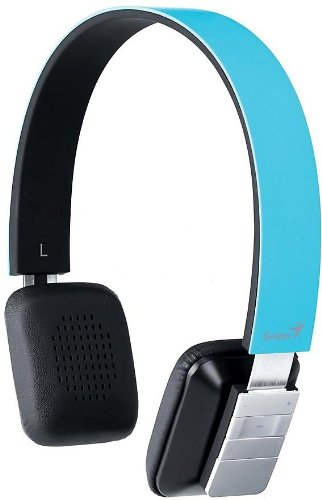
Figure 1: Genius HS-920BT Bluetooth Headset (Blue)
This image displays the Genius HS-920BT Bluetooth Headset in blue, viewed from an angle, highlighting its adjustable headband and earcup design.
Sleutel kenmerke:
- Wireless Bluetooth connectivity for audio and calls (A2DP support)
- Integrated rechargeable Lithium-Ion battery
- Ingeboude mikrofoon vir handvrye kommunikasie
- On-ear controls for volume adjustment, track skipping (AVRCP support)
- Verstelbare kopband vir gemaklike pas
- 40 mm driver units for clear sound
4. Opstelling
4.1 Laai die oorfone
Before initial use, fully charge the headset. Use the provided USB charging cable.
- Koppel die klein punt van die USB-laaikabel aan die laaipoort op die headset.
- Koppel die groter punt van die USB-kabel aan 'n aangedrewe USB-poort (bv. rekenaar, USB-muuradapter).
- The LED indicator on the headset will illuminate during charging and change color or turn off when fully charged. Refer to the headset's LED behavior for specific indications.
'n Volle lading neem gewoonlik ongeveer 2-3 uur.
4.2 Koppeling met 'n Bluetooth-toestel
To use the HS-920BT wirelessly, you must pair it with your Bluetooth-enabled device.
- Krag aan: Press and hold the Power button on the headset until the LED indicator flashes, usually alternating blue and red, indicating pairing mode.
- Aktiveer Bluetooth: On your smartphone, tablet, or PC, enable Bluetooth functionality.
- Soek vir Toestelle: In your device's Bluetooth settings, search for available devices. The headset should appear as "HS-920BT".
- Select and Pair: Select "HS-920BT" from the list. If prompted for a passcode, enter "0000" (four zeros).
- Bevestiging: Once paired, the headset's LED indicator will typically flash blue slowly, and your device will confirm the connection.
The headset will automatically attempt to reconnect to the last paired device when powered on, if that device's Bluetooth is active and within range.
5. Bedryfsinstruksies
The HS-920BT features intuitive controls located on the earcup.

Figure 2: Earcup Controls of HS-920BT
This image shows a close-up of the right earcup of the Genius HS-920BT Bluetooth Headset, detailing the control buttons for power, volume, and track navigation.
5.1 Krag aan/af
- Krag aan: Press and hold the Power button for approximately 3 seconds until the LED indicator flashes blue.
- Skakel af: Druk en hou die aan/af-knoppie vir ongeveer 3 sekondes totdat die LED-aanwyser afskakel.
5.2 Musiekweergawe
- Speel/pouse: Druk die Speel/Pause-knoppie een keer.
- Volgende snit: Press the "Next Track" button (usually marked with a forward arrow).
- Vorige snit: Press the "Previous Track" button (usually marked with a backward arrow).
5.3 Oproepbestuur
- Beantwoord/beëindig oproep: Press the Multi-function button (often the same as Play/Pause) once during an incoming call to answer, or once during a call to end it.
- Verwerp oproep: Press and hold the Multi-function button for approximately 2 seconds during an incoming call.
- Herbel laaste nommer: Double-press the Multi-function button when not on a call.
5.4 Volumebeheer
- Verhoog volume: Druk die Volume Op-knoppie (+).
- Verlaag volume: Druk die Volume Verlaag-knoppie (-).
6. Onderhoud
Proper care ensures the longevity of your headset.
- Skoonmaak: Gebruik 'n sagte, droë lap om die headset skoon te maak. Moenie skuurmiddels of oplosmiddels gebruik nie.
- Berging: Bêre die oorfone op 'n koel, droë plek weg van direkte sonlig en uiterste temperature.
- Batterysorg: Om die batterylewe te behou, vermy om die battery gereeld heeltemal te ontlaai. Laai die oorfone gereeld, selfs al word dit nie vir lang tye gebruik nie.
- Waterblootstelling: Die oorfone is nie waterdig nie. Vermy blootstelling aan water of oormatige vog.
7. Probleemoplossing
If you encounter issues with your HS-920BT headset, refer to the following common solutions:
| Probleem | Moontlike Oplossing |
|---|---|
| Die oorfone skakel nie aan nie. | Ensure the battery is charged. Connect the headset to a power source using the USB cable. |
| Kan nie die oorfone met 'n toestel koppel nie. |
|
| Geen geluid of lae volume nie. |
|
| Die oproepkwaliteit is swak. |
|
8. Spesifikasies
| Model Naam: | HS-920BT |
| Draadlose tegnologie: | Bluetooth |
| Bestuurder eenhede: | 40 mm |
| Battery: | Built-in Rechargeable Lithium-Ion |
| Beheer tipe: | Volume Control, Track Navigation, Call Management |
| Mikrofoon: | Ingeboude |
| Ondersteun Profiles: | A2DP, AVRCP |
| Hardeware platform: | Rekenaar, slimfoon, tablet |
| Item gewig: | 110 gram |
| Afmetings (LxBxH): | 13.6 x 17.3 x 2.9 cm |
9. Waarborg en Ondersteuning
For warranty information and technical support, please refer to the warranty card included with your product or visit the official Genius webwebwerf. Bewaar u aankoopbewys as bewys van aankoop.
For further assistance, you may contact Genius customer service through their official channels.