
1. Inleiding
Thank you for choosing the Xpelair C4HTR 4-inch Simply Silent Contour Extractor Fan. This fan is designed for efficient and quiet ventilation in bathrooms, kitchens, and other areas requiring moisture and odor extraction. It features a built-in humidistat and timer for automatic operation based on humidity levels and adjustable run-on time.
The C4HTR model is recognized for its extremely quiet operation, making it one of the quietest intermittent bathroom fans available. Its sleek design allows for versatile installation on walls, ceilings, or panels.

Image 1.1: The Xpelair C4HTR fan, highlighting its silent running at 16dBA at 3m (15 l/s).
2. Veiligheidsinligting
Lees asseblief alle instruksies sorgvuldig deur voor installasie en gebruik. Versuim om hierdie instruksies te volg, kan lei tot elektriese skok, brand of persoonlike besering.
- Installation must be carried out by a qualified electrician in accordance with current wiring regulations.
- Ensure the power supply is disconnected at the mains before commencing any installation, maintenance, or cleaning.
- Hierdie toestel is nie bedoel vir gebruik deur persone (insluitend kinders) met verminderde fisiese, sensoriese of geestelike vermoëns, of 'n gebrek aan ervaring en kennis nie, tensy hulle toesig of instruksies oor die gebruik van die toestel gegee is deur 'n persoon wat verantwoordelik is vir hul veiligheid.
- Kinders moet onder toesig wees om te verseker dat hulle nie met die toestel speel nie.
- Do not install the fan where it may be exposed to direct water spray.
- Ensure adequate ventilation is provided to prevent the back-flow of gases from open-flued appliances into the room.
- The fan must not be connected to a flexible ducting system that is less than 4 inches (100mm) in diameter.
3. Pakketinhoud
Verifieer dat alle komponente teenwoordig is voordat u met die installasie begin:
- Xpelair C4HTR Extractor Fan Unit
- Monteringskroewe en muurproppe
- Instructiehandleiding (hierdie dokument)
4. Installasie
The Xpelair C4HTR fan is suitable for wall, ceiling, or panel mounting. The 'Twist and Click' front cover simplifies installation and maintenance.
4.1 Montage-opsies
The fan can be installed in various orientations:

Image 4.1: Visual representation of ceiling and wall mounting applications for the fan.
4.2 Voorbereiding vir installasie
- Ontkoppel krag: Ensure the electrical supply to the installation area is completely switched off at the consumer unit/fuse box.
- Berei opening voor: Create a circular opening of appropriate diameter (refer to specifications for exact dimensions) in the wall, ceiling, or panel.
- Afsonderlike komponente: The fan consists of a main body and a front cover. Gently twist and click to separate the front cover from the main unit for easier mounting.
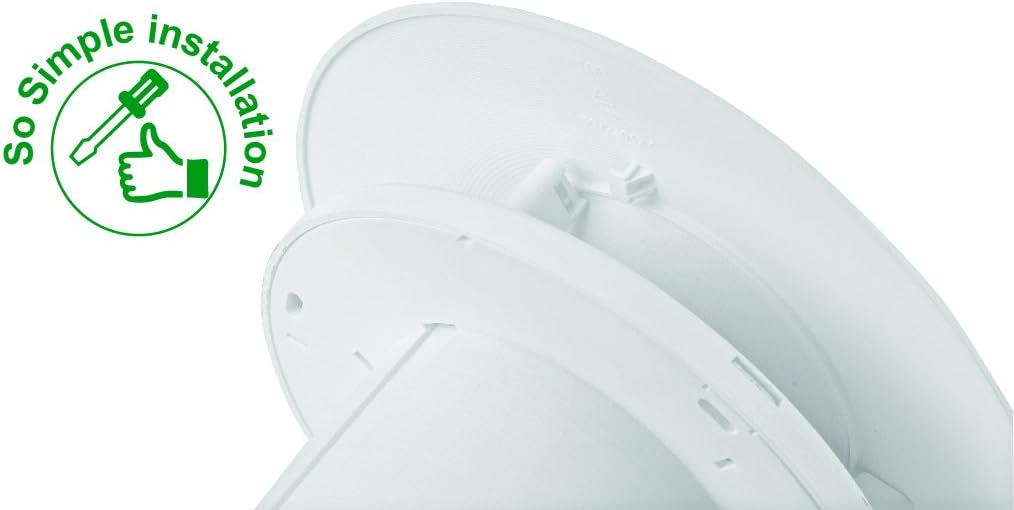
Image 4.2: The 'So Simple installation' feature, indicating ease of assembly with a screwdriver.
4.3 Elektriese aansluiting
The C4HTR requires a 240V electrical supply. Wiring should be performed by a qualified electrician.
- Identify the Live (L), Neutral (N), and Switched Live (T) terminals on the fan unit.
- Connect the mains Live (L) to the fan's Live terminal.
- Connect the mains Neutral (N) to the fan's Neutral terminal.
- For timer and humidistat functionality, connect a switched live supply (e.g., from a light switch) to the fan's Switched Live (T) terminal. This allows the fan to activate when the light is switched on, or to override the humidistat.
- Maak seker dat alle verbindings stewig en korrek geïsoleer is.
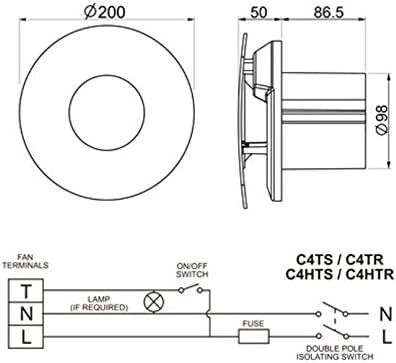
Image 4.3: Wiring diagram for C4HTR models, showing connections for Live, Neutral, and Switched Live, along with fan dimensions.
4.4 Beveilig die waaier
- Position the main fan body into the prepared opening.
- Secure the fan body to the wall/ceiling/panel using the provided screws and wall plugs.
- Once the main body is secure and wired, reattach the front cover by aligning and twisting until it clicks into place.
5. Opstelling en Aanpassing
The C4HTR fan features an adjustable humidistat and timer. These settings are typically accessed by removing the front cover.
5.1 Humidistat Adjustment
The humidistat controls when the fan activates based on the room's humidity level. It can be adjusted to suit your environment.
- Locate the humidistat adjustment dial or screw on the fan unit (usually behind the front cover).
- Turning the dial towards a higher setting (e.g., 'Max' or a higher percentage) means the fan will only activate at higher humidity levels.
- Turning the dial towards a lower setting (e.g., 'Min' or a lower percentage) means the fan will activate at lower humidity levels, running more frequently.
- Adjust incrementally and observe fan behavior over a few days to find the optimal setting for your needs.
5.2 Timer Adjustment
The timer controls how long the fan continues to run after the switched live supply is turned off (e.g., after the light is switched off) or after the humidity drops below the set point.
- Locate the timer adjustment dial or screw (often labeled 'Timer' or with time increments).
- The timer can typically be set from a few minutes up to 30 minutes.
- Turn the dial to increase or decrease the run-on time as desired.
6. Bedryfsinstruksies
The Xpelair C4HTR fan operates automatically based on its humidistat and timer settings, or manually via a switched live connection.
6.1 Automatic Operation (Humidistat)
- When the ambient humidity level in the room rises above the set point on the humidistat, the fan will automatically switch on.
- The fan will continue to run until the humidity level drops below the set point, after which it will run for the duration of the set timer.
6.2 Manual Operation (Switched Live)
- If connected to a switched live supply (e.g., room light switch), the fan will activate when the switch is turned on.
- When the switch is turned off, the fan will continue to run for the duration set on the timer.
6.3 Spoedinstellings
The fan offers two speed settings for airflow:
- Spoed 1: 15 litres per second (L/s)
- Spoed 2: 21 litres per second (L/s)
Refer to the installation guide or consult a qualified electrician for instructions on how to select the desired speed setting, as this may involve internal wiring adjustments.

Image 6.1: The Xpelair C4HTR fan discreetly installed on a bathroom ceiling.
7. Onderhoud
Regular cleaning ensures optimal performance and longevity of your Xpelair C4HTR fan.
7.1 Maak die waaier skoon
- Ontkoppel krag: Always switch off the electrical supply to the fan at the mains before cleaning.
- Verwyder voorblad: Gently twist and click to remove the front cover.
- Clean Cover and Impeller: Wipe the front cover and the fan impeller blades with a soft, damp cloth. A mild detergent can be used if necessary. Do not use abrasive cleaners or solvents.
- Droog deeglik: Maak seker dat alle dele heeltemal droog is voordat dit weer aanmekaargesit word.
- Heg deksel weer aan: Align the front cover and twist until it clicks securely into place.
- Herstel krag: Switch the electrical supply back on at the mains.

Image 7.1: The Xpelair C4HTR fan, illustrating its easy-clean design with a sponge icon.
8. Probleemoplossing
If your Xpelair C4HTR fan is not operating as expected, refer to the following common issues and solutions:
| Probleem | Moontlike oorsaak | Oplossing |
|---|---|---|
| Die waaier skakel nie aan nie. | Geen kragtoevoer. Humidistat set too high. Timer not activated. | Check mains power and circuit breaker. Adjust humidistat to a lower setting. Ensure switched live is active or humidity is high enough. |
| Waaier loop aanhoudend. | Humidistaat te laag gestel. Timer set too long. Faulty humidistat/timer. | Adjust humidistat to a higher setting. Adjust timer to a shorter duration. Contact qualified electrician or support. |
| Die waaier is raserig. | Struikelblok in die waaier. Losse montering. Motor kwessie. | Ontkoppel die krag en kyk vir obstruksies. Ensure fan is securely mounted. Contact qualified electrician or support. |
| Swak onttrekking. | Blocked grille/ducting. Waaierspoed te laag gestel. | Clean grille and check ducting for blockages. Adjust fan to higher speed setting (if applicable). |
If the problem persists after attempting these solutions, please contact Xpelair customer support or a qualified electrician.
9. Spesifikasies
| Kenmerk | Detail |
|---|---|
| Model Naam | C4HTR |
| Handelsmerk | Xpelair |
| Styl | with hygrostat and timer |
| Kleur | Wit |
| Voltage | 240 Volt |
| Geraasvlak | 16 Desibel |
| Aantal snelhede | 2 (15 l/s and 21 l/s) |
| Montage tipe | Wall Mount, Ceiling Mount, Panel Mount |
| Beheer metode | Touch (for adjustments) |
| Produk afmetings | 0.31 x 0.31 x 0.31 inches (Note: This seems to be a placeholder or incorrect data, actual dimensions are likely larger for a 4-inch fan. Refer to Image 4.3 for diagrammatic dimensions.) |
| Item gewig | 0.32 ounces (Note: This seems to be a placeholder or incorrect data for a fan.) |
| UPC | 798256208287 |
Note: The provided product dimensions and item weight appear to be generic placeholder values. For accurate physical dimensions, please refer to the technical drawings or contact Xpelair directly.
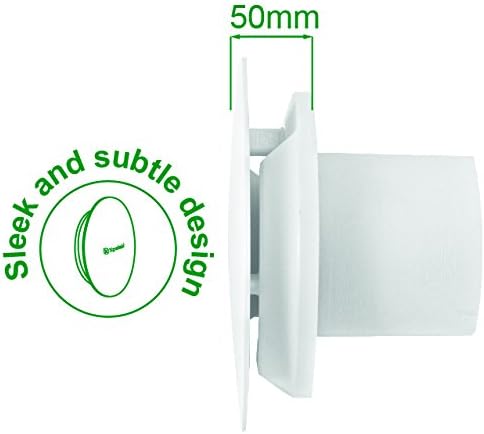
Beeld 9.1: Syprofile of the fan, highlighting its sleek design and a depth of 50mm.
10. Waarborg en Ondersteuning
10.1 Vervaardiger se waarborg
The Xpelair C4HTR fan comes with a 2-jaar vervaardigerswaarborg vanaf die aankoopdatum. Hierdie waarborg dek defekte in materiaal en vakmanskap onder normale gebruik. Bewaar asseblief u bewys van aankoop vir waarborgeise.
Die waarborg dek nie skade wat veroorsaak word deur onbehoorlike installasie, misbruik, nalatigheid, ongemagtigde herstelwerk of normale slytasie nie.
10.2 Kliëntediens
For technical assistance, troubleshooting beyond this manual, or warranty claims, please contact Xpelair customer support through their official webwebwerf of die kleinhandelaar waar die produk gekoop is.
When contacting support, please have your product model number (C4HTR) and proof of purchase readily available.