
1. Inleiding
The Mastech MS6612 is a digital luxmeter designed for measuring illuminance. It features a large LCD display with backlight and a bar graph for easy reading. This device offers automatic and manual range switching, data hold, peak value measurement, relative value measurement, and zero calibration functions. It is capable of measuring up to 200,000 Lux or 20,000 Foot-Candles (Fc).
2. Veiligheidsinligting
Please read and understand all safety instructions before operating the device. Failure to follow these instructions may result in injury or damage to the meter.
- Do not operate the meter in environments with explosive gas, vapor, or dust.
- Avoid exposing the meter to extreme temperatures or high humidity.
- Remove batteries if the meter is not used for an extended period to prevent leakage.
- Do not attempt to repair or modify the meter. Refer all servicing to qualified personnel.
- Hou die meter skoon en droog.
3. Produk verbyview
The Mastech MS6612 Digital Luxmeter consists of a main unit with an LCD display and control buttons, and a silicon photoelectric diode sensor for light detection.
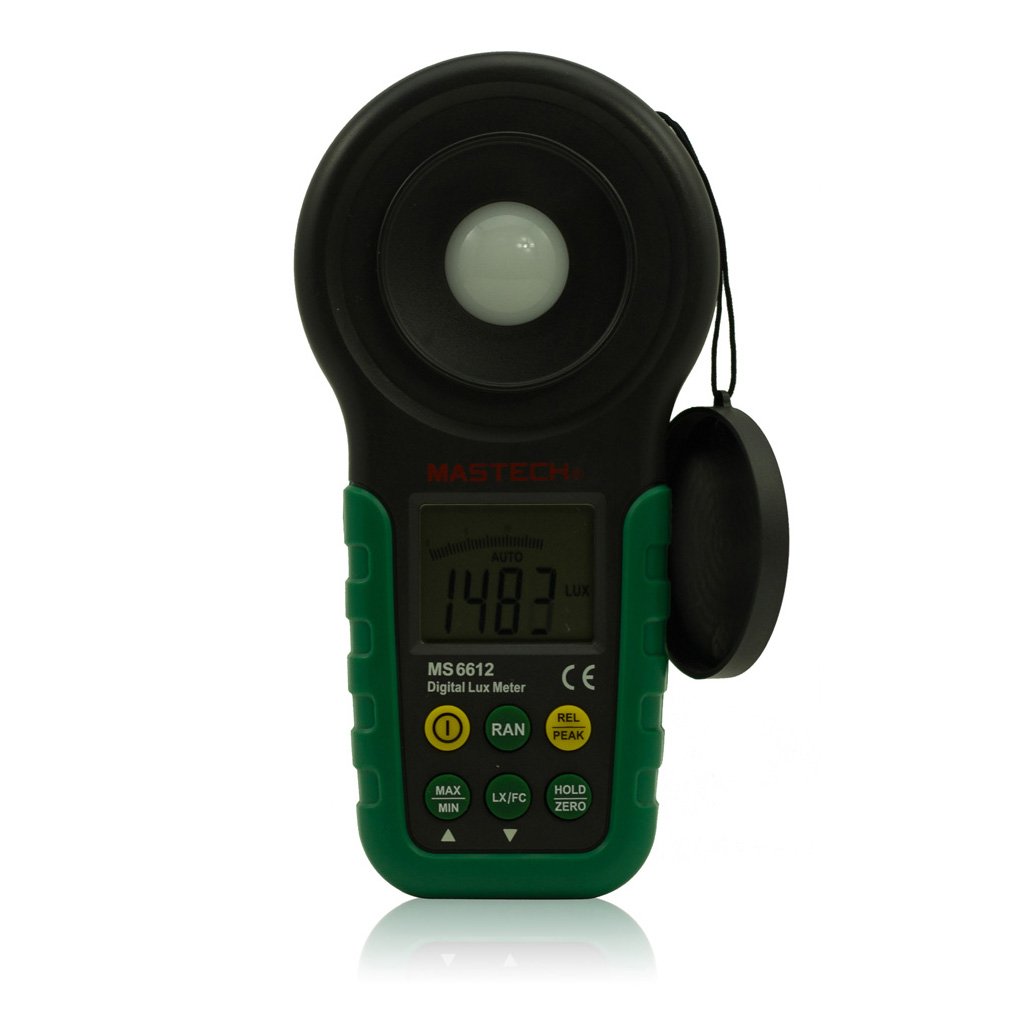
Figuur 1: Voorkant view of the Mastech MS6612 Digital Luxmeter. This image shows the main body of the device, including the large LCD screen, control buttons, and the light sensor located at the top.
Sleutelkomponente:
- LCD-skerm: 3½ digits with analog bar display for clear readings.
- Beheerknoppies: For various functions such as power, range, hold, peak, relative, zero, unit conversion, and mute.
- Ligsensor: Silicon photoelectric diode for accurate light measurement.
- Battery kompartement: Located at the rear for a 9V battery.
4. Opstelling
4.1 Battery installasie
- Vind die batteryklepdeksel aan die agterkant van die meter.
- Use a screwdriver (if necessary) to open the battery compartment.
- Insert one 9V (IEC 6LR61) battery, observing the correct polarity (+/-).
- Plaas die deksel van die batterykompartement terug en maak dit vas.
Note: A low battery indicator will appear on the display when the battery needs replacement.
5. Bedryfsinstruksies
5.1 Krag aan/af
- Druk die KRAG knoppie om die meter aan te skakel.
- Druk die KRAG knoppie weer om die meter af te skakel.
- The meter features an automatic power-off function, which will turn off the device if no keys are operated for more than 10 minutes.
5.2 Basiese Meting
- Skakel die meter aan.
- Point the light sensor towards the light source to be measured.
- The illuminance value will be displayed on the LCD. The meter automatically selects the appropriate range.
5.3 Range Switching (Auto/Manual)
The MS6612 supports both automatic and manual range switching.
- In auto-ranging mode, the meter automatically selects the best measurement range.
- Druk die RANGE button to switch between auto and manual ranging modes. In manual mode, you can cycle through available ranges.
- If the measured value exceeds the current range in manual mode, the LCD will display "OL" (Overload).
5.4 Data Vashou Funksie
Om die huidige lesing op die skerm te vries:
- Druk die HOU button. The "HOLD" indicator will appear on the display.
- Druk die HOU button again to release the data hold and resume live measurement.
5.5 Maximum/Minimum Value Measurement
Om view the maximum or minimum illuminance recorded during a measurement session:
- Druk die MAX/MIN button. The display will show the maximum recorded value.
- Druk MAX/MIN again to cycle to the minimum recorded value.
- Druk MAX/MIN a third time to exit this mode and return to live measurement.
5.6 Peak Value Measurement
This function captures the highest instantaneous illuminance value.
- Druk die PUIK button to activate peak measurement. The "PEAK" indicator will appear.
- The display will show the highest illuminance detected since activating the function.
- Druk PUIK weer om hierdie modus te verlaat.
5.7 Relative Value Measurement
This function allows you to set a reference point and measure the difference from that point.
- In a stable light environment, press the REL button. The current reading becomes the reference, and the display will show "0".
- Subsequent measurements will show the difference (positive or negative) from this reference value.
- Druk REL again to exit relative measurement mode.
5.8 Zero Calibration Function
To ensure accuracy, especially in low light conditions, perform a zero calibration.
- Place the light sensor in a completely dark environment (e.g., cover it with an opaque cap).
- Druk die NUL button. The display should read "0.00".
- This calibrates the meter to account for any residual sensor output in darkness.
5.9 Unit Conversion (Fc/Lux)
The meter can display measurements in Lux or Foot-Candles (Fc).
- Druk die EENHEID button to toggle between Lux and Fc units.
- The selected unit will be indicated on the LCD.
- Omskakeling: 1 Fc = 10.764 Lux; 1 Lux = 0.09290 Fc.
5.10 Touch Tone and Mute Function
The meter may emit a touch tone when buttons are pressed. This can be muted.
- Refer to the specific button on your device for muting the touch tone.
6. Onderhoud
6.1 Skoonmaak
- Vee die meter se c afasing met 'n sagte, damp lap. Moenie skuur skoonmaakmiddels of oplosmiddels gebruik nie.
- Keep the light sensor clean and free from dust or smudges to ensure accurate readings. Use a soft, lint-free cloth.
6.2 Batteryvervanging
Replace the 9V battery when the low battery indicator appears on the display. Follow the steps in Section 4.1 for battery installation.
6.3 Berging
- If storing the meter for an extended period, remove the battery to prevent leakage and potential damage.
- Bêre die meter op 'n koel, droë plek, weg van direkte sonlig en uiterste temperature.
7. Probleemoplossing
| Probleem | Moontlike oorsaak | Oplossing |
|---|---|---|
| Meter skakel nie aan nie. | Dooie of verkeerd geïnstalleerde battery. | Check battery polarity, replace battery. |
| "OL" displayed on screen. | Measurement value exceeds current range (manual mode). | Switch to a higher range or enable auto-ranging. |
| Onakkurate lesings. | Dirty sensor, uncalibrated zero, or incorrect range. | Clean sensor, perform zero calibration, ensure correct range. |
| Lae battery aanwyser. | Batterykrag is laag. | Vervang die 9V-battery. |
8. Spesifikasies
| Parameter | Waarde |
|---|---|
| Meetreekse | 20, 200, 2000, 20000, 200000 Lux 20, 200, 2000, 20000 Fc |
| Vertoon | 3½ digits, max reading of 1999, with analog bar display |
| Sensor | Silicon photoelectric diode |
| Measured Spectral Range | 320~730nm |
| Sampling Koers | ≥2 times/s |
| Bedryfstemperatuur | -10~50 °C, max 80% RH (Non-Condensed) |
| Bergingstemperatuur | -10~50 °C, max 80% RH (Non-Condensed, removing batteries) |
| Bedryfsomgewing | Binne gebruik |
| Hoogte | 2000m highest |
| Kragtoevoer | 1 x 9V, IEC 6LR61 battery |
| Batterylewe | Ongeveer. 200 uur |
| Afmetings (HxBxD) | 190 mm x 89 mm x 42.5 mm (7.48 x 3.50 x 1.67 duim) |
| Gewig (sonder batterye) | Ongeveer 360 g (12.7 oz) |
| Gewig (met batterye) | Ongeveer 420 g (14.8 oz) |
Illuminance Unit Conversion:
- 1 Foot-Candle (Fc) = 10.764 Lux
- 1 Lux = 0.09290 Foot-Candle (Fc)
9. Waarborg en Ondersteuning
Mastech products are designed for reliability and performance. For specific warranty information, please refer to the warranty card included with your purchase or visit the official Mastech website. For technical support or service inquiries, please contact Mastech customer service through their official channels.
Bewaar asseblief u aankoopbewys as bewys van aankoop vir waarborgeise.