
1. Inleiding
This instruction manual provides essential information for the safe and efficient operation of your Nuwave Pro Plus Infrared Oven. Please read all instructions thoroughly before initial use to ensure proper function and to prevent injury or damage. Keep this manual for future reference.
2. Belangrike veiligheidsinstruksies
Wanneer elektriese toestelle gebruik word, moet basiese veiligheidsmaatreëls altyd gevolg word om die risiko van brand, elektriese skok en besering aan persone te verminder, insluitend die volgende:
- Lees alle instruksies voordat u die toestel gebruik.
- Moenie aan warm oppervlaktes raak nie. Gebruik handvatsels of knoppe.
- Om teen elektriese skok te beskerm, moenie die koord, proppe of die toestel in water of ander vloeistof dompel nie.
- Noukeurige toesig is nodig wanneer enige toestel deur of naby kinders gebruik word.
- Trek uit die stopcontact wanneer dit nie gebruik word nie en voor skoonmaak. Laat afkoel voor jy dele aan- of afhaal.
- Moenie enige toestel gebruik met 'n beskadigde koord of prop, of nadat die toestel wanfunksioneer of op enige manier beskadig is nie.
- Die gebruik van bykomstighede wat nie deur die toestelvervaardiger aanbeveel word nie, kan beserings veroorsaak.
- Moenie buite gebruik nie.
- Moenie dat koord oor die rand van tafel of toonbank hang, of aan warm oppervlaktes raak nie.
- Moenie op of naby 'n warm gas- of elektriese brander, of in 'n verhitte oond plaas nie.
- Uiterste versigtigheid moet gebruik word wanneer 'n toestel wat warm olie of ander warm vloeistowwe bevat, verskuif word.
- Koppel altyd eers die prop aan die toestel, en steek dan die koord in die muursok. Om te ontkoppel, draai enige beheer na 'af' en verwyder dan die prop uit die muursok.
- Moenie die toestel vir ander as die bedoeling gebruik nie.
3. Produkkomponente
The Nuwave Pro Plus Infrared Oven consists of several key components designed for efficient cooking.

Figure 3.1: The Nuwave Pro Plus Infrared Oven, shown with its instruction manual and a recipe CD.
- Kragkop: Bevat die verwarmingselement, waaier en beheerpaneel.
- Koepel: A transparent, heat-resistant dome that covers the cooking area.
- Kookrak: Used to elevate food for even cooking.
- Base Pan: Collects drippings and holds the cooking rack.
- Digitale beheerpaneel: For setting time, temperature, and other functions.

Figuur 3.2: Close-up view of the heating element and internal fan located within the power head.
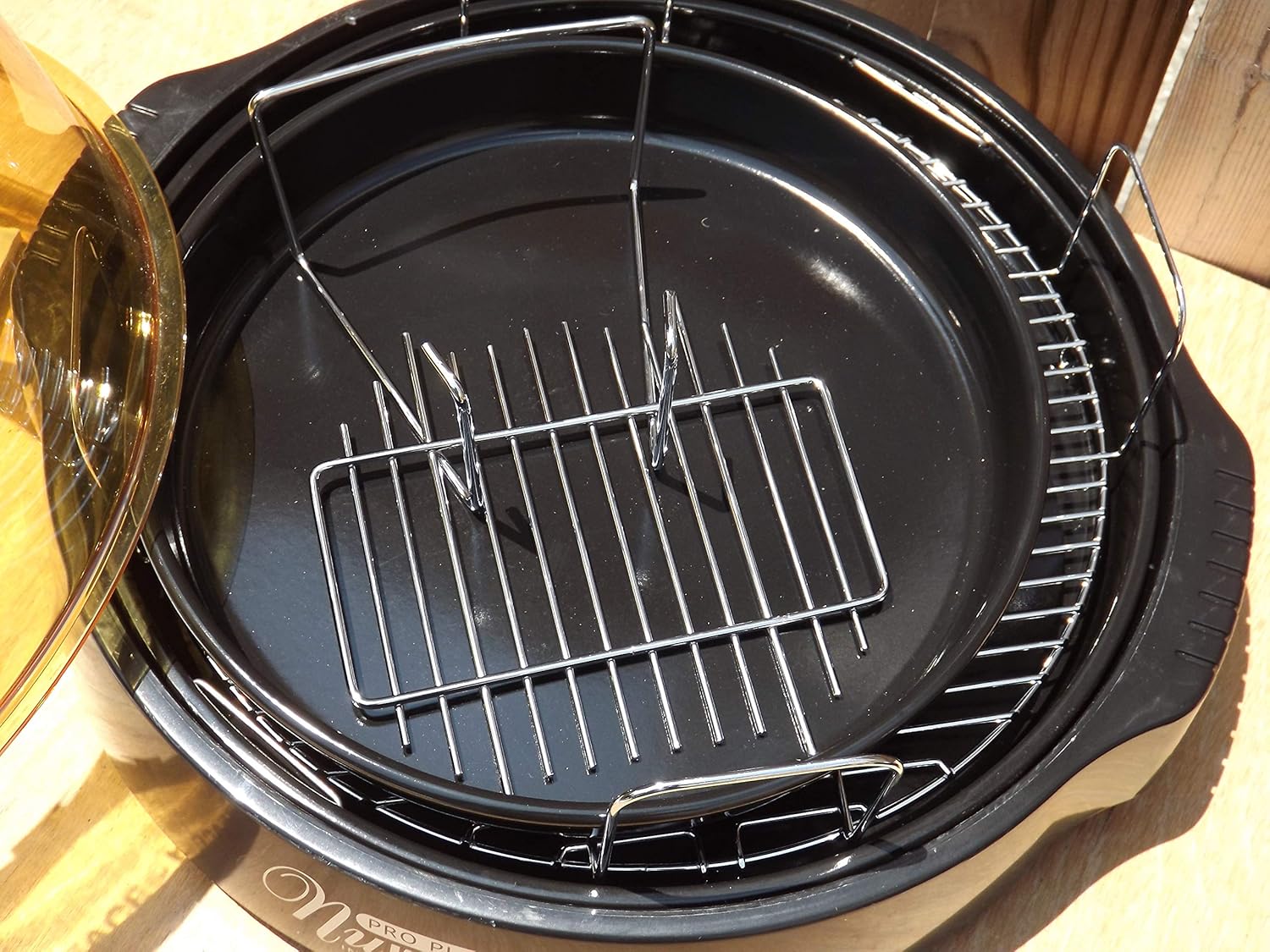
Figure 3.3: The cooking racks positioned within the oven's base pan, ready for food placement.
4. Opstelling
Before first use, ensure all packaging materials are removed and the appliance is assembled correctly.
- Pak uit: Verwyder alle komponente versigtig uit die verpakking.
- Skoon: Wash the dome, cooking rack, and base pan with warm, soapy water. Rinse thoroughly and dry completely. The power head should only be wiped with a damp lap.
- Stel saam: Place the base pan on a stable, heat-resistant surface. Insert the desired cooking rack into the base pan. Place the food on the rack. Carefully position the dome over the base pan. Finally, place the power head securely on top of the dome.
- Kragverbinding: Steek die kragkabel in 'n standaard 120V AC-elektriese uitlaat.
5. Bedryfsinstruksies
The Nuwave Pro Plus Infrared Oven features a digital control panel for precise cooking.

Figure 5.1: The digital control panel with buttons for Cook Time, Cook Temp, Reheat, Warm, Delay, Pause/Clear, Start, and numerical input.
- Krag aan: Sodra dit ingeprop is, sal die skerm verlig.
- Stel kooktyd in: Press the 'Cook Time' button. Use the numerical keypad to enter the desired cooking duration in minutes. Press 'Start' to confirm.
- Set Cooking Temperature: Press the 'Cook Temp' button. Use the numerical keypad to enter the desired temperature in degrees Fahrenheit. Press 'Start' to confirm.
- Begin kook: After setting time and temperature, press the 'Start' button to begin the cooking cycle.
- Pause/Clear: To temporarily stop cooking, press 'Pause/Clear'. Press 'Start' to resume. To cancel the current program, press 'Pause/Clear' twice.
- Herverhit funksie: Press the 'Reheat' button for a preset reheating cycle. Adjust time if necessary using 'Cook Time'.
- Warm funksie: Press the 'Warm' button to keep food warm after cooking.
- Vertragingsfunksie: Press the 'Delay' button to set a delayed start time for cooking. Follow on-screen prompts to set the delay duration.
Always monitor food during cooking. Cooking times may vary based on food type, quantity, and desired doneness.
6. Onderhoud en Skoonmaak
Regular cleaning ensures optimal performance and extends the life of your Nuwave Pro Plus Infrared Oven.
- Ontkoppel en verkoel: Always unplug the oven from the power outlet and allow all components to cool completely before cleaning.
- Dome, Rack, and Base Pan: These components are dishwasher safe or can be washed by hand with warm, soapy water. Use a non-abrasive sponge or cloth. Rinse thoroughly and dry completely.
- Kragkop: The power head contains electrical components and should NEVER be immersed in water. Wipe the exterior with a damp lap. Vir hardnekkige vlekke, gebruik 'n sagte skoonmaakmiddel op die lap en vee dit dan af met 'n skoon, damp cloth. Ensure it is completely dry before storage or next use.
- Berging: Bêre die oond op 'n skoon, droë plek wanneer dit nie gebruik word nie.
7. Probleemoplossing
Verwys na hierdie afdeling vir algemene probleme en hul oplossings.
| Probleem | Moontlike oorsaak | Oplossing |
|---|---|---|
| Oond skakel nie aan nie. | Nie ingeprop nie; krag aftage; foutiewe aansluiting. | Maak seker dat die kragkabel stewig ingeprop is. Kontroleer die stroombreker. Probeer 'n ander aansluiting. |
| Kos kook nie eweredig nie. | Improper food placement; too much food; incorrect temperature/time. | Ensure food is placed on the rack and not directly on the base. Do not overcrowd the oven. Adjust cooking time or temperature as needed. |
| Rook of ongewone reuk tydens werking. | Food drippings on heating element; residue from previous cooking. | Unplug immediately. Allow to cool and clean all components thoroughly. Ensure no food particles are on the heating element. |
| Beheerpaneel reageer nie. | Temporary electrical glitch; power head not seated correctly. | Unplug the oven for 1 minute, then plug back in. Ensure the power head is securely placed on the dome. |
8. Spesifikasies
Detailed technical specifications for the Nuwave Pro Plus Infrared Oven.
- Handelsmerk: Nuwave
- Model Naam: Nu-Wave Oven
- Beheer tipe: Knob (Digital Keypad)
- Deurstyl: Side Swing (Dome Lift)
- Ingesluit komponente: Crumb Tray (Base Pan), Cooking Rack
- Voltooi tipe: Geverf
- Tipe deur materiaal: Stainless Steel (referring to internal components/accents)
- Kragbron: AC-adapter
- Aantal rakke: 1 (Cooking Rack)
- Grootte: Medium
- Item gewig: 14.26 pond
- Pakket afmetings: 15.8 x 14.9 x 12.1 duim
- ASIN: B00IXC09QC
- UPC: 652185206021
9. Waarborg en Ondersteuning
For warranty information and customer support, please refer to the documentation included with your purchase or visit the official Nuwave webwebwerf. Bewaar u aankoopbewys as bewys van aankoop vir enige waarborgeise.
For further assistance, you may contact Nuwave customer service directly. Contact details are typically found on the product packaging or the manufacturer's official webwebwerf.