
Inleiding
Thank you for choosing the SoundBot SB510 HD Water Resistant Bluetooth Shower Speaker. This manual provides essential information for setting up, operating, and maintaining your speaker to ensure optimal performance and longevity. Designed for convenience and durability, this speaker allows you to enjoy your favorite audio content in various environments, including the shower, without concern for water exposure.
Sleutel kenmerke sluit in:
- Water Resistant Design: Built to withstand steam, splashes, and humidity, ideal for bathroom use.
- Handvrye oproepe: Integrated microphone and control buttons for answering and ending calls.
- Draagbaar en liggewig: Compact design for easy transport and use on the go.
- Verlengde speeltyd: Tot 6 uur se ononderbroke klankweergawe op 'n enkele lading.
- Stable Bluetooth Connection: Reliable streaming up to 33 feet from your device.
- Maklik om te gebruik kontroles: Tactile buttons designed for operation even with wet hands.

The SoundBot SB510 HD speaker, showcasing its water-resistant design.
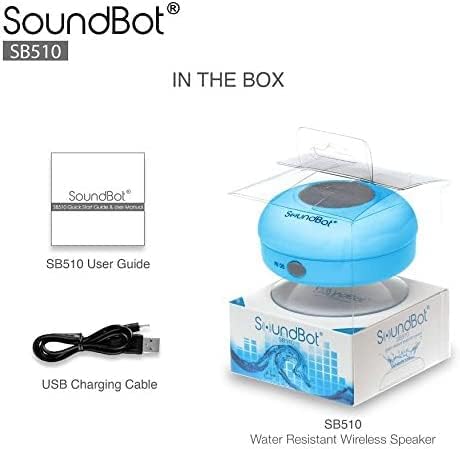
Wat is in die boks
Your SoundBot SB510 HD package includes the following items:
- 1 x SoundBot SB510 Water Resistant Bluetooth Shower Speaker
- 1 x Gebruikersgids
- 1 x USB-laaikabel

Included components: speaker, USB charging cable, and user guide.
Opstelling
Laai die luidspreker
Before first use, fully charge your SoundBot SB510 HD speaker. A full charge takes approximately 3 hours and provides up to 6 hours of playtime.
- Locate the charging port on the side of the speaker, usually protected by a rubber flap.
- Koppel die klein punt van die ingeslote USB-laaikabel aan die luidspreker se laaipoort.
- Koppel die groter punt van die USB-kabel aan 'n USB-kragbron (bv. 'n rekenaar se USB-poort, USB-muuradapter).
- Die LED-aanwyserliggie sal tydens laai brand en afskakel of van kleur verander wanneer dit volledig gelaai is.

The speaker connected to its USB charging cable.
Bluetooth-koppeling
Pair your speaker with your Bluetooth-enabled device (smartphone, tablet, laptop) to begin wireless audio streaming.
- Maak seker dat die luidspreker gelaai en afgeskakel is.
- Druk en hou die Power-knoppie (⏻) on the speaker until the LED indicator light begins to flash rapidly, indicating it is in pairing mode.
- Aktiveer Bluetooth op jou toestel en soek vir beskikbare toestelle.
- Select "SB510" from the list of found devices.
- Once successfully paired, the LED indicator light on the speaker will stop flashing and remain solid blue. You will also hear an audible confirmation.
- Die luidspreker het 'n draadlose reikwydte van tot 33 voet (10 meter).
The speaker's control panel, used for initiating Bluetooth pairing.
Bedryfsinstruksies
Sprekerbeheer
The SoundBot SB510 HD features intuitive buttons for easy control of your audio and calls:
| Knoppie | Funksie (Kort Druk) | Funksie (Lang druk) |
|---|---|---|
| ⏻ (Krag) | NVT | Krag aan/af |
| ⏵⏸ (Speel/Pause) | Speel/Pause Musiek | NVT |
| ⏮ (Previous/Volume Down) | Vorige Liedjie | Volume af (-) |
| ⏭ (Next/Volume Up) | Volgende Liedjie | Volume op (+) |
| 📞 (Foon) | Beantwoord/beëindig telefoonoproep | NVT |

Gedetailleerd view van die luidspreker se beheerknoppies en hul funksies.
Maak en Ontvang Oproepe
The built-in microphone allows for hands-free communication:
- Beantwoord 'n oproep: Wanneer 'n oproep inkom, druk die 📞 button once to answer.
- Beëindig 'n oproep: Druk tydens 'n oproep op die 📞 button once to end the conversation.
- Herbel: Dubbeldruk die 📞 knoppie om die laaste nommer te herbel.
Onderhoud
To ensure the longevity and optimal performance of your SoundBot SB510 HD speaker, follow these maintenance guidelines:
- Waterweerstand: The speaker is IPX4 water resistant, meaning it is protected against splashing water from any direction. It is suitable for use in showers or near pools, but it should nie be submerged in water. Ensure the charging port cover is securely closed when not charging to maintain water resistance.
- Skoonmaak: Maak die luidspreker skoon met 'n sagte, damp cloth. Do not use abrasive cleaners or solvents, as these may damage the surface or internal components.
- Berging: Bêre die luidspreker op 'n koel, droë plek wanneer dit nie gebruik word nie. Vermy uiterste temperature.
- Suigbeker sorg: For best adhesion, ensure the surface where you attach the suction cup is clean, smooth, and dry. Periodically clean the suction cup with water to remove any dust or residue.

The speaker's water-resistant design allows for use in wet environments.
Probleemoplossing
If you encounter any issues with your SoundBot SB510 HD speaker, please refer to the following common troubleshooting steps:
| Probleem | Moontlike oorsaak | Oplossing |
|---|---|---|
| Luidspreker skakel nie aan nie. | Lae battery. | Charge the speaker fully (approx. 3 hours). |
| Kan nie met toestel koppel nie. | Speaker not in pairing mode; Bluetooth off on device; device too far. | Ensure speaker is in pairing mode (flashing LED). Turn on Bluetooth on your device. Move device closer to speaker (within 33 ft). Forget previous pairings on your device and try again. |
| Geen geluid of lae volume nie. | Volume te laag op luidspreker of toestel; luidspreker nie gekoppel nie. | Increase volume on both the speaker and your connected device. Ensure speaker is successfully paired and connected. |
| Klank vervorming. | Toestel te ver; steuring. | Move your device closer to the speaker. Avoid obstacles between the speaker and device. Reduce interference from other wireless devices. |
| Suction cup not sticking. | Surface is dirty, wet, or not smooth. | Clean and dry the surface thoroughly. Ensure the surface is smooth (e.g., tile, glass). Clean the suction cup itself. |
Spesifikasies
Detailed technical specifications for the SoundBot SB510 HD speaker:
| Kenmerk | Beskrywing |
|---|---|
| Model Naam | SB510 HD |
| Item Modelnommer | SB510-BLU |
| Verbindingstegnologie | Bluetooth, USB |
| Draadlose kommunikasietegnologie | Bluetooth |
| Bluetooth-reeks | Tot 33 voet (10 meter) |
| Waterweerstandvlak | IPX4 (Waterbestand) |
| Tipe luidspreker | Desktop / Portable |
| Luidspreker Maksimum uitsetkrag | 3 Watt |
| Klankuitvoermodus | Stereo |
| Batterylewe | 6 ure |
| Laai tyd | 3 ure |
| Battery Tipe | 1 Litium-ioonbattery benodig |
| Ingeboude mikrofoon | Ja |
| Produk afmetings | 3.5" D x 3.5" B x 2.3" H |
| Item gewig | 1.59 onse |
| Materiaal | Plastiek, rubber |
Waarborg & Ondersteuning
The SoundBot SB510 HD Water Resistant Bluetooth Shower Speaker comes with a Limited Warranty. For specific details regarding warranty coverage, duration, and terms, please refer to the warranty information provided in the original product packaging or contact SoundBot customer support directly.
For technical assistance, troubleshooting beyond this manual, or warranty claims, please visit the official SoundBot website or contact their customer service department. Contact information can typically be found on the product packaging or the SoundBot webwebwerf.