
Inleiding
The EDUP EP-B3511 is a compact wireless Bluetooth music receiver designed to add Bluetooth audio streaming capabilities to any device with a 3.5mm audio input. This device allows you to wirelessly connect your smartphone, laptop, or other Bluetooth-enabled devices to car stereos, home audio systems, headphones, and more. It also features an integrated microphone for hands-free calling.
Veiligheidsinligting
- Moenie die toestel blootstel aan uiterste temperature, vog of direkte sonlig nie.
- Vermy om die toestel te laat val of aan sterk impakte te onderwerp.
- Hou buite bereik van kinders.
- Gebruik slegs die meegeleverde laaikabel of 'n gesertifiseerde ekwivalent.
- Moenie probeer om die toestel uitmekaar te haal of te wysig nie. Dit sal die waarborg ongeldig maak.
Pakketinhoud
Kontroleer asseblief die pakket vir die volgende items:
- EDUP EP-B3511 Wireless Bluetooth Music Receiver
- USB-na-mini-USB-laaikabel
- 3.5mm Male-to-Male Audio Connector
- Gebruikershandleiding (hierdie dokument)
Produk verbyview
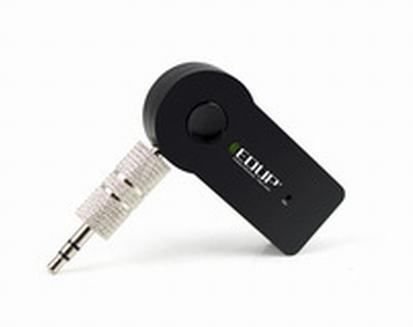
Image: The EDUP EP-B3511 Wireless Bluetooth Music Receiver, a small black rectangular device with a 3.5mm audio jack on one side and a mini-USB charging port on the other. It features a central multi-function button and an indicator light.
The EDUP EP-B3511 is designed for ease of use. It typically features:
- Multifunksie-knoppie: For power on/off, pairing, play/pause, and call management.
- 3.5mm klank-uitvoeraansluiting: Connects to your audio system's AUX input.
- Mini-USB Charging Port: Vir die herlaai van die interne battery.
- LED-aanwyserlig: Wys krag-, parings- en laaistatus.
- Geïntegreerde mikrofoon: Vir handvrye kommunikasie.
Opstelling
1. Laai die toestel
- Connect the Mini-USB end of the charging cable to the receiver's charging port.
- Connect the USB end of the cable to a USB power source (e.g., car charger, computer USB port, USB wall adapter).
- The LED indicator will typically glow red during charging and turn off or change color when fully charged.
- A full charge usually takes 1-2 hours.
2. Connecting to an Audio System
- Ensure your audio system (car stereo, home theater, headphones) has a 3.5mm AUX input.
- Insert the 3.5mm male-to-male audio connector into the receiver's 3.5mm audio output jack.
- Connect the other end of the 3.5mm connector to the AUX input of your audio system.
- Set your audio system's input source to AUX.
3. Koppel met 'n Bluetooth-toestel
- Krag aan: Press and hold the multi-function button on the receiver until the LED indicator flashes blue rapidly (or red and blue alternately), indicating it is in pairing mode.
- Aktiveer Bluetooth: On your smartphone, tablet, or laptop, enable Bluetooth and search for new devices.
- Kies Toestel: Look for "EP-B3511" or a similar name in the list of available Bluetooth devices and select it to pair.
- Bevestiging: Once successfully paired, the LED indicator will typically flash blue slowly or remain solid blue. A voice prompt might also confirm the connection.
- The device will automatically attempt to reconnect to the last paired device when powered on.
Bedryfsinstruksies
Krag aan/af
- Krag aan: Press and hold the multi-function button for approximately 3 seconds until the LED indicator flashes blue.
- Skakel af: Druk en hou die multifunksieknoppie vir ongeveer 5 sekondes in totdat die LED-aanwyser afskakel.
Musiek afspeel
- Once paired, open your music player on your Bluetooth device.
- Music will stream wirelessly to your connected audio system.
- Use the controls on your Bluetooth device to play, pause, skip tracks, and adjust volume. The receiver's multi-function button may also act as a play/pause control (single press).
Handvrye oproepe
- Beantwoord oproep: When a call comes in, press the multi-function button once to answer.
- Beëindig oproep: During a call, press the multi-function button once to end the call.
- Verwerp oproep: Press and hold the multi-function button for approximately 2 seconds to reject an incoming call.
- Herbel laaste nommer: Dubbeldruk die multifunksieknoppie om die laaste nommer weer te skakel.
- The integrated microphone will pick up your voice for communication. Ensure you are within reasonable proximity to the receiver for clear audio.
Onderhoud
- Skoonmaak: Gebruik 'n sagte, droë lap om die toestel skoon te maak. Moenie vloeibare skoonmaakmiddels of oplosmiddels gebruik nie.
- Berging: Bêre die toestel op 'n koel, droë plek weg van direkte sonlig en uiterste temperature wanneer dit nie vir lang tye gebruik word nie.
- Batterysorg: Om die batterylewe te verleng, vermy om die battery gereeld heeltemal te ontlaai. Laai die toestel gereeld, selfs al word dit nie voortdurend gebruik nie.
Probleemoplossing
| Probleem | Oplossing |
|---|---|
| Toestel skakel nie aan nie. | Maak seker dat die toestel gelaai is. Koppel dit aan 'n kragbron met die USB-kabel. |
| Kan nie met Bluetooth-toestel saambind nie. |
|
| Geen klank of swak klankgehalte. |
|
| Mikrofoon werk nie tydens oproepe nie. |
|
| Device automatically turns off. | The device may have an auto-off feature if not connected or active for a period (e.g., 5 minutes). Recharge the battery if it's low. |
Spesifikasies
- Model: EP-B3511
- Verbindingstegnologie: Bluetooth
- Draadlose kommunikasiestandaard: Bluetooth V4.1 (supports all Bluetooth versions of mobile/tablet)
- Kragbron: Battery Powered (inbuilt rechargeable battery)
- Versoenbare toestelle: Headphone, Laptop, Smartphone, Car Audio Systems, Home Audio Systems
- Item gewig: Ongeveer 60 g
- Pakket afmetings: Ongeveer 13.6 x 11.4 x 2.6 cm
- Kenmerke: Integrated Microphone for calls
Waarborg en Ondersteuning
This product comes with a standard manufacturer's warranty. For specific warranty terms, duration, and support inquiries, please refer to the documentation provided at the time of purchase or contact your retailer or the manufacturer directly. Keep your proof of purchase for warranty claims.