
1. Inleiding
This manual provides essential information for the safe and efficient operation of your InFocus IN2126a WXGA Network Projector. Please read this manual thoroughly before using the projector and retain it for future reference. The InFocus IN2126a is designed for versatile use in various environments, offering high brightness and network capabilities.
2. Veiligheidsinligting
Neem die volgende veiligheidsmaatreëls in ag om skade aan die projektor te voorkom en gebruikersveiligheid te verseker:
- Moenie ventilasie-openinge blokkeer nie. Verseker voldoende lugvloei rondom die projektor.
- Moenie direk in die projektorlens kyk wanneer die lamp is aan. Die helder lig kan oogskade veroorsaak.
- Avoid placing the projector in direct sunlight, near heat sources, or in environments with high humidity or excessive dust.
- Gebruik slegs die kragkabel wat saam met die projektor voorsien word.
- Verwys alle diens na gekwalifiseerde dienspersoneel. Moenie probeer om die projektor self oop te maak of te herstel nie.
3. Produk verbyview
Familiarize yourself with the components and features of your InFocus IN2126a projector.
3.1 Projektorkomponente
Figuur 1: Voorkant view of the InFocus IN2126a projector, showing the lens and ventilation.

Figuur 2: Kant view of the InFocus IN2126a projector, highlighting the ventilation grilles.
3.2 Agterpaneelverbindings
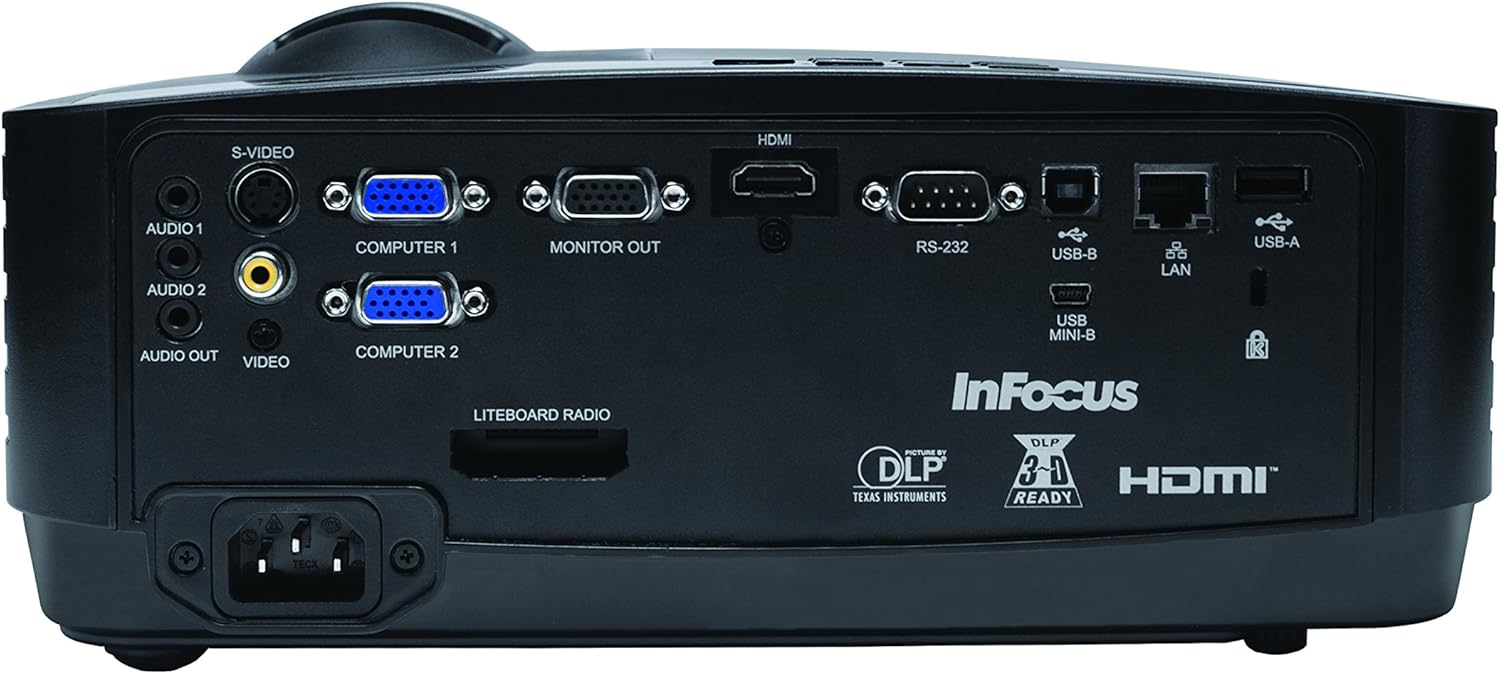
The rear panel provides various input and output ports for connecting external devices.
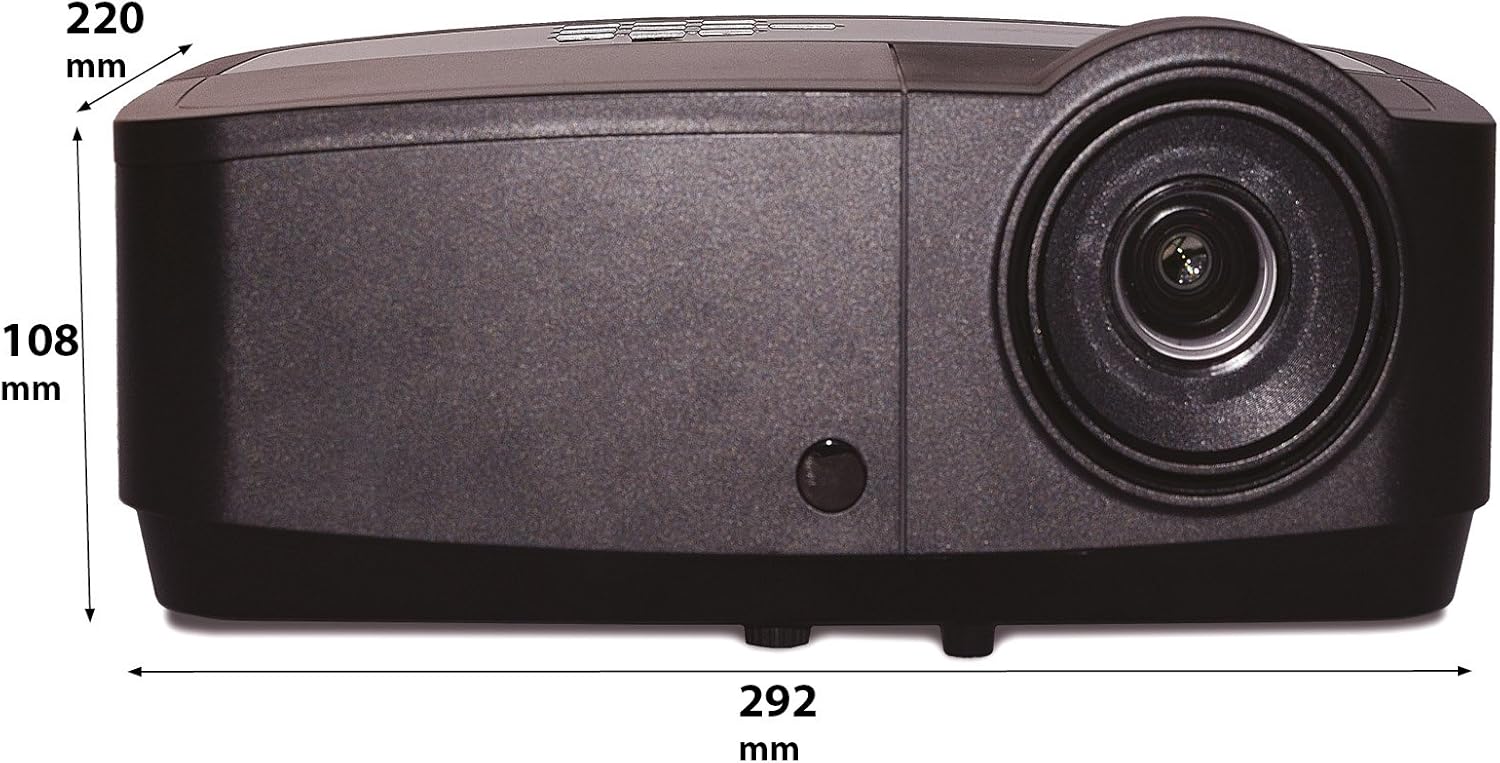
Figure 3: Rear panel of the InFocus IN2126a projector, displaying various connectivity ports including HDMI, VGA, USB, and LAN.
- HDMI: Vir digitale video- en oudio-invoer.
- COMPUTER 1 / COMPUTER 2 (VGA): Vir analoog video-invoer vanaf rekenaars.
- MONITOR OUT (VGA): Vir die koppeling van 'n eksterne monitor.
- USB-B / USB Mini-B: For service or specific USB functions.
- USB-A: For connecting USB devices, such as a wireless adapter.
- LAN (RJ45): Vir netwerkkonnektiwiteit.
- RS-232: Vir seriebeheer.
- AUDIO 1 / AUDIO 2 (RCA): Vir oudio-invoer.
- AUDIO UIT: Vir die koppeling van eksterne klankstelsels.
- VIDEO (RCA): For composite video input.
- S-VIDEO: For S-Video input.
- Kraginlaat: Vir die koppeling van die kragkabel.
3.3 Boonste paneelkontroles
The top panel features controls for basic projector functions and image adjustments.

Figure 4: Top panel of the InFocus IN2126a projector, showing the control buttons and focus/zoom rings.
- Kragknoppie: Skakel die projektor aan of af.
- Menu/Exit Button: Accesses or exits the on-screen display (OSD) menu.
- Navigasieknoppies (Op, Af, Links, Regs): Navigeer deur kieslysopsies.
- Enter-knoppie: Bevestig keuses in die kieslys.
- Bron knoppie: Kies invoerbronne.
- Blank Button: Maak die skerm tydelik leeg.
- Outo -knoppie: Pas beeldinstellings outomaties aan.
- Fokusring: Pas beeldskerpte aan.
- Zoemring: Pas beeldgrootte aan.
3.4 Afmetings
Understanding the physical dimensions is important for installation and placement.

Figure 5: Diagram illustrating the dimensions of the InFocus IN2126a projector (292mm length, 220mm width, 108mm height).
4. Opstelling
4.1 Projektorplasing
Place the projector on a stable, flat surface or mount it securely. Ensure the projector is positioned at an appropriate distance from the screen to achieve the desired image size. Maintain sufficient space around the projector for proper ventilation.
4.2 Koppel toestelle
- Kragverbinding: Koppel die kragkabel aan die projektor se kragtoevoer en dan aan 'n geaarde elektriese aansluiting.
- Video Bron:
- For digital sources (e.g., Blu-ray player, laptop), use an HDMI cable to connect to the HDMI port.
- For analog computer sources, use a VGA cable to connect to the COMPUTER 1 or COMPUTER 2 port.
- For other video sources, use the appropriate S-VIDEO or VIDEO (RCA) connections.
- Oudiobron: If your video source does not transmit audio via HDMI, connect audio cables to the AUDIO 1 or AUDIO 2 ports.
- Netwerk konneksie: For wired network access, connect an Ethernet cable to the LAN port.
- Draadlose konneksie: If using a compatible wireless adapter (sold separately), insert it into the USB-A port.
4.3 Aan-/afskakel
- Om aan te skakel: Press the Power button on the projector's top panel or the remote control. The power indicator light will illuminate.
- Om af te skakel: Press the Power button again. The projector will enter a cooling cycle before shutting down completely. Do not unplug the projector during the cooling cycle.
5. Bediening van die Projektor
5.1 Bronkeuse
After powering on, the projector may automatically detect an active input source. If not, or to switch sources:
- Druk die Bron knoppie op die projektor of afstandbeheer.
- Use the navigation buttons to highlight the desired input source (e.g., HDMI, Computer 1, Video).
- Druk Voer in om die bron te kies.
5.2 Beeldaanpassing
- Fokus: Draai die Fokus ring on the projector lens until the image appears sharp and clear.
- Zoem: Draai die Zoem ring on the projector lens to adjust the image size to fit your screen.
- Keystone-korreksie: If the image appears trapezoidal, use the keystone correction feature in the OSD menu to square the image.
5.3 Skermvertoning (OSD) Kieslys
The OSD menu allows you to configure various projector settings.
- Druk die Spyskaart knoppie om die OSD-kieslys oop te maak.
- Gebruik die Op/af navigation buttons to select a menu category.
- Gebruik die Links/Regs navigation buttons to adjust settings or enter sub-menus.
- Druk Voer in veranderinge te bevestig.
- Druk Verlaat om die OSD-kieslys te sluit.
5.4 Draadlose verbinding
The IN2126a is wireless-ready. To enable wireless display, a compatible InFocus wireless adapter (sold separately) must be connected to the USB-A port. Refer to the wireless adapter's specific instructions for setup and connection procedures.
5.5 3D-funksionaliteit
Die projektor ondersteun 3D-inhoud. Om view 3D content, you will need a compatible 3D source, 3D glasses, and appropriate 3D content. Refer to the projector's OSD menu for 3D settings and ensure your source device is configured for 3D output.
6. Onderhoud
Gereelde onderhoud verseker optimale werkverrigting en verleng die lewensduur van u projektor.
6.1 Lamp Vervanging
Die projektor lamp has a limited lifespan (approximately 4000 hours). When the lamp indicator illuminates or the image brightness significantly decreases, the lamp needs replacement. Always use an authorized InFocus replacement lamp. Refer to the full service manual for detailed lamp replacement instructions or contact customer support.
6.2 Filter Skoonmaak
Dust accumulation on the air filter can impede airflow and cause overheating. Regularly clean the air filter to maintain proper ventilation. Turn off and unplug the projector before cleaning. Use a soft brush or vacuum cleaner to remove dust from the filter cover.
6.3 Algemene Skoonmaak
- Projektor Casing: Gebruik 'n sagte, pluisvrye lap dampened with a mild, non-abrasive cleaner. Do not use harsh chemicals.
- Lens: Use a lens cleaning cloth and specialized lens cleaning solution. Avoid touching the lens surface with your fingers.
7. Probleemoplossing
Indien u probleme met u projektor ondervind, raadpleeg die volgende algemene probleme en oplossings:
| Probleem | Moontlike oorsaak | Oplossing |
|---|---|---|
| Geen beeld op die skerm nie | Verkeerde invoerbron gekies; Los kabelverbinding; Projektor in bystandmodus. | Verify input source; Check all cable connections; Press power button to wake from standby. |
| Beeld is vaag | Fokus nie aangepas nie; Projektor te naby/ver van die skerm af. | Adjust the focus ring; Reposition the projector and adjust zoom. |
| Beeld is trapesiumvormig | Projektor nie loodreg op die skerm nie. | Use keystone correction in the OSD menu. |
| Geen oudio nie | Audio cables not connected; Volume too low; Muted. | Check audio cable connections; Adjust volume; Unmute projector. |
| Projektor oorverhit en skakel af | Blocked ventilation; Dirty air filter. | Ensure clear airflow around projector; Clean the air filter. |
For more detailed troubleshooting, consult the complete user manual or contact InFocus customer support.
8. Spesifikasies
Key technical specifications for the InFocus IN2126a WXGA Network Projector:
- Model Naam: IN2126a
- Vertoon tipe: DLP
- Inheemse resolusie: 1280 x 800 (WXGA)
- Helderheid: 3500 Lumen
- Kontrasverhouding: 15000:1
- Kleurreproduksie: 1.07 Billion Colors (30-bit)
- Ligbron bedryfslewe: 4000 ure
- Verbindingstegnologie: Wireless-ready, HDMI 1.4, VGA (x2), USB (Type-A, Mini-B, Type-B), LAN (RJ45), RS-232, Audio In (x2), Audio Out, Video (RCA), S-Video
- Spesiale kenmerke: 3D-Ready, Network Projector
- Vormfaktor: Draagbaar
- Montage tipe: Tafelblad Mount
- Item gewig: 7.1 pond
9. Waarborg en Ondersteuning
For information regarding your product's warranty, please refer to the warranty card included with your purchase or visit the official InFocus website. For technical support, service, or to purchase accessories, please contact InFocus customer service through their official channels.