
1. Inleiding
This manual provides essential information for the safe and efficient operation of your McGrey DJ-1022 Passive PA DJ Speakers. Please read it thoroughly before use and retain it for future reference. These speakers are designed for sound reinforcement applications, offering a robust and clear audio experience.
2. Veiligheidsinstruksies
- Read all instructions carefully before operating the speakers.
- Bewaar hierdie handleiding op 'n veilige plek vir toekomstige verwysing.
- Moenie die luidsprekers aan reën, vog of uiterste temperature blootstel nie.
- Ensure adequate ventilation around the speakers to prevent overheating.
- Connect the speakers only to compatible amplifiers with appropriate power ratings and impedance.
- Avoid operating the speakers at excessive volume levels for prolonged periods to prevent hearing damage and speaker damage.
- Moenie probeer om die luidsprekers self te diens nie. Verwys alle diens na gekwalifiseerde personeel.
- Position speakers securely to prevent them from falling, especially when using pole mounts.
3. Pakketinhoud
Die pakket moet die volgende items bevat:
- 2 x McGrey DJ-1022 Passive PA DJ Speakers
- Gebruikershandleiding (hierdie dokument)
Inspect the package upon receipt to ensure all components are present and undamaged. Contact your retailer immediately if any items are missing or damaged.
4. Opstelling
4.1 Luidsprekerplasing
Place the speakers on a stable, level surface or mount them on suitable speaker stands using the integrated pole mount. Ensure the speakers are positioned to provide optimal sound coverage for your intended audience.

Prent: Onderkant view of the speaker, highlighting the integrated pole mount socket for stand placement.
4.2 Verbindings
Voordat u enige verbindings maak, maak seker dat u amplifier is turned off and disconnected from the power supply. Connect the speakers to your amplifier using high-quality speaker cables. The McGrey DJ-1022 speakers feature a versatile connection panel.

Prent: Gedetailleerd view of the speaker's rear connection panel, showing two Speakon compatible connectors and two binding post terminals for amplewendiger verbinding.
- Speakon Compatible Connectors: Use these for secure and reliable connections with amplifiers equipped with Speakon outputs. You can use one for input and the other for daisy-chaining to another speaker if your ampverligter ondersteun dit.
- Binding Post Terminals: These allow connection using bare wire, banana plugs, or spade connectors. Ensure correct polarity (+ to + and - to -) when connecting.
Always ensure a secure connection to prevent signal loss or damage to your equipment.
5. Bedryfsinstruksies
5.1 Aan-/afskakel
- Ensure all connections between the speakers and the amplifier are secure before powering on.
- Turn on your audio source (e.g., mixer, media player).
- Skakel jou amplifier. Start with the amplifier's volume at its lowest setting.
- When powering off, first turn down the amplifier volume, then turn off the amplifier, and finally turn off your audio source.
5.2 Volumebeheer
Verhoog die geleidelik amplifier's volume to the desired listening level. Avoid pushing the amplifier or speakers into distortion, as this can cause damage.
5.3 Impedansiepassing
The McGrey DJ-1022 speakers have an impedance of 8 Ohms. Ensure your amplifier is rated to safely drive an 8 Ohm load. Mismatching impedance can lead to amplifier overheating or speaker damage.
6. Onderhoud
6.1 Skoonmaak
Wipe the speaker cabinets with a dry, soft cloth. Do not use liquid cleaners, solvents, or abrasive materials, as these can damage the felt surface or other components.
6.2 Berging
When not in use, store the speakers in a dry, cool environment, away from direct sunlight and extreme temperature fluctuations.
6.3 Inspeksie
Periodically inspect speaker cables and connectors for any signs of wear or damage. Replace damaged cables immediately.
7. Probleemoplossing
| Probleem | Moontlike oorsaak | Oplossing |
|---|---|---|
| Geen geluid van luidsprekers nie |
|
|
| Verwronge klank |
|
|
| Lae volume uitset |
|
|
8. Spesifikasies
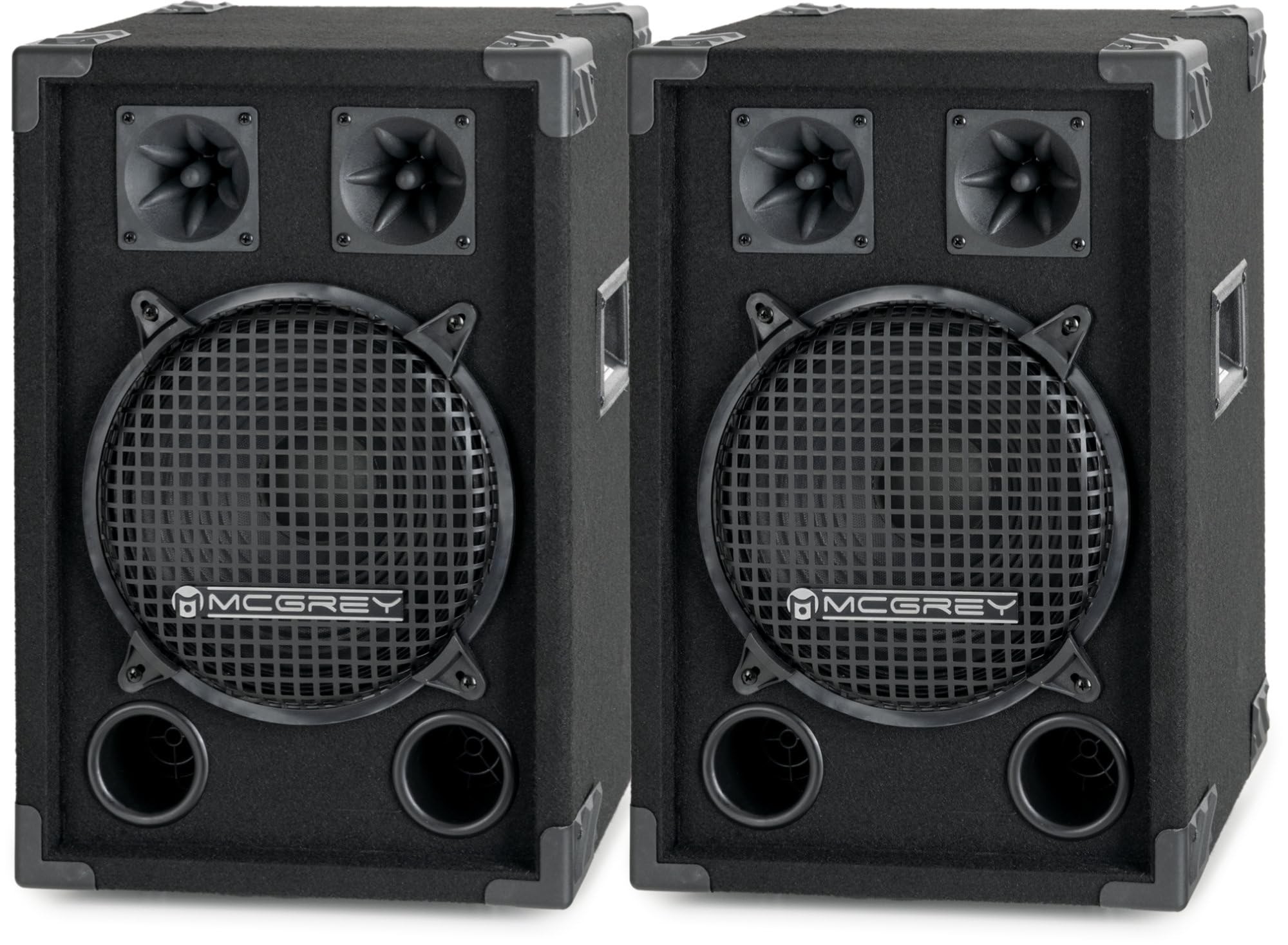
Prent: 'N Overall view of the McGrey DJ-1022 speaker, showcasing its robust design and components.
- Tipe luidspreker: 2-way passive PA DJ speaker
- subwoofer: 10-duim (25 cm)
- Tweeters: Two piezo tweeters
- RMS-krag: 200 W
- Maksimum krag: 400 W
- Impedansie: 8 ohm
- Sensitiwiteit: 90dB (+/-2dB)
- Frekwensie reaksie: 55Hz - 18kHz
- Afmetings (H x B x D): 49 x 33 x 30 cm
- Gewig: 6.2 kg per spreker
- Kabinet materiaal: Robust wood with felt surface
- Beskerming: Metal grille for subwoofer, protective corners
- Handvatsels: Integrated side handles for transport
- Verbindingspaneel: Two Speakon compatible inputs/outputs, two binding post terminals
- Montering: Integrated pole mount socket
9. Waarborg en Ondersteuning
The McGrey DJ-1022 speakers come with a limited warranty. For specific details regarding warranty coverage, duration, and terms, please refer to the warranty card included with your product or contact your point of purchase.
For technical support, troubleshooting assistance, or warranty claims, please contact your retailer or the manufacturer, McGrey, directly. Have your product model number (DJ-1022) and proof of purchase ready when contacting support.