
1. Inleiding
This manual provides detailed instructions for the installation, operation, and maintenance of your Axis P1355 Surveillance/Network Camera. The Axis P13 series offers high-performance fixed cameras designed for both indoor and outdoor surveillance, delivering superb image quality with H.264 compression. These models support HDTV 720p/1080p video and are equipped with features like Wide Dynamic Range and Day/Night functionality for clear imaging in various lighting conditions. Specific models within the P13 series, including HDTV 720p, incorporate Axis Lightfinder technology for enhanced low-light sensitivity, while HDTV 1080p and 5-megapixel cameras feature P-iris control for optimized depth of field and lens resolution.
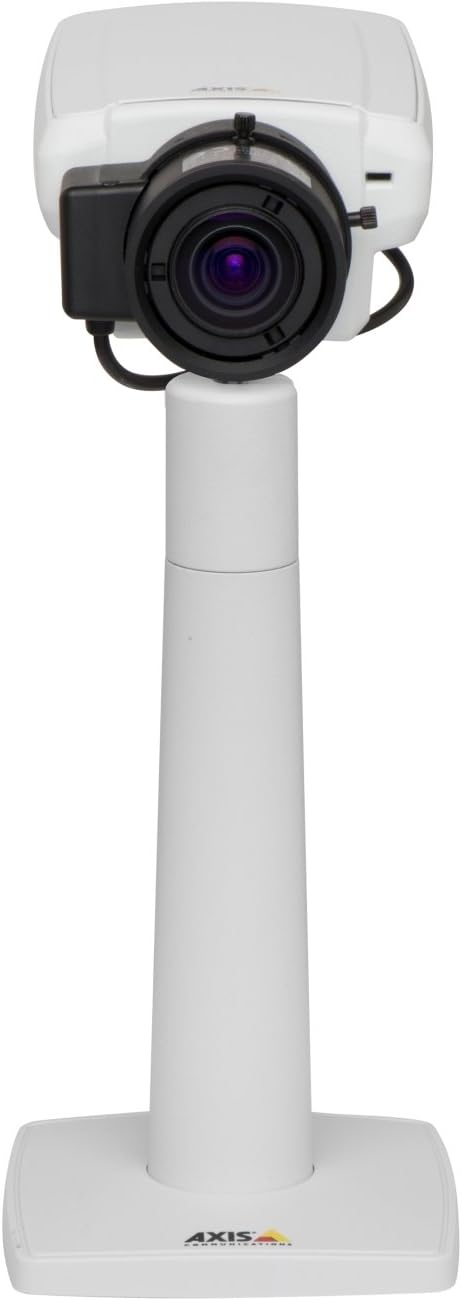
Figuur 1: The Axis P1355 Surveillance Camera shown mounted on its stand. This image illustrates the camera's physical appearance and typical mounting configuration.
2. Veiligheidsinligting
Please read all safety instructions before installing or operating the camera.
- Ensure the power source matches the camera's requirements to prevent electrical hazards.
- Installasie moet deur gekwalifiseerde personeel uitgevoer word in ooreenstemming met plaaslike elektriese kodes.
- Moenie die kamera blootstel aan uiterste temperature, humiditeit of korrosiewe omgewings nie.
- Vermy direkte blootstelling van die lens aan sterk ligbronne, soos die son, aangesien dit die beeldsensor kan beskadig.
- Disconnect power before cleaning or servicing the camera.
3. Opstelling en installering
The Axis P1355 camera is designed for both indoor and outdoor use and supports various mounting options.
3.1 Montering
The camera is typically designed for wall mount installation. Ensure the mounting surface is strong enough to support the camera's weight (approximately 2 pounds). Use appropriate screws and anchors for the chosen surface.
- Select a suitable location for optimal surveillance coverage.
- Maak die monteerbeugel stewig aan die muur vas.
- Mount the camera onto the bracket, ensuring it is firmly in place.
- Adjust the camera's angle for the desired field of view.
3.2 Verbindings
The Axis P1355 camera primarily uses wired connectivity for reliable data transmission and power.
- Kragverbinding: Connect the provided power adapter to the camera's power input and then to a suitable electrical outlet. The camera operates on a corded electric power source.
- Netwerk konneksie: Connect an Ethernet cable from the camera's network port to your network switch or router. This provides wired connectivity for video streaming and control.
- Wireless Connectivity (Optional/Configuration): While primarily wired, the camera supports Wi-Fi for certain configurations. Refer to the Axis product documentation for specific wireless setup instructions if applicable to your model variant.
4. Bedryfsinstruksies
Once installed and connected, the Axis P1355 camera can be configured and operated via a network interface.
4.1 Aanvanklike toegang en konfigurasie
- Use the Axis IP Utility or a similar network discovery tool to find the camera's IP address on your network.
- Maak oop a web blaaier en voer die kamera se IP-adres in om toegang daartoe te verkry web koppelvlak.
- Log in using the default credentials (refer to Axis documentation for default username/password, typically 'root' and 'pass' or similar, which should be changed immediately).
- Follow the on-screen prompts to set up basic network settings, date/time, and user accounts.
4.2 Video Monitoring and Features
- Leef View: Access the live video feed through the web interface or compatible video management software.
- Resolusie: The camera supports video capture resolutions up to 720p and effective video resolutions of 1080 pixels, with effective still resolution of 2 MP.
- Color and Monochrome Modes: The camera can operate in both color and monochrome (black and white) modes, automatically switching based on light conditions or configured manually.
- Nagvisie: Utilize the integrated night vision capabilities for surveillance in low-light or complete darkness.
- Optiese zoom: Adjust the optical zoom for detailed views van spesifieke gebiede.
- P-Iris Control: For models equipped with P-iris, this feature allows precise control over the iris position to optimize depth of field and lens resolution, enhancing image sharpness. This can be configured via the web koppelvlak.
- Videoformaat: Video is typically captured in MP4 format.
- Afstandbeheer: The camera supports remote control for various settings and adjustments.
5. Onderhoud
Regular maintenance ensures optimal performance and longevity of your Axis P1355 camera.
- Skoonmaak: Maak die kameralens en behuising versigtig skoon met 'n sagte, damp lap. Vermy skuurmiddels of oplosmiddels.
- Firmware -opdaterings: Periodically check the Axis Communications webwebwerf vir firmware-opdaterings. Deur die firmware op datum te hou, verseker jy toegang tot die nuutste kenmerke, sekuriteitsopdaterings en prestasieverbeterings.
- Kabel inspeksie: Inspekteer gereeld alle kabels vir tekens van slytasie of skade, veral vir buiteluginstallasies.
- Omgewingskontrole: Maak seker dat die kamera se bedryfsomgewing binne die gespesifiseerde temperatuur- en humiditeitsreekse bly.
6. Probleemoplossing
This section addresses common issues you might encounter with your Axis P1355 camera.
- Geen krag:
- Verifieer dat die kragadapter stewig aan beide die kamera en 'n werkende kragpunt gekoppel is.
- Kontroleer die kragkabel vir enige skade.
- Geen netwerkverbinding:
- Ensure the Ethernet cable is properly connected to the camera and the network switch/router.
- Check network switch/router status.
- Confirm the camera has a valid IP address and is on the same network segment as your viewing toestel.
- Swak beeldkwaliteit:
- Maak die kameralens skoon.
- Adjust focus and zoom settings via the web koppelvlak.
- Check lighting conditions; enable night vision or adjust exposure settings if necessary.
- Ensure P-iris control is correctly configured for optimal sharpness (if applicable).
- Kan nie toegang kry nie Web Interface:
- Verifieer die kamera se IP-adres.
- Ensure your computer is on the same network as the camera.
- Try restarting the camera and your network equipment.
7. Spesifikasies
| Kenmerk | Detail |
|---|---|
| Handelsmerk | As Kommunikasie |
| Modelnommer | AXIS P1355 |
| Binne/buiteluggebruik | Binne, Buitelug |
| Verbindingstegnologie | Wired (Wi-Fi capable for certain configurations) |
| Spesiale kenmerk | Nagvisie |
| Kragbron | Koord Elektries (7.1 watt) |
| Video-opname-resolusie | 720p |
| Effektiewe video-resolusie | 1080 piksels |
| Effektiewe stilresolusie | 2 MP |
| Zoem tipe | Optical Zoom (2.9x Optical) |
| Tipe beheerder | Iris (P-iris control) |
| Montage tipe | Muurmontering |
| Produkafmetings (L x B x H) | 3.07 x 5.94 x 1.69 duim |
| Item gewig | 2 pond |
| Internasionale Beskermingsgraad | IP54 |
| Video-opname-formaat | MP4 |
8. Waarborg en Ondersteuning
For detailed warranty information and technical support, please refer to the official Axis Communications webwebwerf of kontak hul kliëntediens direk.
Vervaardiger: AXIS COMMUNICATION INC.
Webwebwerf: www.axis.com (Besoek asseblief die amptelike website for the most current support resources, drivers, and documentation.)