
1. Inleiding
Thank you for choosing the SCHWAIGER DCR600HD Full HD Cable TV Receiver. This manual provides essential information for the safe and efficient use of your device. Please read these instructions carefully before installation and operation, and keep them for future reference.
2. Veiligheidsinstruksies
- Kragtoevoer: Only use the power adapter supplied with the device. Ensure the voltage pas by jou plaaslike kragtoevoer.
- Ventilasie: Do not block ventilation openings. Ensure adequate space around the receiver for proper airflow to prevent overheating.
- Vog: Keep the device away from water, moisture, and high humidity. Do not expose it to rain or splashes.
- Skoonmaak: Ontkoppel die krag voor skoonmaak. Gebruik 'n sagte, droë lap. Moenie vloeibare of aërosol skoonmaakmiddels gebruik nie.
- Ligging: Place the receiver on a stable, flat surface. Avoid direct sunlight, heat sources, and strong magnetic fields.
- Diens: Moenie probeer om die toestel self oop te maak of te herstel nie. Verwys alle diens na gekwalifiseerde personeel.
3. Pakketinhoud
Kontroleer asseblief die pakket vir die volgende items:
- SCHWAIGER DCR600HD Cable TV Receiver
- Afstandbeheer
- Power Cable (integrated or separate adapter)
- Gebruikershandleiding (hierdie dokument)
4. Produk verbyview
4.1 Voorpaneel
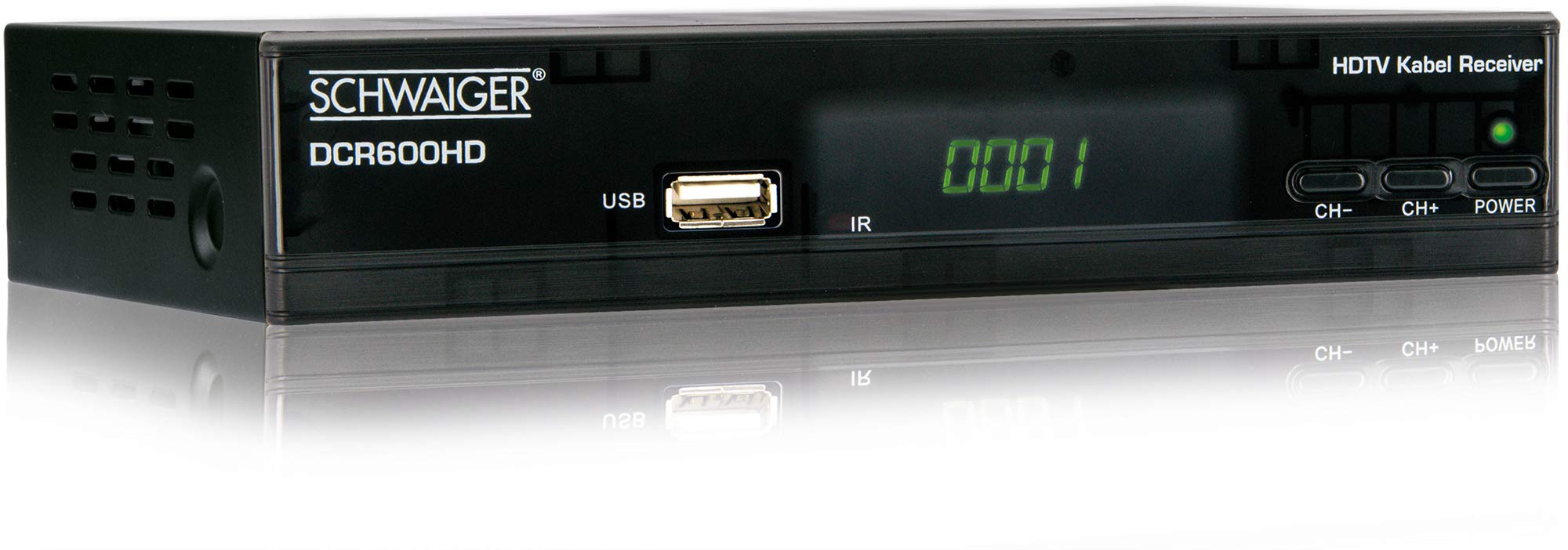
Prent: Voorkant view of the SCHWAIGER DCR600HD receiver, showing the display, USB port, IR receiver, and control buttons.
- Vertoon: Shows channel number or time.
- USB-poort: Vir die koppeling van USB-bergingstoestelle vir mediaterugspeel.
- IR: Infrarooi ontvanger vir die afstandbeheer.
- CH- / CH+: Buttons for changing channels.
- KRAG: Button to turn the receiver on or off (standby).
4.2 Agterpaneel

Prent: Agter view of the SCHWAIGER DCR600HD receiver, displaying various input and output ports.
- RF IN: Input for connecting to your cable TV network.
- ETHERNET / LAN: For network connection (if supported for updates or specific services).
- HDMI: High-Definition Multimedia Interface output for connecting to an HD TV.
- TV SCART (CVBS): SCART output for connecting to older TVs or other devices.
- ~220-240V 50/60Hz: Kraginvoer vir die ontvanger.
4.3 afstandbeheer

Prent: Layout of the SCHWAIGER DCR600HD remote control, showing various function buttons.
The remote control allows you to operate all functions of your receiver. Familiarize yourself with the button layout for easy navigation.
5. Opstelling
5.1 Die Ontvanger Koppel
- Connect to Cable Network: Connect your cable TV antenna cable to the RF IN port on the rear panel of the receiver.
- Koppel aan TV:
- For High Definition (HD) picture quality, connect an HDMI cable from the HDMI port on the receiver to an HDMI input on your TV.
- For standard definition (SD) or older TVs, connect a SCART cable from the TV SCART (CVBS) port on the receiver to the SCART input on your TV.
- Koppel krag: Plug the power cable into the receiver's power input and then into a wall outlet.
- Turn on TV: Switch on your television and select the correct input source (HDMI or SCART) corresponding to your connection.
5.2 Eerste keer installasie
Upon first power-on, the receiver will typically guide you through an initial setup process:
- Taalkeuse: Use the remote control to select your preferred language for the on-screen menus.
- Landkeuse: Select your country. This helps configure regional settings and channel frequencies.
- Kanaalskandering: The receiver will prompt you to perform an automatic channel scan. Confirm to start scanning for available cable TV channels. This process may take several minutes.
- Stoor instellings: Once the scan is complete, save the found channels. Your receiver is now ready for use.
6. Bedryfsinstruksies
6.1 Basiese werking
- Krag aan/af: Druk die KRAG button on the remote control or front panel to switch the receiver on or to standby mode.
- Kanaalkeuse: Gebruik die CH+ / CH- buttons on the remote or front panel to change channels sequentially. Alternatively, use the number buttons to directly enter a channel number.
- Volume aanpassing: Gebruik die VOL+ / VOL- buttons on the remote control to adjust the audio volume.
- Demp: Druk die DEM knoppie om die klank tydelik af te skakel. Druk weer om te herstel.
6.2 Elektroniese Programgids (EPG)
The EPG provides a schedule of current and upcoming TV programs.
- Druk die EPG button on the remote control to access the Electronic Program Guide.
- Navigate through channels and program times using the arrow buttons.
- Druk OK aan view gedetailleerde inligting oor 'n geselekteerde program.
6.3 Mediaweergawe via USB
You can play multimedia files (AVI, MKV, MP3) from a USB storage device.
- Steek 'n USB-geheuestokkie of eksterne hardeskyf in die USB poort op die voorpaneel.
- The receiver should detect the USB device and prompt you to open the media player, or you can access it via the main menu.
- Navigeer deur jou files and folders using the arrow buttons and press OK to select and play a file.
- Use the media control buttons (Play, Pause, Stop, Fast Forward, Rewind) on the remote control for playback.
6.4 Teleteks
Access teletext services provided by broadcasters.
- Druk die TTX button on the remote control to activate teletext.
- Use the number buttons to enter page numbers or the arrow buttons to navigate.
- Druk TTX again to exit teletext.
7. Onderhoud
- Skoonmaak: Regularly wipe the receiver with a soft, dry, lint-free cloth. Do not use abrasive cleaners, waxes, or solvents.
- Ventilasie: Ensure that the ventilation slots are not obstructed by dust or other objects.
- Sagteware-opdaterings: Kontroleer die vervaardiger se gereeld website for any available software updates for your model. Follow the instructions provided with the update carefully.
8. Probleemoplossing
If you encounter problems with your receiver, refer to the following common issues and solutions:
| Probleem | Moontlike oorsaak/oplossing |
|---|---|
| Geen beeld of klank nie |
|
| Afstandbeheer werk nie |
|
| No channels found during scan |
|
| USB-media speel nie |
|
9. Spesifikasies
| Kenmerk | Beskrywing |
|---|---|
| Model Naam | DCR600HD |
| Produk Tipe | Digital DVB TV Tuner / Digital Player |
| Kleur | Swart |
| Afmetings (B x D x H) | 17 cm x 4.5 cm x 10 cm |
| Gewig | 380 g |
| Verbindingstegnologie | HDMI, USB, SCART, RF |
| Versoenbare toestelle | Televisie |
| Video-enkodering | H.264 |
| Ondersteunde resolusies | 576i, 576p, 720p, 1080i, 1080p |
| Aspekverhoudings | 4:3, 16:9 |
| Klankuitvoermodus | Stereo |
| Ondersteunde oudioformate | MP3 |
| Ondersteunde mediasoorte | AVI, MKV, MP3 |
| Totale USB-poorte | 1 (USB 4-pin Type A) |
| Totale HDMI-poorte | 1 |
| Kragverbruik | 3.8 W |
| Voltage | 240 Volt |
| Spesiale kenmerke | Electronic Program Guide (EPG), Teletext, Built-in Bluetooth (Note: Bluetooth functionality may vary by region/firmware) |
| Afstandbeheer | Ingesluit |
10. Waarborg en Ondersteuning
For warranty information and technical support, please refer to the documentation included with your product packaging or visit the official SCHWAIGER webwebwerf. Bewaar u aankoopbewys as bewys van aankoop vir waarborgeise.