
Inleiding
This manual provides essential instructions for the safe and efficient operation of your Grundig Micro 75 DAB+ digital pocket radio. Please read this manual thoroughly before using the device and retain it for future reference.
Veiligheidsinligting
- Moenie die toestel blootstel aan uiterste temperature, direkte sonlig of hoë humiditeit nie.
- Vermy om die toestel te laat val of aan sterk impakte te onderwerp.
- Moenie probeer om die toestel uitmekaar te haal of te wysig nie. Dit sal die waarborg ongeldig maak.
- Gebruik slegs die meegeleverde USB-kabel om te laai.
- Hou die toestel weg van water en ander vloeistowwe.
- Gooi die battery en toestel weg volgens plaaslike regulasies.
Pakketinhoud
Maak seker dat alle items in die pakket teenwoordig is:
- Grundig Micro 75 DAB+ Pocket Radio
- Gebruikershandleiding
- Waarborgkaart
- Stereo oorfone
- USB kabel
- Dra band
Produk verbyview
The Grundig Micro 75 DAB+ is a compact digital pocket radio featuring DAB/DAB+ and FM reception. It includes a built-in rechargeable battery, a micro-USB port for charging, and a headphone jack for private listening.
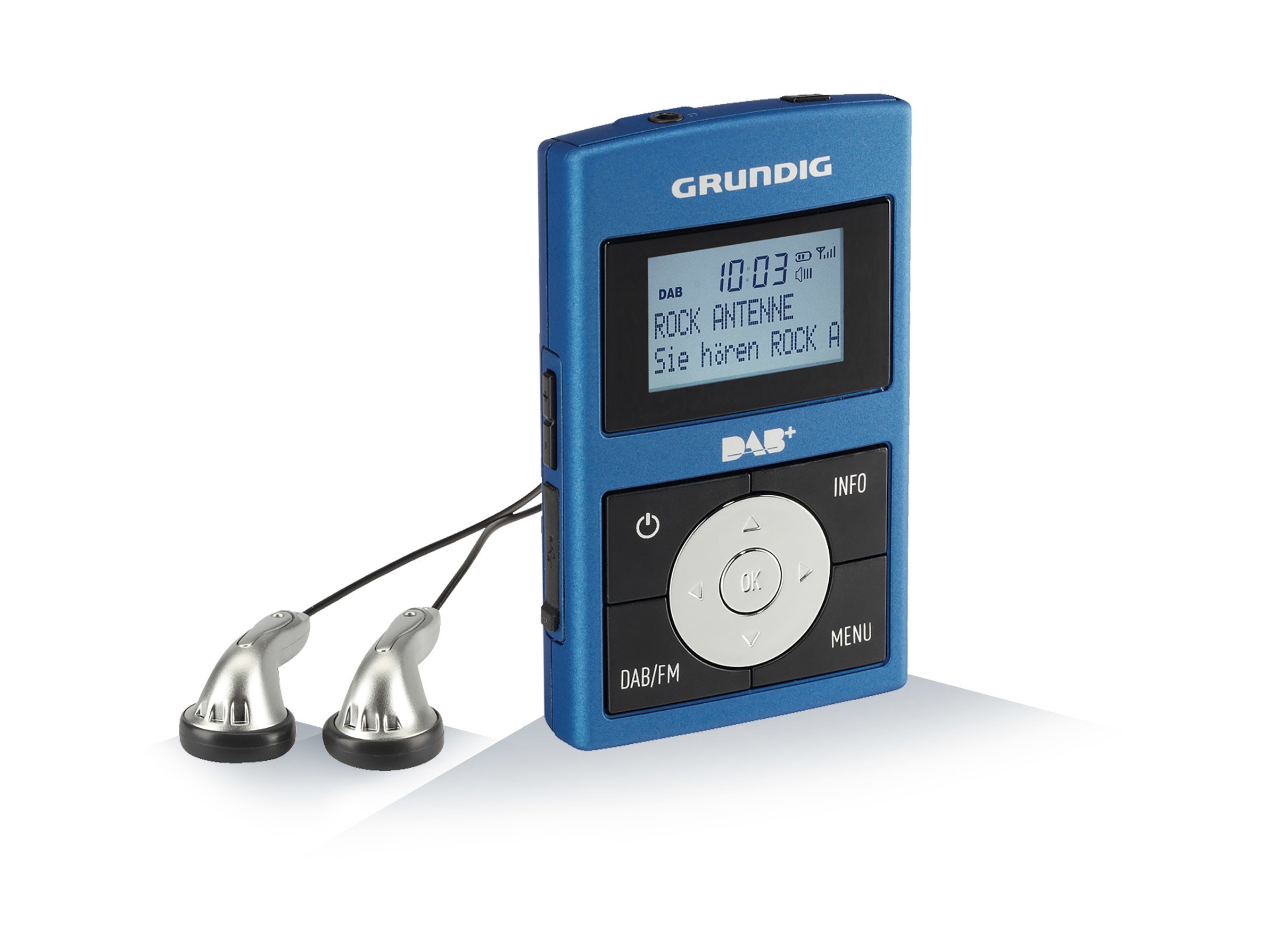
Prent: Voorkant view of the Grundig Micro 75 DAB+ Pocket Radio, showing the display, control buttons, and compact design.
Sleutel kenmerke:
- DAB/DAB+ and RDS-FM PLL tuner for optimal reception.
- Built-in rechargeable Lithium-Polymer battery.
- Micro-USB port for battery charging.
- 6 preset equalizer settings: Normal, Classic, Jazz, Pop, Rock, Speech.
- Headphone output for personal listening.
Opstelling
1. Laai die battery
- Connect the supplied USB cable to the micro-USB port on the radio.
- Koppel die ander kant van die USB-kabel aan 'n versoenbare USB-kragadapter (nie ingesluit nie) of 'n rekenaar se USB-poort.
- The charging indicator will illuminate. The battery is fully charged when the indicator changes color or turns off (refer to the display for battery status).
- A full charge provides extended portable use.
2. Initial Power On and Antenna
- Extend the telescopic antenna fully for best reception.
- Druk en hou die Krag knoppie om die radio aan te skakel.
- Upon first use, the radio may automatically initiate a DAB station scan.
Bedryfsinstruksies
Krag aan/af
Druk en hou die Krag knoppie om die radio aan of af te skakel.
Volumebeheer
Gebruik die Volume op en Volume af knoppies om die luistervlak aan te pas.
DAB/DAB+ radiomodus
- Druk die Modus knoppie om DAB-modus te kies.
- If no stations are found or you are in a new location, perform a full scan: Navigate to the Skandeer option in the menu and confirm. The radio will search for available DAB/DAB+ stations.
- Gebruik die Op/af navigation buttons to browse through the list of found stations.
- Druk die Kies / Enter knoppie om op 'n stasie in te skakel.
- Om 'n stasie as 'n voorafinstelling te stoor, druk en hou die Vooraf ingesteld button, then use navigation buttons to choose a preset number and confirm.
FM-radiomodus
- Druk die Modus knoppie om FM-modus te kies.
- Om outomaties vir stasies te skandeer, druk en hou die Skandeer button. The radio will search and stop at the next strong station.
- Om handmatig in te stem, gebruik die Op/af navigasieknoppies om die frekwensie in klein inkremente aan te pas.
- Om 'n stasie as 'n voorafinstelling te stoor, druk en hou die Vooraf ingesteld button, then use navigation buttons to choose a preset number and confirm.
Equalizer-instellings
The radio features 6 preset equalizer settings to optimize audio output:
- Normaal
- Klassiek
- Jazz
- Pop
- Rots
- Toespraak
Access these settings via the menu and select your preferred sound profile.
Koptelefoongebruik
Insert the supplied stereo headphones into the headphone jack for private listening. The internal speaker will automatically mute when headphones are connected.
Onderhoud
Skoonmaak
Vee die radio af met 'n sagte, droë lap. Moenie skuurmiddels of oplosmiddels gebruik nie.
Battery sorg
To prolong battery life, avoid fully discharging the battery frequently. Recharge the battery regularly, even if the radio is not in use for extended periods.
Probleemoplossing
| Probleem | Moontlike oorsaak/oplossing |
|---|---|
| Geen krag / Radio skakel nie aan nie. | Battery is discharged. Charge the battery using the supplied USB cable. |
| Poor radio reception (DAB/FM). |
|
| Geen geluid uit oorfone nie. |
|
| Knoppies reageer nie. | The device might be frozen. Try turning it off and on again. If the issue persists, allow the battery to fully discharge and then recharge. |
Spesifikasies
| Modelnommer: | Micro 75 DAB+ |
| Handelsmerk: | Grundig |
| Tuner Tegnologie: | DAB, FM (RDS-FM PLL) |
| Kragbron: | Battery-Powered (Built-in Lithium-ion) |
| Battery tipe: | 1 Litiumioonbattery (ingesluit) |
| Verbinding: | USB (vir laai) |
| Spesiale kenmerke: | 6 Equalizer Presets (Normal, Classic, Jazz, Pop, Rock, Speech) |
| Produk afmetings: | 2 x 6 x 9.7 cm |
| Gewig: | 100 g |
| Kleur: | Metallic Blue/Grey |
Waarborg en Ondersteuning
Your Grundig Micro 75 DAB+ radio comes with a manufacturer's warranty. Please refer to the included warranty card for detailed terms and conditions. For technical support or service inquiries, please contact your local Grundig service center or visit the official Grundig webwebwerf.
Let wel: Bewaar u bewys van aankoop vir waarborgeise.