
1. Inleiding
This manual provides essential instructions for the setup, operation, and maintenance of your Grundig Multimedia QWERTY Keyboard, Model 72845. Please read this manual thoroughly before using the product to ensure proper functionality and longevity.
2. Pakketinhoud
Maak seker dat alle items in die pakket teenwoordig is:
- Grundig Multimedia QWERTY Keyboard (Model 72845)
- Instructiehandleiding (hierdie dokument)
3. Opstelling
Follow these steps to set up your keyboard:
- Pak die sleutelbord uit: Verwyder die sleutelbord versigtig uit sy verpakking.
- Koppel aan rekenaar: The Grundig Multimedia Keyboard is a wired device. Locate an available USB port on your PC. Insert the USB connector of the keyboard firmly into the USB port.
- Bestuurder installasie: Your operating system (e.g., Windows, macOS, Linux) should automatically detect and install the necessary drivers. No additional software installation is typically required.
- Toetsfunksionaliteit: Open a text editor or web browser and type to confirm the keyboard is working correctly.

Figuur 3.1: Linkerkant view of the keyboard, illustrating the QWERTY layout and dedicated function keys. This view shows the standard alphanumeric keys, function keys (F1-F4), and several quick-access buttons along the left side, including keys for 'Esc', 'Tab', 'Caps Lock', 'Shift', and 'Ctrl'.
4. Bedryfsinstruksies
The Grundig Multimedia QWERTY Keyboard is designed for ease of use with an ergonomic layout and 13 dedicated hotkeys for quick access to multimedia and system functions.
4.1 Standard Keyboard Functions
The keyboard features a standard QWERTY layout, suitable for general typing and data entry. All standard alphanumeric keys, punctuation, and modifier keys (Shift, Ctrl, Alt) function as expected.
4.2 Multimedia and Hotkey Functions
This keyboard includes 13 quick-access hotkeys. These keys are pre-programmed to control various multimedia functions and system shortcuts, enhancing productivity.

Figuur 4.1: Hoekig view of the keyboard's left side, showing the ergonomic curve and a set of dedicated hotkeys. These hotkeys are typically used for quick access to common computer functions like launching applications or navigating web bladsye.
Common hotkey functions may include:
- Multimedia kontroles: Play/Pause, Stop, Previous Track, Next Track, Volume Up, Volume Down, Mute.
- Internet/Application Shortcuts: Home, Email, My Computer, Search.
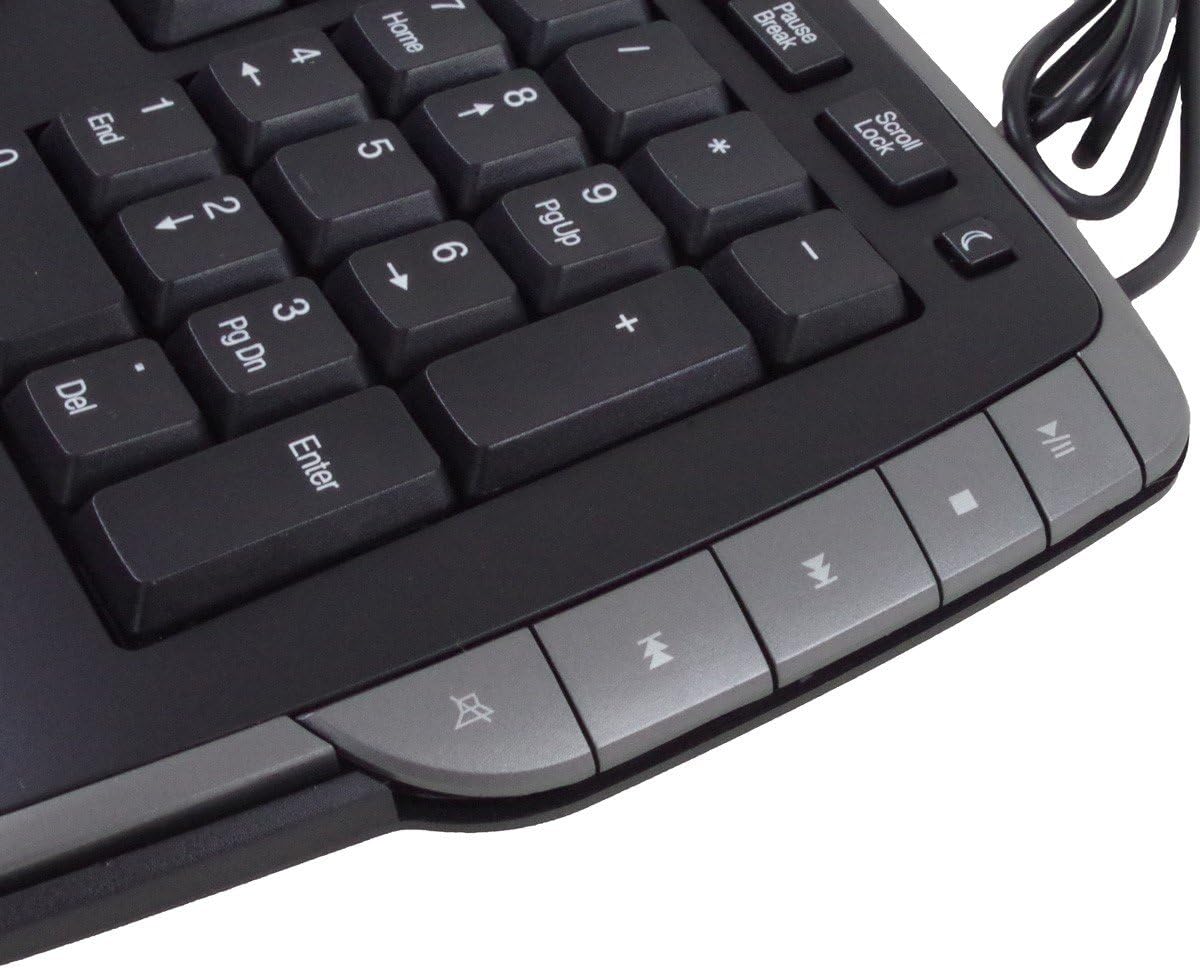
Figuur 4.2: Regterkant view of the keyboard, featuring the numeric keypad and additional multimedia control hotkeys. These keys provide convenient access to media playback controls and other system functions.
Refer to the keycap legends for specific functions of each hotkey. No additional software is required for these keys to function on most operating systems.
5. Onderhoud
Proper care and maintenance will extend the life of your keyboard.
- Skoonmaak: To clean the keyboard, disconnect it from your computer. Use a soft, lint-free cloth slightly dampened with water or a mild cleaning solution. Avoid excessive moisture. Do not spray cleaners directly onto the keyboard.
- Vloeistofblootstelling: Hierdie sleutelbord is nie waterdig nie. Avoid spilling liquids on it. If liquid spills occur, immediately disconnect the keyboard and allow it to dry completely before reconnecting.
- Stof en puin: Gebruik saamgeperste lug om stof en puin tussen die sleutels te verwyder.
- Berging: Store the keyboard in a clean, dry environment when not in use.
6. Probleemoplossing
If you encounter issues with your keyboard, try the following troubleshooting steps:
- Sleutelbord reageer nie:
- Maak seker dat die USB-kabel stewig aan beide die sleutelbord en die rekenaar se USB-poort gekoppel is.
- Probeer om die sleutelbord aan 'n ander USB-poort op jou rekenaar te koppel.
- Herbegin jou rekenaar.
- Test the keyboard on another computer, if available, to determine if the issue is with the keyboard or the computer.
- Hotkeys Not Working:
- Maak seker dat die sleutelbord behoorlik gekoppel is.
- Some hotkeys may require specific software or operating system settings to be enabled. Check your computer's control panel or system preferences for keyboard settings.
- Verkeerde karakteruitvoer:
- Verify that your operating system's keyboard language settings match the QWERTY layout of your keyboard.
7. Spesifikasies
| Handelsmerk: | Grundig |
| Modelnommer: | 72845 |
| Verbindingstegnologie: | Bedraad |
| Sleutelborduitleg: | QWERTY |
| Aantal sleutels: | Standard keys + 13 Hotkeys |
| Spesiale kenmerk: | Ergonomiese ontwerp |
| Versoenbare toestelle: | PC |
| Materiaal: | Polibutileentereftalaat |
| Kleur: | Silver (Note: Product images show a dark grey/black with silver accents) |
| Waterweerstandvlak: | Nie waterdig nie |
8. Waarborg en Ondersteuning
Information regarding specific warranty terms and availability of spare parts is not provided. For product support or warranty inquiries, please contact your retailer or the manufacturer directly. Keep your purchase receipt as proof of purchase.
9. Veiligheidsinligting
- Do not attempt to disassemble or modify the keyboard.
- Keep the keyboard away from extreme temperatures, direct sunlight, and high humidity.
- Vermy om die sleutelbord te laat val of dit aan harde impakte bloot te stel.
- Dispose of the product responsibly according to local regulations at the end of its life cycle.