
Inleiding
This manual provides comprehensive instructions for the setup, operation, and maintenance of your VTech CS6829-2 2-Handset Cordless Phone with Answering System. This system is designed for home use, offering features such as caller ID, a digital answering machine, backlit keypad, and a full duplex speakerphone for enhanced communication.
Wat is in die boks
Verifieer dat alle items in jou pakket ingesluit is:
- Basis eenheid
- 2 koordlose selfone
- Lader
- 2 adapters
- 2 batterypakke
- Telefoon lyn koord
- Muurmonteerbeugel
- Vinnige begingids
Opstelling
Follow these steps to set up your VTech CS6829-2 phone system:
- Verbind die basiseenheid:
Plug one end of the telephone line cord into the TEL LINE jack on the back of the base unit. Plug the other end into a telephone wall jack. Plug the small end of the power adapter into the POWER jack on the back of the base unit. Plug the large end of the power adapter into a wall outlet not controlled by a wall switch.
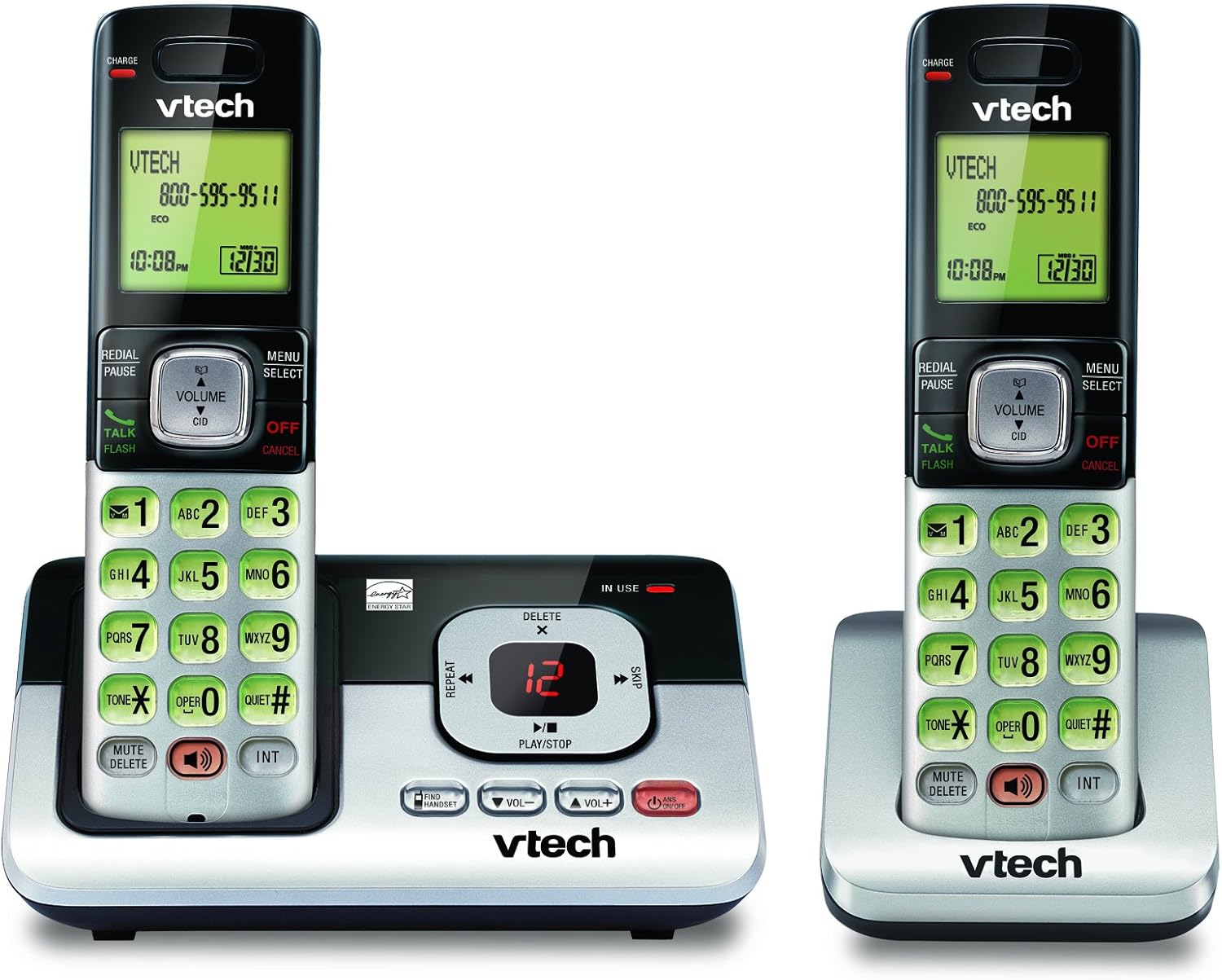
Image: The VTech CS6829-2 base unit with one handset docked, and a second handset with its charging cradle. This illustrates the main components of the phone system.
- Installeer handsetbatterye:
Open the battery compartment cover on the back of each handset. Connect the battery pack connector securely into the jack inside the compartment. Place the battery pack with the label facing up and tuck the wires inside the compartment. Close the battery compartment cover.
- Laai handtoestelle:
Place each handset in the base unit or charger with the display facing up. The CHARGE light on the handset will illuminate, indicating proper charging. Allow the handsets to charge for at least 16 hours before initial use for optimal battery performance.

Beeld: 'n Hoekige view of the VTech CS6829-2 base unit with one handset docked, and the second handset in its separate charging cradle. This shows how the handsets are placed for charging.
- Stel datum en tyd in:
After the handsets are charged, follow the on-screen prompts or refer to the quick start guide to set the date and time. This is important for accurate caller ID and answering system timestamps.
Bedryfsinstruksies
Oproepe maak en beantwoord
- Om 'n oproep te maak: Druk PRAAT / FLITS or any dialing key to get a dial tone, then dial the phone number.
- Om 'n oproep te beantwoord: Druk as die telefoon lui PRAAT / FLITS of enige skakelsleutel.
- Om 'n oproep te beëindig: Druk AF/KANSELLEER or place the handset back in the base unit/charger.
Digitale antwoordstelsel
- Boodskappe speel: Op die basiseenheid, druk SPEEL/STOP. On a handset, press MENU/KIES, scroll to "Answering System", then select "Play Messages".
- Recording an Outgoing Announcement: On the base unit or handset, navigate to the answering system menu and select "Record OGM" (Outgoing Message).
- Vee boodskappe uit: While a message is playing, press SKEE on the base unit or handset.
Luidsprekerfunksie
- To Use Speakerphone: Druk tydens 'n oproep op die SPREKER button on the handset. Press it again to switch back to the handset earpiece.
Sleutel kenmerke
- Digital Answering System with LED Indicator and Volume Control: This system records up to 14 minutes of messages, announcements, and memos. An LED indicator notifies you of new messages. Volume control keys on the base allow easy adjustment of message playback volume.
- Caller ID / Call Waiting — Stores up to 50 Calls: Displays the name, number, time, and date of incoming calls, helping you identify callers before answering.
- Volle Dupleks Luidspreker: The handset features a full duplex speakerphone, enabling natural two-way conversations where both parties can speak and be heard simultaneously.
- Verligte sleutelbord en skerm: The entire keypad and LCD screen on the handset illuminate, ensuring clear visibility and easy dialing even in low-light conditions.
- ECO Mode Power-Conserving Technology: This technology optimizes power consumption for extended battery performance and energy efficiency.
- Stil modus: Allows you to silence the ringer on both the handset and base unit immediately or for a set period, providing peace and quiet when needed.
Onderhoud
- Skoonmaak: Maak die foon en basiseenheid skoon met 'n sagte, damp lap. Moenie skoonmaaksproei of vloeibare skoonmaakmiddels gebruik nie.
- Batterysorg: Replace batteries when they no longer hold a charge. Use only the specified battery type. Dispose of old batteries responsibly according to local regulations.
- Omgewingstoestande: Vermy die plasing van die foon in direkte sonlig, naby hittebronne of in gebiede met oormatige vog.
Probleemoplossing
If you experience issues with your phone, try the following solutions:
| Probleem | Oplossing |
|---|---|
| Geen kiestoon nie. | Ensure the telephone line cord is securely plugged into both the base unit and the wall jack. Check that the power adapter is plugged into a working electrical outlet. |
| Handset laai nie. | Ensure the handset is properly seated in the base unit or charger. Clean the charging contacts on both the handset and base/charger with a dry cloth. Verify the power adapter is connected. |
| Swak klankgehalte / Statiese ruis. | Move the handset closer to the base unit. Avoid placing the phone near other electronic devices (e.g., microwaves, computers) that may cause interference. Check the telephone line cord for damage. |
| Antwoordstelsel neem nie boodskappe op nie. | Maak seker dat die antwoordstelsel AAN is. Kontroleer of die geheue vol is; vee ou boodskappe uit indien nodig. |
Spesifikasies
| Kenmerk | Detail |
|---|---|
| Modelnommer | CS6829-2 |
| Produk afmetings | 5.77 x 3.41 x 6.77 duim |
| Item gewig | 1.41 pond |
| Batterye | 2 Produkspesifieke batterye benodig (ingesluit) |
| Tipe antwoordstelsel | Digitaal |
| Beller ID geheue | Up to 50 calls |
| Antwoordstelsel Opnametyd | Tot 14 minute |
| Kleur | Swart/Silwer |
| Telefoon tipe | Koordloos |
Waarborg en Ondersteuning
Vir waarborginligting en tegniese ondersteuning, verwys asseblief na die waarborgkaart wat by u produk ingesluit is of besoek die amptelike VTech-webwerf. webwebwerf. Bewaar u aankoopbewys as bewys van aankoop vir waarborgeise.
U kan ook die VTech Winkel op Amazon vir bykomende produkinligting en ondersteuningsbronne.