
1. Inleiding
Dankie vir die aankoopasing the Zenith DVP615 Portable 7-inch LCD DVD Player. This device is designed for convenient entertainment on the go, offering multi-format disc playback and a vibrant widescreen display. This manual provides essential information for the safe and efficient operation of your new portable DVD player.
2. Veiligheidsinligting
- Kragbron: Use only the supplied AC adapter (Model DPAC1) or the specified rechargeable battery pack (Model SPB125). Using unauthorized power sources may damage the unit and void the warranty.
- Water en vog: Do not expose the unit to rain, moisture, or immerse it in water. If liquid enters the unit, disconnect power immediately and contact customer support.
- Ventilasie: Ensure proper ventilation. Do not block ventilation openings. Avoid placing the unit on soft surfaces that may obstruct airflow.
- Hitte: Hou die eenheid weg van hittebronne soos verkoelers, hitteregisters, stowe of ander apparaat (insluitend ampversterkers) wat hitte produseer.
- Skyfhantering: Handle discs by their edges. Do not touch the playback surface. Keep discs clean and free from scratches.
- Laserveiligheid: This product utilizes a Class 1 laser. Do not open the player's disc compartment while a disc is spinning. Avoid direct exposure to the laser beam.
- Batteryveiligheid: Do not disassemble, crush, or puncture the battery pack. Do not expose to high temperatures or fire. Dispose of used batteries according to local regulations.
3. Pakketinhoud
Verifieer dat alle items in die pakket teenwoordig is:
- Zenith DVP615 Portable 7-inch LCD DVD Player
- AC Power Adapter (Model DPAC1)
- Rechargeable Battery Pack (Model SPB125)
- Afstandbeheer
- Gebruikershandleiding (hierdie dokument)
4. Produk verbyview
Familiarize yourself with the components and controls of your portable DVD player.

Figuur 4.1: Zenith DVP615 Portable DVD Player with disc tray open, showing the disc spindle and laser lens. Control buttons for playback and display settings are visible on the right side of the player's base.

Figuur 4.2: Top view of the Zenith DVP615 Portable DVD Player when closed, displaying the Zenith logo and "PORTABLE DVD/CD PLAYER" text.
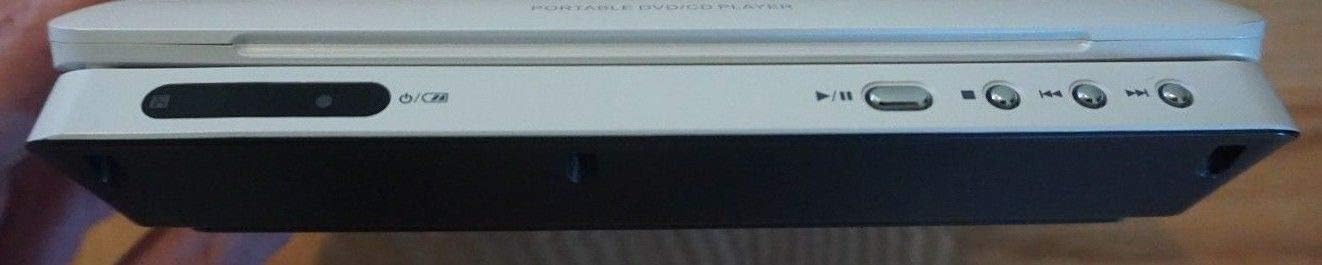
Figuur 4.3: Kant view of the Zenith DVP615 Portable DVD Player, showing the power switch, power indicator, and playback control buttons (Play/Pause, Stop, Skip Forward, Skip Backward).
4.1. Main Unit Features
- 7-inch Widescreen LCD: Provides a clear and vibrant display for your media.
- 180° Swivel and Flip Display: Laat buigsame toe viewhoeke.
- Disc Compartment: Vir die invoeging van DVD's en CD's.
- Beheerknoppies: Power, Play/Pause, Stop, Skip, Menu, Title, Angle, LCD Mode, Setup, Color/Bright.
- Poorte: DC In, AV Out, Headphone Jack.
4.2. AC Power Adapter (DPAC1)

Figuur 4.4: Close-up of the Zenith AC adapter (Model DPAC1), showing input (100-120V~27W 50/60Hz) and output (9.5V === 2.5A) specifications.
The AC adapter is used to power the DVD player from a wall outlet and to charge the rechargeable battery pack.
4.3. Rechargeable Battery Pack (SPB125)

Figuur 4.5: Top view of the Zenith rechargeable battery pack (Model SPB125), showing its specifications (DC 7.4V 2000mAh) and caution labels regarding proper use and disposal.

Figuur 4.6: Onderkant view of the Zenith rechargeable battery pack, illustrating the "PUSH" button for release and attachment mechanism.
The battery pack provides portable power for up to 3 hours of continuous playback.
5. Opstelling
5.1. Attaching the Battery Pack
- Align the battery pack with the battery compartment on the underside of the DVD player.
- Slide the battery pack into place until it clicks securely. Ensure the release latches are engaged.
5.2. Charging the Battery / Connecting to AC Power
- Connect the small plug of the AC adapter to the DC IN jack on the side of the DVD player.
- Prop die AC-adapter in 'n standaard muuraansluiting.
- The power indicator light will illuminate, indicating that the unit is receiving power and the battery is charging (if attached). Allow sufficient time for a full charge before initial portable use.
6. Bedryfsinstruksies
6.1. Skakel aan/af
- To power on, slide the POWER switch to the 'ON' position. The LCD screen will light up.
- To power off, slide the POWER switch to the 'OFF' position.
6.2. Inserting and Removing Discs
- Gently press the OPEN button to open the disc compartment lid.
- Place the disc (DVD, CD, etc.) onto the spindle with the label side facing up. Press down gently on the center of the disc until it clicks into place.
- Close the disc compartment lid firmly until it latches.
- To remove a disc, open the lid, gently press the spindle to release the disc, and lift it out by the edges.
6.3. Basiese Terugspeel
- Play/Pause (►/❚❚): Press to start playback or pause a playing disc. Press again to resume.
- Stop (■): Press to stop playback. Pressing once will stop at the current position. Pressing twice will return to the beginning of the disc.
- Skip (◀◀ / ►►): Press to skip to the previous or next chapter/track. Hold to fast reverse or fast forward.
- Spyskaart: Access the disc's main menu during DVD playback.
- Titel: Access the disc's title menu during DVD playback.
- Hoek: If available on the DVD, press to change the viewing hoek.
6.4. Vertoonaanpassings
- LCD-modus: Press to cycle through different display modes (e.g., Standard, Bright, Soft).
- Color/Bright: Press to adjust the color saturation or brightness of the LCD screen.
6.5. Multi-Format Playback
The DVP615 supports various disc formats:
- DVD-Video: Standard movie DVDs.
- DVD±R/DVD±RW/DVD±R Double Layer: Recordable DVD formats.
- Audio CD/CD-R/CD-RW: Standard audio CDs and recordable CD formats.
- WMA/JPEG/MP3: Digital audio (WMA, MP3) and image (JPEG) files burned onto compatible discs.
6.6. Gebruik die afstandbeheer
The included card-type remote control provides convenient access to all functions from a distance. Point the remote control directly at the infrared sensor on the DVD player.
7. Onderhoud
7.1. Skoonmaak van die eenheid
- Vee die buitekant van die eenheid af met 'n sagte, droë lap. Moenie skuurmiddels of oplosmiddels gebruik nie.
- For the LCD screen, use a soft, lint-free cloth specifically designed for electronics screens.
- Never use liquid cleaners directly on the screen.
7.2. Skoonmaak van skywe
- Wipe discs gently from the center outwards with a soft, lint-free cloth.
- Moenie harde chemikalieë of skuurmateriaal gebruik nie.
7.3. Berging
- When not in use for extended periods, store the DVD player in a cool, dry place.
- Remove the battery pack if storing for a very long time to prevent potential leakage.
8. Probleemoplossing
Indien u probleme met u DVD-speler ondervind, raadpleeg die volgende algemene probleme en oplossings:
| Probleem | Moontlike oorsaak | Oplossing |
|---|---|---|
| Geen krag nie | AC adapter not connected; Battery discharged; Power switch off. | Ensure AC adapter is securely connected and plugged in; Charge battery; Slide power switch to 'ON'. |
| Geen skyf bespeur nie | Skyf verkeerd geplaas; Skyf is vuil of gekrap; Onversoenbare skyfformaat. | Reinsert disc correctly; Clean or replace disc; Ensure disc format is supported (DVD-Video, CD, MP3, JPEG, WMA). |
| Geen prentjie op die skerm nie | Screen swivel position; LCD Mode setting. | Adjust the screen's swivel position; Press 'LCD Mode' button to cycle through display options. |
| Geen klank nie | Volume too low; Headphones not connected properly. | Increase volume; Ensure headphones are fully plugged into the headphone jack. |
| Afstandbeheer werk nie | Batteries dead; Obstruction between remote and player; Remote not pointed at sensor. | Replace remote batteries; Remove obstructions; Point remote directly at the player's IR sensor. |
9. Spesifikasies
Technical specifications for the Zenith DVP615 Portable DVD Player:
- Modelnommer: DVP615
- Vertoon: 7-inch Widescreen LCD, 180° Swivel and Flip
- Ondersteunde skyfformate: DVD-Video, DVD±R, DVD±RW, DVD±R Double Layer, Audio CD, CD-R, CD-RW
- Ondersteun File Formate: WMA, JPEG, MP3
- Kragtoevoer: DC 9.5V (via AC Adapter DPAC1)
- AC Adapter Invoer: 100-120V~27W 50/60Hz
- AC Adapter Uitset: 9.5V === 2.5A
- Battery tipe: Rechargeable Lithium-ion (Model SPB125)
- Battery kapasiteit: DC 7.4V 2000mAh
- Batterylewe: Up to 3 hours (approximate, varies with usage)
- Item gewig: Ongeveer 2 pond
- Afmetings (Geslote): Ongeveer 8.58 x 8.46 x 2.76 duim
- Spesiale kenmerke: Portable, Multi-Format Playback

Figuur 9.1: Onderkant view of the Zenith DVP615 Portable DVD Player, showing the product label with model number DVP615, serial number, power requirements (DC 9.5V AC Adaptor), and manufacturing details.
10. Waarborg en Ondersteuning
Zenith products are manufactured and distributed by LG Electronics U.S.A., Inc. For technical assistance or warranty inquiries, please refer to the contact information provided below or on the product's packaging and labels.
Tolvry nommer: 1-800-243-0000
Bewaar asseblief u aankoopbewys vir waarborgdiens.