
Inleiding
The Bogen TAMB2PS Telephone Access Module is designed to serve as an interface between a telephone system and a paging system. This module facilitates dual-purpose voice paging, allowing for seamless communication. It is compatible with various analog telephone port types and supports both station port and trunk port operations. A 24V power supply is included and is essential for all operational modes.
Belangrike veiligheidsinligting
WAARSKUWING: This product contains chemicals known to the State of California to cause cancer and birth defects or other reproductive harm. Please handle with care and refer to local regulations for disposal.
Produk verbyview en sleutelkenmerke
The TAMB2PS module integrates telephone and paging functionalities. Its key features include:
- 600-ohm output: Ensures compatibility with various audio systems.
- Adjustable tone volume: Allows customization of alert tones.
- Background music input with volume control: Enables integration of background music, which can be muted during paging.
- Dual-purpose voice paging: Supports both telephone and paging system integration.
- Analog telephone port compatibility: Works with a full range of analog telephone port types.
- Station port or trunk port operation: Buigsame ontplooiingsopsies.
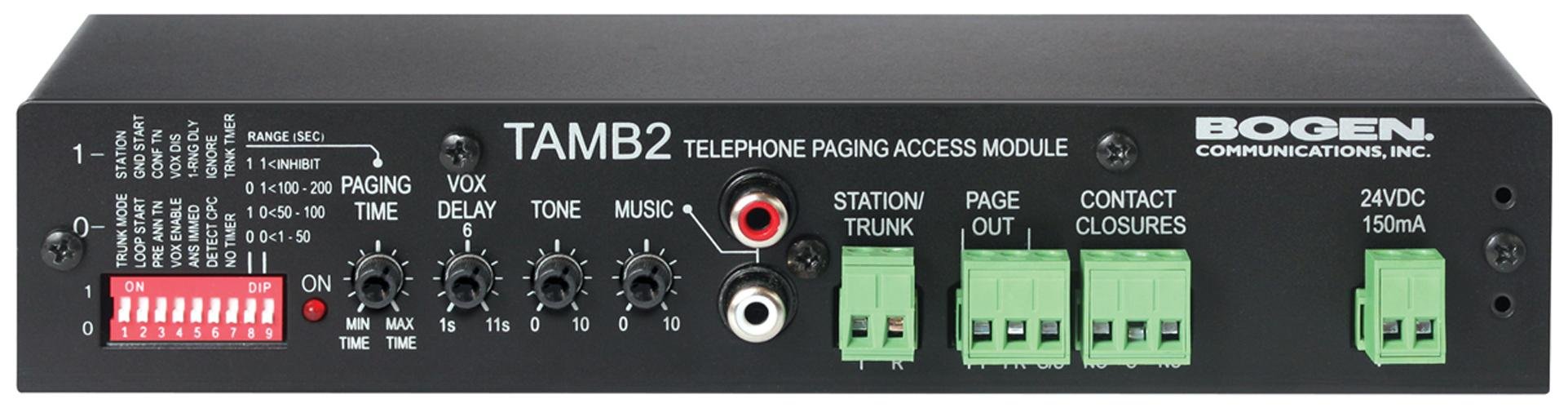
Figure 1: Bogen TAMB2PS Telephone Access Module with included power supply. This image shows the front and side view of the compact black unit, highlighting its various ports and indicators.
Opstelling en installasie
Follow these steps to properly set up your Bogen TAMB2PS module:
- Unpack the Module: Carefully remove the TAMB2PS module and its 24V power supply from the packaging.
- Connect to Telephone System: Connect the module to your analog telephone system. The TAMB2PS supports both station port and trunk port configurations. Refer to your telephone system's documentation for the appropriate connection method.
- Connect to Paging System: Connect the 600-ohm output of the TAMB2PS to the input of your paging amplifier. Ensure proper impedance matching for optimal audio quality.
- Background Music Input (Optional): If using background music, connect your audio source (e.g., CD player, radio) to the line-level input RCA jacks on the module. Adjust the background music volume control as needed.
- Koppel kragtoevoer: Plug the included 24V power supply into the designated power input on the TAMB2PS module, then connect the power supply to a standard electrical outlet. The module requires continuous power for operation.
- Aanvanklike toetsing: After all connections are made, perform a test page through the telephone system to verify proper functionality and audio output.
Operasie
Once installed, the Bogen TAMB2PS operates as follows:
- Voice Paging: To initiate a page, access the telephone line connected to the TAMB2PS module. Speak into the telephone handset to broadcast your message through the connected paging system.
- Background Music Muting: When a page is initiated, the TAMB2PS automatically mutes the background music playing through its input, allowing the page to be heard clearly. Music resumes once the page is complete.
- Toonvolume-aanpassing: Use the adjustable tone volume control on the module to set the desired level for any alert tones generated by the system.
Onderhoud
The Bogen TAMB2PS module requires minimal maintenance to ensure long-term performance:
- Skoonmaak: Periodically wipe the exterior of the unit with a soft, dry cloth. Do not use liquid cleaners or solvents.
- Omgewing: Ensure the module is installed in a dry, well-ventilated area, away from direct sunlight, extreme temperatures, and excessive dust.
- Kabelverbindings: Kontroleer gereeld alle kabelverbindings om seker te maak hulle is veilig en vry van skade.
Probleemoplossing
If you encounter issues with your TAMB2PS module, refer to the following common problems and solutions:
- Geen oudio-uitvoer nie:
- Verify the 24V power supply is correctly connected and receiving power.
- Check all audio connections between the TAMB2PS and the paging amplewendiger.
- Ensure the telephone line connected to the module is active and functioning.
- Confirm the paging ampDie verligter is aangeskakel en die volume is dienooreenkomstig aangepas.
- Low Paging Volume:
- Adjust the output level control on the TAMB2PS module.
- Increase the input sensitivity or volume on your paging amplewendiger.
- Ensure the telephone system's output level to the TAMB2PS is sufficient.
- Humming or Static Noise:
- Check for ground loops. Try connecting the TAMB2PS and paging amplifier to the same power outlet or using a ground loop isolator.
- Ensure all cables are properly shielded and not running parallel to power lines.
- Inspekteer kabels vir skade of los verbindings.
- Background Music Not Muting:
- Verify the background music source is connected to the correct input on the TAMB2PS.
- Ensure the telephone system is properly signaling the TAMB2PS when a page is initiated.
If problems persist, contact Bogen customer support or a qualified technician.
Tegniese spesifikasies
| Kenmerk | Spesifikasie |
|---|---|
| Handelsmerk | Bogen |
| Model Naam | TAMB2PS |
| Item Modelnommer | TAMB2PS |
| Produkafmetings (LxBxH) | 8.5 x 3 x 1.75 duim |
| Item gewig | 2 pond |
| Connector Tipe | RCA (for background music input) |
| Maksimum Voltage | 24 Volts DC (from included power supply) |
| Uitsetimpedansie | 600 ohm |
| Binne/buiteluggebruik | Binneshuise |
| UPC | 643749567672, 765368482058 |
| ASIN | B00D61HS2I |
Opmerking: Spesifikasies kan sonder kennisgewing verander word.
Waarborg inligting
Specific warranty details for the Bogen TAMB2PS Telephone Access Module are typically provided with the product packaging or can be found on the official Bogen Communications website. Please retain your proof of purchase for warranty claims. For the most current and detailed warranty information, please visit the manufacturer's official support page or contact your authorized dealer.
Kliënte ondersteuning
For technical assistance, product inquiries, or further support regarding your Bogen TAMB2PS module, please contact Bogen Communications directly:
- Vervaardiger Webwebwerf: Visit the official Bogen Communications webwebwerf vir produkdokumentasie, algemene vrae en kontakinligting.
- Kliëntediens: Verwys na die kontakbesonderhede wat in u produkverpakking of op die vervaardiger se webwebwerf vir telefoniese of e-posondersteuning.
When contacting support, please have your product model number (TAMB2PS) and purchase information readily available.