
1. Inleiding
This manual provides detailed instructions for the installation, operation, and maintenance of your SpeaKa Professional DL-1117 In-Wall/Ceiling Speaker. Please read this manual thoroughly before installation and use to ensure proper function and safety. Keep this manual for future reference.
2. Produk verbyview
The SpeaKa Professional DL-1117 is a high-quality in-wall/ceiling speaker designed for various audio applications in both residential and industrial environments. Its robust metallic construction ensures durability and reliable performance.

Figuur 2.1: Voorkant view of the SpeaKa Professional DL-1117 In-Wall/Ceiling Speaker. This image shows the speaker's front grille and mounting frame.
Sleutel kenmerke:
- Ideal for wall and ceiling mounting.
- Suitable for industrial and residential spaces.
- Solid metallic construction for enhanced durability.
3. Spesifikasies
| Spesifikasie | Waarde |
|---|---|
| Handelsmerk | SpeaKa Professional |
| Model Naam | DL-1117 |
| Item Modelnommer | SP-1207908 |
| Tipe luidspreker | In-Wall/Ceiling Speaker |
| Luidsprekergrootte | 8 Inches (77mm INWALL SPEAKER as per label) |
| Impedansie | 8 ohm |
| Power (Nominal) | 15 Watt |
| Maksimum luidspreker-uitsetkrag | 25 Watt |
| Frekwensierespons | 90Hz - 17,000Hz (as per label) |
| Montage tipe | Ceiling Mount (also suitable for wall mount) |
| Produkafmetings (L x B x H) | 11 x 11 x 7 cm |
| Item gewig | 520 gram |
| Kleur | Swart |
| Aantal eenhede | 1 eenheid |
| Aanbevole gebruike | For computer (audio output), general audio systems |
| Versoenbare toestelle | Desktop computer, Laptop (via ampontvanger/verskaffer) |

Figuur 3.1: Dimensional drawing of the SpeaKa Professional DL-1117 speaker. This diagram illustrates the speaker's diameter (Ø100mm), depth (49mm), and cutout dimensions (Ø74mm, Ø81mm).
Figuur 3.2: Terug view of the SpeaKa Professional DL-1117 speaker, showing the product label with model number DL-1117BK8, frequency response, power rating, and impedance.
4. Veiligheidsinstruksies
Neem asseblief die volgende veiligheidsmaatreëls in ag om beserings of skade aan die produk te voorkom:
- Elektriese veiligheid: Ensure all power to the audio system is disconnected before making any connections or performing installation. Incorrect wiring can cause damage to the speaker or amplewendiger.
- Installasie: Installation should be performed by a qualified professional if you are unsure about electrical wiring or structural integrity. Ensure the mounting surface (wall or ceiling) can safely support the weight of the speaker.
- Omgewing: Do not expose the speaker to excessive moisture, extreme temperatures, or direct sunlight.
- Skoonmaak: Gebruik 'n sagte, droë lap vir skoonmaak. Moenie vloeibare skoonmaakmiddels of aërosols gebruik nie.
- demontage: Moenie probeer om die luidspreker uitmekaar te haal of te wysig nie. Dit sal die waarborg ongeldig maak en kan skade of besering veroorsaak.
5. Opstelling en installering
Follow these steps for proper installation of your in-wall/ceiling speaker:
5.1 Gereedskap benodig
- Boor
- Hole saw (matching cutout diameter, approx. Ø74-81mm)
- Skroewedraaier
- draad strippers
- Speaker wire (appropriate gauge for your amplifier and cable length)
5.2 Montageplek
Choose a suitable location in your wall or ceiling. Ensure there are no electrical wires, plumbing, or structural elements behind the chosen area. Use a stud finder if necessary.
5.3 Sny die opening
- Carefully mark the desired cutout diameter on the wall or ceiling. Refer to the dimensions in Figure 3.1.
- Using a hole saw, carefully cut the opening.
5.4 Bedrading
- Trek luidsprekerdraad vanaf jou amplifier/receiver to the cutout opening.
- Strip approximately 1/2 inch (12mm) of insulation from the ends of the speaker wire.
- Connect the speaker wires to the terminals on the back of the DL-1117 speaker. Ensure correct polarity (+ to + and - to -) from the amplifier to the speaker. The terminals are typically screw-type or spring-loaded.
5.5 Installing the Speaker
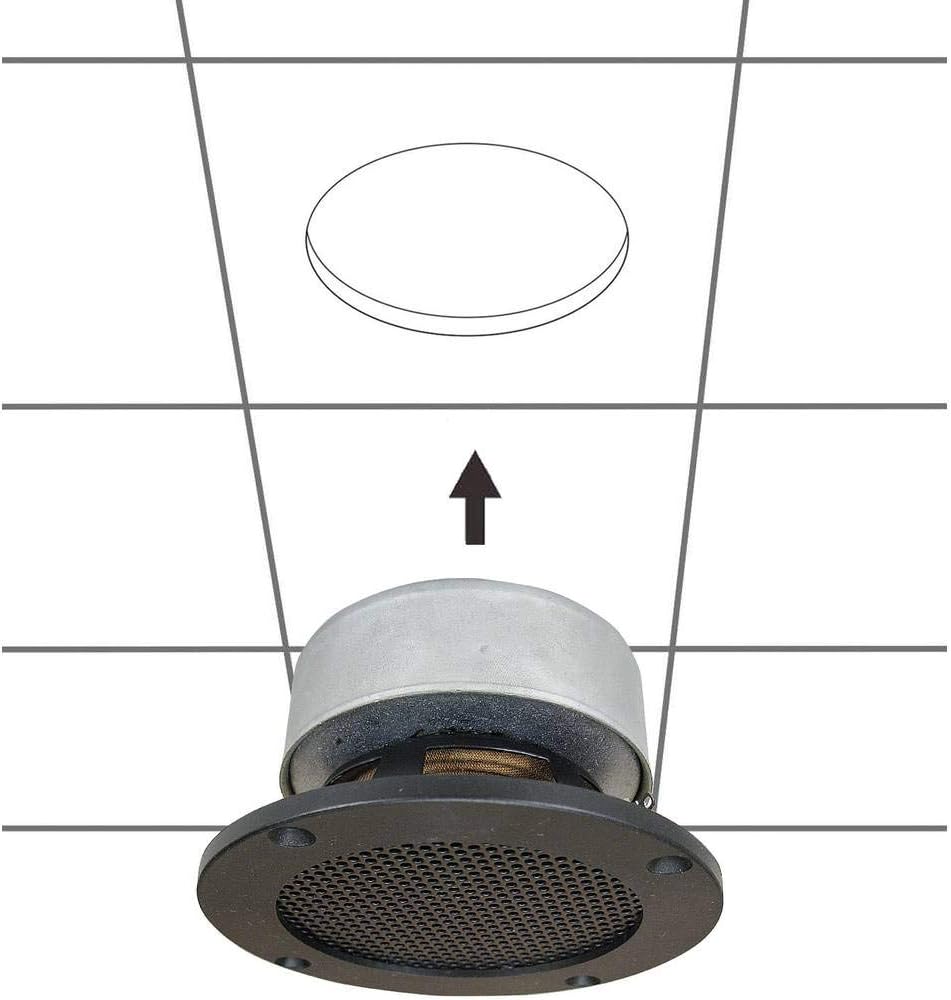
- Carefully insert the speaker into the cutout opening.
- Secure the speaker using the integrated mounting clips or screws, if applicable. For this model, the design suggests it is inserted and then secured from the front.

Figuur 5.1: Diagram illustrating the installation process of the SpeaKa Professional DL-1117 speaker into a ceiling opening. The speaker is inserted from below into the pre-cut hole.
6. Bedryfsinstruksies
Once the speaker is correctly installed and wired to your ampleweraar of ontvanger:
- Maak seker dat alle verbindings veilig is.
- Skakel jou ampverligter/ontvanger.
- Start playing audio through your connected source.
- Pas die volume op jou amplifier/receiver to a comfortable listening level. Avoid excessively high volumes that could distort the sound or damage the speaker.
7. Onderhoud
The SpeaKa Professional DL-1117 speaker requires minimal maintenance:
- Skoonmaak: Periodically wipe the speaker grille and frame with a soft, dry cloth to remove dust. Do not use abrasive cleaners or solvents.
- Inspeksie: Occasionally check the speaker for any visible damage or loose connections.
8. Probleemoplossing
As jy probleme met jou luidspreker ondervind, raadpleeg die volgende algemene probleme en oplossings:
| Probleem | Moontlike oorsaak | Oplossing |
|---|---|---|
| Geen klank van luidspreker nie | Los of verkeerde bedrading Ampontvanger/luidspreker af of gedemp Brontoestel speel nie klank nie | Check all speaker wire connections for proper polarity and tightness. Verseker amplifier/receiver is on and not muted, and volume is up. Verify audio is playing from the source device. |
| Verwronge klank | Volume te hoog Swak kwaliteit klankbron Damaged speaker wire | Reduce the volume on your ampverligter/ontvanger. Probeer 'n ander oudiobron om bronprobleme uit te skakel. Inspect speaker wires for fraying or damage and replace if necessary. |
| Intermitterende klank | Los verbindings Foutief ampverligter kanaal | Kontroleer en beveilig alle luidsprekerdraadverbindings. Toets die luidspreker met 'n ander amplifier channel or a known working amplewendiger. |
If the problem persists after trying these solutions, please contact SpeaKa Professional customer support.
9. Waarborg en Ondersteuning
For warranty information and customer support, please refer to the documentation provided with your purchase or visit the official SpeaKa Professional webwebwerf. Bewaar u bewys van aankoop vir waarborgeise.
Vervaardiger: SpeaKa Professional
ASIN: B00CS2V1AQ