
1. Inleiding
Thank you for choosing the Fonestar AS-24U Hi-Fi USB/SD/MP3 Amplifier. This manual provides essential information for the safe and efficient operation of your device. Please read it thoroughly before use and retain it for future reference.
2. Veiligheidsinstruksies
- Kragtoevoer: Verseker die amplifier is connected to a power source matching the specified voltage (230V).
- Ventilasie: Moenie ventilasie-openinge blokkeer nie. Laat voldoende spasie rondom die eenheid toe vir behoorlike lugvloei om oorverhitting te voorkom.
- Vog: Hou die amplifier away from water, moisture, and high humidity environments. Do not expose it to dripping or splashing.
- Hittebronne: Vermy die plasing van die eenheid naby hittebronne soos verkoelers, hitteregisters, stowe of ander hitteproduserende toestelle.
- Skoonmaak: Disconnect the power cord before cleaning. Use a dry, soft cloth. Do not use liquid cleaners or aerosol cleaners.
- Diens: Moenie probeer om hierdie produk self te onderhou nie. Verwys alle diens na gekwalifiseerde dienspersoneel.
- Voorwerp/vloeistofinvoer: Moet nooit voorwerpe van enige aard in hierdie produk deur openinge druk nie, aangesien dit gevaarlike voltage punte of kort-uit dele wat kan lei tot 'n brand of elektriese skok.
3. Produk verbyview
3.1 Voorpaneel
The front panel features controls for power, input selection, volume adjustment, and USB/SD media playback. It also includes a display for media information.
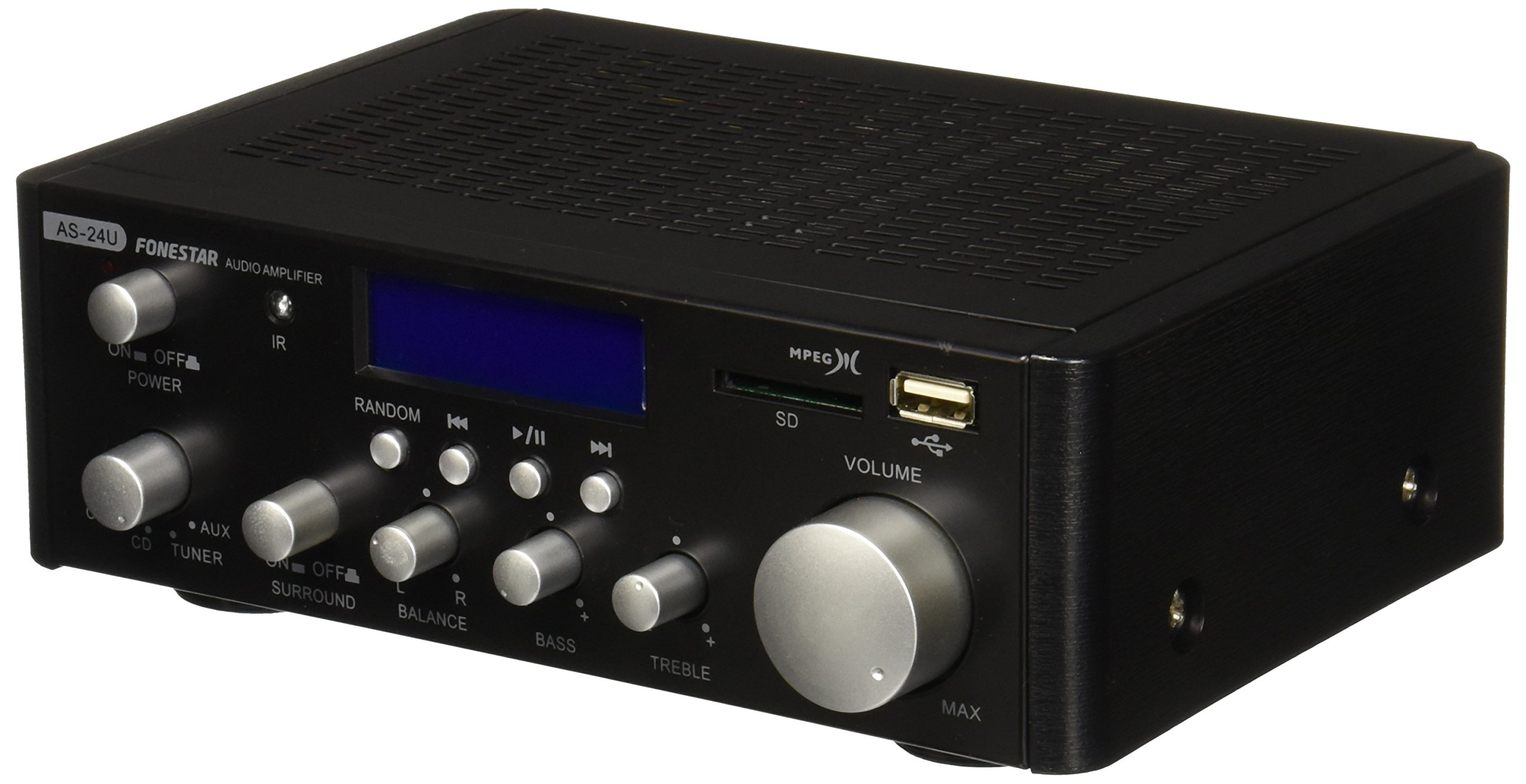
Beeld 1: Voorkant view of the Fonestar AS-24U amplifier, showing the main controls and display.
3.2 Agterpaneel
The rear panel provides all necessary connections for audio input sources, speaker outputs, and power.

Prent 2: Agter view of the Fonestar AS-24U amplifier, detailing input/output ports and power connection.
- INPUT (AUX, TUNER, CD): RCA stereo inputs for connecting external audio sources.
- SPEAKER OUT (STEREO): Spring clip terminals for connecting passive speakers (4-8 Ω).
- SPEAKER OUT (SURROUND): Additional spring clip terminals for surround speakers (8 Ω).
- KRAG IN: AC power input for the main power cable.
- VOLTAGE SELECTOR: Switch for selecting between 115V and 230V power input. Ensure this is set correctly for your region.
3.3 afstandbeheer
The included remote control allows for convenient operation of the amplifier's media playback functions.
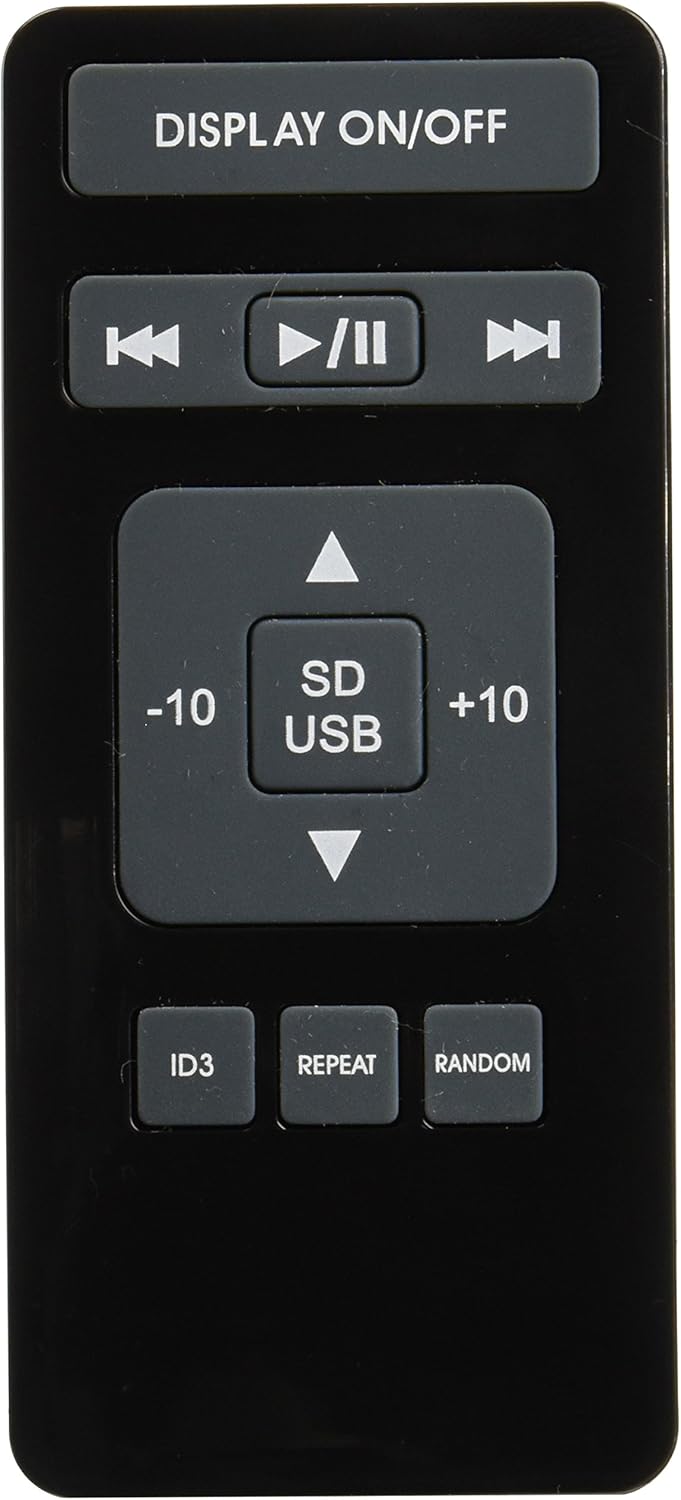
Image 3: Remote control for the Fonestar AS-24U amplifier, showing buttons for media playback and display control.
- UITSTALLING AAN / UIT: Toggles the front panel display.
- PLAY/PAUSE, PREVIOUS/NEXT: Controls for media playback.
- SD/USB: Selects between SD card and USB drive as the media source.
- -10/+10: Skips tracks by 10.
- ID3: Displays ID3 tag inligting vir MP3 files.
- HERHAAL: Toggles repeat modes (e.g., repeat one, repeat all).
- LOSLOOP: Toggles random playback.
4. Opstelling
4.1 Koppel luidsprekers
- Verseker die amplifier is powered off and unplugged.
- Connect your passive speakers to the SPEAKER OUT terminals on the rear panel.
- Match the positive (+) terminal on the ampluidspreker aan die positiewe (+) terminaal op jou luidspreker, en die negatiewe (-) aan die negatiewe (-).
- For stereo speakers, use the 4-8 Ω terminals. For surround speakers, use the 8 Ω terminals. Ensure your speakers' impedance matches the amplaaier se spesifikasies.
4.2 Verbinding van klankbronne
- Connect your audio devices (e.g., CD player, tuner, auxiliary device) to the corresponding RCA INPUT jacks (CD, TUNER, AUX) on the rear panel.
- Ensure left and right channels are correctly matched (red for right, white for left).
4.3 Kragverbinding
- Verify the VOLTAGE SELECTOR switch on the rear panel is set to the correct voltage for your region (e.g., 230V).
- Connect the power cable to the POWER IN socket on the rear panel and then to a suitable wall outlet.
5. Bedryfsinstruksies
5.1 Aan-/afskakel
Press the power button on the front panel to turn the amplifier on or off. A soft start protection circuit is integrated.
5.2 Kies van Invoerbron
Use the input selector knob or buttons on the front panel to choose between CD, TUNER, AUX, USB, or SD inputs.
5.3 Aanpassing van volume
Rotate the main volume knob on the front panel to adjust the overall sound level. Start with a low volume and gradually increase it to a comfortable listening level.
5.4 USB/SD-terugspeel
- Insert a USB flash drive or SD card containing MP3 audio files into the respective slot on the front panel.
- Select the USB or SD input using the input selector.
- Use the playback controls (Play/Pause, Previous/Next) on the front panel or remote control to manage your music.
- The remote control allows for additional functions like skipping 10 tracks (+10/-10), displaying ID3 tags, repeating tracks, and random playback.
6. Onderhoud
6.1 Skoonmaak
Om die skoon te maak amplifier, first unplug it from the power outlet. Use a soft, dry cloth to wipe down the exterior surfaces. Do not use abrasive cleaners, waxes, or solvents as they may damage the finish.
6.2 Berging
As die stoor van die amplifier for an extended period, ensure it is unplugged, clean, and stored in a cool, dry place away from direct sunlight and extreme temperatures.
7. Probleemoplossing
- Geen krag:
- Kyk of die kragkabel stewig aan beide die amplifier and the wall outlet.
- Maak seker dat die muuraansluiting funksioneel is.
- Verify the VOLTAGE SELECTOR switch is set correctly.
- Geen klank:
- Confirm that the correct input source is selected.
- Kontroleer alle luidsprekerverbindings vir korrekte polariteit en stewige passing.
- Maak seker dat die volume verhoog is en nie gedemp is nie.
- Toets met 'n ander klankbron.
- Verwronge klank:
- Verminder die volume.
- Kontroleer luidsprekerimpedansie-versoenbaarheid.
- Maak seker dat oudiokabels nie beskadig is nie en stewig gekoppel is.
- USB/SD Playback Issues:
- Ensure the USB drive or SD card is formatted to a compatible file stelsel (bv. FAT32).
- Verifieer dat die klank files is in MP3 -formaat.
- Probeer 'n ander USB-skyf of SD-kaart.
8. Spesifikasies
| Handelsmerk | FONESTAR |
| Model | AS-24U |
| Stereo Power Output | 25 + 25 W max, 15 + 15 W RMS (4 Ω), 12 + 12 W RMS (8 Ω) |
| Surround Power Output | 10 + 10 W max, 6 + 6 W RMS (8 Ω) |
| Insette | 3 stereo (CD, Tuner, AUX), 2 x RCA 400 mV |
| Beskermings | Sagte begin, kortsluiting, oorbelasting |
| Voltage | 230 Volt |
| Afmetings (L x B x H) | 5 x 5 x 10 cm (ongeveer 50 x 50 x 100 mm) |
| Gewig | 1.9 kg |
| Luidsprekerverbinding | Bedraad |
9. Waarborg en Ondersteuning
This Fonestar AS-24U amplifier comes with a standard manufacturer's warranty. Please refer to the warranty card included with your purchase for specific terms and conditions. For technical support, service, or warranty claims, please contact your retailer or the official Fonestar customer service.