
Inleiding
This manual provides instructions for the Vivanco RR 220 remote control, designed for compatibility with Samsung Smart TVs. Please read this manual thoroughly before using the device to ensure proper operation and to understand its features.
Pakketinhoud
- Vivanco RR 220 Remote Control
- Hierdie gebruikershandleiding
Let wel: Batterye is nie ingesluit nie en moet afsonderlik aangekoop word.
Opstelling
1. Battery Installasie
- Vind die batterykompartement aan die agterkant van die afstandbeheer.
- Skuif die batteryklep afwaarts of druk die grendel en lig op om oop te maak.
- Insert two (2) AAA batteries, ensuring the positive (+) and negative (-) terminals align with the markings inside the compartment.
- Plaas die batteryklep terug en maak seker dat dit stewig in plek klik.
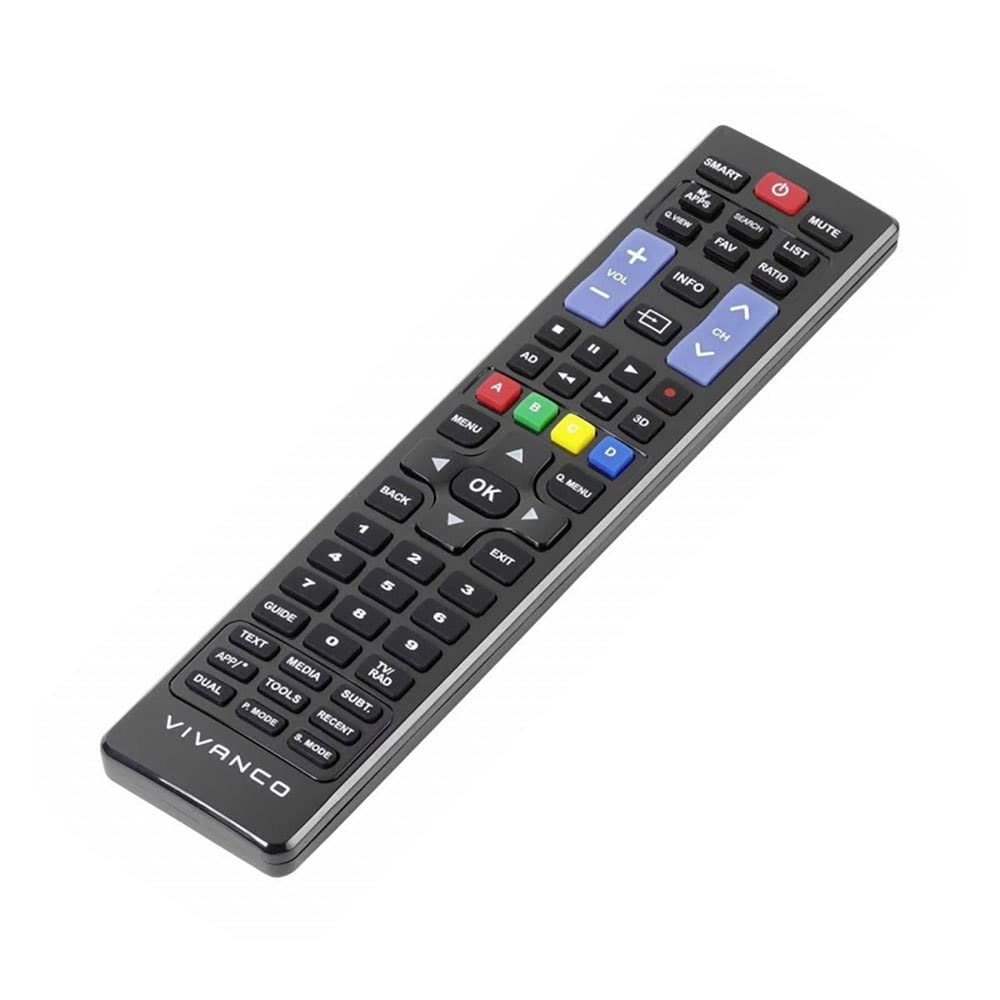
Prent 1: Vivanco RR 220 remote control. This image displays the front of the remote control, highlighting its 57 buttons and ergonomic design. The battery compartment is located on the reverse side.
2. Aanvanklike gebruik
The Vivanco RR 220 is pre-programmed for Samsung Smart TVs. No additional setup or pairing is typically required. Once batteries are installed, point the remote control towards your Samsung Smart TV and press the Power button to test functionality.
Bedryfsinstruksies
The remote control features 57 buttons, providing comprehensive control over your Samsung Smart TV and compatible devices. Below are common button functions:
- Kragknoppie: Skakel die TV aan of af.
- Getalknoppies (0-9): For direct channel selection or data input.
- Volume op/af: Pas die klankvolume aan.
- Kanaal op/af: Verander TV-kanale.
- Demp-knoppie: Maak die TV-klank stil.
- Navigasieblok (Op, Af, Links, Regs, Enter): Word gebruik om deur spyskaarte te navigeer en opsies te kies.
- Terug/Terug-knoppie: Keer terug na die vorige skerm of spyskaart.
- Smart Hub/Home Button: Accesses the Smart Hub or main menu of your Samsung Smart TV.
- Bron/invoer-knoppie: Kies invoerbronne (HDMI, AV, ens.).
- Kleurknoppies (rooi, groen, geel, blou): For specific functions within certain applications or menus, as indicated on-screen.
- Terugspeelkontroles (Speel, Pouseer, Stop, Vinnig Vorentoe, Terugspoel): Controls media playback on compatible devices or apps.
For specific functions related to your TV model, refer to your Samsung TV's user manual.
Onderhoud
Maak die afstandbeheer skoon
- Gebruik 'n sagte, droë lap om die oppervlak van die afstandbeheerder af te vee.
- Vir hardnekkige vuiligheid, effens dampen die lap met water of 'n sagte, nie-skuur skoonmaker.
- Moenie harde chemikalieë, oplosmiddels of skuurmiddels gebruik nie, aangesien dit die afstandbeheerder se afwerking of interne komponente kan beskadig.
- Maak seker dat geen vloeistof die afstandbeheerder deur die knoppie-openinge of die batterykompartement binnedring nie.
Battery vervanging
Replace batteries when the remote's response becomes sluggish or it stops functioning. Always replace both batteries simultaneously with new AAA alkaline batteries. Do not mix old and new batteries or different types of batteries.
Probleemoplossing
| Probleem | Moontlike oorsaak | Oplossing |
|---|---|---|
| Afstandbeheer werk nie. |
|
|
| Sommige knoppies funksioneer nie. |
|
|
Spesifikasies
- Handelsmerk: Vivanco
- Model Naam: RR 220
- Produkmodelnommer: 38016
- Versoenbare toestelle: Home cinema, DVD/Blu-ray player, Television (Samsung Smart TV compatible)
- Verbindingstegnologie: Wireless IR (Infrared)
- Aantal knoppies: 57
- Battery tipe: 2 x AAA (Alkaliese batterye word aanbeveel)
- Batterye ingesluit: Nee
- Produk afmetings: 18 x 4.8 x 2.3 cm
- Produk gewig: 80 g
- Maksimum reeks: 15 XNUMX meter
- Spesiale kenmerke: IPTV, DVB-T, HDTV compatibility