
1. Inleiding
This manual provides detailed instructions for the proper use and maintenance of your TFA 38.2028.02 Digital Timer and Stopwatch. This device is designed for precise timekeeping in various applications, featuring a reversible display, touch-sensitive buttons, and magnetic mounting options. Please read this manual thoroughly before operating the device.
2. Produkkenmerke
- Reversible Display: Maak dit maklik moontlik viewvanuit verskillende hoeke.
- Touch-Sensitive Buttons: For intuitive operation.
- Agterlig: Bied duidelike sigbaarheid in lae ligtoestande.
- Magnetiese Montering: Securely attaches to metallic surfaces.
- Wall or Tabletop Mounting: Veelsydige plasingsopsies.
- Timer reeks: Counts up to 99 minutes and 59 seconds.
- Kompakte ontwerp: Dimensions of 76 x 25 x 76 mm.
3. Pakketinhoud
- TFA 38.2028.02 Digital Timer and Stopwatch Unit
- Gebruikershandleiding (hierdie dokument)
Note: 2 x 1.5V AAA batteries are required and not included in the package.
4. Opstelling
4.1 Battery installasie
- Vind die batteryklepdeksel aan die agterkant van die eenheid.
- Skuif of lig die deksel liggies op om die kompartement oop te maak.
- Plaas twee (2) 1.5V AAA-batterye in en maak seker dat die polariteit (+/-) korrek is soos aangedui in die kompartement.
- Plaas die batteryklepdeksel terug en maak seker dat dit stewig vasklik.
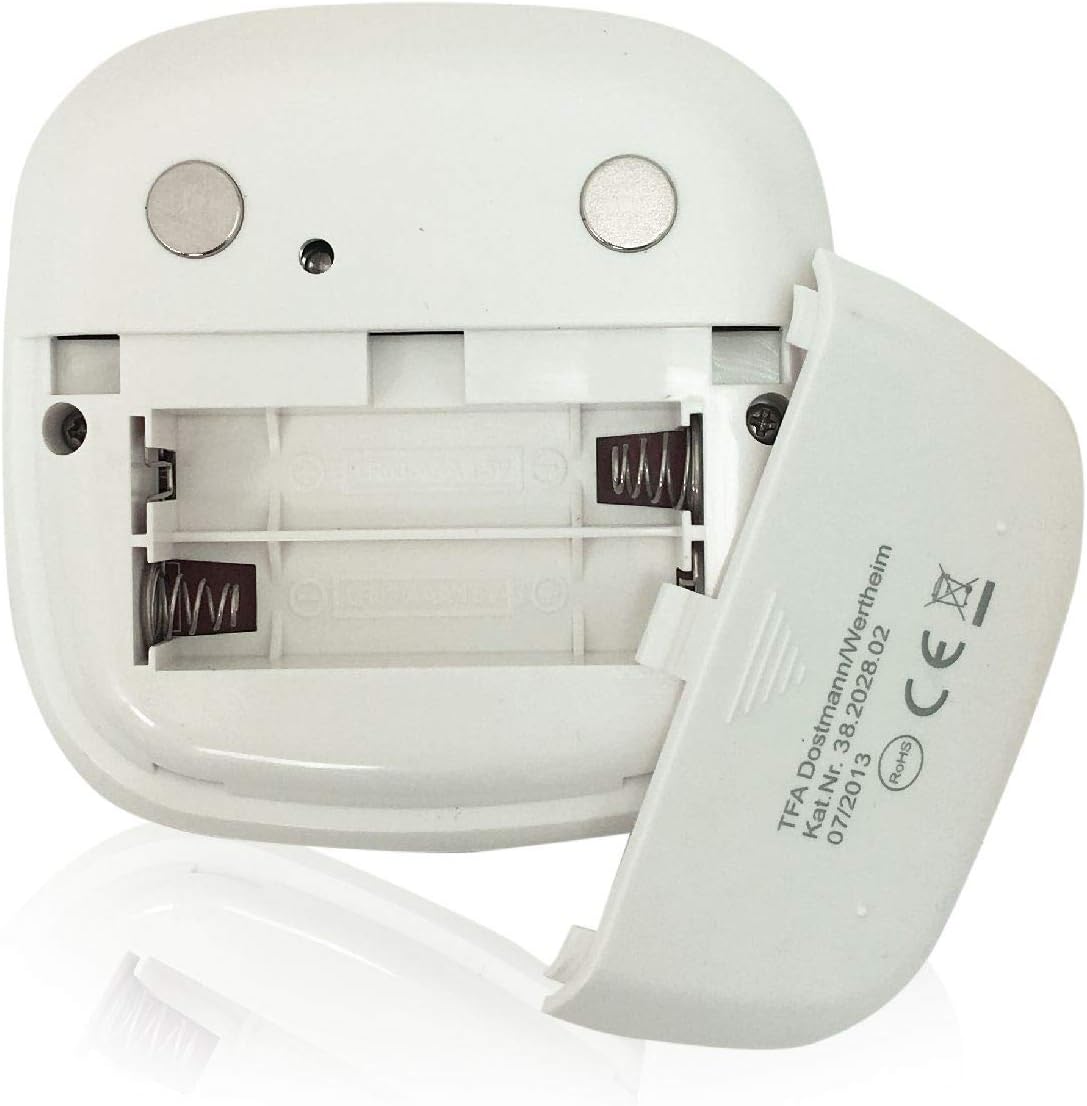
Beeld: Agter view of the timer with the battery compartment open, illustrating where to insert the two AAA batteries.
4.2 Aanvanklike aanskakeling
Once batteries are installed, the display will illuminate, and the device will be ready for use. The default display shows "00:00".
5. Bedryfsinstruksies

Beeld: Voorkant view of the TFA 38.2028.02 timer, highlighting the digital display and the three touch-sensitive buttons: 'M' for minutes, 'S' for seconds, and 'S/S' for Start/Stop.
5.1 Knoppie Funksies
- M (Minutes): Press to increase minutes. Hold to rapidly increase minutes.
- S (Seconds): Press to increase seconds. Hold to rapidly increase seconds.
- S/S (Start/Stop): Press to start or stop the timer/stopwatch.
5.2 Setting the Timer (Countdown)
- Ensure the display shows "00:00". If not, press M en S gelyktydig om te herstel.
- Druk die M button to set the desired minutes (up to 99 minutes).
- Druk die S button to set the desired seconds (up to 59 seconds).
- Sodra die verlangde tyd ingestel is, druk die S/S knoppie om die aftelling te begin.
- Om die aftelling te onderbreek, druk S/S weer. Druk S/S te hervat.
- When the timer reaches "00:00", an alarm will sound. Press any button to stop the alarm.
5.3 Using the Stopwatch (Count-up)
- Ensure the display shows "00:00". If not, press M en S gelyktydig om te herstel.
- Druk die S/S button to start the count-up. The display will begin counting from "00:00".
- Druk op om die stophorlosie te onderbreek S/S weer. Druk S/S te hervat.
- To reset the stopwatch to "00:00", pause the stopwatch, then press M en S gelyktydig.
5.4 Agtergrondbeligtingsfunksie
The display features a backlight for improved visibility. The backlight activates automatically when buttons are pressed and typically remains on for approximately 30-40 seconds before dimming to conserve battery life.
6. Monteer Opsies
The TFA 38.2028.02 timer offers flexible mounting solutions:
- Magnetiese aanhegting: The back of the timer is equipped with magnets, allowing it to be securely attached to refrigerators, oven hoods, or any other metallic surface.
- Tafelbladplasing: The timer's design allows it to stand upright on a flat surface, such as a kitchen counter or desk.
- Muurmontering: The unit can also be mounted on a wall using a small hook or screw (not included) through the designated hole on the back.

Beeld: Agter view of the timer, showing the integrated magnets for secure attachment to metallic surfaces and the model number.
7. Onderhoud
7.1 Skoonmaak
To clean the timer, wipe it with a soft, damp cloth. Do not use abrasive cleaners or immerse the device in water. Avoid getting moisture into the battery compartment or display area.
7.2 Batteryvervanging
When the display becomes dim or the device stops responding, it is time to replace the batteries. Follow the battery installation steps in Section 4.1. Always use fresh 1.5V AAA batteries and dispose of old batteries responsibly.
8. Probleemoplossing
| Probleem | Moontlike oorsaak | Oplossing |
|---|---|---|
| Toestel skakel nie aan nie. | Batterye is leeg of verkeerd geïnstalleer. | Kontroleer die polariteit van die batterye of vervang dit met nuwe AAA-batterye. |
| Die skerm is dof of flikker. | Lae batterykrag. | Vervang batterye. |
| Knoppies reageer nie. | Low battery power or temporary software glitch. | Replace batteries. If problem persists, remove batteries for 1 minute and reinsert. |
| Timer alarm is too quiet. | Alarm volume is fixed and cannot be adjusted. | Ensure the timer is placed in a location where the alarm can be heard. |
9. Spesifikasies
| Kenmerk | Detail |
|---|---|
| Modelnommer | 38.2028.02 |
| Handelsmerk | TFA |
| Afmetings (L x B x H) | 76 x 25 x 76 mm (approximately 2.5P x 7.6l x 7.6H cm) |
| Gewig | 92 gram |
| Materiaal | Plastic with integrated magnets |
| Kragtoevoer | 2 x 1.5V AAA-batterye (nie ingesluit nie) |
| Timer reeks | Up to 99 minutes, 59 seconds |
| Vertoon | Digital with backlight |
| Monteer Opsies | Magnetic, Tabletop, Wall-mountable |

Image: The timer held in a hand, visually demonstrating its compact size and indicating its dimensions (7.6 cm x 7.6 cm x 2.5 cm).
10. Waarborg en Ondersteuning
TFA products are manufactured with quality and precision. For specific warranty information, please refer to the documentation provided with your purchase or visit the official TFA website. For technical support or inquiries, please contact TFA customer service through their official channels.
Bewaar hierdie handleiding vir toekomstige verwysing.