
1. Inleiding
This manual provides instructions for the OEM RMT-B119A remote control, designed as a replacement or secondary remote for various Sony Blu-ray player models. This remote offers full functionality for controlling your Blu-ray player's features.
Compatible Sony Blu-ray Player Models:
- BDP-BX59
- BDP-S390
- BDP-S590
- BDP-BX110
- BDP-S1100
- BDP-S3100
- BDP-BX310
2. Opstelling
2.1 Battery installasie
Die afstandbeheerder benodig twee (2) AAA-batterye (nie ingesluit nie). Volg hierdie stappe om die batterye te installeer:
- Vind die battery kompartement deksel op die agterkant van die afstandbeheer.
- Druk die oortjie af en skuif die deksel afwaarts om die kompartement oop te maak.
- Plaas twee AAA-batterye in en maak seker dat die positiewe (+) en negatiewe (-) terminale korrek in lyn is met die merke binne-in die kompartement.
- Skuif die batteryklepdeksel terug in plek totdat dit stewig klik.
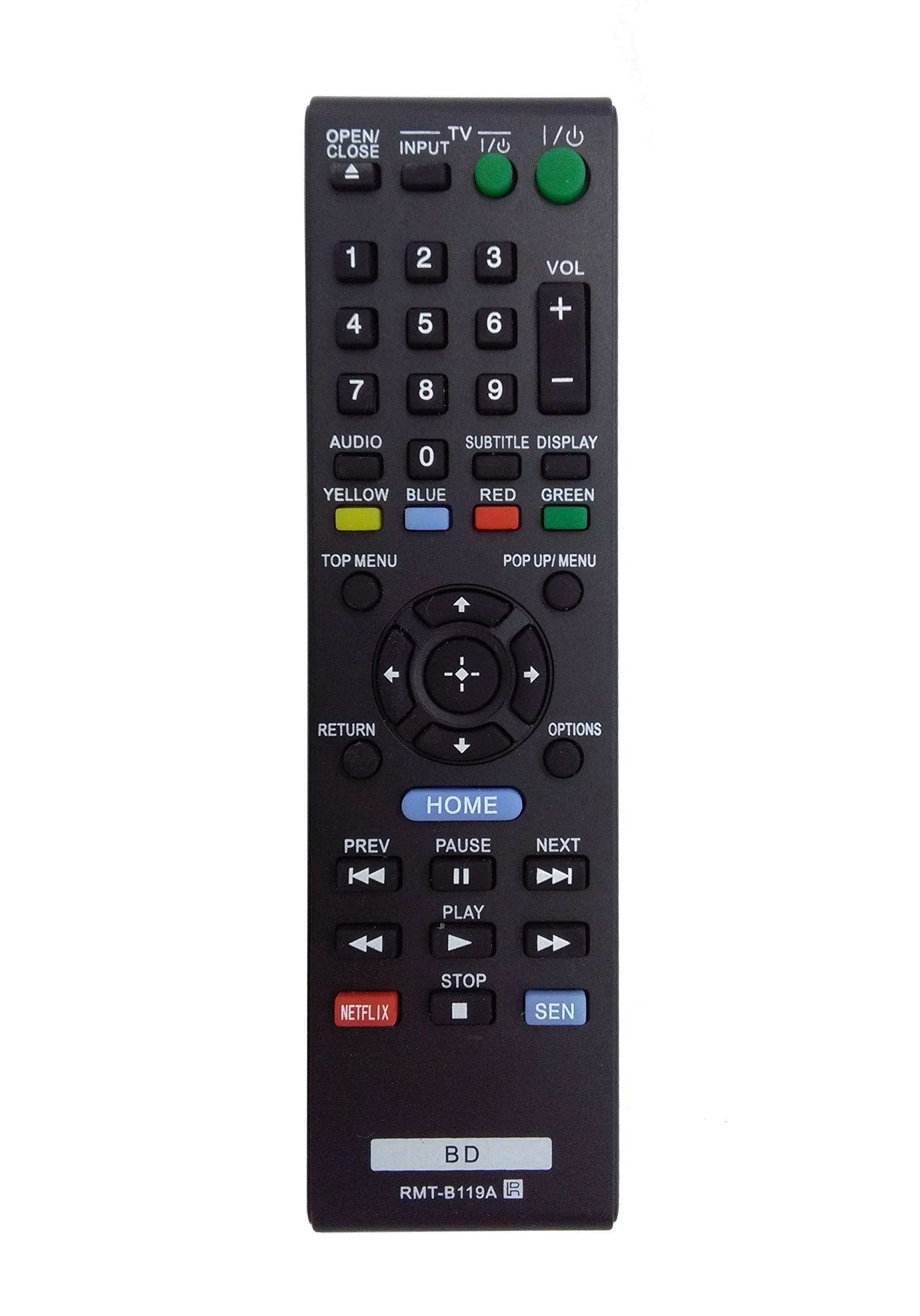
Image: The OEM RMT-B119A remote control, showing the full button layout on the front and a partial view of the open battery compartment on the back, revealing the battery terminals.
3. Bedryfsinstruksies
3.1 Remote Control Layout and Button Functions
Familiarize yourself with the buttons on your RMT-B119A remote control. Below is a description of each button's primary function.
Image: The OEM RMT-B119A remote control, displaying all buttons and their labels.
- Power (I/O): Turns the Blu-ray player on or off.
- OPEN/CLOSE (▲): Maak die skyfbak oop of toe.
- INSET: Switches the input source on the connected TV (if programmed).
- TV: Switches the remote to TV control mode (if programmed).
- Nommerblokkie (0-9): Used for direct track selection, chapter selection, or entering numerical data.
- VOL (+/-): Adjusts the volume level (typically for the connected TV, if programmed).
- OUDIO: Changes the audio track or language during playback.
- SUBTITLE DISPLAY: Toggles subtitle display on or off, or cycles through available subtitle languages.
- YELLOW, BLUE, RED, GREEN: Color-coded function buttons, typically used for specific features within menus or interactive content. Their function varies depending on the disc or menu.
- BOSTE SPYSKAART: Accesses the main menu of the Blu-ray disc.
- POP UP/MENU: Displays the pop-up menu during disc playback.
- Directional Pad (↑↓←→): Navigeer deur spyskaarte en opsies.
- Center Button (Enter/Select): Confirms a selection or enters a menu item.
- TERUG: Gaan terug na die vorige skerm of kieslys.
- OPSIES: Displays context-sensitive options or settings.
- TUIS: Accesses the Blu-ray player's home menu.
- PREV (◀◀): Skips to the beginning of the current track/chapter or the previous track/chapter.
- PAUSE (▌▌): Onderbreek afspeel.
- NEXT (▶▶): Spring na die volgende snit of hoofstuk.
- PLAY (▶): Begin of hervat terugspeel.
- STOP (■): Stop afspeel.
- NETFLIX: Direct access button for the Netflix streaming service.
- SEN: Direct access button for the Sony Entertainment Network (now PlayStation Video/Music).
- BD: Likely a dedicated button for Blu-ray Disc functions or to switch to Blu-ray mode.
4. Onderhoud
Om die lang lewensduur en behoorlike werking van u afstandbeheerder te verseker, volg hierdie onderhoudsriglyne:
- Skoonmaak: Vee die afstandbeheerder af met 'n sagte, droë lap. Vir hardnekkige vuiligheid, liggies droog.ampMaak die lap skoon met water of 'n sagte, nie-skurende skoonmaakmiddel. Vermy die gebruik van harde chemikalieë of oplosmiddels.
- Battery vervanging: Replace batteries when the remote's response becomes sluggish or it stops functioning. Always replace both batteries at the same time with new ones of the same type.
- Berging: Store the remote in a cool, dry place away from direct sunlight, extreme temperatures, and high humidity. If the remote will not be used for an extended period, remove the batteries to prevent leakage.
- Vermy druppels: Beskerm die afstandbeheerder teen fisiese impak, aangesien val interne komponente kan beskadig.
5. Probleemoplossing
If you experience issues with your remote control, refer to the following table for common problems and solutions:
| Probleem | Moontlike oorsaak | Oplossing |
|---|---|---|
| Afstandsbediening werk nie. | Dooie of verkeerd geplaasde batterye. | Vervang batterye met nuwes en maak seker dat die polariteit (+/-) korrek is. |
| Afstandbeheer werk af en toe. | Lae batterykrag of obstruksie. | Replace batteries. Ensure no objects are blocking the remote's signal path to the Blu-ray player. |
| Die afstandbeheer beheer nie die TV nie. | Remote not programmed for TV or TV mode not selected. | This remote is primarily for Blu-ray players. TV control functionality may require specific programming not covered by this manual, or may not be supported by this OEM model. |
| Knoppies reageer nie of is klewerig. | Vuilgoed of puin onder knoppies. | Clean the remote control surface. Avoid spilling liquids on the remote. |
6. Spesifikasies
- Handelsmerk: OEM
- Modelnommer: RMT-B119A
- Verbindingstegnologie: Infrarooi (IR)
- Versoenbare toestelle: Sony Blu-ray Players (specific models listed in Introduction)
- Kragbron: 2 x AAA-batterye (nie ingesluit nie)
- Maksimum reeks: Ongeveer 10 meter (33 voet)
- Spesiale kenmerk: Ergonomiese ontwerp
7. Waarborg en Ondersteuning
This OEM RMT-B119A remote control comes with a 30-dae waarborg vanaf die aankoopdatum, wat vervaardigingsfoute dek. Bewaar asseblief u bewys van aankoop vir waarborgeise.
For technical support or warranty inquiries, please contact the retailer or manufacturer directly. Refer to your purchase documentation for specific contact information.