
1. Inleiding
Thank you for choosing the Linq HB-02 Mini Speaker. This portable speaker is designed to provide amplified audio from a variety of devices, including smartphones, MP3/MP4 players, notebooks, and more. Its compact design and rechargeable battery make it ideal for on-the-go use. Please read this manual carefully before using the product to ensure proper operation and longevity.
2. Veiligheidsinligting
- Moenie die luidspreker aan water of oormatige vog blootstel nie.
- Vermy uiterste temperature.
- Moenie die luidspreker self uitmekaar haal of probeer herstel nie. Dit sal die waarborg ongeldig maak.
- Hou buite bereik van kinders.
- Gebruik slegs die meegeleverde USB-kabel om te laai.
- Gooi die battery verantwoordelik weg volgens plaaslike regulasies.
3. Pakketinhoud
The Linq HB-02 Mini Speaker package typically includes:
- Linq HB-02 Mini Speaker
- USB-laaikabel
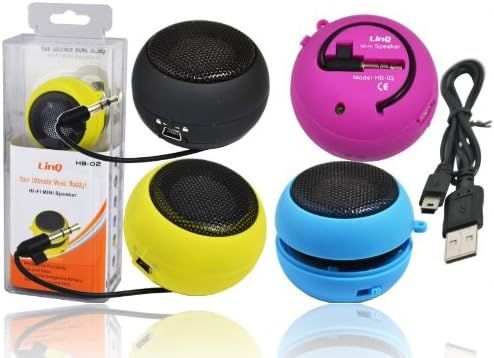
Image: Linq HB-02 Mini Speaker shown in its retail packaging, alongside other speakers and the included USB charging cable. This illustrates the typical contents and appearance of the product.
4. Produkkenmerke
- Mini Pocket Speaker: Kompakte en draagbare ontwerp vir maklike dra.
- Universele verenigbaarheid: Connects via 3.5mm audio jack to devices like iPhones, iPods, MP3/MP4 players, smartphones, notebooks, PSP, CD players, and more.
- Herlaaibare battery: Built-in lithium-ion battery for wireless use.
- Retractable Sound Resonator: Features a pneumatic suspension system that allows the acoustic membrane to be extended from one side, enhancing amplification and sound quality.
- USB-laai: Conveniently recharges via the included USB cable.
- Ampgeverifieerde klank: Delivers excellent and pleasant acoustic performance despite its small size.

Image: Four Linq HB-02 Mini Speakers in pink, yellow, purple, and blue, shown with their retractable sound resonators extended, demonstrating the design and color variety.
5. Opstelling
5.1 Aanvanklike laai
- Laai die luidspreker volledig voor die eerste gebruik.
- Connect the small end of the included USB charging cable to the mini USB port on the speaker.
- Koppel die standaard USB-punt van die kabel aan 'n USB-kragbron (bv. rekenaar-USB-poort, USB-muuradapter).
- Die laai-aanwyserliggie (indien teenwoordig) sal tydens laai brand en afskakel of van kleur verander wanneer dit volledig gelaai is.
5.2 Verbinding met 'n oudiotoestel
- Locate the integrated 3.5mm audio jack on the speaker. This jack is often stored neatly within the speaker's body.
- Plug the 3.5mm audio jack into the headphone port of your audio device (e.g., smartphone, MP3 player, notebook).
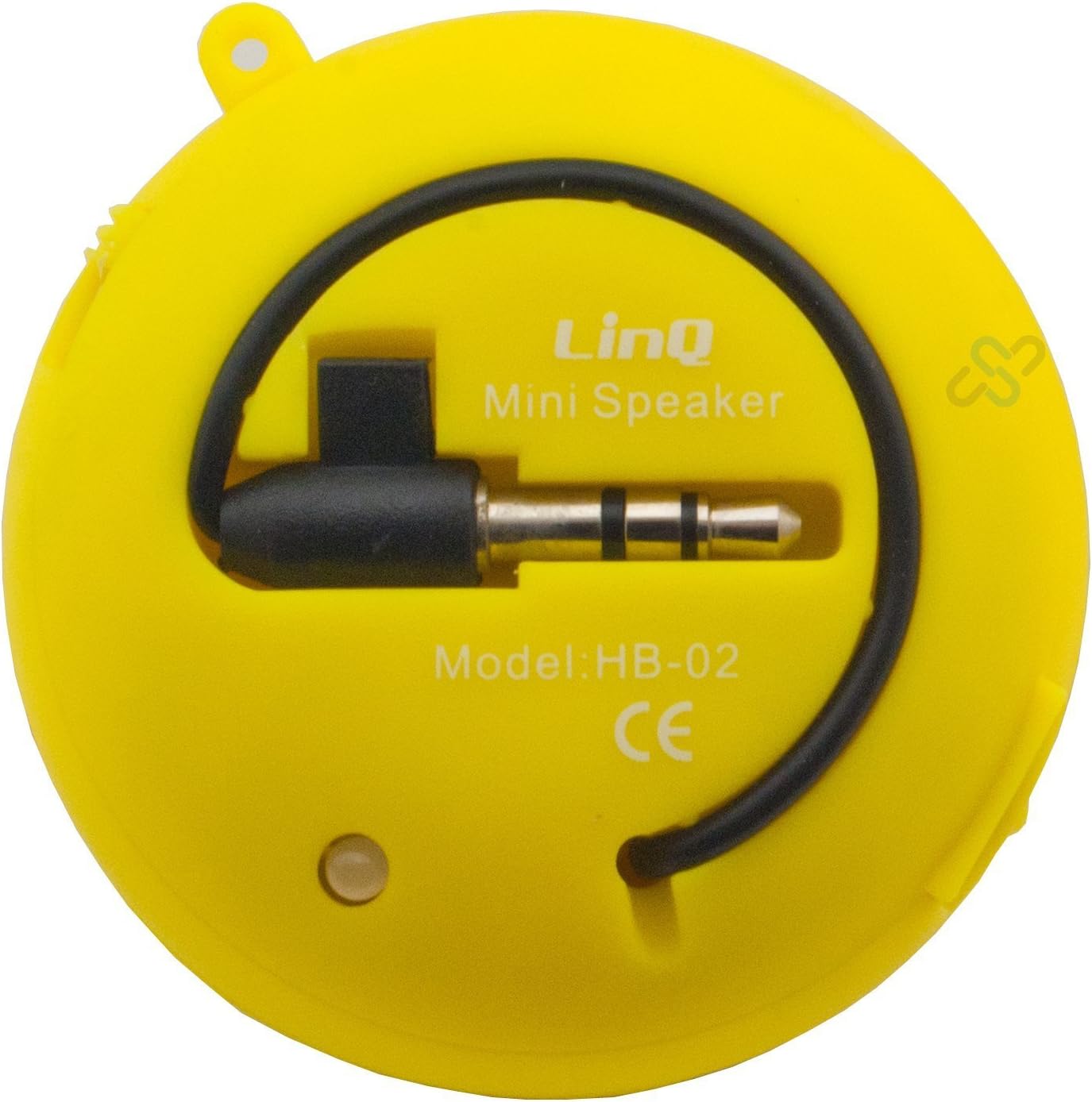
Image: A yellow Linq HB-02 Mini Speaker, viewed from the back, clearly showing the integrated 3.5mm audio jack coiled around the speaker and the model number 'HB-02'.
6. Bedryfsinstruksies
6.1 Aan-/afskakel
Locate the power switch on the speaker. Slide it to the 'ON' position to turn on the speaker. Slide it to the 'OFF' position to turn it off.
6.2 Speel oudio
- Ensure the speaker is connected to your audio device via the 3.5mm jack.
- Skakel die luidspreker aan.
- Start playing audio on your connected device. The sound will now be amplified through the Linq HB-02 speaker.
- Adjust the volume directly from your connected audio device. The speaker itself does not have volume controls.
6.3 Using the Retractable Sound Resonator
Vir verbeterde amplification and sound quality, gently pull and extend the acoustic membrane from one side of the speaker. This engages the 'Retractable Sound Resonator' system. To return to a more compact form, gently push the membrane back into the speaker body.
7. Onderhoud
- Skoonmaak: Use a soft, dry cloth to clean the speaker's exterior. Do not use liquid cleaners or aerosols.
- Berging: Wanneer dit nie gebruik word nie, bêre die luidspreker op 'n koel, droë plek, weg van direkte sonlig en uiterste temperature.
- Batterysorg: Om die batterylewe te verleng, vermy om die luidspreker gereeld heeltemal te ontlaai. Laai dit gereeld, selfs al word dit nie vir lang tye gebruik nie.
8. Probleemoplossing
8.1 Geen klank nie
- Ensure the speaker is turned ON.
- Check if the 3.5mm audio jack is fully inserted into both the speaker and your audio device.
- Verify that your audio device's volume is turned up and not muted.
- Ensure the speaker's battery is charged.
8.2 Swak klankgehalte
- Kontroleer die klankbron vir kwaliteitsprobleme.
- Ensure the 3.5mm audio jack connection is secure.
- Try extending the 'Retractable Sound Resonator' for improved sound.
- Maak seker dat die luidspreker volledig gelaai is. ’n Lae batterylewe kan die klankgehalte beïnvloed.
8.3 Speaker Not Charging
- Verify that the USB cable is correctly connected to both the speaker and the power source.
- Probeer 'n ander USB-poort of kragadapter.
- Maak seker dat die USB-kabel nie beskadig is nie.
9. Spesifikasies
| Handelsmerk | Linq |
| Model | HB-02 |
| Maksimum uitsetkrag | 2 watt |
| Verbindingstegnologie | AUX (3.5mm Jack), USB (for charging) |
| Montage tipe | Tafelblad |
| Tipe luidspreker | Draagbare luidspreker |
| Impedansie | 8 ohm |
| Kragbron | Batteryaangedrewe (herlaaibaar) |
| Gewig | Not specified, designed for portability. |
10. Waarborg en Ondersteuning
This product comes with a standard manufacturer's warranty. Please refer to the warranty card included with your purchase or contact your retailer for specific warranty terms and conditions. For technical support or further assistance, please contact the retailer or the manufacturer's customer service.