
1. Inleiding
This manual provides essential information for the safe and effective use of your ProForm Power 995c Treadmill. Please read all instructions carefully before assembly and operation. Retain this manual for future reference.

Image 1.1: The ProForm Power 995c Treadmill, ready for use.
2. Veiligheidsinligting
Om die risiko van ernstige beserings te verminder, lees alle belangrike voorsorgmaatreëls en instruksies in hierdie handleiding voordat u die loopband gebruik. ProForm aanvaar geen verantwoordelikheid vir persoonlike besering of eiendomskade wat deur of deur die gebruik van hierdie produk opgedoen word nie.
- Raadpleeg altyd u dokter voordat u met enige oefenprogram begin.
- Hou kinders en troeteldiere weg van die trapmeul.
- Place the treadmill on a level surface with at least 6 feet of clear space behind it and 2 feet on each side.
- Dra gepaste oefenklere en atletiese skoene.
- Moenie die loopband gebruik as dit beskadig of wanfunksioneer nie.
- Gebruik altyd die veiligheidsleutel. Heg die knippie aan jou klere vas voordat jy die loopband begin.
- Moenie die maksimum gebruikersgewig van 350 lbs (159 kg) oorskry nie.

Image 2.1: User preparing to use the treadmill.
3. Monteer-instruksies
The ProForm Power 995c Treadmill requires assembly. Due to its weight and size, it is recommended that two or more people assist with the assembly process. Ensure all parts are present before beginning. Refer to the included assembly guide for detailed, step-by-step instructions and diagrams.
3.1 Space Saver Design
This treadmill features a Space Saver design, allowing the walking platform to be folded vertically for storage. To fold, lift the walking platform until the latch pin locks it in the upright position. To unfold, push the latch pin and slowly lower the platform to the floor.

Image 3.1: Folding the treadmill for compact storage.
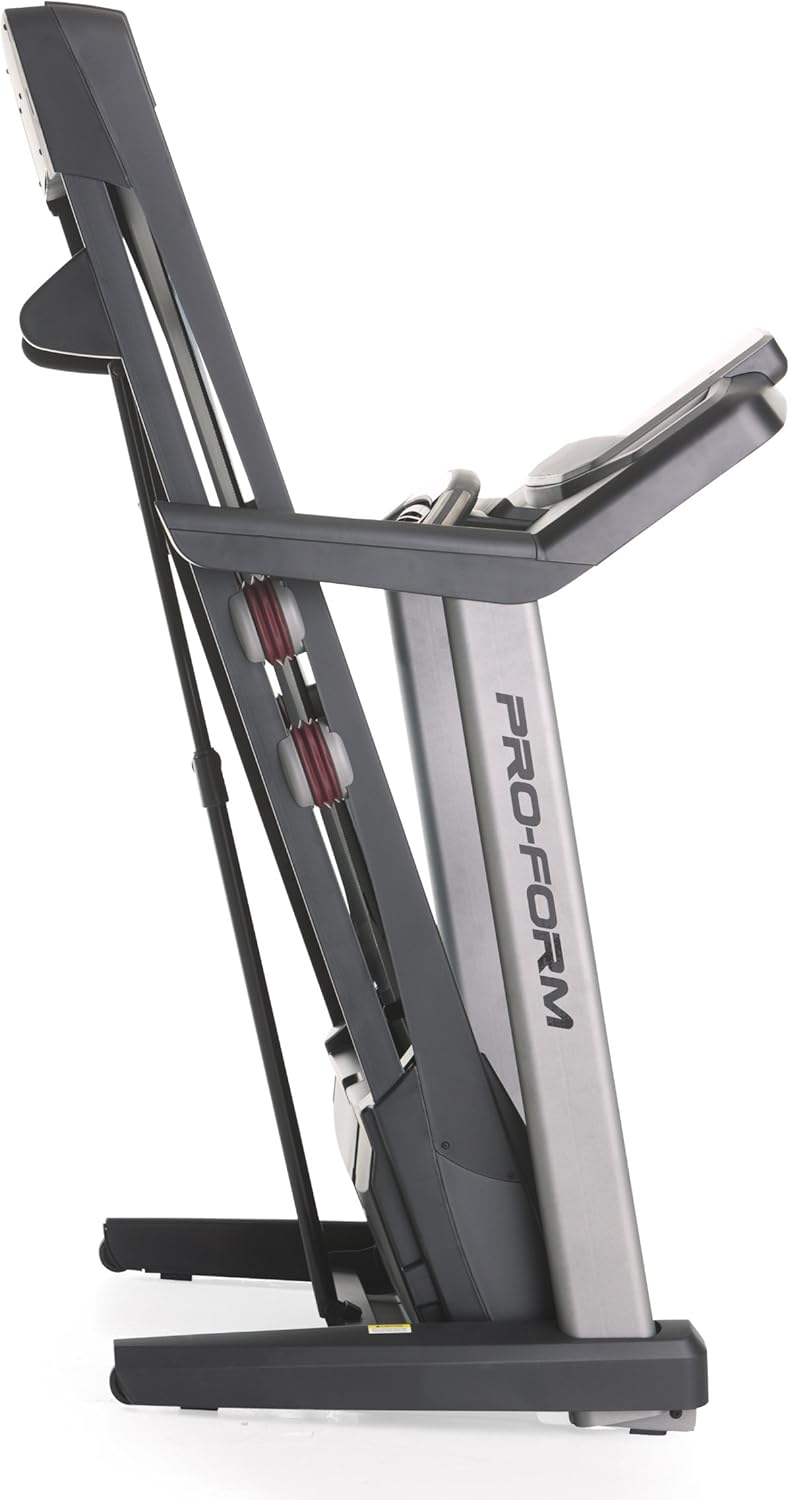
Image 3.2: The treadmill in its folded position.
4. Bedryfsinstruksies
Familiarize yourself with the console and its functions before starting your workout.
4.1 Konsole Oorview
The treadmill features a 7-inch oversized backlit display that shows your workout metrics. The console includes QuickSpeed and Quick Incline controls for easy adjustments during your exercise.

Image 4.1: Treadmill console with display and control buttons.
4.2 Starting a Manual Workout
- Stap op die loopband.
- Heg die veiligheidssleutelklem aan jou klere vas.
- Druk die BEGIN knoppie. Die band sal teen 'n lae spoed begin beweeg.
- Pas die spoed aan met behulp van die QuickSpeed knoppies of die + en - knoppies.
- Verstel die helling met behulp van die Quick Incline knoppies of die ^ en v knoppies.
- Om te stop, druk die STOP knoppie of trek die veiligheidsleutel.

Image 4.2: Interacting with the console controls.
4.3 Built-in Workout Apps
The treadmill includes 30 pre-programmed workout apps. Select a workout by pressing the corresponding number button on the console. The treadmill will automatically adjust speed and incline according to the program.
4.4 iFit Compatibility
The ProForm Power 995c Treadmill is iFit Compatible. With an iFit wireless module (sold separately), you can access a library of interactive workouts, track your progress, and simulate real-world routes using Google Maps. The console also features a media tray for your personal devices.

Image 4.3: iFit Compatible feature on the console.

Image 4.4: Media tray for personal devices.
4.5 Hartklopmonitering
The treadmill is equipped with a heart rate monitor. Grip the metal sensors on the handlebars to display your heart rate on the console. This feature helps you stay within your target heart rate zone.
5. Onderhoud
Gereelde onderhoud verseker die lang lewensduur en optimale prestasie van jou loopband.
- Skoonmaak: Vee die loopbandoppervlaktes af met advertensiesamp lap na elke gebruik. Vermy skuurmiddels.
- Gordelsmering: Periodically check and lubricate the walking belt as instructed in the detailed assembly guide. Proper lubrication prevents friction and wear.
- Bandbelyning en -spanning: Ensure the walking belt remains centered and properly tensioned. Adjustments may be necessary over time. Refer to the assembly guide for specific instructions.
- Motordeksel: Keep the motor cover clean and free of dust to ensure proper ventilation.
6. Probleemoplossing
If you encounter issues with your treadmill, refer to the following common solutions. For problems not listed here, contact customer support.
| Probleem | Moontlike oorsaak | Oplossing |
|---|---|---|
| Trapmeul skakel nie aan nie. | Kragkabel nie ingeprop nie; stroombreker het afgeskakel; veiligheidsleutel nie ingesit nie. | Ensure power cord is securely plugged into a grounded outlet. Check household circuit breaker. Insert safety key fully into the console. |
| Walking belt slows down or stops during use. | Belt too loose; motor overheating; user weight exceeds capacity. | Adjust belt tension as per manual. Allow treadmill to cool down. Ensure user weight is within specifications. |
| Console display is erratic or not working. | Loose cable connection; console malfunction. | Check all cable connections to the console. If problem persists, contact customer support. |
| Ongewone geraas van die loopband. | Loose parts; belt friction; motor issue. | Inspect for loose bolts or screws and tighten. Lubricate walking belt if needed. If noise persists, contact customer support. |
7. Spesifikasies
Detailed technical specifications for the ProForm Power 995c Treadmill.
- Modelnommer: PFTL99912
- Motor: 3.0 CHP Mach Z Commercial Plus Motor
- Maksimum spoed: 12 myl per uur (19.3 km/h)
- Maksimum helling: 15% Quick Incline Control
- Loopvlakgordel: 20 inches x 60 inches (50.8 cm x 152.4 cm) Non-Stretch, Commercial Tread belt
- Kussing: ProShox Cushioning
- Maksimum gebruikergewig: 350 pond (159 kg)
- Produkafmetings (LxBxH): 81" x 37" x 60" (205.7 cm x 94 cm x 152.4 cm)
- Folded Dimensions (Approx.): 33"W x 14"H (Depth varies)
- Vertoon tipe: 7-inch Oversized Backlit LCD
- Oefenprogramme: 30 Built-in Workout Apps
- Verbinding: iFit-versoenbaar
- Metrieke gemeet: Distance, Heart Rate, Incline, Time, Calories Burned, Speed
- Raammateriaal: Metaal, plastiek

Image 7.1: ProShox Cushioning system.

Image 7.2: ProForm branding on the treadmill deck.
8. Waarborg en Ondersteuning
Your ProForm Power 995c Treadmill is covered by the following warranty:
- Raam en motor: Lewenslange waarborg
- Onderdele: 3-jaar waarborg
- Arbeid: 1-jaar waarborg
For warranty claims, technical assistance, or to order replacement parts, please contact ProForm Customer Service. Have your model number (PFTL99912) and serial number ready when contacting support.