
Inleiding
This manual provides comprehensive instructions for the safe and efficient use of your Marmitek BoomBoom 560 Bluetooth Over-Ear Headphones. These headphones offer excellent digital sound quality with clear mid-tones and deep bass, along with passive noise reduction for an immersive audio experience. Please read this manual thoroughly before operating the device.

Image: Marmitek BoomBoom 560 Bluetooth Over-Ear Headphones, black, shown from a slight angle.
Pakketinhoud
Kontroleer asseblief dat al die items wat hieronder gelys word, in u pakket teenwoordig is:
- 1x Marmitek BoomBoom 560 Bluetooth Over-Ear Headphones
- 1x Micro USB to USB charging cable
- 1x 3.5mm Mini-jack audio cable (160 cm)
- 1x Gebruikershandleiding (hierdie dokument)

Image: Visual representation of the Marmitek BoomBoom 560 package contents, including the headphones, charging cable, audio cable, and user manual.
Produk verbyviewKontroles en Poorts
Familiarize yourself with the controls and ports on your BoomBoom 560 headphones:
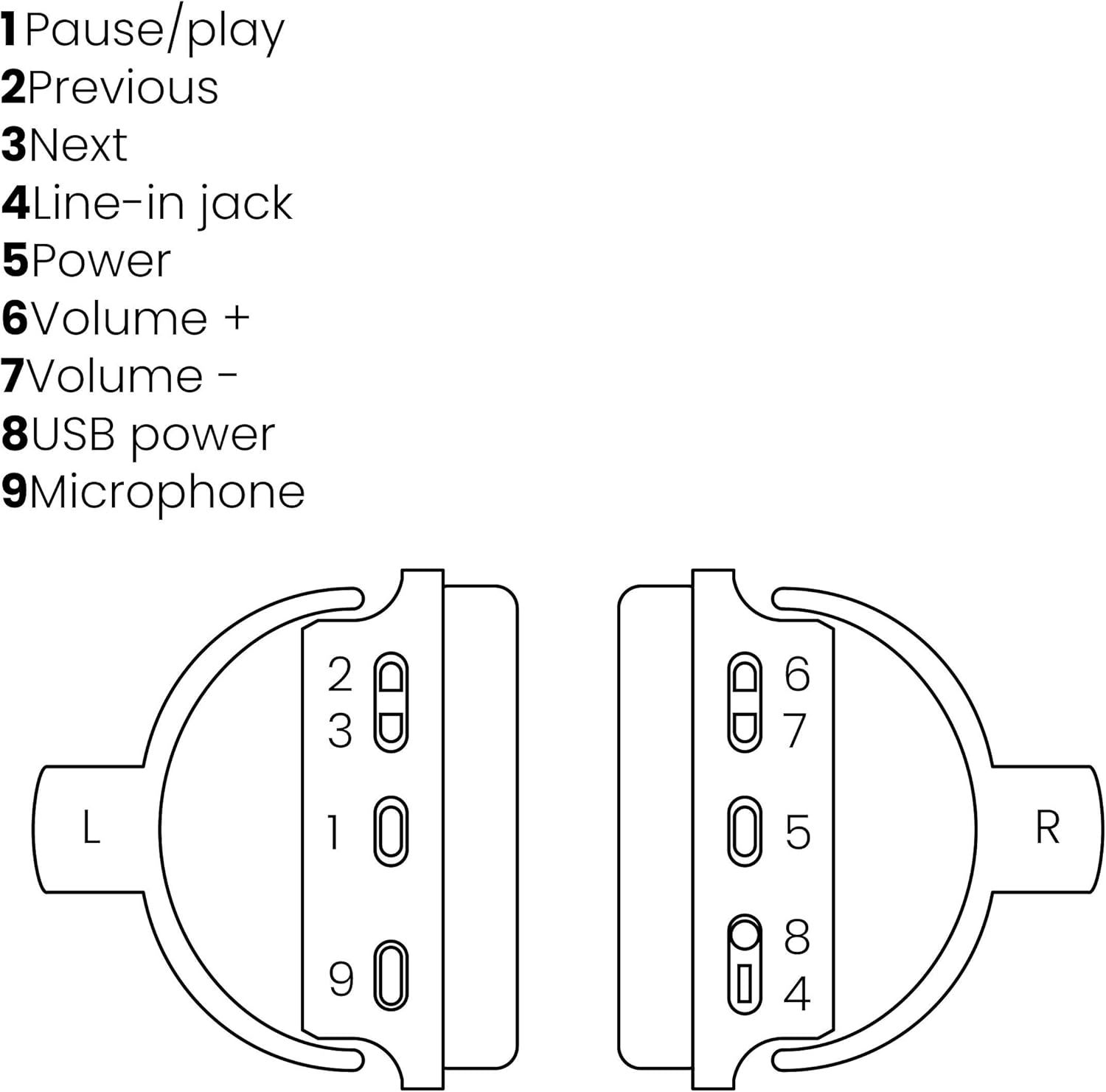
Image: A line drawing illustrating the left and right ear cup controls and ports, numbered for identification.
- Pouse/speel-knoppie: Beheer musiekterugspeel.
- Vorige snitknoppie: Spring na die vorige liedjie.
- Volgende snitknoppie: Spring na die volgende liedjie.
- Line-in Jack: For wired audio connection using the 3.5mm cable.
- Kragknoppie: Turns the headphones on/off and initiates Bluetooth pairing.
- Volume + knoppie: Verhoog die volume.
- Volume - Knoppie: Verlaag die volume.
- USB-kragpoort: For charging the headphones using the Micro USB cable.
- Mikrofoon: Ingeboude mikrofoon vir handvrye oproepe.
Opstelling
1. Laai die oorfone
Before first use, fully charge your headphones. Connect the Micro USB end of the charging cable to the USB Power Port (8) on the headphones and the standard USB end to a USB power adapter (not included) or a computer's USB port. The LED indicator will show charging status. A full charge provides over 8 hours of playback time.
2. Bluetooth-koppeling
Om jou oorfone draadloos aan 'n Bluetooth-geaktiveerde toestel te koppel:
- Maak seker dat die oorfone afgeskakel is.
- Druk en hou die Kragknoppie (5) until the LED indicator flashes blue and red, indicating pairing mode.
- Aktiveer Bluetooth op jou slimfoon, tablet of ander Bluetooth-toestel en soek vir beskikbare toestelle.
- Select "BoomBoom 560" from the list of found devices.
- Sodra dit gekoppel is, flits die LED -aanwyser stadig blou.

Image: Illustration depicting various Bluetooth-enabled devices (laptop, smartphone, tablet) wirelessly transmitting audio to the headphones.
3. Bedrade verbinding
If Bluetooth is not available or the battery is depleted, you can use the included 3.5mm audio cable. Connect one end of the cable to the Line-in Jack (4) on the headphones and the other end to the audio output of your device.
Bedryfsinstruksies
Krag aan/af
- Om aan te skakel: Druk en hou die Kragknoppie (5) for approximately 3 seconds until the LED indicator flashes blue.
- Om af te skakel: Druk en hou die Kragknoppie (5) for approximately 3 seconds until the LED indicator turns off.
Musiek afspeel
- Speel/pouse: Druk die Pause/Play Button (1) een keer.
- Volgende snit: Druk die Next Track Button (3) een keer.
- Vorige snit: Druk die Previous Track Button (2) een keer.
Belbestuur
When connected via Bluetooth, you can manage phone calls using the built-in microphone (9):
- Beantwoord/beëindig oproep: Druk die Pause/Play Button (1) een keer.
- Verwerp oproep: Druk en hou die Pause/Play Button (1) vir ongeveer 2 sekondes.
Volumebeheer
- Verhoog volume: Druk die Volume + Button (6).
- Verlaag volume: Druk die Volume - Button (7).

Image: A user enjoying music or media with the Marmitek BoomBoom 560 headphones while relaxing at home.
Onderhoud
Om die lang lewensduur en optimale werkverrigting van jou oorfone te verseker:
- Maak die oorfone skoon met 'n sagte, droë lap. Moenie skuurmiddels of oplosmiddels gebruik nie.
- Vermy die blootstelling van die oorfone aan uiterste temperature, humiditeit of direkte sonlig.
- Berg die oorfone op 'n koel, droë plek wanneer dit nie gebruik word nie.
- Moenie probeer om die oorfone self uitmekaar te haal of te herstel nie, aangesien dit die waarborg ongeldig sal maak.
Probleemoplossing
If you encounter issues with your BoomBoom 560 headphones, refer to the following common solutions:
- Geen krag: Maak seker dat die oorfone volledig gelaai is. Koppel hulle aan 'n kragbron met die USB-laaikabel.
- Kan nie via Bluetooth koppel nie:
- Maak seker dat die oorfone in paringsmodus is (LED flikker blou en rooi).
- Ensure your Bluetooth device's Bluetooth function is enabled and within range (typically 10 meters).
- Try turning off and on both the headphones and your Bluetooth device.
- Delete "BoomBoom 560" from your device's Bluetooth list and attempt to pair again.
- Geen klank:
- Kontroleer die volumevlakke op beide die oorfone en jou gekoppelde toestel.
- Ensure the headphones are properly paired or the 3.5mm audio cable is securely connected.
- If using Bluetooth, try disconnecting and reconnecting.
- Swak klankgehalte:
- Beweeg nader aan jou Bluetooth-toestel om steuring te verminder.
- Ensure there are no obstacles between the headphones and the device.
- Kontroleer die klankbron vir kwaliteitsprobleme.
- Loose Earcup Bracket: If the earcup bracket feels loose, handle the headphones with care. Avoid excessive force when adjusting or folding. If the issue persists and affects functionality, contact customer support.
Spesifikasies
| Model Naam | BoomBoom 560 |
| Modelnommer | 8122 |
| Handelsmerk | Marmitek |
| Verbindingstegnologie | Wireless (Bluetooth), Wired (3.5mm jack) |
| Bluetooth-versoenbaarheid | Ja |
| Vormfaktor | Oor-oor |
| Materiaal | Leer (oorkoppe) |
| Spesiale kenmerke | Geraasvermindering |
| Mikrofoon Tegnologie | Omni (Built-in) |
| Battery Beskrywing | Litium-ioon (Li-ioon) |
| Batterylewe | Over 8 hours (approx.) |
| Verhouding sein-tot-ruis (SNR) | 82 dB |
| Produk afmetings | 23 x 5 x 18 cm; 100 g |
Waarborg en Ondersteuning
Marmitek products are designed and manufactured to high quality standards. For information regarding warranty terms and conditions, please refer to the documentation provided with your purchase or visit the official Marmitek webwebwerf.
Vir verdere hulp of tegniese ondersteuning, besoek asseblief die Marmitek Store on Amazon or the official Marmitek support channels.

Image: Logo indicating "Dutch Quality" and compliance with "EU European Standards".