
1. Produk verbyview
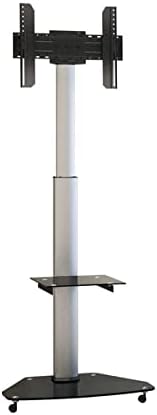
The KIMEX 030-2020 is a versatile mobile TV stand designed to accommodate LCD and LED screens ranging from 37 to 75 inches. It features a robust construction with a solid glass base equipped with casters for easy mobility and a telescopic column for height adjustment. The stand supports VESA mounting patterns from 200x200mm to 600x400mm and has a maximum weight capacity of 40 kg. Users can adjust the screen height between 120 cm and 180 cm (measured to the center of the screen) and rotate the display from landscape to portrait orientation. An integrated, height-adjustable shelf provides space for media devices, and a cable management system ensures a tidy appearance.
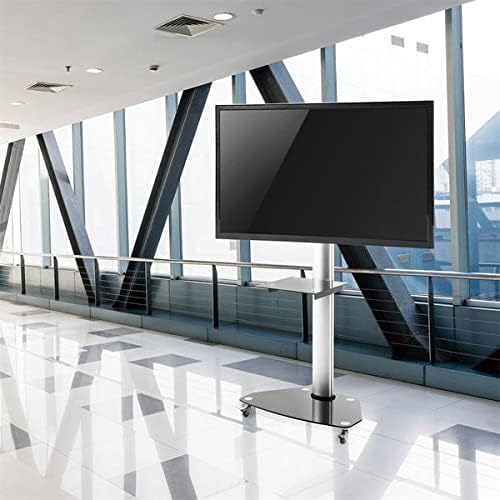
The KIMEX 030-2020 mobile TV stand with a large display, positioned in a contemporary office or presentation space, showcasing its professional application.
2. Veiligheidsinligting
Please read all instructions carefully before assembly and use of the KIMEX 030-2020 mobile TV stand. Retain this manual for future reference.
- Ensure all components are present and undamaged before beginning assembly. Do not use if any parts are missing or faulty.
- Moenie die maksimum gewigskapasiteit oorskry nie 40 kg (88 lbs).
- Do not exceed the recommended screen size range of 37-75 duim.
- Always ensure the stand is stable and on a level surface before attaching a television.
- Use extreme caution when moving the stand, especially on uneven surfaces or over thresholds.
- Keep children and pets away from the stand during movement, assembly, and adjustment to prevent injury.
- Do not attempt to modify the product in any way. Only use manufacturer-supplied parts for replacement or repair.
- Ensure all cables are properly managed and secured to prevent tripping hazards and damage.
3. Pakketinhoud
Before assembly, verify that all parts listed below are included in your package. If any parts are missing or damaged, please contact KIMEX customer support immediately.
- Base Plate with Casters
- Telescopic Column Sections
- VESA-monteringsplaat
- VESA Mounting Bracket Arms
- Toestelrak
- Monteringshardeware-stel (verskeie skroewe, wassers, spasieerders)
- Assembly Tools (e.g., Allen keys, if provided)
4. Opstelling en samestelling
Follow these steps carefully to assemble your KIMEX 030-2020 mobile TV stand. It is recommended to have assistance during assembly, especially when mounting the television.
- Heg wiele aan die basis vas: Securely attach the casters to the base plate using the provided screws. Ensure they are tightened to prevent wobbling.
- Assemble Column: Connect the telescopic column sections according to the assembly diagrams. Use the designated fasteners to secure each section firmly.
- Heg kolom aan basis vas: Mount the assembled column onto the base plate. Ensure the connection is stable and all bolts are fully tightened.
- Install Device Shelf: Position the device shelf at your desired height on the column. Secure it using the provided fasteners, ensuring it is level.
- Attach VESA Bracket to TV: Attach the VESA mounting bracket arms to the back of your television. Select the appropriate screws, washers, and spacers from the hardware kit that match your TV's VESA pattern. Refer to your TV's user manual for specific VESA compatibility and screw length requirements.
- Monteer TV op staander: With assistance, carefully lift the television (with the attached VESA bracket arms) and hook it onto the main VESA mounting plate on the stand's column. Secure the TV using the safety screws or locking mechanisms to prevent accidental dislodgement.
- Stabiliteitstoets: Gently push and pull the stand to ensure all connections are secure and the TV is stable on the stand.
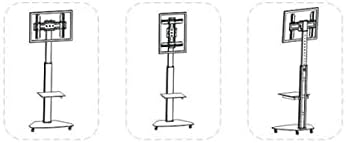
A diagram outlining the sequential steps for assembling the KIMEX 030-2020 mobile TV stand, from attaching the base to mounting the screen.
5. Bedryfsinstruksies
This section details how to utilize the adjustable features of your KIMEX 030-2020 mobile TV stand.
5.1. Adjusting Screen Height
To change the screen's vertical position, locate and loosen the locking mechanism on the telescopic column. Carefully raise or lower the screen to your desired viewing height. Once positioned, securely re-tighten the locking mechanism to prevent the screen from slipping. Always ensure the screen is level after any height adjustment.
5.2. Rotating Screen Orientation
The stand allows for easy rotation of the screen between landscape (horizontal) and portrait (vertical) modes. To rotate, ensure any rotation locking pins or screws are disengaged. Gently rotate the screen to the desired orientation. After rotation, re-engage the locking mechanism to secure the screen in place.
5.3. Moving the Stand
To relocate the stand, ensure all casters are unlocked (if applicable). Gently push the stand from the base or the main column. Avoid pushing directly on the television screen. Exercise caution when moving the stand over uneven surfaces, carpets, or door thresholds. Once the stand is in its new position, lock the casters to prevent accidental movement.
5.4. Adjusting the Device Shelf
The integrated device shelf can be adjusted vertically to accommodate various media devices. Loosen the fasteners that secure the shelf to the column, slide the shelf to the desired height, and then re-tighten the fasteners securely to ensure stability.
An illustration demonstrating the adjustable height feature and the ability to rotate the screen between landscape and portrait orientations on the KIMEX 030-2020 stand.
6. Onderhoud
Regular maintenance helps ensure the longevity and safe operation of your KIMEX 030-2020 mobile TV stand.
- Skoonmaak: Use a soft, dry cloth to clean the stand's surfaces. For more stubborn marks, a slightly damp cloth with a mild, non-abrasive cleaning solution can be used, followed by immediate drying. Avoid harsh chemicals or abrasive materials.
- Bevestigingskontrole: Periodically inspect all screws, bolts, and connections to ensure they remain tight. Loose fasteners can compromise the stand's stability and safety.
- Inspeksie van die rolwiel: Regularly check the casters for any accumulated dust, hair, or debris that might hinder smooth movement. Clean them as needed. Lubricate the caster axles if movement becomes stiff.
- Kabelbestuur: Ensure that all cables are neatly routed through the integrated cable management system and are not pinched or under excessive tension. This prevents damage to cables and reduces tripping hazards.
7. Probleemoplossing
This section addresses common issues you might encounter with your KIMEX 030-2020 mobile TV stand and provides potential solutions.
| Probleem | Moontlike oorsaak | Oplossing |
|---|---|---|
| Die staanplek is onstabiel of wankelrig. | Loose assembly screws; TV weight/size exceeds limits; Uneven surface. | Ensure all assembly screws and bolts are fully tightened. Verify the TV's weight and size are within the stand's specifications (max 40 kg, 37-75 inches). Move the stand to a level surface. |
| Difficulty moving the stand. | Casters are locked; Debris in casters; Floor surface resistance. | Unlock the casters. Clean any accumulated dust, hair, or debris from the caster wheels. Ensure the floor surface is suitable for smooth caster movement. |
| Screen not level after adjustment. | Height locking mechanism not fully engaged; VESA bracket misalignment. | Re-adjust the screen height and ensure the locking mechanism on the telescopic column is fully and securely engaged. Check that the VESA bracket is properly attached and level on the back of the TV. |
| Device shelf is loose. | Shelf fasteners are not tight. | Tighten the fasteners that secure the device shelf to the main column. |
8. Spesifikasies
Detailed technical specifications for the KIMEX 030-2020 mobile TV stand:
| Kenmerk | Spesifikasie |
|---|---|
| Handelsmerk | KIMEX |
| Modelnommer | 030-2020 |
| Versoenbare skermgroottes | 37 - 75 duim |
| VESA-versoenbaarheid | 200x200mm (min) to 600x400mm (max) |
| Gewig kapasiteit | 40 kg (88 lbs) |
| Verstelbare Hoogte | 120 - 180 cm (to screen center) |
| Materiaal | Stainless Steel, Tempered Glass (for base and shelf) |
| Kleur | Swart |
| Produk Gewig | 23 kg |
| Skerm oriëntasie | Landscape to Portrait rotation |
| Kenmerke | Mobile (casters), Adjustable Shelf, Cable Management |
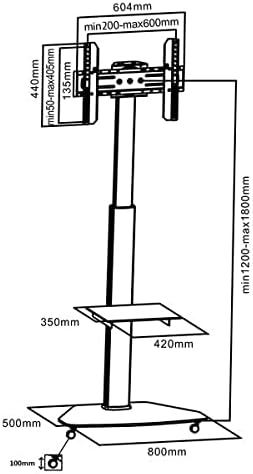
A technical drawing of the KIMEX 030-2020 mobile TV stand, indicating overall dimensions, VESA mounting ranges (min 200x200mm, max 600x400mm), and shelf dimensions.
9. Waarborg en Ondersteuning
KIMEX provides a warranty for the 030-2020 mobile TV stand. Please refer to your purchase documentation or the official KIMEX webwebwerf vir spesifieke waarborgbepalings en -voorwaardes wat op u streek van toepassing is.
Onderdele Beskikbaarheid: Spare parts for this product are guaranteed for 3 jaar vanaf die aankoopdatum.
For technical assistance, inquiries about missing parts, or to initiate a warranty claim, please contact KIMEX customer support through their official website or the retailer from whom the product was purchased. When contacting support, please have your model number (030-2020) and proof of purchase readily available to expedite the process.