
1. Produk verbyview
The Cloud b Tranquil Turtle Ocean Night Light is designed to create a calming and soothing environment for children, aiding in relaxation and sleep. It projects gentle underwater light effects and plays two soothing sound options: ocean waves or a tranquil melody. The brightness and movement speed of the projection are adjustable, and the device features an automatic shut-off timer.

Image 1: The Cloud b Tranquil Turtle Ocean Night Light in purple, ready to create a calming atmosphere.
2. Veiligheidswaarskuwings
- Slegs vir eksterne gebruik.
- Vermy kontak met oë.
- Keep away from any flame or heat source.
- Ensure battery compartment is securely closed to prevent access by children.
3. Pakketinhoud
- 1 x Cloud b Tranquil Turtle Ocean Night Light (Model: CB-7423PR)
- Instruksie Handleiding
4. Opstelling
4.1 Battery installasie
The Tranquil Turtle requires 3 Lithium metal batteries (not included).
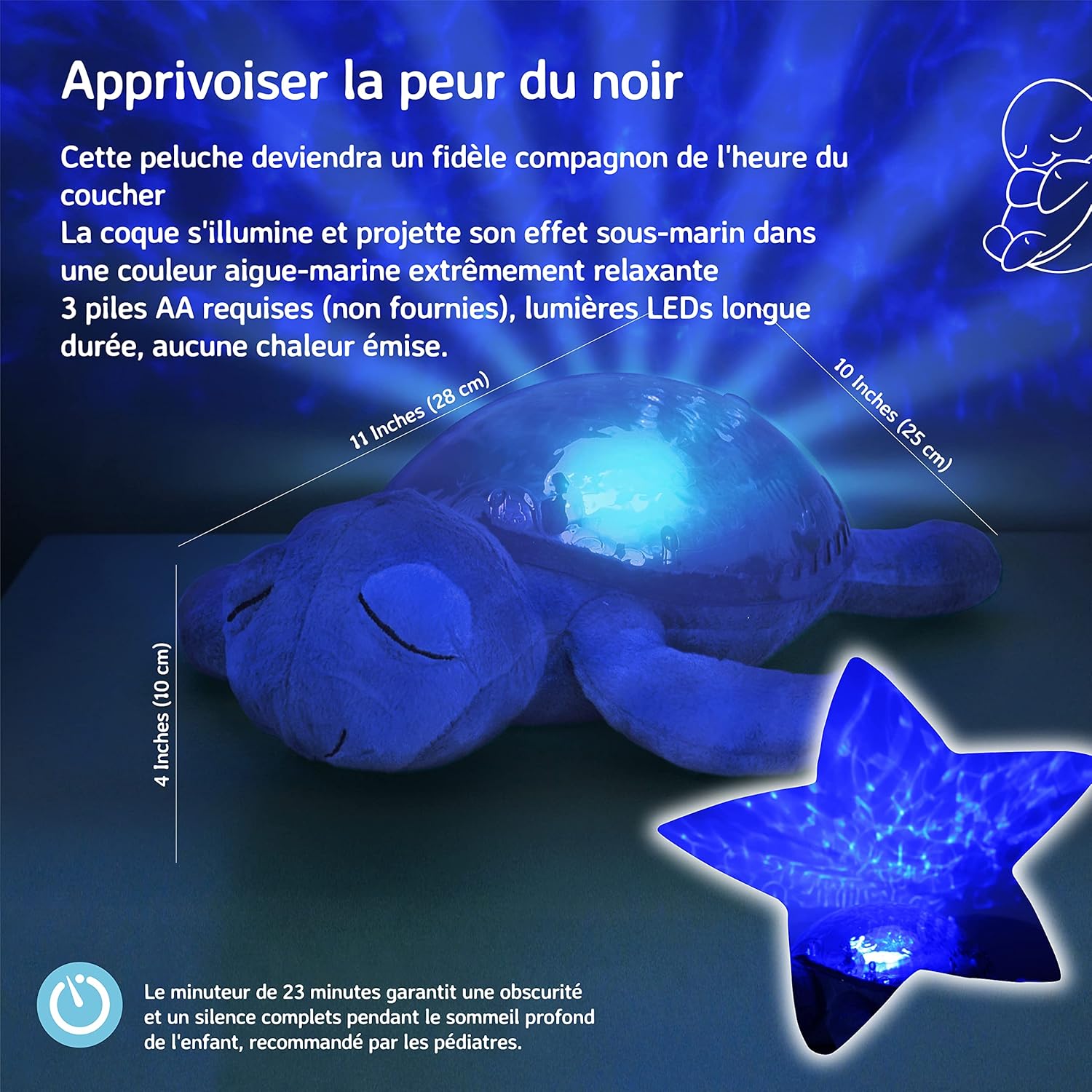
Image 2: The underside of the Tranquil Turtle, illustrating the battery compartment and product dimensions.
- Locate the battery compartment on the underside of the turtle's shell.
- Open the fabric flap and unscrew the battery compartment cover using a small Phillips head screwdriver.
- Insert 3 new Lithium metal batteries, ensuring correct polarity (+/-).
- Plaas die deksel van die batterykompartement terug en draai die skroef vas.
- Close the fabric flap.
5. Bedryfsinstruksies
The control buttons are located on the turtle's shell.

Image 3: Detail of the control buttons on the turtle's shell.
5.1 Krag aan/af
- Press the main power button (usually the largest button) to turn the unit on or off.
5.2 Light Projection
The Tranquil Turtle projects a soothing underwater light effect onto the ceiling and walls.

Image 4: The Tranquil Turtle projecting calming underwater light effects.
5.3 Klankmodusse
Select between two calming sound options:
- Ocean Waves: Recreates the gentle sound of ocean waves.
- Tranquil Melody: A soft, soothing musical tune.
- Use the dedicated sound selection button to switch between modes.
5.4 Adjusting Brightness and Movement Speed
The light projection's brightness and the speed of the wave movement can be adjusted to create a personalized experience.
- Use the brightness control button to cycle through different brightness levels.
- Use the movement speed button to adjust how quickly the underwater effects move.
5.5 Automatic Shut-Off Timer
The Tranquil Turtle features an automatic shut-off timer set for 23 minutes. This ensures complete darkness and silence during a child's deep sleep, as recommended by pediatricians. The unit will automatically turn off after this period.
6. Onderhoud
6.1 Skoonmaak
- Wipe the surface of the turtle with a soft, damp lap.
- Do not immerse the unit in water or use harsh cleaning agents.
6.2 Batteryvervanging
Refer to section 4.1 for detailed instructions on battery installation and replacement.
7. Probleemoplossing
- No Light/Sound: Maak seker dat die batterye korrek geïnstalleer is en nie uitgeput is nie. Vervang met nuwe batterye indien nodig.
- Dim Light/Weak Sound: Dit dui dikwels op lae batterykrag. Vervang batterye.
- Light/Sound Not Changing: Check if buttons are pressed firmly. If issues persist after battery replacement, contact customer support.
8. Spesifikasies
| Modelnommer | CB-7423PR |
| Afmetings (L x B x H) | 26.67 x 19.05 x 10.16 cm |
| Gewig | 498.95 gram |
| Materiaal | Plastic, Plush Fabric |
| Kragbron | 3 x Lithium Metal Batteries (not included) |
| Batterylewe | Ongeveer 60 uur |
| Outomatiese afskakeling | 23 minute |
9. Waarborg en Ondersteuning
For warranty information or customer support, please refer to the contact details provided on the product packaging or visit the official Cloud b webwerf. Hou jou aankoopkwitansie vir waarborgeise.