
1. Inleiding
This manual provides essential instructions for the safe and efficient operation of your Sharp CD-DH950P 240W Mini-Component System. This system features a 5-disc CD changer, a cassette deck, an iPod/iPhone docking station, a USB host for digital audio playback, and an AM/FM tuner. Please read this manual thoroughly before using the system and retain it for future reference.
2. Veiligheidsinligting
- Kragbron: Koppel die eenheid slegs aan 'n WS-aansluiting van die gespesifiseerde volumetage.
- Ventilasie: Verseker voldoende ventilasie. Moenie ventilasie-openinge blokkeer nie.
- Water en vog: Do not expose the unit to rain, moisture, or dripping/splashing liquids.
- Hitte: Hou die eenheid weg van hittebronne soos verkoelers, hitteregisters, stowe of ander toestelle wat hitte produseer.
- Skoonmaak: Unplug the unit from the wall outlet before cleaning. Use a soft, dry cloth.
- Diens: Moenie probeer om hierdie produk self te onderhou nie. Verwys alle diens na gekwalifiseerde dienspersoneel.
3. Pakketinhoud
Verifieer dat jou pakket die volgende items bevat:
- Main Unit (CD-DH950P)
- Linker Speaker
- Regte Speaker
- Afstandbeheer met batterye
- AM-lusantenne
- FM-draadantenne
- Kragkoord
4. Opstelling
4.1 Die luidsprekers koppel
Connect the speaker wires from the main unit to the corresponding terminals on the back of each speaker. Ensure correct polarity (red to red, black to black) for optimal sound quality. The left speaker connects to the left speaker output, and the right speaker to the right speaker output.
4.2 Connecting the Antennas
- FM-antenne: Connect the supplied FM wire antenna to the FM antenna terminal on the rear of the main unit. Extend the wire for better reception.
- AM-antenne: Connect the supplied AM loop antenna to the AM antenna terminals on the rear of the main unit. Position the antenna for best reception.
4.3 Kragverbinding
Plug the power cord into the AC IN jack on the rear of the main unit, then plug the other end into a standard AC wall outlet.
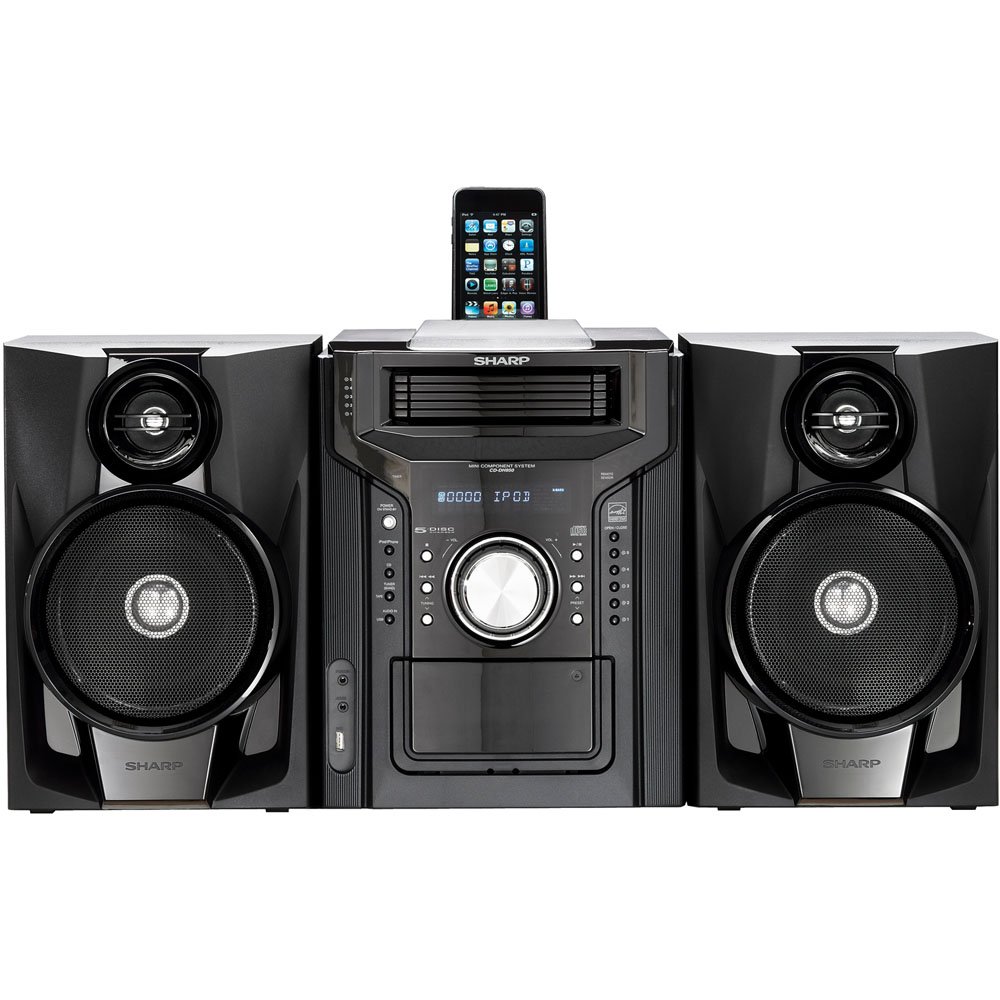
Figuur 4.3.1: Algehele view of the Sharp CD-DH950P Mini-Component System, showing the main unit flanked by two speakers, with an iPhone docked on top of the main unit.
5. Bedryfsinstruksies
5.1 Aan/Af en Volumebeheer
- Druk die KRAG knoppie op die voorpaneel of afstandbeheerder om die eenheid aan of af te skakel.
- Draai die VOLUME knoppie op die voorpaneel of gebruik die VOL +/- knoppies op die afstandbeheerder om die klankvlak aan te pas.
5.2 CD-weergawe
This system features a 5-disc CD changer.
- Druk die OOP/TOUS knoppie om die CD-laai oop te maak.
- Place up to five CDs on the disc trays, label side up.
- Druk OOP/TOUS weer om die skinkbord toe te maak.
- Druk die CD knoppie om die CD-funksie te kies.
- Druk die SPEEL/POUSEER knoppie om die afspeel te begin.
- Gebruik die SKAP OOR buttons to navigate between tracks or discs.
5.3 Kassettedek-werking
- Druk die TAPE OPEN/CLOSE button to open the cassette deck.
- Plaas 'n kassetband in.
- Druk die TAPE knoppie om die kassetfunksie te kies.
- Druk SPEEL om te begin speel.
- To record, ensure the source is selected (e.g., CD, Tuner) and press the REKORD button on the cassette deck.
5.4 iPod/iPhone Docking
The system includes a top-mounted docking slot for compatible iPod and iPhone devices (30-pin connector).
- Carefully place your iPod or iPhone into the docking slot.
- The system will automatically switch to iPod/iPhone mode or you may need to press the iPod / iPhone knoppie.
- Use the system's controls or your device's controls to play music. The device will also charge while docked.
5.5 USB Host Playback
Connect a USB storage device containing MP3 or WMA audio files to the USB port on the front panel.
- Plaas die USB-toestel in die USB-poort.
- Druk die USB knoppie om die USB-funksie te kies.
- Use the playback controls to navigate and play files.
5.6 AM/FM-ontvanger
- Druk die Ontvanger knoppie om AM- of FM-radio te kies.
- Gebruik die TUNING +/- knoppies om handmatig na 'n stasie in te skakel.
- To auto-scan, press and hold the TUNING +/- knoppies.
- To store a preset, tune to the desired station, then press GEHEUEN followed by a preset number.
5.7 Klankinvoer
Connect an external audio device (e.g., MP3 player, smartphone) to the AUDIO IN jack on the front panel using a 3.5mm stereo cable.
- Connect your device to the AUDIO IN jack.
- Druk die LUISTER IN button to select this source.
- Control playback from your connected device.
6. Onderhoud
6.1 Skoonmaak van die eenheid
Wipe the exterior of the unit with a soft, dry cloth. Do not use abrasive cleaners, waxes, or solvents. Ensure the unit is unplugged before cleaning.
6.2 CD- en kassetversorging
- Handle CDs by their edges to avoid fingerprints and scratches. Clean discs with a soft, lint-free cloth from the center outwards.
- Store cassette tapes away from strong magnetic fields and direct sunlight.
7. Probleemoplossing
| Probleem | Moontlike oorsaak | Oplossing |
|---|---|---|
| Geen krag nie | Kragkabel nie gekoppel nie; kragaansluiting foutief | Maak seker dat die kragkabel stewig ingeprop is; Probeer 'n ander aansluiting |
| Geen klank nie | Volume te laag; Luidsprekers nie gekoppel nie; Verkeerde bron gekies | Verhoog volume; Kontroleer luidsprekerverbindings; Kies korrekte invoerbron |
| CD speel nie | Disc inserted incorrectly; Disc is dirty or scratched | Insert disc correctly (label side up); Clean or replace disc |
| Swak radio-ontvangs | Antenna not positioned correctly; Weak signal | Adjust position of AM/FM antennas; Try auto-tuning or manual fine-tuning |
| iPod/iPhone not charging/playing | Device not properly docked; Device not compatible (e.g., newer connector) | Re-dock the device; Note that this system uses a 30-pin connector, newer devices may require an adapter (not included) |
8. Spesifikasies
- Handelsmerk: Skerp
- Model: CD-DH950P
- Totale uitsetkrag: 240 Watts RMS (85W/ch FTC)
- Luidsprekerkonfigurasie: 2.1 Kanaal
- Ondersteunde oudioformate: CD, MP3, WMA
- Sein-tot-geraas-verhouding: 100 dB
- Versoenbare toestelle: MP3 Player, Smartphone (via 30-pin dock or USB/Audio In)
- Afmetings (L x B x H): 27.6 x 13.6 x 13.5 duim
- Item gewig: 24.4 pond
- UPC: 074000369863, 074000369290
9. Waarborginligting
This product is covered by a 1-year limited warranty from the date of purchase. Please refer to the warranty card included with your product for full terms and conditions, or contact Sharp customer service for details.
10. Ondersteuning
For further assistance, technical support, or service inquiries, please contact Sharp customer service. Contact information can typically be found on the Sharp official webwebwerf of in die dokumentasie wat saam met u produk verskaf word.