
Sonic Alert SBJ525SS
Sonic Alert SBJ525SS Digitale Wekker Instruksiehandleiding
Model: SBJ525SS
Inleiding
This manual provides comprehensive instructions for the setup, operation, and maintenance of your Sonic Alert SBJ525SS Digital Alarm Clock. Please read this manual thoroughly before using the device to ensure proper function and longevity. This alarm clock is designed to provide reliable timekeeping and alarm functions, including a powerful vibrating bed shaker, loud audible alarm, and visual alert features.
Veiligheidsinligting
- Ensure the power adapter is connected to a standard electrical outlet.
- Moenie die eenheid aan water of oormatige vog blootstel nie.
- Vermy die plasing van die eenheid naby hittebronne of in direkte sonlig.
- Hou buite bereik van kinders.
- Use only the provided power adapter and bed shaker.
Pakketinhoud
Verifieer dat alle items in jou pakket teenwoordig is:
- Sonic Alert SBJ525SS Digital Alarm Clock Unit
- 12-Volt Vibrating Bed Shaker
- Kragadapter
- Instruksie Handleiding
Produk verbyview
Maak jouself vertroud met die verskillende dele en kontroles van jou wekker.
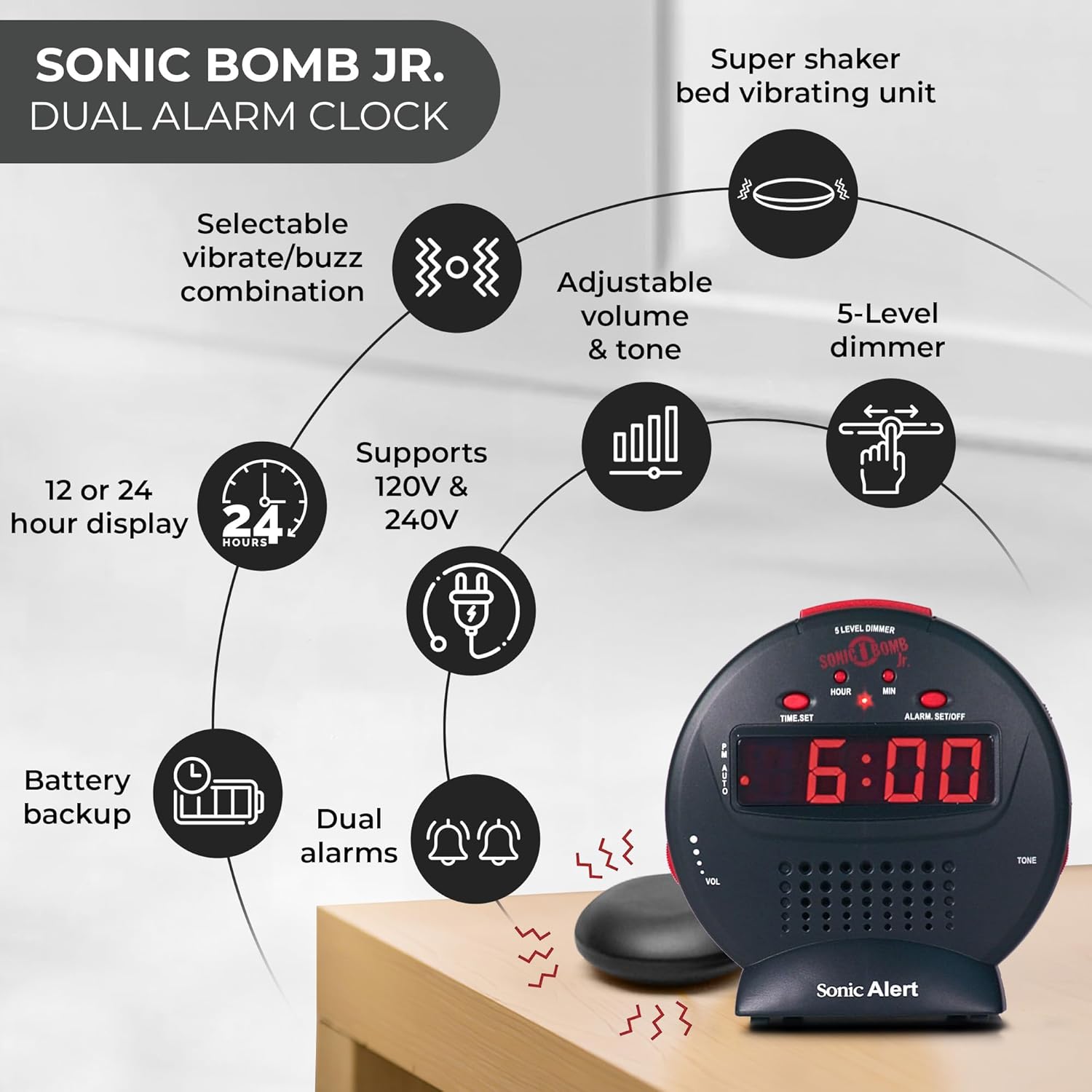
Prentbeskrywing: A diagram illustrating the Sonic Alert SBJ525SS Digital Alarm Clock. Key features highlighted include the 12 or 24-hour display, battery backup, dual alarms, selectable vibrate/buzz combination, adjustable volume and tone, 5-level dimmer, and the super shaker bed vibrating unit. The clock supports 120V & 240V power.
The clock features a large digital display, control buttons for time and alarm settings, and adjustment knobs for volume and tone. A dedicated port is available for the bed shaker connection.
Opstelling
1. Kragverbinding
- Connect the power adapter to the DC IN jack on the back of the alarm clock.
- Plug the power adapter into a standard electrical wall outlet. The display will illuminate.
2. Battery-rugsteun installasie
The alarm clock requires 2 AA batteries (not included) for battery backup functionality. This ensures your time and alarm settings are retained during a power outage.
- Vind die batterykompartement aan die onderkant van die eenheid.
- Maak die batteryvakdeksel oop.
- Plaas 2 AA-batterye in en let op die korrekte polariteit (+/-).
- Plaas die deksel van die batterykompartement terug.

Prentbeskrywing: A graphic illustrating the battery backup feature of the alarm clock. It shows the clock on a nightstand with a small circular battery icon (CR2032, 3V) next to it, indicating the type of battery used for backup. The text emphasizes that batteries are not included and are for retaining settings during power outages.
3. Tydsinstelling
- Druk en hou die TYD BEREIK knoppie. Die uursyfers sal begin flikker.
- Druk die UUR druk die knoppie herhaaldelik om die uur aan te pas. Let op die PM-aanwyser vir die korrekte AM/PM-instelling.
- Druk die MIN knoppie herhaaldelik om die minute aan te pas.
- Druk TYD BEREIK weer om die tyd te bevestig.
- Om tussen 12-uur en 24-uur formaat te wissel, druk die 12/24H button (if available, otherwise it might be part of time set cycle).
4. Bed Shaker Connection
The vibrating bed shaker is an integral part of the Sonic Alert system, designed for heavy sleepers or individuals with hearing impairments.
- Locate the jack labeled SKUDER on the back of the alarm clock.
- Insert the plug of the bed shaker into this jack.
- Place the bed shaker under your pillow, between your mattress and box spring, or under a fitted sheet for optimal vibration.

Prentbeskrywing: A composite image showing three different methods for placing the super bed shaker: under a pillow, under a fitted sheet, and under a mattress. The image also highlights the 6ft long cable of the shaker.
Bedryfsinstruksies
1. Alarms instel (dubbele alarms)
The SBJ525SS features dual alarms, allowing you to set two independent wake-up times.
- Druk en hou die ALARM SET/OFF button once for Alarm 1. The hour digits for Alarm 1 will flash.
- Gebruik die UUR en MIN knoppies om die verlangde alarmtyd in te stel.
- Druk ALARM SET/OFF again to confirm Alarm 1 and proceed to Alarm 2. The hour digits for Alarm 2 will flash.
- Gebruik die UUR en MIN buttons to set the desired time for Alarm 2.
- Druk ALARM SET/OFF a third time to confirm Alarm 2 and exit alarm setting mode.
- Om 'n alarm te aktiveer of deaktiveer, druk die ALARM SET/OFF button briefly (not held). Each press cycles through Alarm 1 ON, Alarm 2 ON, Both Alarms ON, Both Alarms OFF. An indicator light on the display will show which alarm(s) are active.

Prentbeskrywing: A bedroom scene with a couple sleeping, and the Sonic Alert alarm clock prominently displayed on a nightstand. The text overlay emphasizes the "Dual Alarm Clock" feature, allowing two different alarms to be set for reliable wake-up times.
2. Alarm Modes (Vibrate, Sound, Both)
The alarm clock offers various alert modes:
- Vibrate Only: The bed shaker will activate without an audible alarm.
- Slegs klank: The audible alarm will sound without bed shaker activation.
- Albei: Both the bed shaker and audible alarm will activate simultaneously.
To select the alarm mode, use the ALARMMODUS switch located on the side or back of the unit. Cycle through the options until your desired mode is selected.

Prentbeskrywing: A woman sleeping in bed with the Sonic Alert alarm clock and its bed shaker visible on the adjacent nightstand. The image highlights the clock's features: a powerful 6-volt bed shaker, 102dB loud alarm with adjustable tone and volume, alarm and bed shaker test mode, and built-in red flashing lights.
3. Sluimerfunksie
Wanneer die alarm afgaan, druk die groot knoppie SLUIMER button on top of the unit to temporarily silence the alarm. The alarm will sound again after the set snooze duration.
- The snooze duration is adjustable from 1 to 30 minutes. Refer to the full instruction manual for specific steps on adjusting the snooze time.

Prentbeskrywing: A man sleeping in bed with the Sonic Alert alarm clock on his bedside table. An overlay graphic shows a slider indicating the adjustable snooze duration from 1 to 30 minutes.
4. Brightness Dimmer
Adjust the display brightness to your preference using the 5-level dimmer function.
- Vind die DOWWER control (often a slider or button) on the unit.
- Adjust the control to cycle through the 5 brightness levels, from brightest (5) to dimmest (1).

Prentbeskrywing: A woman sleeping in a bedroom with the Sonic Alert alarm clock on her nightstand. Below, a series of five clock images illustrate the different brightness levels of the display, from level 5 (brightest) to level 1 (dimmest), demonstrating the five-level dimmer feature.
5. Volume en toonaanpassing
Customize the audible alarm sound to your preference.
- Gebruik die VOL (Volume) knob/slider to increase or decrease the alarm's loudness.
- Gebruik die TOON knob/slider to adjust the pitch of the alarm sound.

Prentbeskrywing: ’n Nabyskoot view of the Sonic Alert alarm clock, specifically highlighting the volume control slider on its side. The accompanying text explains how to adjust the sound with ease using the knobs for volume and tone.

Prentbeskrywing: The Sonic Alert alarm clock on a white surface, with a graphic overlay demonstrating the adjustable tone feature. Sound waves emanate from the clock, and a slider indicates the range of tone adjustments available.
6. USB Charging Port Usage
The alarm clock includes a built-in USB port for charging compatible handheld devices.
- Locate the USB charging port on the side or back of the unit.
- Koppel jou toestel se USB-laaikabel aan die poort.
- Ensure your device begins charging. Note that charging speed may vary depending on the device and cable.

Prentbeskrywing: A woman reaching for her smartphone, which is connected and charging via the built-in USB port on the Sonic Alert alarm clock, placed on a nightstand next to her bed.
Onderhoud
- Skoonmaak: Vee die eenheid af met 'n sagte, droë lap. Moenie vloeibare skoonmaakmiddels of skuurmiddels gebruik nie.
- Battery vervanging: Replace backup batteries annually or when the battery low indicator appears to ensure continuous backup functionality.
- Berging: Indien die eenheid vir 'n lang tydperk gestoor word, verwyder die rugsteunbatterye om lekkasie te voorkom.
Probleemoplossing
| Probleem | Moontlike oorsaak | Oplossing |
|---|---|---|
| Die klokskerm is af of flikker. | Power adapter not connected or faulty; power outage. | Ensure power adapter is securely plugged in. Check wall outlet. If power outage, battery backup should maintain time (display will be off). |
| Alarm does not sound/vibrate. | Alarm not activated; incorrect alarm mode selected; volume too low; bed shaker not connected. | Verify alarm is ON (indicator light). Check alarm mode switch. Increase volume. Ensure bed shaker is securely plugged in. |
| Tyd-/alarminstellings gaan verlore na kragonderbrekingtage. | Rugsteunbatterye is pap of nie geïnstalleer nie. | Install fresh AA batteries in the battery compartment. |
| USB-laai is stadig of werk nie. | Device incompatibility; faulty USB cable; device requires higher power output. | Try a different USB cable. Ensure your device is compatible with standard USB charging. The clock's USB port provides standard charging output. |
Spesifikasies
| Handelsmerk | Soniese waarskuwing |
| Modelnommer | SBJ525SS |
| Tipe vertoon | Digitaal |
| Spesiale kenmerke | Alarm, Auto Dimmable, Snooze, Vibrating Bed Shaker, USB Charging Port, Red Flashing Alert Lights |
| Kragbron | Corded Electric with Battery Backup (2 AA batteries required, not included) |
| Produk afmetings | 5"B x 5"H |
| Materiaal | Plastiek |
| Alarm Hardheid | Up to 102dB (with bed shaker) |
Waarborg en Ondersteuning
The Sonic Alert SBJ525SS Digital Alarm Clock comes with a Limited Warranty. For specific warranty terms and conditions, please refer to the warranty card included with your product or visit the official Sonic Alert webwebwerf.
For technical support, troubleshooting assistance, or to inquire about replacement parts, please contact Sonic Alert customer service:
- Webwebwerf: www.sonicert.com
- Kontakinligting: Verwys na die amptenaar webwebwerf of produkverpakking vir die mees onlangse kontakbesonderhede.

Prentbeskrywing: An open instruction manual for the Sonic Bomb Jr. alarm clock, showing detailed operational instructions and diagrams. This image signifies that a manual is included with the product for user guidance.