
Inleiding
The My Weigh CTS-3000 Digital Counting Scale is a versatile and precise instrument designed for accurate weighing and counting of various items. With a robust 30,000 gram capacity and 0.5 gram resolution, it is suitable for a wide range of applications including kitchen use, business inventory, and educational purposes. This manual provides comprehensive instructions to help you set up, operate, and maintain your scale for optimal performance.
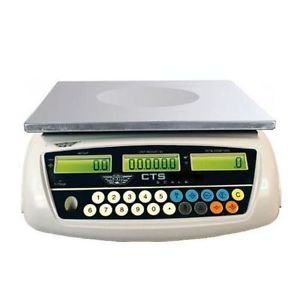
Image: The My Weigh CTS-3000 Digital Counting Scale, featuring a stainless steel platform and a blue backlit LCD display.
Opstelling
- Uitpak: Carefully remove the scale from its packaging. Ensure all components are present: the scale unit, stainless steel platform, clear protective cover, and AC adapter.
- Plasing: Place the scale on a stable, flat, and level surface. Avoid areas with excessive vibration, drafts, or direct sunlight, as these can affect accuracy. The scale features adjustable feet for leveling.
- Kragverbinding:
- AC krag: Connect the provided AC adapter to the scale's power input port and then plug it into a standard electrical outlet.
- Batterykrag: The scale can also operate on 5 AA batteries (not included). Open the battery compartment on the underside of the scale and insert the batteries, ensuring correct polarity. The scale features overcharge and over-discharge protection when using the rechargeable battery pack (if included).
- Platform installasie: Place the stainless steel weighing platform securely onto the scale base.
- Beskermende dekking: Position the clear protective cover over the display and control panel to guard against spills and debris.
- Aanvanklike krag aan: Druk die AAN/AF button to power on the scale. The display will show a self-test sequence before settling at 0.00.
Bedryfsinstruksies
1. Basiese Weeg
- Krag aan: Druk die AAN/AF button. Wait for the display to stabilize at 0.00.
- Plaas item: Gently place the item(s) to be weighed onto the center of the stainless steel platform.
- Lees Meting: The weight will be displayed on the main LCD screen.
2. Changing Weighing Modes (Units)
The CTS-3000 supports multiple weighing modes: grams (g), ounces (oz), kilograms (kg), and pounds (lb).
- Druk MODE: Met die skaal aan, druk die MODUS druk die knoppie herhaaldelik om deur die beskikbare eenhede te blaai.
- Kies Eenheid: Stop pressing when your desired unit (e.g., "g" for grams, "lb" for pounds) is displayed.
Video: Demonstration of the scale's accurate weighing and unit conversion functions. The video shows how to switch between grams, kilograms, and pounds.
3. Tareerfunksie
The Tare function allows you to subtract the weight of a container, so only the weight of its contents is measured.
- Plaas houer: Plaas 'n leë houer op die weegplatform. Die skerm sal die gewig daarvan wys.
- Press TARE: Druk die tarra button. The display will reset to 0.00, effectively subtracting the container's weight.
- Voeg items by: Add the items you wish to weigh into the container. The display will show only the net weight of the items.
4. Telfunksie
The counting function allows you to count a large number of identical items quickly.
- Sample Hoeveelheid: Place a known number of sample items (e.g., 10, 20, 50, 100) on the platform. The more samples, the more accurate the count.
- Invoer Sample: Using the numeric keypad, enter the exact number of samples you placed on the platform.
- Druk SAMPLE: Druk die SAMPLE button. The scale will calculate the average unit weight and display the quantity.
- Add More Items: Verwyder die samples and add the bulk quantity of items. The scale will automatically count them.
Video: Demonstration of the counting function, showing how to input a sample quantity and then count a larger batch of items.
5. Alarm Function (Weight & Quantity)
The scale features an alarm function that can be set for both weight and quantity thresholds.
- Gaan na Alarmmodus: Druk en hou die '.' sleutel, druk dan '5' to enter the alarm mode setting.
- Select Alarm Type: Gebruik die M+ key to cycle through alarm modes: "no" (alarm off), "in" (alarm within range), "out" (alarm outside range), "up" (alarm when exceeding set value).
- Set Alarm Value: Druk die ALARMSTEL key. Input the desired alarm value using the numeric keypad. For weight, input the value in grams (e.g., 10000 for 1kg on a 0.1g scale). For quantity, input the number of pieces.
- Bevestig: Druk die tarra sleutel om die instelling te bevestig.
Video: Detailed instructions on setting up the weight and quantity alarm functions on the counting scale.
Onderhoud
- Skoonmaak: Wipe the scale platform and display with a soft, damp cloth. Do not use abrasive cleaners or immerse the scale in water. The removable "gunk shield" protects the display from spills.
- Berging: Bêre die skaal in 'n skoon, droë omgewing weg van uiterste temperature en humiditeit.
- Batterysorg: If using battery power, ensure batteries are replaced when low to maintain accuracy. If storing for extended periods, remove batteries to prevent leakage.
Probleemoplossing
| Probleem | Moontlike oorsaak | Oplossing |
|---|---|---|
| Skaal skakel nie aan nie. | Geen krag, dooie batterye of foutiewe adapter. | Kontroleer die WS-adapterverbinding of vervang die batterye. |
| Onakkurate lesings. | Unstable surface, drafts, or scale not level. | Place on a stable, level surface. Avoid drafts. Ensure feet are adjusted. |
| Display shows "OVERLOAD". | Gewig oorskry maksimum kapasiteit. | Verwyder oortollige gewig onmiddellik om skade te voorkom. |
| Counting function is inaccurate. | Onvoldoende sample size or inconsistent unit weight. | Gebruik 'n groter sample size (e.g., 50 or 100 pieces) for calibration. Ensure all items are identical. |
Spesifikasies
- Handelsmerk: My Weeg
- Model: CTS-3000
- Kapasiteit: 30,000 grams (30 kg / 66.078 lb / 1057.24 oz)
- Resolusie: 0.5 grams (0.0005 kg / 0.001 lb / 0.02 oz)
- Weighing Modes: Grams (g), Ounces (oz), Kilograms (kg), Pounds (lb), Counting Mode
- Vertoon: Three backlit LCD displays (Total Weight, Unit Weight, Number of Pieces)
- Platformmateriaal: Vlekvrye staal
- Kenmerke: Tare function, Batching feature, Counting feature, Removable "gunk shield", RS-232 serial port, Liquid level indicator
- Krag: Rechargeable battery pack and AC adapter included
- Produk afmetings: 14.5 x 7 x 15 duim
- Item gewig: 8.9 pond
Waarborg en Ondersteuning
For warranty information and technical support, please refer to the official My Weigh webwebwerf of kontak hul kliëntediensafdeling. Bewaar u aankoopbewys as bewys van aankoop vir enige waarborgeise.
Vir bykomende hulpbronne en produkregistrasie, besoek: www.myweigh.com